






ExpressVPN and Surfshark both rank among the best VPNs on the market, but if you’re choosing between the two, which one will suit you best depends on the experience you’re after.
Both VPNs offer a large number of servers across a range of locations, and both are suitable choices for unblocking region-locked content, streaming video, online gaming, and downloading large files.
But, you’ll quickly spot differences when you drill into each’s performance capabilities and wider suites of tools.
Keep reading for a detailed breakdown of the pros and cons of each, based on TechRadar’s real-world testing.
- TechRadar's ExpressVPN review
- TechRadar's Surfshark review
Pricing and plans
Like most VPNs, both ExpressVPN and Surfshark offer monthly, one-year, and two-year plans, with increasing discounts for longer terms – though its worth noting that these are paid in advance.
In both cases – and as is the case with most VPNs – the longer you subscribe, the more you can save.
Surfshark’s base plan, Surfshark Starter, offers an impressive range of features for the price. This includes an unlimited simultaneous connection allowance, ad-blocking, rotating IP, and Alternative ID.
Moving up, the Surfshark One plan adds Surfshark Antivirus, data leak alerts, and a private browser. The highest tier, Surfshark One+, adds Surfshark’s data removal service, Incogni.
ExpressVPN has recently introduced its own multi-tier subscription system: Basic, Advanced, and Pro.
Like Surfshark Starter, ExpressVPN Basic includes ad-blocking. However, it’s a lot lighter on features overall and is limited to 10 simultaneous connections. ExpressVPN Advanced has 12 simultaneous connections and benefits from Advanced Protection (ad, tracker, and malicious website blocking) and a password manager.
Pro lets you connect up to 14 devices at once and includes data removal and, unlike Surfshark One+, a Dedicated IP.
As a monthly subscription, ExpressVPN starts at $14.99 for the Basic plan, rising to $16.99 per month for the Advanced plan and $22.99 for the Express Pro plan. A one-year commitment drops these prices to the equivalent $4.99 / $5.99 / $8.99 per month and comes with three free months, while a two-year plan grants cuts prices further to $2.99 / $4.49 / $7.49.
Surfshark is actually more expensive than ExpressVPN when paid for as a rolling monthly subscription. Prices start at $17.45 per month for Surfshark Starter, $19.95 per month for Surfshark One, and $22.85 per month for Surfshark One Plus.
It’s with the one and two-year plans that you’ll start to see savings. Just remember that you’ll need to pay the full amount upfront. One year with Surfshark works out at $3.19, $3.39, or $6.29 each month, depending on the tier you choose. With ExpressVPN, this is $4.99, $5.99, or $8.99.
Surfshark’s two-year subscription plans offer the steepest discounts of up to 83% with its plans priced at as little as $1.99, $2.19, or $4.19 a month. With ExpressVPN, you can save up to 73%, paying $3.49, $4.49, or $7.49 a month.
Keep in mind that VAT/sales tax isn’t included in any of the aforementioned prices and is added at checkout in both cases.
As for extras, Surfshark gives you the option of adding Alternative Number, a secondary phone number to enhance your privacy. This is available at checkout and generally costs around $2 a month.
Both VPNs offer a Dedicated IP as an add-on (except for ExpressVPN Pro, where it’s included as part of the plan). Otherwise, it costs from $3.99 a month with ExpressVPN or $3.75 a month with Surfshark.
Every Surfshark plan is more affordable than its ExpressVPN counterpart. It’s very hard to argue with the value of Surfshark’s middle tier, Surfshark One. This is just $2.19 a month and includes three extra months free ($59.13 upfront for the first 27 months).
For this you get an unlimited simultaneous connection allowance (ExpressVPN’s equivalent plan offers just 12 in comparison) as well as the added benefit of Surfshark Antivirus.
All Surfshark and ExpressVPN plans come with 30-day money-back guarantees, so you’ll have a chance to test out their various features risk-free.
Features
Surfshark and ExpressVPN have generous feature offerings that become more extensive as you move up their respective subscription tiers.
Surfshark does an excellent job of providing the same features across its apps. ExpressVPN generally does too, but it should be noted that its split tunneling isn’t available for iOS or for macOS 11 and above.
Although they offer some similar features, there are far more differences to be found.
One feature they share is ad, tracker, and malicious website blocking. This is thanks to Surfshark’s CleanWeb feature and ExpressVPN’s Advanced Protection. They also each offer split tunneling, allowing you to choose which traffic routes via the VPN tunnel and which can bypass it.
A key difference is in connections. ExpressVPN’s plans allow up to 10, 12, or 14 simultaneous connections, whereas Surfshark doesn’t impose a connection limit on any of its plans.

One of ExpressVPN’s standout features is ExpressVPN Keys, its built-in password manager. Surfshark doesn’t offer a password manager of its own, but it’s the only one of the two to provide MultiHop (Double VPN) servers to connect via two servers simultaneously for an extra layer of protection.
One of Surfshark’s most impressive features is Alternative ID, a product that generates a new identity and email for use online, protecting real data in the process.
The fact that this is included with every Surfshark plan is a major plus, adding to the excellent value. Surfshark Antivirus is also a commendable addition, having earned an AV-Test Top Product certification, demonstrating its ability to block threats.
The highest-tier plans both offer are capable of alerting you to any of your personal information being leaked online.
Although both Surfshark and ExpressVPN also offer data removal, ExpressVPN’s is only available to US residents. Surfshark's solution is provided through Incogni, and offered to users in the US, UK, EU, Canada, and Switzerland.
Server network
As two of the best VPNs on the market, both ExpressVPN and Surfshark offer a large number of servers across a wide range of locations.
ExpressVPN holds the lead here, with 196 locations across 113 countries. These are tilted towards North America, which has 72 locations, and Europe, with 61.
Still, there are at least 7 options to choose from on every continent, meaning it should be easy enough to access region-locked content while travelling.
Surfshark doesn’t quite match ExpressVPN for countries or locations, but still offers a solid range of servers to choose from.
With 142 servers across 100 countries, there’s no one region where Surfshark beats ExpressVPN, but it’s still well ahead of competitors like CyberGhost and PureVPN. You’ll still have plenty of options for unblocking content or finding a fast connection.

Looking more closely, Surfshark and ExpressVPN’s servers are generously spread throughout North America, Europe, and Asia. They offer servers in a similar number of countries as rivals in South America and Oceania. Where they do lag somewhat is in offering servers in only six countries in Africa – far behind both NordVPN (17) and Proton VPN (26).
Some Surfshark and ExpressVPN servers are virtual. These provide IP addresses for a particular country but are physically located elsewhere, often due to cost or for legal reasons. Both providers are transparent about which server locations are virtual, with ExpressVPN providing a full list on its website and Surfshark clearly indicating them within its apps.
Unfortunately, ExpressVPN doesn’t provide any Double VPN servers. Surfshark does, however. Referred to as MultiHop, these route your traffic via two locations for an extra layer of encryption. You won’t find a list of specially obfuscated servers within their respective apps because both obfuscate traffic by default over the OpenVPN protocol.
Both VPNs offer Dedicated IP addresses for an extra monthly fee. These have the advantage of fewer CAPTCHAs and website blocks but offer slightly less privacy as your online activity isn’t mixed with other users' as with shared IP addresses. It’s also worth knowing that Surfshark gives you the option of Static IP addresses. Available within the Surfshark apps, these are shared with other users but stay the same each time.
Privacy and security
Surfshark and ExpressVPN both operate no-logs policies, so that even if data were to be requested by authorities, they won’t have anything of substance to provide.
ExpressVPN is arguably the most audited VPN on the market, with its most recent no-logs audit marking its 27th audit overall. These audits have included its proprietary Lightway protocol, apps, and browser extensions. Such a high level of transparency is to be applauded and fosters a great deal of trust.
It’s fair to say that both VPNs offer a very high level of security, especially since both use RAM-only servers. The advantage of this is that these servers are wiped whenever they’re rebooted. With no data persistence, damage from any potential attacks would be minimal.

ExpressVPN’s default VPN protocol is its proprietary Lightway protocol, which uses ChaCha20 encryption and post-quantum support. Lightway’s code corebase has been open-sourced and independently audited, which is a big plus.
You also have the option of OpenVPN, which uses 256-bit AES encryption. Surfshark uses the very popular and lightweight WireGuard protocol (ChaCha20) and, like ExpressVPN, also offers OpenVPN.
A key security feature provided by Surfshark and ExpressVPN on all platforms is a kill switch (this is referred to as Network Lock or Network Protection by ExpressVPN). Should your VPN connection drop for some reason, the kill switch steps in to cut your internet traffic, stopping data from being exposed. We tested these kill switches by forcing the respective VPNs’ apps to crash, and both successfully blocked all traffic until the VPN connection was re-established.
As you’ll find with most paid VPNs, these VPN services also provide DNS, IPv6, and WebRTC leak protection. These passed our in-house leak tests with flying colors, which proved their protection is working exactly as it should.
We’ve also put these two VPNs’ ad blockers to the test, and were impressed with ExpressVPN’s Advanced Protection, which stopped 86%. In comparison, Surfshark’s CleanWeb stopped just 50%. ExpressVPN also performed better when blocking phishing sites, with a success rate of 76% compared to Surfshark's 38%. Yet Surfshark is your best bet for malware, blocking 68% of malware sites tested. ExpressVPN failed to block even one of 50 test malware-hosting links.
Performance
Both ExpressVPN and Surfshark offer some of the fastest connection speeds we’ve seen from any VPNs.
With the WireGuard protocol selected, Surfshark managed 2,005Mbps in our testing – a truly impressive connection speed. ExpressVPN holds a close second with its proprietary Lightway Turbo Dual Tunnel protocol, managing 1,810Mbps.
Both VPNs slow down significantly when we switch to OpenVPN. Here, ExpressVPN is the clear winner, with a download speed of 967Mbps. Surfshark manages a respectable 620Mbps.
In truth, these speeds are all plenty fast for streaming content, downloading files, and playing games. If you’re looking to move huge amounts of data over a VPN connection, either option performs excellently with the best available protocol, though you might consider ExpressVPN a better choice if you’re set on using OpenVPN.
Unblocking
Both ExpressVPN and Surfshark are very open about the streaming services and other sites they can unblock, listing a handful of examples on their websites. These include BBC iPlayer, Netflix, and Amazon Prime Video.
In our testing, we had consistent success with both VPNs when connecting to Disney Plus, YouTube, and DAZN, as well as niche local services like the UK’s Channel 4 and Australia’s 9Now. Certain locations did present issues, but were fixed by switching to another server in the same country.
All in all, not much difference between the two for unblocking and streaming video – though users looking to access certain countries will benefit from ExpressVPN’s wider range of server locations.
P2P and torrenting
You can torrent on any Surfshark or ExpressVPN server. Both offer high-speed connections with unlimited bandwidth, so you shouldn’t have any issues even with larger files.
Unfortunately, neither VPN supports port forwarding for accepting incoming P2P requests. That’s a shame, as not being able to connect to some peers in a swarm can result in slightly slower torrenting speeds.
It’s worth mentioning that Proton VPN has P2P-optimized servers and allows port forwarding, so it may offer better speeds for this if that’s your priority. However, Surfshark and ExpressVPN still rank among our best VPNs for torrenting.
Apps and compatibility
As is expected from two major VPN providers, both offer apps for all major platforms. This includes desktop (Windows, Mac, and Linux) and mobile (Android and iOS).
What separates Surfshark and ExpressVPN from many other VPN services is that both of their Linux apps have a Graphical User Interface (GUI), making them much easier to use, particularly for beginners.
Apps are also offered for Amazon Fire TV and Apple TV. If you’d like to secure devices that don’t natively support VPN apps or, in the case of ExpressVPN, simply bypass its simultaneous connection limit, know that Surfshark and ExpressVPN are router-compatible. In fact, ExpressVPN is one of the best router VPNs, providing custom router firmware to make setup even quicker and easier.
If you only need to secure your browser traffic, and not that of any apps, know that the two VPNs have browser extensions for this. These are available for Chrome, Firefox, and Edge.
Surfshark’s lightweight desktop app makes it very easy to connect to a server, switch locations, or go to your settings. You’ll find shortcuts for the fastest location and nearest country, and the option to filter by different server types: static IP, MultiHop, and dedicated IP.
Despite all this, the app is responsive and uncluttered. The left-hand menu expands when the cursor is hovered over it, bringing up features like Alternative ID and Antivirus. The settings page features neat descriptions and toggle buttons.
ExpressVPN’s desktop app is even simpler in design, featuring a prominent quick-connect button and shortcuts to your most recent server location, as well as a Smart (fastest) location.
Clicking on the three dots next to the selected location opens up a separate small window with the full server list. Selecting the hamburger menu in the top left corner brings up the option of preferences, where you’ll find the various settings for activating certain features or protocols via check boxes and radio buttons.
As for the mobile apps, Surfshark’s is very similar in style to its desktop counterparts. Again, it's responsive with accessible settings. One minor gripe is how the quick-connect button floats in the foreground, blocking the lower part of the screen.
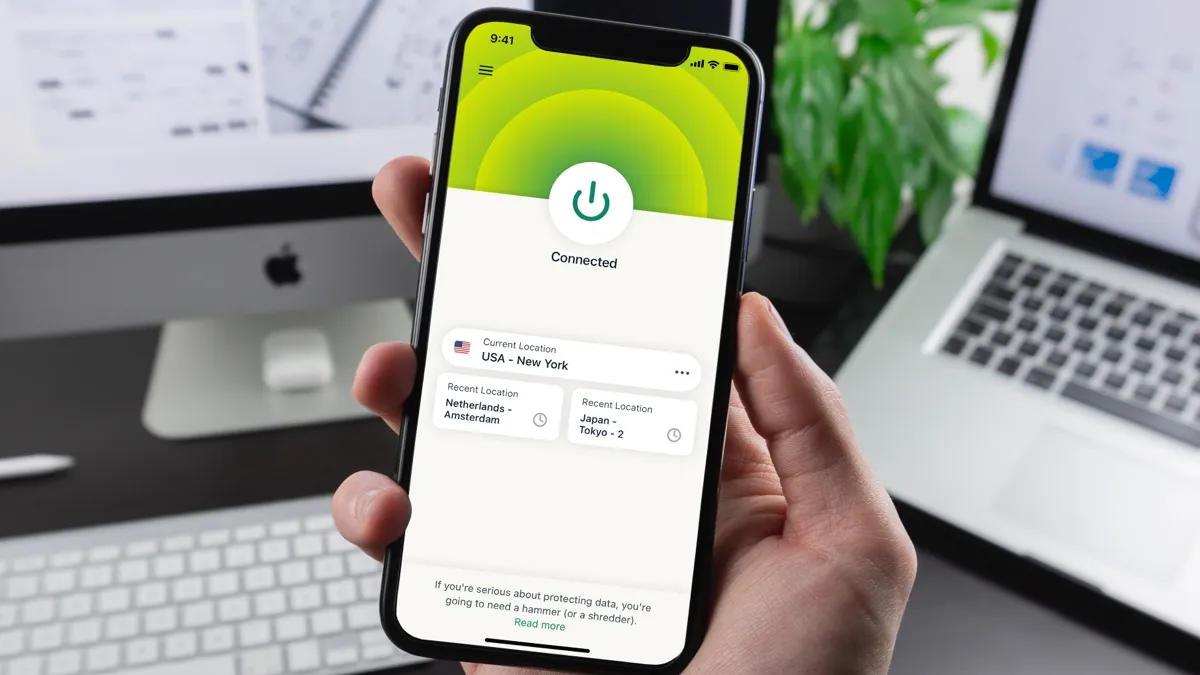
ExpressVPN’s mobile app offers slightly more information than its desktop counterpart, showing how much time you’ve spent connected and including a shortcut to switch protocols. A footer menu makes accessing the settings more straightforward than the desktop app.
Overall, Surfshark and ExpressVPN's apps are beginner-friendly. They’re not quite as slick as those of Proton VPN after its recent app overhaul, but they’re still among the best in class and won’t be causing any headaches.
Customer support
As easy to use as Surfshark and ExpressVPN are, it’s nice to be able to get help as and when you need it.
These are two VPN providers that provide 24/7 live chat and email support. Generally speaking, we received replies via live chat in a matter of minutes, whereas email takes anything from a few hours to a day.
Aside from live chat and email, Surfshark and ExpressVPN have handy help centers that are packed full of troubleshooting articles and step-by-step setup guides, many of which feature annotated screenshots so they’re even easier to follow. Both are extremely extensive, more so than most rivals.
Where Surfshark and ExpressVPN separate themselves from most VPNs, however, is in their video guides. Surfshark has the edge here, however, with a YouTube channel that’s a lot more active with videos posted far more recently. This includes updates on new features, troubleshooting, how-tos, discussion points, and more.
Verdict
Surfshark and ExpressVPN have a lot of similarities that put them among the best VPNs available. This includes global server networks, a strong set of security features, user-friendly apps, and 24/7 support. They’re not without their differences, however.
Of the two VPNs, Surfshark is faster, making it arguably more suitable for streaming, gaming, and torrenting. Unlike ExpressVPN, it has an unlimited simultaneous connection allowance, Double VPN (MultiHop servers), and includes an antivirus. It also does all this while offering more affordable one-month, one-year, and two-year subscription plans.
You may prefer ExpressVPN if you particularly want to bundle your VPN with a password manager, as that feature is unique to ExpressVPN, or want the added convenience of its custom router firmware. Overall, Surfshark edges this competition, but it’s easy to try both Surfshark and ExpressVPN risk-free because they come with 30-day money-back guarantees.
