


I started using an ergonomic mouse – along with an ergonomic keyboard – back in late 2021 to help me reduce the damage I was doing to my body by sitting at my desk all day, typing. At the time, the ergonomic mouse I was using was the Logitech MX Vertical, but that proved to be too big for my small mitts.
When the Logitech Lift was announced, I promptly swapped and I have not looked back since! I love this mouse and it's currently available at its lowest price yet of just AU$58.34 for the black variant. That's a very generous 55% off the listed price and it will ship to New Zealand for NZ$74.39 with no additional shipping fees.
The other two colour options are also discounted but nowhere as well as the black model, so if you aren't too fussed about that, this offer won't last long — not likely till the end of Prime Day on Tuesday, July 13.
- Follow my live coverage of the best Prime Day 2026 deals, many of which ship to New Zealand as well
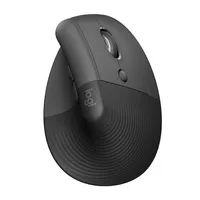
I currently have the white Logitech Lift, but that has started to look a little grubby now. To be fair to my mouse, though, I carry it with me between home and office, and my bag can't be doing it any favours. With that in mind, I think the black colourway would be best for long-term and everyday use and I am very tempted to buy this one at this price.
I'm not the only one who likes this mouse. It scored high in our Logitech Lift review, with our tester saying it makes "toiling away on the computer for hours on end just a little easier – and much less painful". It's also our pick of the best mouse for ergonomics, thanks to the 57º twist to the vertical 'sail'.
Admittedly the Lift is best suited to small and medium-sized hands, but it might be quite comfortable for people with large hands as well. There's a rubber grip on the rear that keeps your palm from slipping, plus the buttons and the scroll wheel has been placed exactly where your fore, middle and ring finger will sit naturally when you wrap your hand around it.
The clicks are whisper quiet, so you'll never disturb anyone working beside you.
Importantly, its performance is excellent. You can use the Logitech Options app to make some adjustments, like saving two DPI presets, but don’t expect high-speed tracking resolution comparable to gaming mice. It glides smoothly and is accurate for more everyday needs. And while our reviewer had issues with its sensor while testing, I have had no such problems myself.
My only complaint with the Logitech Lift is that it requires a single AA battery, while the MX Vertical I had previously could be recharged via USB-C. Sure, the battery goes on for up to 24 months (depending on use), but it would have been nice if this too was a rechargeable option.
