


Logitech is behind some of our favorite productivity peripherals and desk accessories - and right now, the company is running a big office upgrade sale as part of Amazon for Business Brand Week.
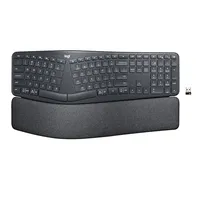
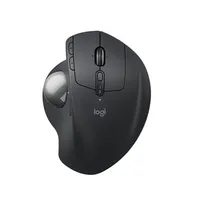
Two accessories catching my eye, that pair perfectly, are the Logitech MX Ergo S Advanced Wireless Trackball Mouse for $102 (was $120) and the Logitech Ergo K860 Wireless Ergonomic Split Keyboard for $128 (was $150) at Amazon.
Driving the deals for business users is Logitech's desire to highlight that 'bargain' office equipment comes with hidden costs for corporate buying teams.
Why we recommend them
The MX Ergo S mouse and Ergo K860 keyboard make sense together because they're both designed around making long periods at a computer more comfortable, but they approach the problem very differently.
The MX Ergo S keeps your hand largely stationary, with your thumb controlling the trackball instead of moving the mouse around your desk. Its 20-degree tilt, sculpted shape and quieter clicks make it an interesting alternative to a conventional mouse, while six programmable buttons add useful productivity options.
In his 4.5-star review of the older but very similar MX Ergo Wireless trackball, our expert Jon called it: "an exceptionally designed product that’s a joy to use. It might not have re-invented the wheel, but when it works this well it’s hard to ask for much more."
The Ergo K860 uses a curved, split design that places your hands at a more natural angle, backed by a substantial memory-foam wrist rest.
In her 4-star review, our expert Rosario said the "K860 keyboard does its job of providing support, comfort and reducing physical strain." She added it "has great features like its curved, split design, and a double-layered soft foam wrist rest with front end tilt legs. While initially awkward to use, you soon get used to it."
Both devices can connect wirelessly through Bluetooth or their included USB receivers, and Logitech's software provides additional customization.
Price context & historical value
The Logitech MX Ergo S is currently $101.99 at Amazon, down from $119.99, and the Ergo K860 is $127.49, down from $149.99, a 15% saving on both. We have seen the mouse cheaper in the past — it was briefly $84 earlier in the year — and the keyboard has been as low as $102. It's possible you might be able to pick up either or both devices for less in the future, but this is still a decent offer for office buying teams upgrading business gear for multiple staff.
Should you buy them?
✅ Buy the MX Ergo S and Ergo K860 if...
The Logitech MX Ergo S is worth considering if you spend long hours working and want to reduce how much you move your arm. Its thumb-controlled trackball, 20-degree tilt, six customizable buttons and up to 120-day battery life make it particularly well suited to productivity.
The Logitech Ergo K860 is good if typing comfort is your priority. Its curved split layout, pillowed wrist rest and adjustable palm lift are designed to encourage a more natural position.
❌ Skip the MX Ergo S and Ergo K860 if...
Give the MX Ergo S a miss if you've never got along with trackballs or prefer the speed and familiarity of moving a conventional mouse. It's also designed primarily for medium- to large-sized hands.
The Ergo K860 won't suit everyone either. Its split curved layout takes some adjustment. It's also a large keyboard at 17.95 x 9.17 inches so occupies a lot of desk space.
The Catch: What to know before you buy
It's worth noting that you need to be comfortable adapting to this keyboard and mouse set up. The MX Ergo S uses a thumb-operated trackball rather than traditional mouse movement and it's not one for left-handed users. The Ergo K860's curved split layout will initially also feel unusual if you've spent years typing on conventional keyboards.
