


If you only get one office upgrade for this year's Prime Day, make it this one - the Logitech MX Master 3S is now $90 (was $120) at Amazon. This is the best wireless mouse we've ever tested, period, and it's specifically engineered to boost productivity at work.
It's designed for business and creative professionals, comes loaded with features like the intuitive MagSpeed technology and a very long battery life, and an 8000 DPI Track Anywhere Sensor that's suitable for every kind of monitor from 1080p to 8K. In the UK, right now the cheapest I've found the Master MX 3S is £77.01 (was £89.99) at Amazon.
What really makes this wireless mouse stand out, though - beyond that exceptional deal price - is the customization. During our tests, we found it made using office software like Excel and Photoshop an absolute breezed. Not one to be missed if you value staying productive at work. For more top savings you can get right now, see our live hub for the best Prime Day home office deals.
• See all early Prime Day deals at Amazon.com
• See all early Prime Day deals at Amazon.co.uk
What's new? US price is holding for the mouse, but I've found the cheapest price in the UK is back at Amazon, for a penny over £77, although it's still on sale at Argos for £79.99 too.
Today's top Logitech mouse deal
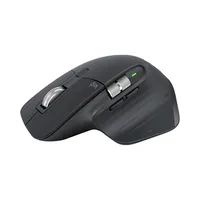
Comfort remains one of the biggest reasons people choose the MX Master series. The ergonomic shape is built for extended use, helping reduce strain during long work sessions while keeping all important controls within easy reach.
The MX Master 3S uses an 8,000 DPI optical sensor that can track on virtually any surface, including glass. Whether you're working at a desk, on a conference table, or in a coffee shop, the mouse maintains precise control without needing a dedicated mouse pad.
One of our favorite features is MagSpeed scrolling which Logitech says delivers scrolling that is faster, more precise, and quieter than traditional mouse wheels.
In our rave review we said the "Logitech MX Master 3S can easily be considered the best wireless mouse geared specifically towards enhancing the average user’s workplace productivity."
The Quiet Click buttons help create a more pleasant working environment. Click noise is dramatically reduced while maintaining the familiar tactile response users expect from a premium mouse.
The MX Master 3S can connect to up to three devices and works across Windows, macOS, Chrome OS, and Linux systems. For users who regularly switch between multiple devices, that alone can be a major time saver.
Logitech's FLOW functionality takes things even further by allowing users to move between compatible computers and transfer text, files, and images seamlessly.
Battery life is excellent as well, with Logitech rating the rechargeable battery for up to 70 days on a full charge. USB-C charging means topping up the battery is as simple as it gets.
The Logitech MX Master 3S remains one of the best productivity mice available. With ergonomic comfort, ultra-precise tracking, quiet operation, and multi-device support, this Amazon deal makes an already popular mouse even more appealing.
For even more choices take a look at our roundup of the best computing mice. Spoiler alert, the MX Master 3S is in the top spot.
