





Whether you've been an Apple fan for years or you're just now deciding to take the leap from Windows, there's never been a better time to buy a new Mac. With Apple powering ahead with its new M5 chips – as well as finally doing the unthinkable and releasing an actual budget MacBook! – it's fair to say that macOS is looking like a very attractive option right now.
Using its own M-series silicon means that Apple has complete oversight on the design, hardware and macOS software, which means modern Macs are excellent and dependable performers that can potentially last a lot longer than rival Windows 11 laptops (which are made up of components and software made by many different companies, and can mean that Windows machines are more prone to crashes and other problems).
Since the launch of the M1 chip in 2020, up to Apple's most recent chip, the M5, the company has been refining and innovating its silicon, and modern MacBooks powered by its chips are incredibly efficient, which means battery life can often exceed 20 hours, and there's no noticeable loss of performance if you're using the MacBook unplugged.
There's also a huge range of different MacBooks and Macs to pick from that will suit almost any budget and need. Want something affordable yet effective? Go for the Mac mini or the new MacBook Neo. Need something more powerful? A MacBook Pro could be perfect for you. Meanwhile, the iMac remains one of the best all-in-one computers you can buy.
So, where do you begin? Right here, on this very page. Every single Mac and MacBook on this page has been thoroughly tested by us at TechRadar, and we've used our combined decades of experience with Apple products to pick the very best devices for a wide range of budgets and use cases.
Speaking of budgets, make sure you check out our collection of the best MacBook deals, which can help save you some serious cash.
This buying guide was updated on 04/20/2026 with new entries and up-to-date buying advice.

I've been reviewing laptops, desktops, and all manner of other computer hardware for close to a decade, putting me in the perfect position to break down the advantages and disadvantages of each Mac product I've chosen to feature in the list below. I'm also something of an Apple critic (don't worry, I'm just as cynical towards Microsoft – no unfair bias here!), so you can rest assured I'm not merely lionizing Apple's offerings for no good reason.
The best MacBooks and Macs 2026
Why you can trust TechRadar We spend hours testing every product or service we review, so you can be sure you're buying the best. Find out more about how we test.
We've tested every MacBook, iMac, and Mac mini under the sun to bring you the best of the best. Whether you're after a budget-buy entry to the world of Apple computing or you're upgrading to the latest hardware and want to know where the best bang for your buck is, you've landed on the right list. These are our picks for the best Macs you can buy.
The best MacBook overall


✅ You want the best ultraportable MacBook: On the outside, the most recent 13-inch MacBook Air looks like previous models, but the M5 chip upgrade makes it a winner.
✅ You're after a thin and light laptop: At 0.44 inches / 1.13cm thick and just 2.7lbs /1.24kg, the 13-inch Air is perfect for traveling with.
❌ You want a touchscreen: Apple has been on record saying it won't make a touchscreen MacBook, so you might need to go for an iPad Pro with Magic Keyboard, or switch to Windows 11.
❌ You're on a tight budget: Although the performance-per-dollar here is excellent, there's no denying that the MacBook Air is still a fairly pricey device.
Apple launched its latest MacBook Air earlier in 2026, powered by the M5 chip, and it has once again produced not only the best MacBook you can buy right now, but also the best laptop in the world.
On the outside, it might seem like Apple has played it safe with the MacBook Air 13-inch (M5), as it keeps the same design as the previous three iterations. However, we're not complaining - this is one of the best-looking laptops around, and at just 2.7lbs / 1.24kg, and with dimensions of 11.97 x 8.46 x 0.44 inches / 30.41 x 21.5 x 1.13cm, I love how easy this - and previous MacBook Airs - is to place in a backpack and carry it around wherever I go.
The backlit keyboard feels fantastic to type on, and the glass-covered multi-touch trackpad is comfortable to use, making working in macOS a pleasure. Screen-wise, the MacBook Air 13-inch (M5) comes with the same excellent 13.6-inch Liquid Retina panel with 2560 x 1664 resolution and 500 nits of sustained brightness as last year's model, with the (somewhat controversial) display notch containing a 12MP webcam, which we found makes video calls look great, and allows for some cool effects, such as keeping you in frame as you move around the room.
Internally, there aren't many changes from last year's M4 model, which sported a base configuration upgrade from 8GB to 16GB, a change that has thankfully carried over to the M5 iteration. However, this model can be configured with up to 4TB of storage compared to the 2025 model's 2TB maximum, which is great for anyone who wants to store lots of large files locally – video editors, I'm looking at you. And that M5 chip delivers blazing fast performance across numerous different workloads, from creative software to triple-A gaming.
Read our in-depth MacBook Air 13-inch (M5) review
Attributes |
Notes |
Rating |
|---|---|---|
Price |
The MacBook Air 13-inch (M5) is a little more expensive than the M4 before it, but with twice the storage it's still a good deal. |
4.5/5 |
Design |
Close to a perfect laptop design, with quality materials, excellent build and Apple's exquisite attention to detail. |
4.5/5 |
Display and Center Stage |
Excellent screen with great color, brightness and sharpness. We've learned to live with the notch, and Center Stage makes for high-quality video calls. |
4.5/5 |
macOS and Apple Intelligence |
macOS Tahoe is the complete package, a rich and comprehensive platform that ties in nicely to the Apple ecosystem. I wish Apple Intelligence was more useful, but there's great utility in every other area. |
4/5 |
Performance |
The M5 brings the level of performance we've previously seen in the MacBook Pro — I had trouble finding anything the laptop couldn't do. |
4.5/5 |
Battery life |
The previously middling battery life has been improved, and we got closer to the possible 18 hours Apple promises if you only stream video. |
5/5 |
The best budget MacBook


✅ You want an ultra-portable MacBook that's affordable: Finally, Apple has made a true budget offering: the MacBook Neo is sleek, portable, and won't break the bank.
✅ You don't need extreme power: The Apple A18 Bionic chip in the MacBook Neo was originally designed to power the iPhone 16, so it won't offer the same high performance as M-series chips - though it's no slouch.
❌ You want the latest hardware: While the A18 Bionic is an effective solution for an affordable MacBook, it's still a two-year-old chip originally intended for smartphones.
❌ You want a big screen: With a 13-inch screen configuration and no larger models available, the Neo is currently the smallest MacBook on the market.
It feels insane that this has finally happened, but it has: Apple has made a budget-friendly MacBook. Yep, the new MacBook Neo checks in at an extremely reasonable $599 / £599 / AU$899 (plus an extra hundred if you want the 512GB storage version), making it quite possibly the best value laptop in the world right now.
Indeed, our esteemed Managing Editor of Core Tech, Matt Hanson, said in his review that the Neo is "the best budget laptop you can buy" - and you can expect to see it rocket to the top of our best budget laptop page very shortly, if I haven't already got around to adding it by the time you read this!
Utilizing the A18 Bionic chip for this MacBook was a savvy move from Apple. It was originally designed for the iPhone 16, but if that immediately has you worrying about performance, don't. It delivers a full-fat macOS experience with total app support, and with the A18's built-in 16-core Neural Engine, it also packs full functionality for Apple Intelligence features – something an older Mac chip like the M1 can't do.
It's also a fantastically well-constructed laptop for the asking price. Very few laptops in the $400-600 range are able to deliver such a high-quality, premium-feeling chassis. No, the keyboard isn't backlit, but it still feels great to type on, and the all-metal casing is far more robust than your average cheap Chromebook or Windows laptop. Really, the only downsides here are the slower USB 2.0 ports (really, Apple, no USB 3.0 in 2026?) and the limit of 8GB of RAM - but as long as you're not aiming to run highly demanding software, you won't have any issues with the Neo.
Read our in-depth MacBook Neo review
Attributes |
Notes |
Rating |
|---|---|---|
Price |
The MacBook Neo offers exceptional value for money, especially if you're able to take advantage of the $100 / £100 student discount. |
5/5 |
Design |
It looks and feels a lot more premium than most laptops at this price, and its display is similarly impressive – though the slow USB ports are a shame. |
4/5 |
Performance |
You get the full-fat macOS experience here, and day-to-day tasks pose no trouble at all – but the 8GB of memory means multitasking is a bit less smooth. |
4/5 |
Battery life |
16 hours promised, and 13 and a half in our tests is more than enough for going a whole work or school day without needing a charge. |
4/5 |
The best Mac
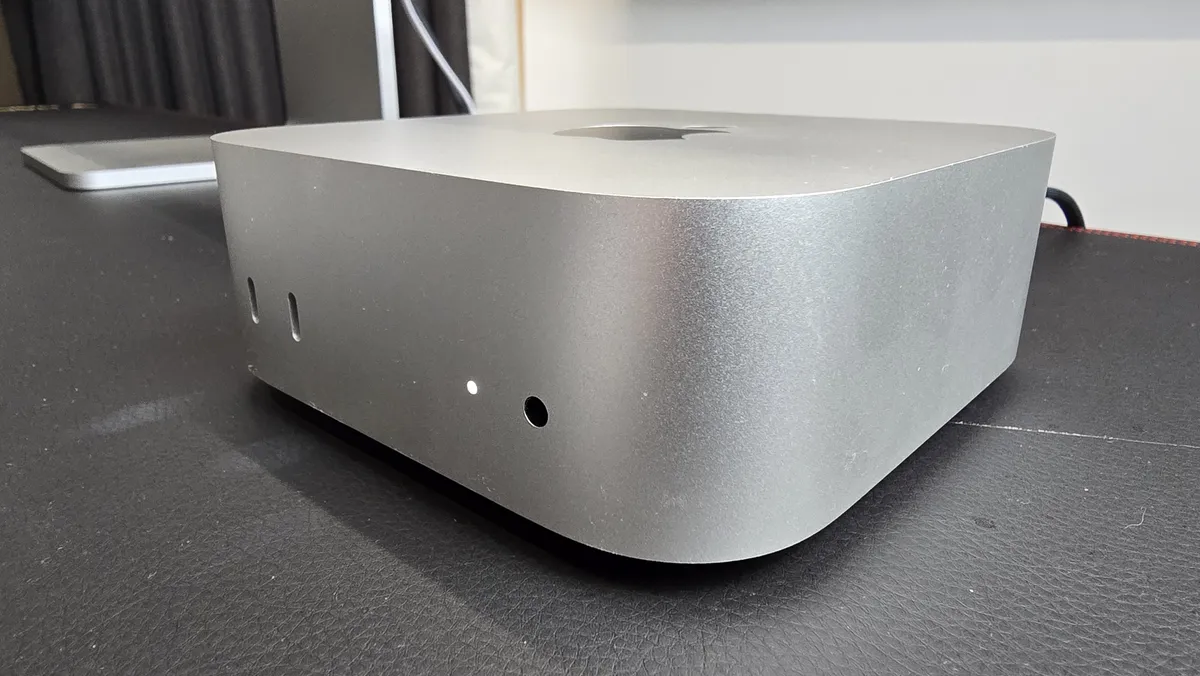


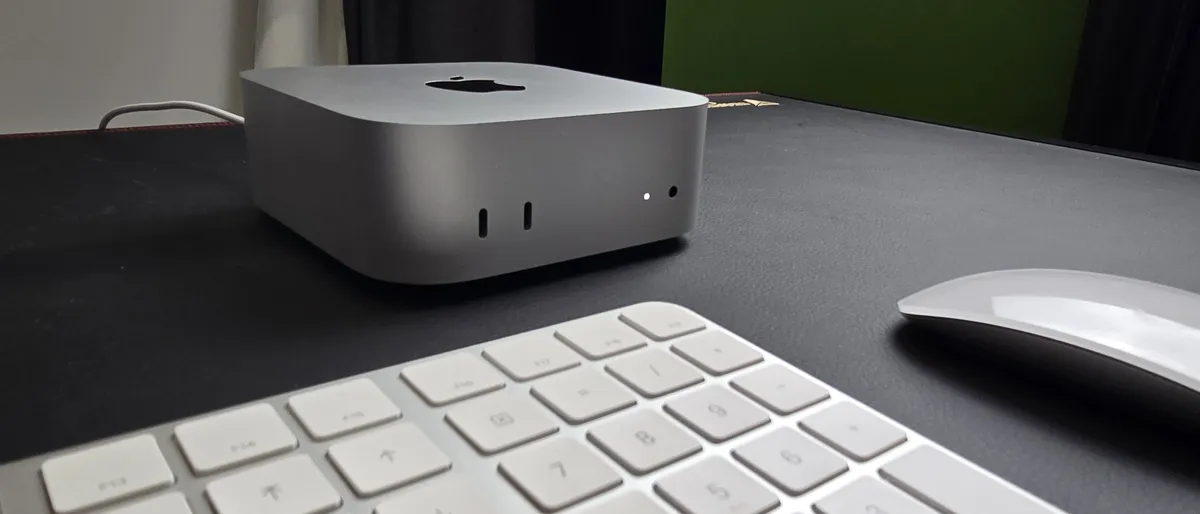


✅ You want an affordable Mac: This is the cheapest way to get into the Mac ecosystem, and it's worth every cent thanks to excellent performance and a gorgeous design.
✅ You're looking for a mini PC: Put simply, if you want a small form factor desktop PC, this is the one to get. No Windows 11 mini PC can come close.
❌ You want a gaming PC: There's a growing library of Mac-compatible games out there, but if you want to play AAA titles with graphical settings whacked up to max, a gaming PC (or gaming laptop) remains a better buy.
❌ You like to tinker and upgrade your PCs: Apple has never seemed keen on letting its users open up and upgrade their devices, but due to the compact size of the mac Mini (M4), it's even harder.
If you're on the hunt for a powerful Apple computer that will get the job done with that Mac flair but without breaking the bank, then you're after the Mac mini, especially now that it comes with an even smaller design, plus new and improved M4 hardware inside.
Apple also finally put the lowest RAM config at 16GB, which is more necessary than ever with memory-hungry apps like Chrome happily gobbling up resources.
The model I reviewed is the Mac mini with M4 chip, 16GB of unified memory, and a 512GB SSD. For day-to-day tasks, where I used the Mac mini for writing the review, browsing the web and general admin, it worked brilliantly. The operating system – macOS Sequoia – booted quickly, and every app I used loaded speedily and ran smoothly.
I also used Premier Pro for editing videos in 4K, and the Mac mini didn't miss a beat - which is particularly impressive considering its tiny size (and low price point). I also played Shadow of the Tomb Raider on the Mac mini (M4), and at high graphics settings it hit a very good 44fps (frames per second). While I wouldn't say the Mac mini (M4) is a gaming PC, for dabbling in games it does an impressive job (and remains completely silent), and thanks to its lounge-friendly compact design, it could be the closest we come to getting an Apple games console.
In the downside department, you may not love the fact that there's no USB-A port - but you can always supplement with one of our picks for the best USB-C hubs.
It's smaller, it's faster, it's better. For an affordable foot in the Apple-ecosystem door, choose the Mac mini (M4) simply can't be beat, even 21 years after Steve Jobs announced the original model.
Read the in-depth Apple Mac mini (M4) review
Attributes |
Notes |
Rating |
|---|---|---|
Value |
The new Mac mini once again offers phenomenal value for money |
5 / 5 |
Design |
The new design is fantastic, with a smaller footprint and additional ports. Just a shame about the placement of the power button |
4.5 / 5 |
Performance |
Simply amazing performance for a mini PC at this price, though it struggles with modern games a bit |
4.5 / 5 |
The Best MacBook for Content Creators


✅ You’ve not had an M-series MacBook Pro before: The M5 chip isn't a huge leap over the previous M4, but if you're thinking of upgrading from an Intel-powered Mac, you're going to be blown away by the difference.
✅ You want a portable workstation: Not only is this an incredibly powerful workstation laptop, capable of complex tasks, it's also impressively portable thanks to its 14-inch screen size and compact design.
❌ You want the most powerful Mac: Oddly, while this MacBook Pro comes with the latest M5 chip, it's not the most powerful model - MacBook Pros running on the older M4 Pro and M4 Max chips offer even better performance.
❌ You want a large-screen laptop: Currently, the MacBook Pro with M5 chip only comes in one size: 14-inch. If you prefer the bigger 16-inch MacBook Pro, you'll need to go with the M4 Pro or M4 Max model.
Apple's latest MacBook Pro is full of surprises, yet it also plays it safe. It comes with the very latest generation of Apple silicon, the M5 chip, however unlike previous models, there's currently no option to boost the performance with an M5 Pro or M5 Max chip. Presumably, they'll come later on.
In another break with tradition, the M5 MacBook Pro launched in just one size with a 14-inch screen, so if you fancy a 16-inch MacBook Pro you either need to buy the older MacBook Pro 16-inch (M4 Pro/M4 Max), or wait for Apple to announce and release a 16-inch M5 model. While it's likely Apple will announce that at some point, we still have no indication of when that might be.
Meanwhile, the M5 chip, which hasn't made it to any other MacBook book yet, is a solid upgrade, and while content creators who have an M4-powered MacBook Pro won't see a huge performance jump (and if you have an M4 Pro or M4 Max, they still out perform the base M5), if you have an older MacBook, especially an Intel-powered one, then you'll be incredibly impressed with the performance and battery life of the MacBook Pro 14-inch (M5).
For most content creators who don't need excessive amounts of power, the 14-inch MacBook Pro with M5 is ideal, as it's a great performer for editing 4K videos, working on complex audio projects and coding, without coming with a sky-high price tag.
When I say that Apple has played it safe with the latest MacBook Pro, I'm referring to the fact that there's no new design here. That's not an awful thing, as the design remains stylish and portable, but it means if you were hoping for an OLED screen (or touchscreen capabilities) then you're going to be disappointed. It also means that newer technology such as Wi-Fi 7 are still absent.
Read our in-depth Apple MacBook Pro 14-inch (M5) review
Attributes |
Notes |
Rating |
|---|---|---|
Value |
Launching at the same price as last year's model is good to see |
3.5/5 |
Design |
No new design isn't a huge issue, it still looks great, but it means some things, like its USB-C port speeds and Wi-Fi 6E support are showing their age |
3.5/5 |
Performance |
Once again, Apple has made a MacBook Pro that is excellent at all kinds of tasks. However, it's not a huge leap over the M4 |
4/5 |
Battery life |
The battery in the MacBook Pro 14-inch (M5, 2025) is 72.4 watt-hours, and Apple claims claiming up to 24 hours of video streaming, and we found it came very close |
5/5 |
The Best iMac


✅ You want the best all-in-one PC: Like the latest M4 Mac mini, the iMac (M4) isn't just one of the best Macs ever made, it's also a leader in its product class. No other all-in-one PC comes close.
✅ You want a sleek, yet colorful, desktop computer: The iMac (M4) is incredibly thin, while still offering excellent performance. It will look good on pretty much any desk, and there's some great new color choices as well.
❌ You the most powerful Mac: The latest iMac only comes with the M4 chip, which is undoubtedly powerful, but doesn't reach the performance highs of the M4 Pro and M4 Max found in some of the best MacBooks and Macs.
❌ You want a big screen: The iMac also only comes in one screen size: 24 inches. Some people might find this a bit too cramped, but with no sign of a larger iMac on the horizon, you'll need to look elsewhere for something with a big screen.
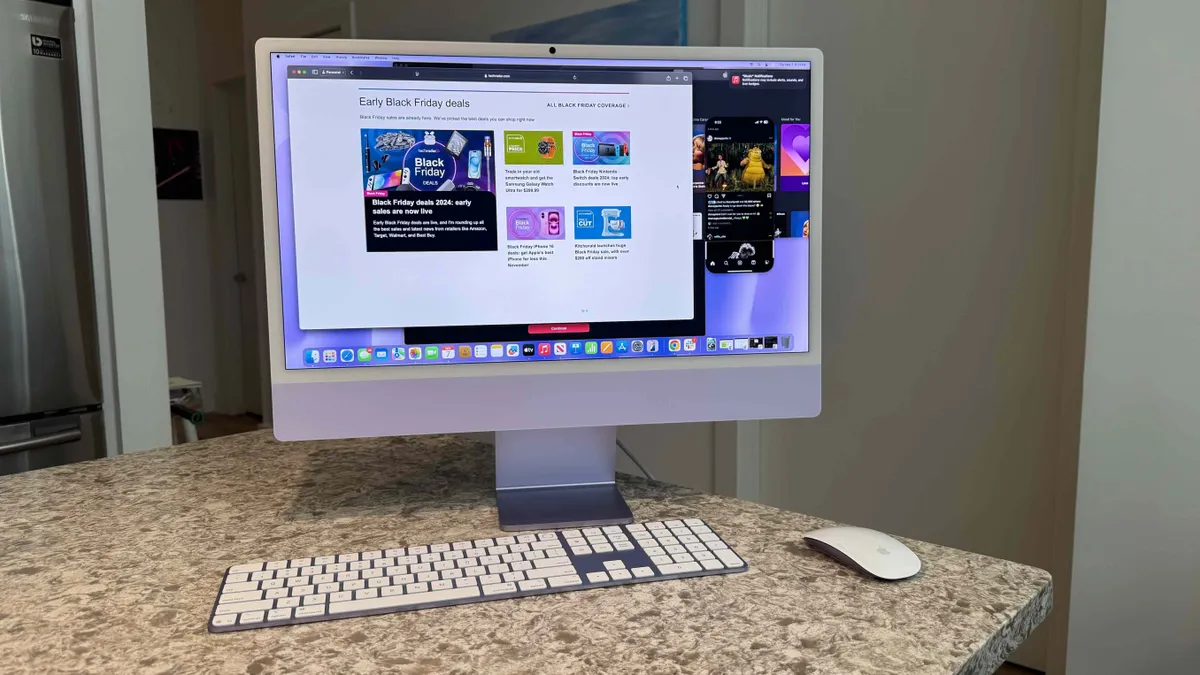
Apple's latest iMac brings a host of new color options, the updated M4 processor, double the base RAM configuration of the M3 iMac, and a lower price tag to boot. There's some serious value here, and we wouldn't blame you if you hadn't noticed it at first because the beautiful new colorways grabbed your eye first.
Our review unit came in purple and looked absolutely stunning, but you can also choose from blue, pink, yellow, orange, green, and the classic Apple silver.
It's not just a pretty face, though; it's got some serious computing power to show off. We scrutinized the M4 iMac's performance for any slow-downs or stutters throughout a range of tests including photo and video editing, gaming, and AI/ML tasks; we couldn't get the M4 chip to fold in everyday scenarios. We ran both Safari and Google Chrome web browsers with upwards of 20 tabs, as well as Slack, Messages, Pixelmator, Preview, Calendar, a couple more apps, and iPhone Mirroring open, and the iMac didn't crash or hang. While more intensive tasks will require a Mac or MacBook with a more powerful M4 Pro or M4 Max chip, for most users, the iMac (M4) will offer more than enough power.
When you consider its design and performance, and with 16GB of RAM finally set as the entry-point, a set of new USB-C Apple Magic peripherals included, and a lower price tag on top of it all, the M4 iMac is easily the best all-in-one PC you can buy.
Read our in-depth Apple iMac 24-inch (M4) review
Value |
A lower starting price year over year makes the iMac a lot more affordable without undercutting the performance |
4.5/5 |
Row 0 - Cell 3 |
Design |
New colors freshen up a modern design that won't take up much space on your desk |
4.5/5 |
Row 1 - Cell 3 |
Display |
It's a one-size-fits-all solution, but the 24-inch Retina display is visually immersive for myriad tasks. |
4/5 |
Row 2 - Cell 3 |
Performance |
Apple's M4 chip provides ample power, now and well into the future |
4.5/5 |
Row 3 - Cell 3 |
The best 15-inch MacBook


✅ You want a 15-inch laptop: Apple has done it again, and the latest MacBook Air 15-inch (M4) is the best 15-inch laptop you can buy, and for most people, it's the best big-screen MacBook to get.
✅ You have an Intel-based MacBook: If you have an old Intel-based MacBook, then the new M4 MacBook Air will offer a very noticable upgrade.
❌ You have an M2 or M3 MacBook: While the M4 chip is a great performer, I still don't think you'll need to upgrade if you have an M2 or M3 MacBook, as the leap isn't quite worth it.
❌ You want the most powerful MacBook: While I think that the MacBook Air 15-inch (M4) is the best large-screen MacBook for most general users, mainly thanks to its slim design and affordable price, if you want a MacBook for demanding tasks like 3D modelling, go for the MacBook Pro 16-inch with M4 Pro or M4 Max instead.
If you want a large screen MacBook, then unless you're a creative professional that needs huge amounts of power, I strongly recommend the MacBook Air 15-inch, which now comes with the M4 chip.
I was really impressed when personally reviewing the MacBook Air 15-inch (M4), with the MacBook offering excellent performance, a large and vibrant screen, and a lovely thin and light design that means even with the extra screen space, this is still a laptop you can easily carry around with you.
I have a bad habit of browsing the web with loads of tabs open in Chrome, but that didn't phase the MacBook Air 15-inch (M4) at all, and with the added memory that comes with the base model (16GB rather than 8GB of previous generations), this is an excellent multi-tasker. I had Premiere Pro running to edit videos while also watching a TV show in the Apple TV app, and the 15-inch MacBook Air kept everything running smoothly - and silently, thanks to the fanless design.
I should also give a big shoutout to the built-in speakers of the MacBook Air (which are an improvement over the ones found in the smaller 13-inch MacBook Air, which otherwise features a very similar list of specs and features) - the sound they produce is loud, detailed and immersive - especially impressive considering how thin this MacBook is.
Perhaps best of all, and the reason why I'd recommend the MacBook Air 15-inch (M4) over the MacBook Pro for most people, is that its launch price of $1,199 / £1,199 / AU$2,099, which gives you an M4 chip with a 10-core CPU, 10-core GPU, 16GB of unified memory and 256GB of SSD storage, is $100 / £200 / AU$100 less than the previous M3 model launched at, making this large-screen MacBook even better value for money.
Read our full Apple MacBook Air 15-inch (M4) review
Attributes |
Notes |
Rating |
|---|---|---|
Price |
Now with a new, lower price, the MacBook Air 15-inch (M4) offers excellent value for money. |
4.5 / 5 |
Design |
The design remains the same, but that's not a bad thing - this is a stylish thin and light 15-inch laptop. However, competitors are beginning to catch up. |
4 / 5 |
Performance |
The MacBook Air 15-inch (M4) is a solid performer that can handle any day to day task you throw at it. It's not a major leap from the M3 model, however. |
4 / 5 |
Average rating |
The MacBook Air 15-inch (M4) is the best 15-inch laptop you can buy, especially due to its new lower price, which makes it better value than ever. |
4.5 / 5 |
The Best Mac for pure performance



✅ You want an extremely powerful and compact workstation: The small size combined with the incredible amount of power the M3 Ultra chip provides means the new Mac Studio really doesn’t have any competition.
✅ You need professional-grade graphics power: The new Mac Studio, especially with the M3 Ultra chip, offers a level of performance that will seriously please demanding power users, particularly when it comes to graphics work.
❌ You don’t need pro-grade performance: Even the 'entry level' Mac Studio, with the M4 Max chip, offers a huge amount of power that most people won't need. This is a professional workstation with a spec sheet and price tag to match.
❌ You are on a budget: The latest Mac Studio comes with some of the most powerful hardware you can buy for creative tasks, while also coming in a stylish and compact case - and this means this is a very expensive product. If you don't need the power, consider the much cheaper Mac mini instead.
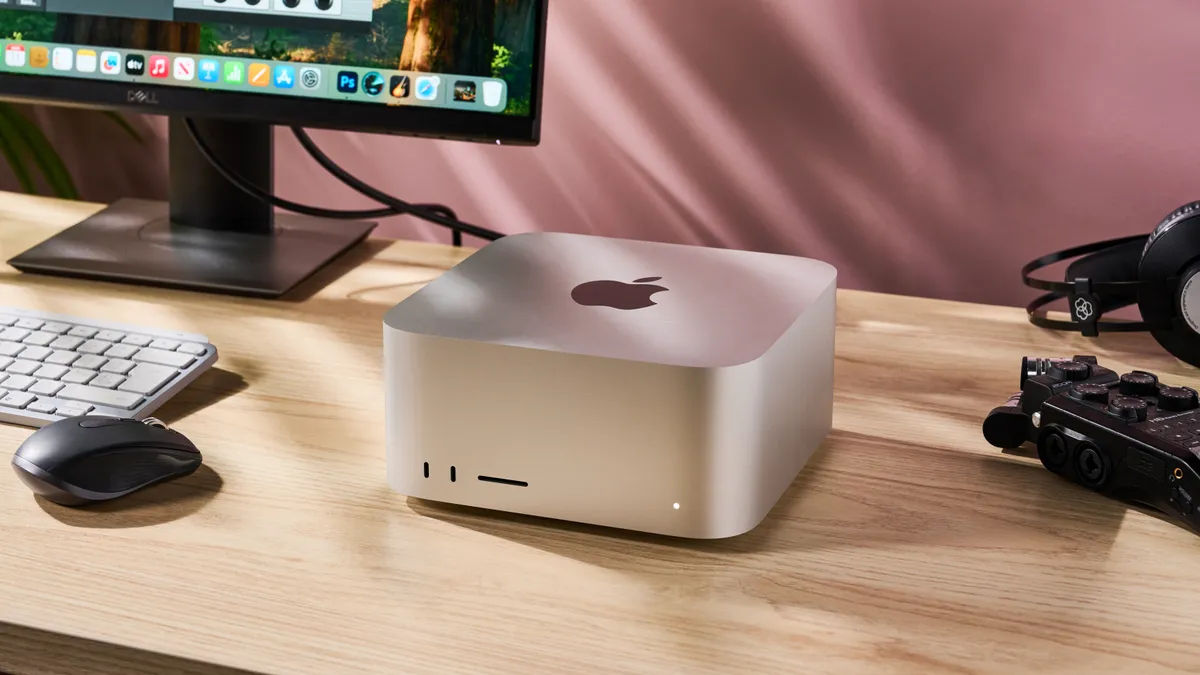
The Mac Studio is like a supercharged Mac mini for creative professionals. It's an impressively compact computer that comes packing some serious power in its latest incarnation, thanks to a choice of the M4 Max or M3 Ultra chips. Unlike previous models of the Mac Studio, which kept to single generations of Apple's M-series chips, the latest Mac Studio's base model comes with the M4 Max chip, which even with the launch of the newer M5 chip, remains one of the most powerful chips Apple has ever made. However, if you want even more power, you can get it with the M3 Ultra.
While the M3 chip is a previous generation, the M3 Ultra is made up of two M3 Max chips connected together, which means it blows past the M4 Max when it comes to intensive workloads.
The Mac Studio is a formidable machine when it comes to video editing, coding and 3D modeling. It certainly easily handled any task I threw at it while reviewing the Mac Studio - web browsing with Safari and Chrome, with multiple tabs open was no issue at all, and even the most complex projects that I opened in Adobe Premiere Pro (with footage shot at 4K and above) were incredibly smooth.
The super-fast SSD meant that video files were loaded and complex projects saved in seconds (using the Blackmagic Disk Speed Test app, the SSD hit write speeds of 7,115.6 and read speeds of 5,799MB/s).
Even when I was working with large 4K video files and multi-scene projects (while browsing the web and writing up the review at the same time), the Mac Studio didn't miss a beat.
The level of performance available here will be overkill for many people, but if you're looking for a workstation PC for heavy creative workloads, such as editing 8K footage or rendering complex 3D scenes and animations, then the Mac Studio will be a great choice. It's expensive, but worth the investment.
Read my in-depth Mac Studio (M3 Ultra) review
Attributes |
Notes |
Rating |
|---|---|---|
Price |
There's no getting away from the fact that the Mac Studio is an expensive bit of kit which will be out of reach for many people, but for the money you do get an incredible workstation. |
3.5 / 5 |
Design |
The Mac Studio's stylish and compact design really has no rivals. It's something of an engineering marvel considering the powerful components inside, though the lack of upgradability and older wireless tech are a shame. |
4.5 / 5 |
Performance |
The new Mac Studio, especially equipped with the M3 Ultra chip, offers an incredible level of performance. |
5 / 5 |
Average rating |
While the Mac Studio won't be for everyone, if it is for you, then you're not going to find another workstation of this calibre. |
4.5 / 5 |
How to choose the best Mac and MacBooks for you

What to look for in the best Macs and MacBooks
Whether it’s the heavyweight 16-inch MacBook Pro or the dinky little Mac mini, it’s not hard to see why the best Macs and MacBooks are the weapons of choice of creative professionals. But thanks to a wide range of different Macs and MacBooks on offer, you don’t need to be a creative professional to use an Apple laptop or PC – and there’s a good chance that no matter what your needs are, there will be a Mac or MacBook for you.
But, with all this choice, it can be tricky to find the best Mac or MacBook for your particular needs. To help, I’ve listed some of the most important things I consider when deciding whether or not to include a product in this buying guide, and this criteria can also help you when picking a new Mac or MacBook to buy.
Performance: Since 2020, and the unveiling of the M1 chip, Apple has been making its own Arm-based silicon to power modern Macs and MacBooks, rather than relying on Intel.
If that all sounds a bit jargony and complex, fear not, as the move has simplified things in some ways. The M1 was the first generation of Apple’s own chips, followed by the M2, then M3, the M4, and finally the M5, which is the latest chip.
This gives you an idea of how recent a Mac is, and each new generation brings efficiency and performance improvements. The speed of these generational releases (four in the past five years) does mean that people with, say, an M2-powered Mac shouldn’t really feel the need to upgrade to an M4 model, as the performance difference isn’t quite big enough to justify buying a whole new Mac or MacBook.
It also means that with each new generation, previous generations often see price cuts, so if you’re on a tight budget, buying an M2 or M3 Mac could be a better choice than buying an M4 model. Meanwhile, the M5 is currently only available in the MacBook Pro 14-inch.
There are also more powerful variants of these chips which come in Pro and Max configurations. These offer much higher performance and are only found in MacBook Pro laptops, Mac Studio and the higher-end Mac mini, as these are Macs aimed at people (mainly professionals) who need additional performance. Meanwhile, the MacBook Air and iMac are aimed at more casual customers, so the more affordable base M chips are used.
Another thing to consider when weighing up how powerful a Mac is, is the amount of memory it comes with. Apple’s modern Macs use unified memory, and this means the memory is shared across the hardware – so instead of having separate system RAM and video memory (VRAM), the memory is pooled and used depending on the tasks you’re running.
Up until recently, Apple’s starting configurations for its base models of Macs came with 8GB of unified memory. However, with ever-more intensive apps being released, that amount of memory was increasingly being seen as too little. Thankfully, Apple got the message, and now new Macs and MacBooks come with 16GB by default.
The more unified memory a Mac or MacBook has, the better it is at multitasking (having multiple apps open at once, for instance), and these days 16GB should be the minimum. For future-proofing, going up to 24GB or 32GB will give you even better performance. If you want to also use the Mac for graphically-intensive tasks, then consider 64GB or higher considering that the memory will be shared across the hardware.
Efficiency and battery life: Apple’s M-series of chips aren’t just great performers, they are also excellent at power efficiency, mainly thanks to their Arm architecture and the combination of performance cores (used when running intensive tasks) and efficiency cores (for when you’re doing less intensive work, such as browsing the web). The M-series chips can intelligently switch between the two types of cores depending on what you’re doing.
This means that the components don’t use too much power, and that can result in extremely impressive battery lives for MacBooks, with most modern Apple laptops reaching 20 hours on a single charge.
This power efficiency also means less heat is produced when the components are running, and that has allowed Apple to produce impressively slim and compact devices, especially with the Mac mini, MacBook Air and iMac.
In some cases, such as the MacBook Air 13-inch (M4) and MacBook Air 15-inch (M4) this efficiency has meant Apple has been able to ditch internal fans as well. These fanless laptops are completely silent when in use.
Display and design: MacBooks, especially MacBook Pros, come with some of the best screens you can find in a laptop. Thanks to a combination of high resolutions and wide color support, even the entry-level MacBooks look fantastic.
The more expensive models will often also boast adaptive refresh rates, known as ProMotion, which can make tasks, especially scrolling through websites and documents, as well as playing games, feel much smoother, while also helping to prolong battery life. The MacBook Pro range also have XDR (Extreme Dynamic Range) technology, which offer a 1,000,000:1 contrast ratio, leading to incredibly bright and vibrant image quality with extremely dark blacks.
Unlike other Macs, the iMac comes with a built-in screen, and while it lacks some of the visual bells and whistles that the (much more expensive) MacBook Pros come with, you still get a great-looking 23.5-inch screen with a 4.5K Retina resolution and support for the Wide color (P3) gamut, which means colors are reproduced accurately, making it ideal for photographers and film makers.
For Macs without a display, I concentrate on the overall design of the PCs, along with the ports that allow you to connect them to a monitor or TV. Thanks to the compact designs of the Mac mini and Mac Studio, these can easily be hooked up to a screen, and even placed out of sight behind the screen for an extremely clean-looking setup.
Value for money: Last, but definitely not least, I always consider the value proposition of a Mac or MacBook when deciding if it should go into this best Mac and MacBook list, and this should also be a very important consideration when you’re looking to buy.
When I talk about value for money, that doesn’t just mean seeing if it’s the cheapest product. After all, Apple isn’t known for making budget devices. Instead, I consider how much it charges for its products compared to rival products that offer similar performance, design and features.
So, while the Mac mini and MacBook Air aren’t the cheapest PC or laptop you can buy, they offer fantastic value for money as they offer experiences that rival products simply cannot compete with. In some cases, such as with the latest MacBook Air 13-inch (M4), Apple has even reduced the launch price compared to the previous model.
Even with super-expensive Macs and MacBooks, such as the 16-inch MacBook Pro, their value should also be considered. If you need a powerful device to work on, investing in a high-end MacBook Pro, or even a Mac Studio, could end up providing excellent value for money despite their high price tags, especially if it enables you to finish projects more quickly, or means you don’t need to upgrade the device for many, many years.
On the other hand, buying one of these devices when you don’t need the level of performance they offer means they can be poor value, no matter how good they are.
How we test the best MacBooks and Macs
Testing the best MacBooks and Macs is more intensive than you might think, especially because most of these devices are meant to be used by creative professionals with more taxing workloads.
Aside from putting any given Mac’s build, display (if it has one), keyboard, trackpad, and webcam through their paces, we also perform creative benchmark tests like Handbrake, as well as run demanding workflows like editing an 8K video in Final Cut Pro and doing real-time 3D modeling and animation to see how every device fares in real-world situations. We also test battery life and take a look at heat management performance when running such intensive tasks.
When to expect new Macs and MacBooks

If you're looking to buy one of the best MacBooks or Macs in 2026, should you buy one now, or should you wait for the next generation? In a way, Apple has made this both an easy, and a difficult question to answer.
It's got into the routine of launching a new M-series chip, and a suite of Macs that come with the latest chip, roughly every 12 to 14 months, though there have been instances where the gap between generations (particularly between the M2 and M3 chips) was shorter.
The M4 chip first debuted with the iPad Pro in May, 2024, and the M5 chip launched towards the end of 2025 in a new iPad Pro and 14-inch MacBook Pro. It's only a matter of time until the M5 comes to other Macs and MacBooks, though Apple is being typically tight-lipped about any future releases.
This means it's a bit of a folly to hold off buying a new Mac in case a new one is around the corner, as it seems there will always be a newer Mac coming soon. However, there are advantages for the canny consumer, as it means that once new models are launched, the price of older models usually drops - it's why we recommend the older M3 MacBook Air as the best student laptop, for example. The rate of release also means there's not a massive upgrade between generations, so you can buy a cheaper M3 model without feeling like you're missing out on too much by not going for the M4 model.
On the other hand, this also means that despite the M5 chip likely coming to other Macs and MacBooks soon, if you buy an M4 Mac or MacBook now, you shouldn't have to worry about it becoming instantly outdated.
FAQs
Are MacBooks touchscreen?
No. Former Apple CEO Steve Jobs was famously dismissive of the idea of touchscreen laptops, and current CEO Tim Cook seems to agree, as there's no sign that we'll get a touchscreen MacBook anytime soon. If you're after a 2-in-1 laptop, then you'll need to look at a Windows 11 laptop instead.
If you're determined to stick with Apple, then the closest you're going to get to a touchscreen MacBook is an iPad Pro with iPad Magic Keyboard.
Do Macs need antivirus?
For decades, the recieved wisdom was that Macs didn't need antivirus software, as due to the vast popularity of Windows PCs compared to Macs running macOS, virus makers would target Windows due to the much larger amount of potential victims.
While Windows 11 laptops and PCs still dominate, Macs and MacBooks have increased in popularity, and sadly that also means that viruses and malware targeting Mac users has also surged.
However, for most users, you likely won't need an antivirus for your Mac, as long as you are careful. That means not opening emails, links or files from people or companies you don't know and being careful about what applications you download from the internet. As a general rule, downloading apps from Apple's own App Store for Macs will ensure that the downloads are virus-free, as Apple is careful to approve every app.
The Mac operating system, macOS, also has some good built-in security features which prevent downloaded apps from installing automatically without you knowing. However, if you want extra protection, or you use your Mac for essential work, then it's worth looking into the best Mac antivirus software for peace of mind.
Do Macs have USB or HDMI ports?
It depends on the Mac you buy. Both the Mac mini and Mac Studio come with HDMI. Both the Mac Studio and Mac mini (M4) have HDMI 2.1 and support one display with up to 8K resolution at 60Hz, or 4K resolution at 240Hz.
When it comes to MacBooks, both the 14-inch and 16-inch MacBook Pros come with a HDMI 2.1 port as well.
Meanwhile, because the iMac has a built-in screen, and is aimed at more casual users, it does not come with an HDMI port. Neither do either size of MacBook Air. Instead, they use USB-C to connect to external screens. If the Mac or MacBook comes with Thunderbolt 4 USB ports you can connect one display with up 60Hz over DisplayPort 1.4.
If your Mac or MacBook comes with Thunderbolt 5 USB ports, you can use DisplayPort 2.1 and output to up to three external displays: two with 6K resolution and 60Hz refresh rate, plus one running at up to 8K at 60Hz.
The Mac mini, Mac Studio and MacBook Pros also have USB-C as well as HDMI ports, and those can also be used with external screen alongside HDMI and, in the case of the MacBook Pros, the built-in screen.
- Want more choices? Check out our list of the best laptops
- Stay safe online with our pick of the best Mac VPNs
