





✅ More than 100 monitors reviewed over the past few years
✅ 15 years of product testing
✅ Over 16,000 products reviewed in total
✅ Nearly 200,000 hours testing tech
Once you have one of the best ultrawide monitors on your desk, you'll understand the wide range of benefits these immersion-built powerhouses have to offer – quite literally. We at TechRadar have tested and reviewed the finest ultrawide displays on the market, and this guide will help you find the right one to fit your PC setup.
Ultrawide monitors are all about space. With their elevated 21:9 to 32:9 aspect ratios (compared to 16:9 on standard monitors), you get more screen real estate in just a single display. From working in multiple windows or apps at once to game-changing immersion in the latest PC titles, you'll essentially be getting a multi-monitor setup in one package. And the ultrawide monitors of today are a visual treat for the eyes.
Right now, the best ultrawide monitor we recommend is the MSI MPG 491CQP QD-OLED. Not just for its stunning 49-inch (5120 x 1440) OLED panel with an immersive 1800R curvature made for work, gaming and everything in between, but also for its now-incredible price. Looking for something more affordable? Look no further than wallet-friendly Alienware AW3425DWM.
With over 20 years of testing hundreds of displays, my team of monitor experts has found just the ultrawide screens worth buying to upgrade your PC setup. In this guide, I've put together a list of the best ultrawide monitors to put on your radar.
The best ultrawide monitors you can buy right now
Why you can trust TechRadar We spend hours testing every product or service we review, so you can be sure you're buying the best. Find out more about how we test.
The best ultrawide monitor overall

The MSI MPG 491CQP QD-OLED is a 49-inch ultrawide gaming monitor that delivers exceptional visual performance at a competitive price point – and now even less.
Featuring a Samsung QD-OLED panel, it offers a 5120 x 1440 resolution, a 144Hz refresh rate, and a rapid 0.03ms response time, making it a wonder for smooth, high-paced gameplay. Plus, that sharp 1800R curvature combined with the 32:9 aspect ratio makes working and gaming feel truly immersive.
Now priced around $849 / £899 / AU$1,399, the MPG 491CQP is more affordable than many of its flagship competitors, which can be double the price. That alone makes this a screen that's well worth your attention.
In terms of connectivity, the monitor offers a variety of ports, including USB-C with 90W power delivery and a built-in USB hub with KVM functionality. However, the USB-A ports are limited to USB 2.0 speeds. It's a shame that the monitor lacks built-in speakers, but that's hardly a dealbreaker.
While the MPG 491CQP excels in gaming performance, its handling of productivity tasks isn't as impressive, with text and UI elements appearing less sharp due to the nature of the QD-OLED panel. Overall, though, the MSI MPG 491CQP QD-OLED takes the crown as the ultrawide monitor to get (if you have the space).
Read our full MSI MPG 491CQP QD-OLED review
The best budget ultrawide monitor

If you're shopping for a display that delivers immersive, expansive visuals without overwhelming your desk or wallet, this Alienware AW3425DWM stands out not just for its real-world value, but also for its sharp 3440 x 1440 resolution and an impressive 180Hz refresh rate – and that all comes in a satisfyingly compact, small-footprint package.
During our testing, which included everyday work and playing a wide range of games like Assassin’s Creed Shadows and Forza Motorsport, we found the nice 1500R curved screen design made immersion a treat, while its 1ms response time kept fast action feeling crisp and responsive. This is the kind of setup that rewards both competitive play and cinematic experiences, especially if your hardware isn’t top-of-the-line.
Even though its not an OLED panel, you'll still find rich, striking colors and blacks across the board. Yes, the AW3425DWM wins on price, but you’ll need to add your own speakers and connectivity setup for the complete PC setup, since it made some trade-offs to keep the price low.
It's not easy to find a curved, ultrawide monitor that's well below $500 / £500 / AU$1,000, but the Alienware AW3425DWM thankfully found its way to our desks to show us it can happen. And from using this screen as our main driver, if you're all about value, it should make its way to your desk, too.
Read our full Alienware AW3425DWM review
The best premium ultrawide monitor

The LG Ultragear GX9 Gaming Monitor is the premium ultrawide that sets the bar for all-around performance, pairing its OLED panel with HDR support to create superb contrast and eye-popping visuals across everything from games to productivity apps. You'll pay a hefty price for it (but not too outrageously high), but it's worth every penny.
From the moment we powered it on, the difference in color vibrancy and shadow detail was obvious. It's the sort of screen that makes even dark scenes in games look alive and nuanced.
That wide, immersive display (with a pronounced 800R curve) wraps around your field of view, while the single USB-C port with 90W Power Delivery streamlines desk setups and handles laptop charging without fuss. What's more, the expansive 21:9 aspect ratio and curvature made multitasking and gaming a dream, letting us jump from spreadsheets to sprawling open-world games without feeling like we were compromising on clarity or comfort.
Games, in particular, look gorgeous, with visuals that completely envelop our vision and bring out the best in the OLED’s contrast and color.
The unavoidable catch? Price. But if you’re after an uncompromising ultrawide that nails panel quality, motion handling, and practical connectivity in a single package, the LG Ultragear GX9 is our top choice.
Read our full LG UltraGear GX9 45GX950A-B review
The best super ultrawide monitor

Are you looking for the widest digital view possible? The Philips Evnia 49M2C8900 QD-OLED is the super ultrawide monitor that delivers a massive 32:9 aspect ratio and an impressively smooth 240Hz refresh rate, making it a dream pick for anyone chasing the most immersive single-panel desktop possible.
Essentially, it's like having two sizeable screens in one. Whether you're multitasking across windows or diving into cinematic game worlds, the Evnia's screen real estate and visual punch really do set it apart. But it doesn't sacrifice detail; with its QD-OLED panel, we found color vibrancy and contrast to be a clear highlight.
We also had plenty of fun in games that thrive on deep blacks and dynamic color, like Cronos: The New Dawn, where the OLED panel's strengths shine. However, all that space and speed mean you’ll need serious GPU power to keep up with it, so make sure you've got the performance chops.
This super ultrawide actually comes with a reasonable price tag that can be found below the $1,000 / £1,000 mark, making it quite the value buy for this kind of monitor and its premium specs.
Not everything is perfect: our experience with the Ambiglow RGB feature was a mixed bag, occasionally missing the mark on color accuracy. Still, if you want a bezel-free workspace for gaming or multitasking, the Philips Evnia 49M2C8900 is one of the best ways to go ultrawide without compromise.
Read our full Philips Evnia 49M2C8900 QD-OLED review
The best bendable ultrawide display

Bendable monitors aren't anything new in the PC world anymore, but the Corsair Xeneon Flex 45WQHD240 OLED is one of the pioneers. As with any unique tech, it's an expensive piece of kit, but it gives you a whole new experience you won't get from all other ultrawide gaming displays – and gaming monitors in general, for that matter.
By bendable, we really do mean bendable, as this display's panel is capable of curving up to 800R. That means that you can pretty much play whatever PC game genre you want on this monitor at the ideal curve for immersion. And it can completely flatten as well for games like Rocket League and Sid Meier's Civilization VI. Its flex is quite literally its flex.
Being an OLED panel, we weren't surprised to also find its colors rich and its blacks beautifully deep. What we were particularly pleased about were the color representation and color accuracy. Our colorimeter reading gave us just under 100% DCI-P3, 100% sRGB, and a Delta E average of less than 1. That means that it’s good enough for content creation as well.
There are opportunities for improvement here. The bending mechanism still feels clunky, HDR10 support is also disappointing, and there are no swivel or height adjustments. However, this is a truly versatile and immersive gaming monitor that's worth considering if you want to go the ultrawide route.
Read our full Corsair Xeneon Flex 45WQHD240 review
The best ultrawide monitor for work
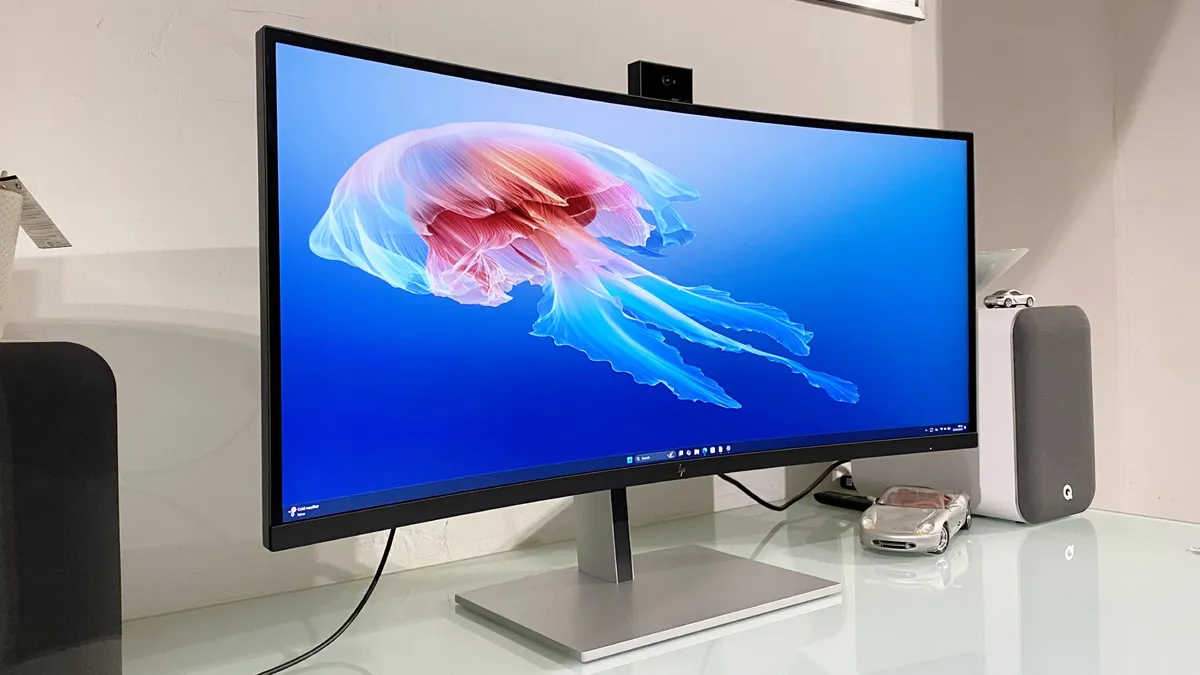
Who says ultrawide monitors are just for gaming? The HP Series 7 Pro 734pm widescreen monitor is purpose-built for productivity, with its outstanding array of connectivity and a webcam that actually outperforms most built-in laptop cameras.
If you’re tired of juggling multiple cables or relying on grainy conference calls, we found this monitor’s docking-friendly ports and sharp 5MP AI camera make it a genuine upgrade for work-from-anywhere setups.
At 34 inches with a 3440 x 1440 resolution, the HP gives you that crucial ultrawide workspace for multitasking. Think full-size spreadsheets, side-by-side documents, or sprawling timelines. The 98% DCI-P3 color coverage means colors are faithful and accurate, which is especially helpful if your day includes creative or content work.
The biggest letdown? Speaker quality. In our experience, the integrated speakers pump out plenty of volume but sound thin and unimpressive—not ideal for video calls or background music. Still, if your priority is a streamlined, productive workspace and webcam performance, this is the ultrawide to beat.
Read our full HP Series 7 Pro 734pm review
The best OLED ultrawide monitor

It's been a good few years since the Samsung Odyssey OLED G9 launched, and it's still one of the best ultrawide monitors you can grab today. Samsung was pretty much ahead of its time, with its whopping 32:9 aspect ratio and 240Hz refresh rate, but also its ultra-fast 0.03ms response time, wide color gamut, deep blacks, and lean, clean visuals overall.
Though held back by a convoluted user interface and the lack of port variety, it impresses in looks and performance. Titles like Forza Horizon and Doom: Eternal looked absolutely phenomenal during our testing, especially in that aspect ratio, and the display delivers excellent color accuracy, with the Delta-E staying around 1. Throw in a set of speakers that deliver good audio, and this is the best ultrawide monitor to get if money is no object.
These days, it won't set you back as much as it used to (thankfully), with prices dipping below $1,000 / £1,000 / AU$3,000. That's a fantastic deal considering it cost twice as much at launch. Yes, its UI is still a clunky mess, which makes navigating around menus and such a pain.
But when you experience the views this beast offers, anyone would be satisfied putting the Samsung Odyssey OLED G9 on their desks. If you're looking to go big, this super ultrawide's OLED panel won't disappoint.
Read our full Samsung Odyssey OLED G9 review
How to choose the best ultrawide monitor for you
Ultrawide monitors are somewhat niche, but they're more popular than ever. Still, there are a few factors to think about when opting for these screens, especially if you're limited to a small space.
Fortunately, we've pulled together some frequently asked questions to help set you on the right path to finding a great ultrawide display.
What’s the difference between ultrawide monitors and standard monitors?
The difference between ultrawide monitors and regular monitors mainly lies in their aspect ratios. Standard monitors have an aspect ratio of 16:9, whereas ultrawide monitors have an aspect ratio of 21:9, making them, as their name states, much longer horizontally. The extra length is great if you need to keep a lot of things onscreen or just like watching or creating 4K videos.
It’s important to note that, as impressive as ultrawide displays are, their resolutions aren’t always supported by modern tech. If you’re looking for a monitor to connect to your PS5 or Xbox Series X, you’re probably better off with a standard monitor because the traditional resolutions are supported on those consoles. That's why the best gaming PCs, or even the best laptops, will be a better fit.
Is an ultrawide monitor good for gaming?
Yes, ultrawide monitors are a popular choice among gamers due to the extra real estate that they provide. With an ultrawide display, you can typically see more of your in-game surroundings than you can with a more standard 16:9 display.
Additionally, many ultrawide monitors feature curved screens, which are ideal for drawing you into your game, and offer you a deeper level of immersion than a flat panel display can provide.
Is an ultrawide monitor worth it?
There’s no doubt that an ultrawide monitor will set you back more than a regular one will (unless you go for the Alienware AW3425DWM). Whether or not it’s worth the extra cost will depend on you, but do know you're basically getting two screens for one.
Ultrawide monitors, particularly curved ones, can be game-changing for creativity and PC gaming. And if you're looking for a more immersive experience with either, it’s well worth making the upgrade. They’re also good for productivity, too, since they allow more scope for multitasking.
Ultrawide monitors tend to have a slightly lower resolution than other monitor options, so it’s worth bearing this in mind. And if you’re looking for more vertical space from your monitor, you may prefer to look at other alternatives.
How big of an ultrawide monitor should I get?
For a long time, 34 inches was the largest screen size you could get for an ultrawide monitor, but there are now plenty of screens that are much larger these days. If you've got the space on your desk (and in your chosen room), going for a wider display can boost your productivity and, yes, especially gaming.
For example, the MSI MPG 491CQP QD-OLED, Samsung Odyssey OLED G9 and Philips Envia 49M2C8900 QD-OLED are massive 49 inches with resolutions of 4K and 1440p. These are completely immersive experiences, but they require a lot of room. Sometimes, it can even be too much screen for many, though.
If you're looking for that sweet spot, the LG UltraGear GX9 comes in at 44.5 inches, so while it's still big, it's not going to completely take over a space.
How we test ultrawide monitors
Testing monitors in general is more involved than you'd think. It isn't as simple and straightforward as setting it up, using it for a day, and taking down notes. A monitor is an investment, whether you're looking to get the traditional 16:9 aspect ratio or need the screen real estate an ultrawide monitor can offer, so we take great pains to ensure that anything we recommend is worth your hard-earned money.
To do so, we use it as our main monitor for at least a week, utilizing it for our day-to-day workloads, watching movies and shows with it, and playing our favorite AAA games on it if it's a gaming monitor. This way, we can gauge its real-world performance.
We also test very specific things like refresh rates, response times, and viewing angles. We use a colorimeter to check its color reproduction, color accuracy, and uniformity. We check to see just how smooth, clean, and artifact-free its image quality is as well as how good its marquee features like HDR, adaptive sync technology, RGB lighting, and curvature are.
Of course, we note its design, aesthetic, and other physical features like how thin its bezels are, how good its port selection is, and how durable its build is. We then gather all that information and compare it to its price tag, to see if it’s a great value to consumers.
Today's best ultrawide monitor deals
