





A video doorbell is a handy addition to any household to help bolster home security and make managing entry more convenient. It’s also a great starting piece for a smart home, or it can slot in easily in an existing setup.
Installing a video doorbell will let you see who’s on the other side, or check if a courier has dropped off a parcel. Many models can record footage, which can be useful if you're concerned about theft or property damage. Some doorbells have a two-way speaker system to let you talk to the person on the other side, while others have a secondary downward-facing camera specifically for viewing packages.
Video doorbells come in two main types: wireless (battery powered) or fixed (requiring mains power). Many have features locked behind a subscription, while other models can store recorded footage offline, on-device or externally.
TechRadar's international team of experts tested all of the best video doorbells in Australia, assessing their cameras, prices, app integrations, microphones and speaker quality. Our international team of smart home experts have put these devices through rigorous testing, and based on those results, I've narrowed down the six best models below.
Need more peace of mind? You can check out our best home security cameras guide to create a holistic smart home security setup to complement your video doorbell.
The best video doorbells for 2026
Why you can trust TechRadar We spend hours testing every product or service we review, so you can be sure you're buying the best. Find out more about how we test.
The best video doorbell overall

✅ You want a doorbell without a paid subscription: Every feature that the EP3x Pro provides is available without paying a monthly fee, with 32GB on-board storage.
✅ You want something wireless and reliable: The battery in the EP3x Pro lasts a long time, but if you forget to charge it, the included solar panel will keep it running.
❌ You need instant notifications: There were times when we received a notification five minutes after someone rang the bell.
❌ You're on a budget: The EP3x Pro isn't cheap, but it doesn't require a monthly subscription, so the high price may be justified.
While many video doorbells in this price range keep features like saving video files and large storage limits behind subscriptions, the EZVIZ EP3x Pro offers a generous 32GB of storage capacity on-device.
The EP3x Pro comes with a very useful solar charger – it can be run continuously when plugged in, and the battery can power the doorbell for up to four weeks. You also have the option of charging the device via its USB-C port.
Our reviewer found the EP3x Pro also has great quality cameras, with a forward-facing lens shooting in 2K resolution, and a 1080p downward-facing camera for checking packages.
While the app is convenient, some users may get lost in the many options it offers like customising the video feed. We also found that notifications can get delayed at times.
Read our full review: EZVIZ EP3x Pro Doorbell
The best subscription video doorbell

✅ You want excellent video quality: Arlo's doorbell offers great quality without the price tag associated with a 4K camera.
✅ You have other Arlo devices: The Video Doorbell works great with the Arlo app and other Arlo devices.
❌ You’re on a serious budget: If you want the cheapest option, you can grab a Ring video doorbell for less than this.
❌ You don’t have an existing wired doorbell: If you don't already have doorbell wiring, then don't pay out to get this installed; opt for the wireless version.
For a company specialising in security cameras and floodlights, we found Arlo’s first go at a video doorbell to be the best one, but it requires a subscription to access its full features. It has hi-res video and is one of the few doorbells that can fit into a household that already uses smart assistants like Amazon Alexa, Google Assistant and Siri.
The camera provides a crystal-clear 180º field of view at a 1:1 aspect ratio (1536x1536 resolution), allowing you to view the person at your door from head to toe, as well as any packages they place on the ground. It also looks stylish in a nice slim form factor.
This is a mains-powered unit, so we'd recommend getting it installed professionally. If you want something easier to install, Arlo does offer a battery-powered version called the Arlo Essential Video Doorbell Wire-Free (this model isn’t actually listed in Arlo’s Australian website, but there are a few local resellers).
Most of the features are locked behind the Arlo Secure subscription, like the ability to go back and view who was at the door if you missed a call, and giving callers the option to leave a message. Without the subscription, the Arlo Video Doorbell can still serve as a real-time viewer and two-way speaker. Prices for an Arlo Secure subscription start at AU$7.99 a month for a single camera, and then plans for unlimited cameras start at AU$12.99 a month.
If you already have some other Arlo security cameras and floodlights in your smart home, then the video doorbell is a no-brainer addition.
Read our full review: Arlo Video Doorbell
The best affordable video doorbell

Ring's most affordable doorbell by quite a large margin, the Ring Video Doorbell Wired offers excellent value for money. Like other Ring smart doorbells, its 1080p video recordings (colour by day and black and white at night) have clear audio, but also slightly a narrower 155-degree field of view (compared to up to 180-degrees in other video doorbells).
While the ability to review a missed alert requires a subscription, the majority of key features, such as setting zones, are all available at no extra cost.
It’s worth noting though that the Ring Video Doorbell has to be wired in as a complete replacement to an existing doorbell, and it won’t produce audible alerts unless you either link it to an Amazon Echo smart speaker, or buy the Ring Chime or Ring Chime Pro.
It also only integrates with Alexa smart home devices, so it may not those with Google Assistant or Apple HomeKit setups.
Read our full review: Ring Video Doorbell Wired
The best video doorbell for deliveries
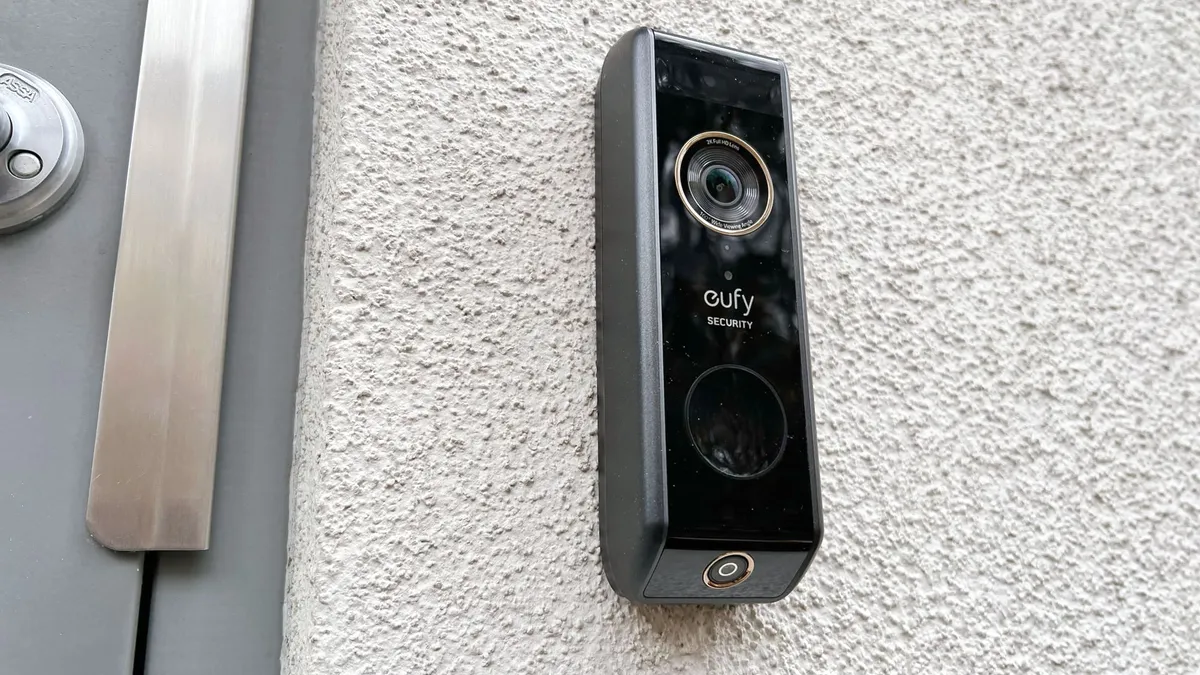
✅ You receive a lot of packages: The additional downward-facing camera and delivery detection make this doorbell ideal for anyone who receives a lot of parcels.
✅ You want facial recognition: This doorbell can recognize faces and lets you assign names to them, making it easy to see at a glance it’s a friend/family member at your door.
❌ You want a sleek, slim device: It may not be as big as the Ring Video Doorbell 4, but this model from Eufy is still relatively chunky.
❌ You use Apple HomeKit: Plenty of Eufy devices support HomeKit; but this isn’t one of them.
As the name suggests, this Eufy model has a second camera facing the ground, making it ideal for keeping track of any delivered packages. It also has handy features like pre-recorded messages that can be broadcast when anyone approaches said package, with the aim of deterring any would-be thieves.
The Eufy Video Doorbell Dual is battery-powered, so it’s ideal for renters or DIY aficionados. Included in the box is a base station that offers 16GB of local storage for videos recorded by the doorbell, compared to others in this list that require a subscription for storing video.
This model is bulkier than the others listed here, and the battery isn't swappable, so it will be out of action while charging, which can last between 3-6 hours. While the Eufy Doorbell Dual integrates with Alexa and Google Assistant, Apple fans will be disappointed to know there's no HomeKit support.
Read our full review: Eufy Video Doorbell Dual
The best battery-powered video doorbell

✅ You want to see parcels and people in one frame: Head-to-toe view is the feature, now in 2K, and it's the most practical thing a doorbell can offer.
✅ You want to avoid frequent charging: The quick-release battery pack and an optional spare all but eliminate doorbell downtime.
❌ You don't want a subscription. Without a Ring plan, you lose package and person alerts and recorded footage, which guts the proposition.
❌ You need the absolute best image: If you want Retinal 4K and 3D motion detection, the AU$229 Battery Doorbell Pro is the one to stretch for.
The Ring Battery Video Doorbell Plus is a great option for renters or those who don’t want to hardwire their systems to their homes. The head-to-toe camera viewing option is now in 2K resolution (1920p vs 1536p from the predecessor) and with HDR support. It also comes with true-colour low-light vision and 6X enhanced zoom.
As with all of Ring's offerings, some of the best features are locked behind a subscription, which costs from AU$4.95 per month. These include the ability to keep recordings, package detection, advanced motion detection and alerts. At AU$249, it’s also on the expensive side – although you can find it regularly discounted in Amazon’s bigger sale events.
If you’re a renter and you want to add a bit of Back to the Future to your home, the 2nd Gen Ring Battery Video Doorbell Plus is your best bet.
Read our full review: Ring Video Doorbell Plus
The best video doorbell for facial recognition

✅ You want facial recognition: This video doorbell can identify any familiar faces and can also differentiate between people and animals.
✅ You want great video quality: Enjoy clear footage during the day and night.
❌ You use Alexa or HomeKit: It's a Google product, so this only works with a Google Home setup.
❌ You don't want to pay for a subscription: Starting from AU$15 per month, Google Home Premium is more expensive than the competition.
If you like Google Photos’ facial recognition technology, where it lets you assign names of people in your photos, the same tech can be found in the Google Nest Doorbell, where it helps recognise familiar visitors.
Our reviewer found that while its video quality isn't quite best in class, any footage it recorded was clear – during both night and day.
The Nest Doorbell will save video clips of any detected motion and visitors for up to 3 hours, but it will delete footage older than that unless you subscribe to Google Home Premium (formerly Nest Aware), which starts at AU$15 per month. As you'd expect, there's more comprehensive integration with Google Assistant than Alexa, and is completely incompatible with HomeKit.
While being battery operated makes it easy to install, we were disappointed that the rechargeable battery isn't swappable – like with some rival doorbells – so you will be without a video doorbell while it's charging.
Read our full review: Google Nest Doorbell (Battery)
The best video doorbell with AI

✅ You want pre-recorded voice messages: This video doorbell offers several messages to play to those who come to your door.
✅ You don’t want to pay for a monthly plan: The Swann 4K video doorbell has a generous amount of local storage (up to 128GB).
❌ You want to install at an angle: The device’s smallish metal bracket and fiddly anti-tamper screw are tricky to install on the architrave of a front door.
❌ You're on a limited budget: Although it’s not expensive, there are cheaper video doorbells out there to choose from
This video doorbell from Melbourne-based Swann was first launched in 2024, but a major software update that came in later that year gave the SwannBuddy4K its biggest differentiator – AI voice responses. These responses are generated on the fly based on what’s happening on your doorstep, and the tone of voice can be customised to your liking,
In addition to the voice responses, our reviewer found that the doorbell’s video quality was excellent, providing a clear hi-definition image even when recording at night. Also praised was its software, which has well laid out menus and intuitive instructions to help with initial setup.
When we tested it, installing the doorbell was simple, but it has a metal mount that may limit users’ options when it comes to positioning the unit itself. The companion mobile app also makes customising settings and defining detection zones a breeze. You also have the option to connect the doorbell to either mains power or just use its internal rechargeable battery.
While there is an option to sign up for a subscription plan for 60-day cloud storage and other features (starting from AU$6.99 per month), the doorbell also offers internal storage via an included 32GB MicroSD card (upgradeable to 128GB). The SwannBuddy 4K also includes free rolling cloud backup of the previous 24 hours of footage.
With on-board storage and the cool smart responses feature – combined with the relatively low price tag and frequent discounts, the SwannBuddy 4K provides great value for money, while also being an Aussie product.
Read our full review: SwannBuddy4k
How we test the best video doorbells

All the video doorbells listed in this guide have been reviewed in the homes of TechRadar contributors or editors. We take testing very seriously, considering all the things important to us if we were shopping for a video doorbell.
To compare the best video doorbells, we review the quality of the footage they capture both during the day and at night, the video's sound quality, as well as how effective it is for conversing in real-time with someone on the doorstep (when supported).
We also assess the ease of installation, battery life (where relevant), how simple the app is to use, and the benefits offered by any subscription services. These may include secure storage for footage and handy features designed to identify what triggered a motion alert, or to reduce unwanted notifications about activity in the doorbell’s field of view.
How to choose a video doorbell
There are few things you need to look into before choosing the best video doorbell for you and your household:
Battery vs wired: Video doorbells are widely available in both battery and mains-powered options, meaning that your current preferences and setup could help you choose. Those who already have existing wiring for an old doorbell might find it easier to choose a hardwired option, while renters could be better suited to a battery-powered model.
If you do opt for a mains-powered doorbell and you’re not too keen on working on your home's wiring, make sure you get it professionally installed. A battery-powered alternative requires far less DIY and can be better for some people, despite needing to be regularly charged.
Additional extras: In some cases, you may need to purchase an additional chime to hear a sound inside your house when the doorbell is pressed (or set up a compatible smart speaker or smart display to do this for you). The recorded video quality should also be considered, with many recording footage in 1080p. Some offer a higher resolution, which is ideal if you have a long driveway and want to clearly see small details in the field of view.
Aspect ratio: A video doorbell with a 1:1 aspect ratio camera should let you see the full length of the person on your doorstep, and any packages at their feet too.
Storage and subscriptions: Finally, consider how the video the camera captures is stored. Does it require a subscription to save the video in the cloud so it can be reviewed later? These will set you back anywhere between AU$5 to AU$15 each month, and should be factored in the overall cost. Some video doorbells offer local storage, meaning you can avoid any ongoing costs. Others, like the Google Nest Doorbell (Battery), provide free cloud storage for a limited time after the video has been recorded.
The best video doorbell in Australia: FAQ
Why do I need a video doorbell?
Video doorbells are a great example of tech that seems unnecessary until you have it, at which point it becomes impossible to imagine life without it. The main benefit is that you can see a video of who is standing outside your front door, but there are plenty of other features that can be just as valuable – and this is one of the few smart home devices that can suit both homeowners and renters alike.
Video doorbells' best feature is that they can answer the door when you’re not in. By this we don't mean they physically open the door; but they will enable you to tell delivery drivers where to put parcels, for example.
Most video doorbells also sync with other smart home devices such as security cameras and smart alarms, usually (but not always) with the condition that the other devices need to be by the same brand. You'll usually find that you can connect each of the smart devices to your Alexa, Google Assistant or Apple HomeKit smart home system so you can respond to activity outside or inside the home without having to lift a finger. Essentially, once you've got a video doorbell, you may find it hard to go back.
How do video doorbells work?
Video doorbells work the same way as home security cameras, connecting to your home Wi-Fi and sending a notification to your smartphone if motion is detected. You can log in and view a live feed from the camera and even converse with whoever is on the other side. Alternatively, you can also just review the footage at a later date.
Higher resolution doorbell cameras provide more detailed footage, and those with cameras with a wider field of view can let you see the full length of the person at the door and any packages they may have with them. For more detail, check out our how do video doorbells work guide.
Can I use a Ring video doorbell without a subscription?
Ring video doorbells, and those from other manufacturers, can be used without a subscription. This means, however, you only get access to the most basic functions like getting an alert when the doorbell is pressed and accessing a live feed from the camera. With a subscription (like Ring Protect in this instance), you can review the recorded video at a later date if you miss an alert.
These subscription services also provide access to handy features designed to reduce the number of false-positive alerts issued by the video doorbell, such as identifying the cause of the motion and creating activity zones, so you’re only notified about motion in these areas.
Do video doorbells work with Alexa (and other voice assistants)?
Most video doorbells work with Alexa, and some also support other voice assistants like Google Assistant and Apple HomeKit. This allows a compatible smart speaker in your home to announce and play an audible alert when someone is at the door, and let you converse with them through the speaker. Amazon-owned Ring and Blink have the most comprehensive Alexa integration. Find out how the two brands compare by reading our Blink vs Ring head-to-head.
If you have a smart display like Amazon’s Echo Show 10, you can also view the doorbell's feed on its screen. Only a handful of video doorbells work with Alexa, Google Assistant, and HomeKit, with most only supporting one or two of these voice assistants.
