


Sponsored by

This handy VPN feature saves me from having to tell companies my email address and personal details

Although the old saying suggests that nothing in life is free, it sometimes feels that the online world runs contrary to that. Free content. Free videos. Free software.
And then you're met with a request to give the provider of those freebies all your personal details.
This has become such a common way of 'charging' these days that it's almost become the norm to dish out one's details.
While on the surface I used to find this a mere annoyance – a time consuming form-filling faff, and a hurdle to be overcome before getting what I wanted – I then came to the realisation it can have deeper implications.
In an age where data breaches and leaks are becoming far more common, spreading my details online across more and more places – some more secure than others – poses a genuine risk to my privacy.
I tried to manage this danger by using fake email addresses, details that weren't my own or just by unsubscribing from all those mailing lists you can end up on. It was time consuming and still felt less secure and, frankly, far too much effort.
Then, thankfully, I came upon the Surfshark Alternative ID feature, which directly tackles this problem. This now lets me sign up for freebies, accounts, mailing lists and beyond, all without having to give my real details. It's easier, too.
Alternative ID: what it is and what it does
The Alternative ID feature from Surfshark VPN works to create a new digital you. That includes a name, email address, physical address, and other basic details. So everything you’re typically asked to provide when registering for a service, then.
One of the great things I've found is that I no longer find myself assessing which sites I can give genuine details to and those I need to get creative with. This is a consistent second identity that can be used on all sites to get me access while keeping my personal details safe and secure.

Give a fake email address and you can't use some sites, I hear you say. That's where this gets really clever. The fake email address is still a working one and you get that forwarded to your email (if you want) so you can verify sign-ups and access receipts, all while keeping a safe distance, hidden behind this Alternative ID layer.
The sweet part is, if that email starts getting spammed, I just generate a new one and carry on seamlessly.
All this comes from a VPN company, meaning it's focused on privacy and data minimalism. Yet, unlike tools such as split tunneling and kill switches, you won't find this feature on any other such service right now.
How to get and use Alternative ID
Alternative ID is included with all of Surfshark’s plans, including Surfshark Starter and Surfshark One.
Here’s how to get started:
- Sign up for a Surfshark subscription that includes Alternative ID
- Log in to your Surfshark account via the app or web dashboard
- Navigate to the Alternative ID section
- Generate a new identity profile. You can customize some details if needed
- Copy the generated email and personal details
- Use these details when signing up for websites or services
- Check your real inbox for forwarded emails sent to your Alternative ID
Once set up, it becomes natural to use. I now instinctively reach for it whenever a site asks for my details.
And then there’s Alternative Number…
Going hand-in-hand with Alternative ID is another innovative feature from Surfshark: Alternative Number.
I like the sound of Alternative Number in theory, but unfortunately I can’t use it (yet). At the time of writing, it’s only available in the US. So, as a UK resident, I’m currently locked out.
The idea is straightforward one and similar to the tool described above. Alternative Number gives you a secondary phone number that you can use instead of your real one.
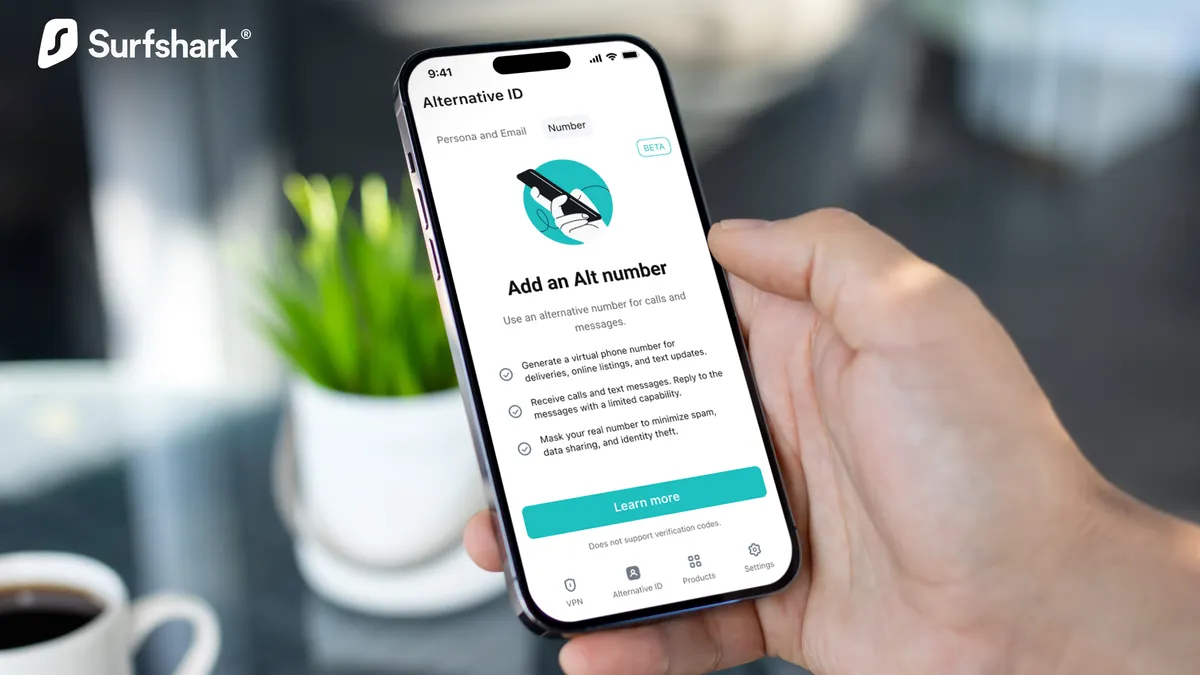
That could be really useful for things like account verification, signing up for services, or avoiding marketing calls and texts. Much like Alternative ID, it acts as a buffer between you and the company requesting your details.
If it works the same way as the email system, it should mean you can receive messages and verification codes without exposing your actual number. This is arguably even more sensitive than an email address.
Pricing varies depending on the plan, but it’s typically offered as an add-on, rather than a standard inclusion.
Alternatives to Alternative ID
There are other tools out there that tackle similar problems, though they tend to be more fragmented.
Services like SimpleLogin and Firefox Relay focus on email masking, letting you generate alias addresses that forward to your inbox. Apple’s iCloud+ also includes a Hide My Email feature that does something similar within its ecosystem.
These are all useful in their own right, but they’re usually standalone services. They don’t bundle identity generation, email masking, and broader privacy tools together in one place.
That’s what makes Surfshark’s approach feel different. It’s integrated into a wider privacy suite, rather than being another separate tool to manage.
