


If you have an iPhone and want a smartwatch, the Apple Watch is the obvious place to start. But obvious doesn't always mean best. Garmin, Amazfit and Huawei all make watches that work with iOS, and some have clear advantages over Apple's own models, from longer battery life to more detailed running stats.
We've tested smartwatches across these brands to find out what you gain and lose by choosing each one. That means looking at how well they pair with an iPhone, which health and fitness features you can actually use, and whether the companion app makes it easy to get at your data.
Your priorities matter, too. If you run regularly, you may want proper training metrics and recovery advice. If you mainly want to track sleep, check notifications and keep an eye on your heart rate, you might not need to spend Apple Watch money. Battery life is another key consideration, especially if you'd rather not charge your watch every night.
Our recommendations are based on hands-on testing, with each watch judged on its features, performance, battery life, comfort and value. We've picked out the models we'd recommend for different needs, so you can compare the alternatives and find the best fit for your iPhone.

Matt is TechRadar's Senior Fitness and Wearables Editor, which means he's an expert on workouts, smartwatches, and all things fitness tech. Matt's spent a decade covering the health and fitness beat as a journalist, and has been TechRadar's in-house wearables guru since 2022.
The best smartwatch for iPhone overall


The Apple Watch Series 12 is our favourite smartwatch for iPhone users, and there's more to it than seeing notifications on your wrist. Its biggest new feature is Readiness Score, which uses your sleep and other health data to give you a score out of 10, helping you gauge how ready you might feel for the day ahead.
Our reviewer spent more than a month testing the Series 12 and found Readiness Score the addition he used most. The redesigned sensors collect heart-rate and heart-rate variability data more frequently, helping to inform that score. Better still, it's included in the price, with no subscription needed to access it.
The S11 chip keeps everything running smoothly, and the always-on OLED display makes checking your stats straightforward. Battery life is rated for up to 24 hours, and faster charging helps when you're short on time. Our reviewer did experience two overnight shutdowns, so a quick charge before bed is worth building into your routine if you want to track your sleep.
If you're using an Apple Watch Series 9 or older, the new health features give you a good reason to consider upgrading. Series 10 and 11 owners can probably hold on to their current watch. For most iPhone users, the Series 12 is a well-rounded choice that covers what matters without the extra bulk of the Ultra 4, which makes more sense if you need a tougher watch and longer battery life for outdoor adventures.
Read our full Apple Watch Series 12 review
The best Garmin smartwatch for iPhone


Apple isn’t the only brand to consider when picking the best smartwatch for iPhone. Garmin has consistently been one of the best fitness tech brands and, depending on your preferences, Garmin’s top smartwatches might better suit you. Our top Garmin pick right now is the Garmin Venu X1.
It’s an impressive fitness-focused smartwatch with a sleek design and an upgraded AMOLED display we thought was stunning during testing. In our review, we particularly loved its maps capability, which (unlike Apple) can be interacted with within the workout app itself – no switching apps on long runs, walks or cycles!
Its slender case and cambered stainless-steel back is light at just 34g, making it comfortable for all-day and all-night wear, whether you're working out or tracking daily activities. Without always-on display enabled, the Venu X1 lasts up to 9 days – realistically, a week with multiple GPS workouts. Features like Pulse OX monitoring, Body Battery and Training Readiness energy tracking, sleep tracking, Garmin Coach training plans and stress monitoring round things out. It's even got an LED torch!
It's not cheap, but for those who want a versatile and well-rounded fitness watch with excellent battery life while retaining that Apple Watch visual language, it’s a great option.
Read our full Garmin Venu X1 review
The best budget smartwatch for iPhone


In 10 years of using Apple Watch, the $99 Amazfit Active 2 is the closest I've ever come to jumping ship.
This inexpensive, understated wearable sports a classic design that users will love as a contrast to the blocky smartwatches that dominate the wearables market today. The AMOLED display is bright and vibrant, and the overall design makes the watch extremely comfortable to wear and very light.
The chip is snappy for everyday use, and in my testing I found the calorie tracking and overall workout metrics to be right on par with my Apple Watch Ultra 2. GPS performance is also strong, as is battery life, which was more than good for the promised 5 days of heavy use in my testing.
There are a bunch of impressive, well-designed faces and an onboard AI-powered assistant that can actually do things, unlike Siri on the Apple Watch.
For the price this is a formidable smartwatch with a great range of features, and well worthy of our five-star rating.
Read our full Amazfit Active 2 review
The best premium smartwatch for iPhone


Battery life is the Apple Watch Ultra 4's biggest strength. In our testing, it lasted around two and a half days between charges, even with the always-on display enabled and sleep tracking running overnight. That's a welcome break from the nightly charging routine, and if you do run low, 15 to 20 minutes on the charger is enough to restore around 30% battery.
The Ultra 4 has useful health features to match that stamina. Like the Apple Watch Series 12, it gets Apple's new Readiness Score, which uses sleep and activity data to help you decide whether you're primed for a tough workout or might be better off taking it easy. You don't need a subscription to access it, either. The updated health sensors also take heart-rate and heart-rate variability readings more frequently. The latter measures the time between heartbeats and can offer clues about recovery and stress. During our testing, the Ultra 4's average heart-rate reading on a 5km run came within 2bpm of an electrical heart-rate monitor.
Its rugged 49mm titanium case, bright display and customisable Action Button make it a good companion for outdoor adventures. The button gives you quick access to a chosen function, such as starting a workout, and the S11 chip keeps apps and menus running smoothly.
The trade-off is size. This is a substantial watch, and it can feel like overkill if you have smaller wrists or simply want something discreet.
The Ultra 4 sticks with the familiar design of the Ultra 3, refining the experience rather than reinventing it. If you already own last year's model, the changes may not be enough to tempt you to upgrade just yet. For older Apple Watch owners, the Ultra 4 brings longer battery life, smarter health tracking and a rugged build.
Read our full Apple Watch Ultra 4 review
The best cheap Apple Watch for iPhone


The Apple Watch SE 3 is the Apple Watch we’d point most Apple fans towards if you want the essentials without paying Series 11 or Ultra money. It skips some of the fancier health tools and newer design touches, but when you are saving $100+, it doesn't feel like the biggest compromise.
One of the biggest upgrades this time around is the Always-On display. It sounds small, but once you’ve had it, going back feels oddly annoying. Our reviewer found it made everyday moments much easier, whether that was quickly checking the time in a meeting or glancing at notifications without doing the slightly awkward wrist flick Apple Watch users know all too well.
Performance is another big win. The SE 3 runs on the same S10 chip as the pricier Series 11 and Ultra 3, and our reviewer found it just as smooth in daily use. Apps open quickly, watchOS 26 feels snappy, and gestures like Double Tap and Wrist Flick work just as well here as they do on Apple’s more expensive watches.
There are a few compromises for the lower price, but none feel dealbreaking for the right person. You miss out on some of Apple’s more advanced health features, including ECG and Blood Oxygen monitoring, and the thicker bezels mean it looks a little less modern than the Series 11 or Ultra 3. Battery life is solid rather than show-stopping, but our reviewer still comfortably got through a full day, even with sleep tracking enabled, and fast charging helps take some of the sting out of daily top-ups.
Still, if what you really want is an Apple Watch that works brilliantly with your iPhone, tracks workouts reliably, handles notifications without fuss, and does not cost a small fortune, the SE 3 is very easy to recommend.
Read our full Apple Watch SE 3 review
The best Huawei smartwatch for iPhone
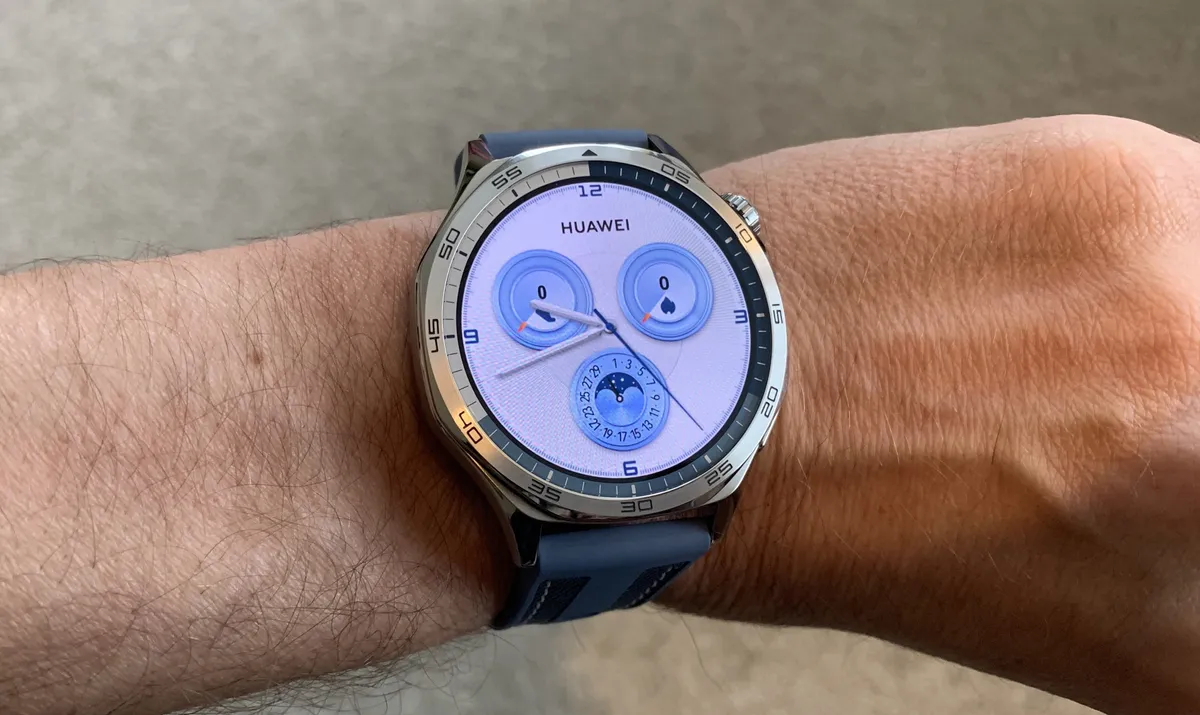


Huawei makes some of the best high-quality smartwatches out there for people outside of the US, and up there competing with the best that Apple and Samsung have to offer. Unfortunately, Huawei products are still not accessible in the US, which limits their appeal to the UK and Chinese markets.
The Watch GT5 is the first Huawei watch to feature TruSense, which is designed to provide the highest possible level of health and fitness tracking. The emphasis is on runners and cyclists, although there's plenty on offer for a much wider range of exercise types. The watch interface is clear and large enough to display all the required data while working out.
Choose between 46mm and 41mm models with very little difference in features. Both provide a geometric-style watch face that looks great on the wrist. The watch can be partnered with the Huawei Health app on Android and iOS, crossing platforms.
Read our full Huawei Watch GT 5 review
How to choose the best smartwatch for iPhone
Choosing the best smartwatch for your iPhone requires you to think about compatibility, features, and your priorities. The first thing to consider is compatibility. The Apple Watch is the best smartwatch for most people with an iPhone. It’s designed to work seamlessly with iOS and it offers great integration with Apple’s ecosystem. Features like notifications, messaging, Apple Pay, and health data syncing all work incredibly well. If you want the most out of your smartwatch, for most people an Apple Watch is the top choice.
Consider the features you need the most. The Apple Watch offers a range of fitness and health tracking, including heart rate monitoring, ECG, sleep tracking, and blood oxygen levels. Newer models now offer even more advanced features, like body temperature tracking. But if health and fitness aren’t your priority, many of the watches in the guide above offer support for notifications, app interactions, and even cellular connectivity for use without your phone.
The Apple Watch is considered the gold standard for iPhone users, but other options, like Fitbit or Garmin smartwatches, also work very well with iOS. You may find that they don’t offer the same level of integration but do bring you excellent health tracking features and longer battery life. So if you're primarily looking for a fitness tracker with basic notification functionality, these can be great alternatives.
A downside of the Apple Watch, at least compared to some other brands, is its battery life. It typically lasts a day or two. This means that if you prioritize longer-lasting battery life over advanced features, you may want to consider alternatives from other brands, like Garmin, which can last longer on a single charge, depending on the model.
Since you’re going to be wearing it most of the time, the design of the smartwatch for iPhone you choose will be a crucial factor. Apple Watches come in a range of sizes and you can customize them with interchangeable bands, which makes it easy to find a style that suits you. Other smartwatch brands also offer nice-looking and comfortable designs, but depending on your preferences, Apple has the edge in terms of aesthetics and comfort.
For the best overall experience, especially if you have a lot of other Apple products, an Apple Watch is the clear winner. However, if you’re looking for specific features, like extended battery life or more focused fitness tracking, other brands can still offer a solid experience for your iPhone.
How we test the best smartwatches for iPhone
Our smartwatch process typically involves using the device as if it were our own personal wearable. That's the best way for us to fully test it and see how it fares in the real world. We do a comprehensive sweep of its features, functionalities, performance, battery life, and ease of use, doing so over multiple days.
Of course, since we also want to know how it performs and which features are available when it's paired with an iPhone, we make sure to squeeze that into our testing as well. Once we've collected all the data and information we need, we take all of it and compare it to the smartwatch's price, finding out if it's a great value for our readers before making a recommendation.
FAQs
What's the best smartwatch for iPhone users?
The best smartwatch for iPhone users is the one that fits your budget and what you expect it to do; at the time of writing, the Apple Watch Series 11 is our best overall pick for its balance of iPhone integration, display, health tools and everyday usefulness. If you want longer battery life and more structured training tools, the Garmin Venu X1 may suit you better, while the Amazfit Active 2 is our budget option.
We regularly update this guide as we test and review new watches, so the best overall pick can change. If you are not ready to buy yet, bookmark this page and return when you are comparing current models and prices.
Should I buy an Apple Watch or a Garmin for my iPhone?
Buy an Apple Watch if you want a watch that feels like an extension of your iPhone. Setup takes minutes, notifications arrive without fuss, and things such as Apple Pay, calls and apps work in the way you’d expect. For everyday convenience – checking a message on the train, paying for coffee or leaving your phone in your pocket – it’s hard to beat.
Garmin is the better fit if your watch is primarily a training companion and the thought of another nightly charge makes you groan. The Venu X1 works with iPhone, brings maps, Garmin Coach and Training Readiness, and can last up to nine days with its always-on display off. You sacrifice some of Apple’s polish, but gain the sort of endurance and workout depth keen runners and cyclists will appreciate.
What is the best budget smartwatch for iPhone users?
The Amazfit Active 2 is our current best budget smartwatch for iPhone users because it packs in far more than its price suggests. It has a bright AMOLED display, a light, classic-looking design, strong GPS and workout tracking, plus an onboard AI assistant – plenty of useful smartwatch basics, without the usual Apple Watch outlay.
In our testing, it was comfortable to wear and its calorie and workout figures held their own against an Apple Watch Ultra 2. Amazfit says it can manage five days of heavy use, too, which is a welcome break from daily charging. Want the full watchOS experience and closer iPhone integration? Spend more on the Apple Watch SE 3; the Active 2 is for buyers who want plenty of watch for less.
Do non-Apple smartwatches work with an iPhone?
Yes – you are not locked into an Apple Watch just because you own an iPhone. Garmin, Amazfit and Huawei watches can pair through their companion apps, delivering notifications, activity tracking and health or workout data.
The catch is that the experience is rarely as joined-up. Third-party watches can be great for fitness and endurance, but app interaction, replying to messages, calls, payments and data syncing may be more limited. Check the companion app supports your iPhone and current iOS version, then make sure the features you actually use are on the list before clicking buy.
Do Apple Watch health features work in every country?
No. Apple Watch health features are not a one-size-fits-all deal: availability can vary by country, model, software version and local regulations. ECG, blood oxygen and hypertension notifications are among the features that can differ, so a watch bought in one market may not have exactly the same health toolkit in another.
If a particular health feature is your reason for buying, check Apple’s current watchOS feature-availability page for your country before handing over your money. And while these tools can be useful for spotting trends or prompting a conversation, they are not a substitute for medical advice – speak to a clinician if you receive an alert or have a concern.
