


Fireworks nights are full of pure magic. The bright, colorful explosions, loud whizzes, and the heavy smell of gunpowder in the air always make me feel like a kid again. They are also the perfect excuse to pull out your camera!
Last year, the iconic Macy’s 4th of July Fireworks Spectacular over the Brooklyn Bridge reportedly cost $6 million. And for this historic 250th Independence Day on July 4, 2026, your own photos really could look a million bucks!
Taking pictures in low light, however, is no easy feat. Add in the complication of fast-paced explosions going off haphazardly and a tight time restriction, and capturing the perfect shot can feel stressful.
Fear not! I’ve compiled my favorite tips to help you take better photos of fireworks. Whether you shoot on a professional DSLR, a mirrorless camera, or plan to capture everything on your iPhone – I’ve got you covered.
1. Find a vantage point

Rather than shooting close up details of singular fireworks, it’s better instead, to include them in a wider landscape for extra context. You’ll only have a limited time to capture your shots before the fireworks display is over, so it pays dividends to do your research beforehand – try to figure out where the fireworks are going to be set off from and plan your shoot to make sure you can capture a wide landscape plus the fireworks in the sky above.
Some of the best vantage points for fireworks displays are well known and very popular so it can be well worth getting to the location well in advance of the display and setting up your gear to stake your claim in the best position before the crowds arrive.
2. Steady your camera or phone

For the best quality photos a dedicated camera such as an interchangeable mirrorless or DSLR camera is preferred. You’ll want to set up on a tripod to remove camera-shake caused by the vibrations picked up when shooting handheld. It’s also beneficial to switch off and disable any image stabilization your camera may have as this can actually introduce blur when your camera is locked off on a tripod as it might try to correct for motion that isn’t there.
Rather than trying to focus on each and every firework exploding, you’re best bet is to shoot a wider landscape and manually focus on something in the scene so that your camera isn’t struggling to autofocus on the fast action of a firework. If your scene has street lights in it, for example, use these as a guide to lock focus, thus preventing the camera from hunting in those high stakes split-second moments.
Apple’s latest iPhones automatically enable Night Mode in low light environments, as do most leading Android phones. While it is easier than ever to shoot handheld with recent phones, thanks to the latest and greatest image processing and stabilization tricks, for best results I'd still recommend using a tripod, fixing your phone to it with one of the best smartphone tripod adapters. Failing this, try to find a fence, railing or wall you can prop your phone up on to make it steadier.
3. Starting settings: DSLR & mirrorless cameras – the ‘card’ method

One of the best tricks to create incredible fireworks images is to use the ‘card’ method, for which you set your tripod-mounted DSLR / mirrorless camera to its bulb mode, in which the shutter is open for as long as the shutter button is held down. To minimize vibrations caused by your hand, you’ll want to use a tripod and plug in a shutter release cable to your camera, which allows you to keep the shutter open without directly touching the camera.
It’s called the ‘card’ method because you place a black piece of black card in front of the lens while the shutter is open. When a firework goes off you can quickly whip the card out of the way to expose for the firework and then cover the lens again.
It's possible to repeat this process multiple times for multiple fireworks, to build up a single exposure with lots of the best fireworks going off in it for a more impressive photo.
4. Starting settings: iPhone & Android – long exposure & burst modes

To capture an entire firework, with its long trail and then vibrant colorful burst when it explodes, go into your iPhone’s Live Photo mode and tweak the setting from Live to Long Exposure. To capture the split-second action with better sharpness your best bet is to use your iPhone’s Burst Mode and slide the shutter button to the left to take a brace of photos in fast succession. I’ll show you how to blend your best shots together in Photoshop in my final tip.
Android smartphones may also have something similar to the iPhone, for example my Android has a Light Painting picture mode which extends the shutter time in a similar way to the Long Exposure mode on the iPhone, while recent Pixel phones have a long exposure setting. Camera apps in Android phones vary between manufacturers, do the best settings will vary depending on the model. You should be able to find tips specific to your model through a simple internet search.
5. Blend your best fireworks together
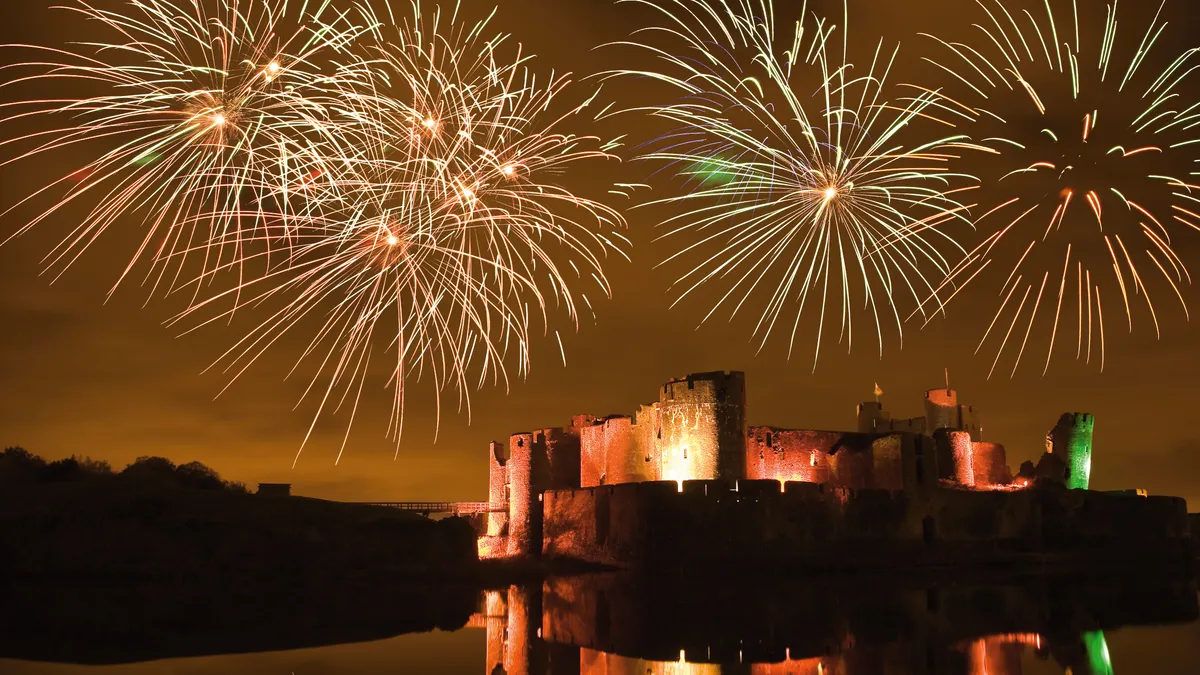
To make your fireworks photos more impressive, it can be a good idea to blend the best fireworks into a single image with editing software — I recommend Adobe Photoshop or, if shooting on a phone, apps such as Photoleap, Snapseed or Adobe Photoshop Express.
If you use a mirrorless or DSLR camera I highly recommend shooting in the RAW file format as this will provide much more exposure information – essential for editing images especially in low light situations like a fireworks display. Select and edit all of your RAW files at once to make sure your edits are consistent, then stack them all together in Adobe Bridge using Tools>Photoshop>Load files into Photoshop Layers.
Now select all of the fireworks images in the layers panel and go to Edit>Auto Align Layers, to make sure all of the pictures are lined up perfectly (which only works if you have a consistent landmark in the frame, hence my advice for shooting wide and including the landscape).
Then in the layers panel, change each of the firework blending modes from Normal to Screen and you’ll see them become blended with the layer below. You may also want to add a Layer Mask and mask off each layer so only the firework is blended with the layer below and not the landscape – you can mask off unwanted areas with a soft black brush tool.
Et voila! You now have a single scene with all of your best firework explosions lighting up the night sky.
You can find more software options in the photography sections of our best Android apps, best free Android apps, best iPhone apps and best free iPhone apps guides.


Follow TechRadar on Google News and add us as a preferred source to get our expert news, reviews, and opinion in your feeds.
