





The academic year may be over halfway done, but that doesn't mean you don't need to upgrade or replace a laptop for school or Uni.
Whether you’re a student searching for a reliable device or a parent gearing up your child with the tech essentials for their studies, navigating the sea of available options can be challenging.
A key consideration for both students and parents is finding a laptop that strikes the right balance between affordability and quality. Opting for the cheapest machine might save money upfront, but it’s unlikely to be a worthwhile investment in the long run.
Fortunately, here at TechRadar, we’ve reviewed a wide range of laptops, giving us unique insight into which models offer genuine value for money – especially when it comes to features and specs that truly matter for student life.
With that in mind, we’ve put together our top recommendations for the best value student laptops. No matter your budget or requirements, we’ve got a laptop to suit your study needs (and your wallet).
Don't forget to take a look at our Frequently Asked Questions section at the end of the article, where we delve into school requirements, education discounts, how to pick the right laptop and more.

Lindsay is a long-serving contributor to TechRadar, handling testing and reviews for a wide range of products. He especially loves to benchmark the latest laptops, but also can't resist testing power banks and all things charging related.
The best student laptops in 2026
Why you can trust TechRadar We spend hours testing every product or service we review, so you can be sure you're buying the best. Find out more about how we test.
Below you'll find full write-ups for the best student laptops, no matter your needs.
The best student MacBook

Many schools favour Apple devices, so the MacBook Air is usually a solid choice. Just make sure to double check your schools device policy says MacBooks are ok.
While not everyone wants a MacBook or to join the Apple ecosystem, there's no denying the M series CPUs are impressively good. While you do tend to pay a premium (especially in Australia), Apple laptops have high-end build quality and some of the best battery life going.
The new M5 powered Air looks just like the M4 model – which is a good thing, as the design is simple but effective. The MacBook Air has great battery life, in our tests it lasted up to 15 hours between charges.
While it's aimed at those on the move, the Air can run two external monitors and the base spec is now 16GB of RAM, so it's a decently powerful study machine at home on a desk.
Unfortunately Apple has increased the price of the M5 due to rising RAM and storage costs and it now starts from AU$2,099, but competitors have also gone up, so it's still good value. You can read more about the price changes in our Apple price hike coverage.
Read the full review: Apple MacBook Air M4 13-inch
The best Windows laptop for students
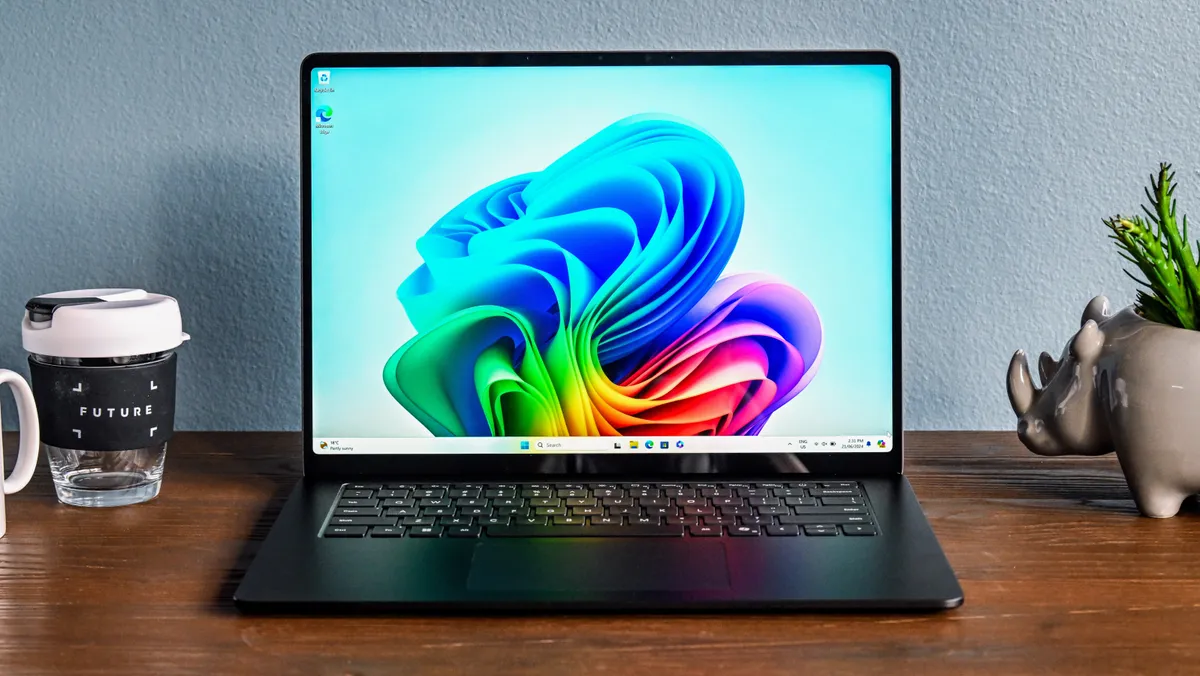

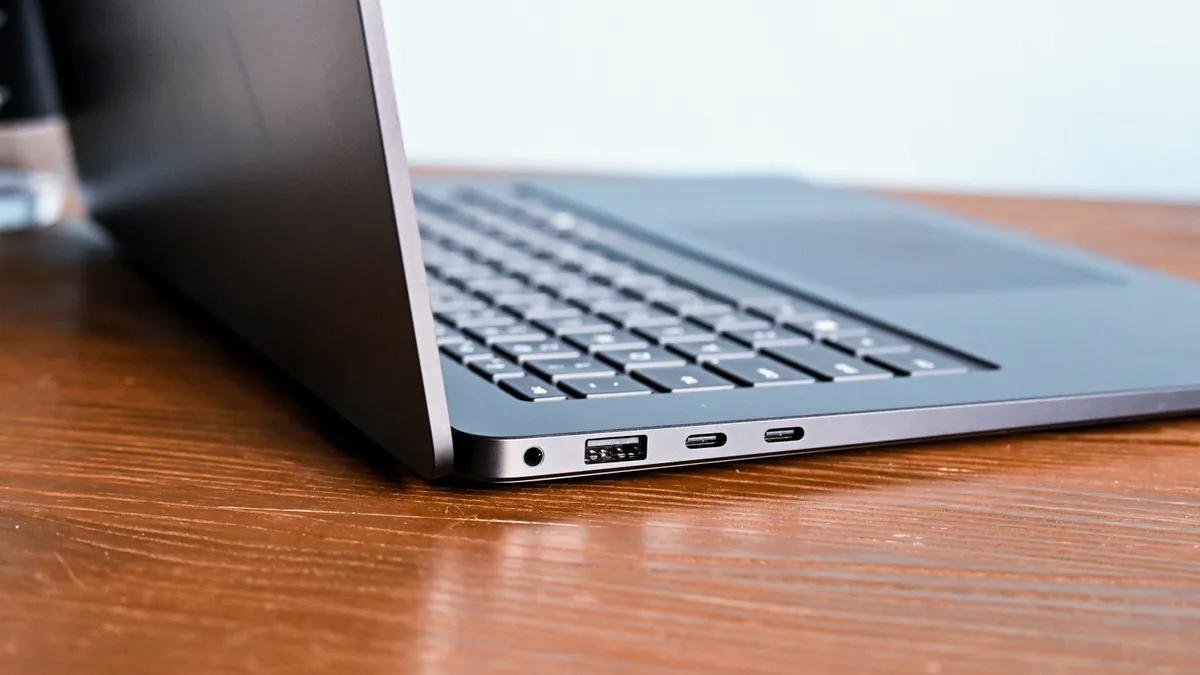
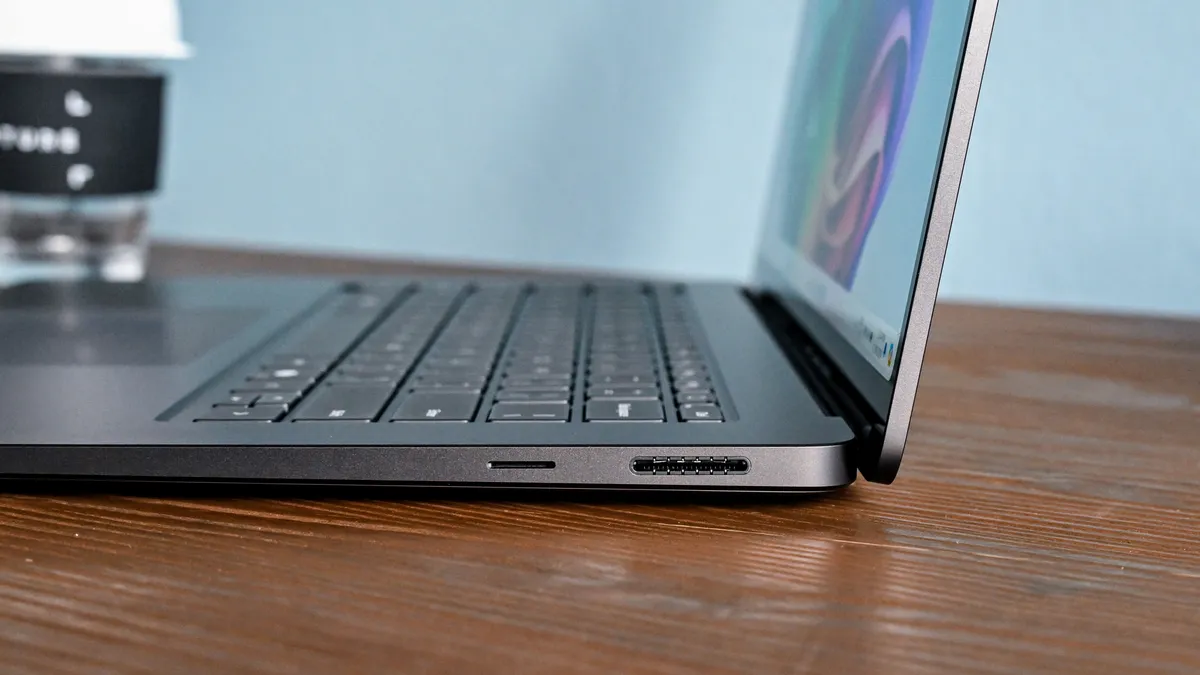


Loads of schools use Microsoft products like Office, and while you can generally use it in a browser or on a MacBook, sometimes a Windows laptop is needed. If so, then the Microsoft Surface laptop is hard to beat.
Windows has plenty of faults as an operating system, but it's never been as smooth and fast as on the new Surface Laptop. From the outside it's a very normal looking laptop that might even be boring if not for the range of colours available. On the plus side, it uses a premium all-metal design that (finally!) favours robust repairability over being extra slim and light.
But the real magic of the new Surface Laptop is inside, thanks to the Snapdragon X Plus and X Elite CPUs from Qualcomm. These new Arm CPUs match the best Apple silicon, giving excellent performance yet remaining efficient enough for truly all-day battery life.
The Surface Laptop comes in two main variants – 13.8-inch, and 15-inch. The former can be bought with the slightly less powerful X Plus CPU, or the faster X Elite, whereas the 15-inch model only comes with the X Elite. Either size is available with up to 32GB of RAM and a 1TB SSD – the latter is user upgradeable. The 15-inch laptop has a 2496 x 1664 (201 PPI) display, while the 13.8-inch screen is 2304 x 1536 (201 PPI) – though both are IPS panels with a touchscreen, plus a high 400-nit brightness and excellent colour reproduction.
Some Windows software does not yet have a native Arm version and is run using emulation. This can cause a mild reduction in performance (and compatibility issues in some cases), but isn't a particular problem for mainstream apps. In light loads such as playing video, the 66Wh battery in the 15-inch Surface Laptop lasts over 25 hours. Even in heavier workloads, it has no problems lasting 10 to 15 hours on battery. The 13.8-inch Surface laptop has a slightly smaller 54Wh battery but almost as long run times unplugged.
The Surface Laptops have dual USB 4 Type-C ports that do video out and charging, plus a single USB-A connection. In a move we love, Microsoft has kept the magnetic Surface charging port (it also does data and video output), keeping your USB-C ports free and allowing the laptop to connect to existing accessories such as older Surface docks.
The Surface Laptops are not the cheapest (though are already attracting the occasional discount), and the 13.8-inch model starts from AU$1,899 with 16GB of RAM, while the most expensive 32GB option is AU$3,399. The 15-inch model starts at AU$2,399 for 16GB RAM, and ranges up to AU$3,699 for the 32GB machine.
Read the full review: Microsoft Surface Laptop 13.8-inch
The best budget laptop for students

For students looking for an affordable yet durable laptop, the Lenovo ThinkBook series is a solid choice. While designed for business needs, it offers the performance and build quality needed for school and university, or even just everyday use. One of the best-value options in the range is the AMD ThinkBook 14, which is easy to buy under AU$1,500. It's rarely discounted heavily, but small savings can sometimes be found, especially through the Lenovo’s Education Store.
The AMD ThinkBook 14 is powered by either a Ryzen 5 7535HS or a Ryzen 7 7735HS processor, and comes with 16GB of RAM and a 1920 × 1200 IPS display – though its 45% NTSC color coverage makes it unsuitable for creative use. If looking to buy one, opting for the 60Wh battery upgrade (for just AU$20) is a good call to ensure a full day of use on a single charge.
If you’re keen to save a little money, consider the older Gen 6 ThinkBook (available with Intel or AMD processors), as it's also a great machine.
While we have not yet gotten hands on with this specific Gen 7 ThinkBook 14 model, those interested can check out our review of the similar ThinkBook 14 2-in-1, keeping in mind that it has an Intel CPU.
Can't find a ThinkBook you like? The ThinkPad is a slightly more premium (but very similar) machine – check out our Lenovo ThinkPad T14s review for more info.
Best cheap student MacBook

Apple has made a serious move into the budget laptop space with the MacBook Neo, delivering a more polished experience than you might expect for the price.
Starting from AU$1,049, with an AU$1,249 model also available, the MacBook Neo comes with an Apple A18 Pro chip, 8GB of unified memory and either 256GB or 512GB of storage.
For students, the 13-inch Liquid Retina display is one of the biggest highlights, offering 500 nits of brightness and a more premium set of display specs than you’d normally expect from a laptop at this price.
Battery life is another highlight, lasting 13 and a half hours in testing. That’s comfortably enough to get through a full day of classes, study or general use without constantly looking for a charger, which makes it especially well suited to students.
Build quality is also excellent, with a level of fit and finish that many similarly priced budget laptops struggle to match.
There’s also a bit more personality on offer than you’ll find with most budget laptops, with the MacBook Neo available in four colours — Silver, Blush, Citrus and Indigo. It gives students a little more choice in how their laptop looks, while helping the Neo stand out from the typically more subdued designs in this part of the market.
There are still a few compromises to keep in mind. There’s no keyboard backlight, one of the USB-C ports is limited to USB 2 speeds, and the 8GB memory limit can start to show when you’re juggling lots of apps or browser tabs at once.
For most everyday student tasks, that shouldn’t be a major issue, but more demanding workloads and heavier creative work are better suited to the more expensive MacBook Air and MacBook Pro models.
Read the full MacBook Neo review
Best affordable Dell laptop


The Dell 14 Plus is one of the more affordable options and starts from AU$1,299.10. The laptop offers configurations with AMD Ryzen AI 300 processors, up to 32GB of RAM and 512GB or 1TB storage.
The 14-inch display is good enough for normal use, though its 300-nit brightness can be limiting in bright environments.
Its battery life is impressive, reaching around 13.5 hours on a charge, which comfortably supports a full day of schoolwork.
Of course, there are some limitations – the keyboard feels a bit stiff, the trackpad is average, and the speakers lack oomph. While it’s not suited for heavier creative tasks, it handles daily student tasks with ease.
All in all, the Dell 14 Plus delivers excellent value and features for its class, and the higher-tier configurations offer surprisingly good performance.
Read the full Dell 14 Plus review
The best 2-in-1 for students

While most students just need a standard laptop, for some classes a touchscreen 2-in-1 model that can double as a tablet can be very helpful. You only need to worry about this if your school recommends a 2-in-1, so if in doubt, double check.
As a premium 2-in-1, the HP OmniBook Flip Ultra delivers high-end features, but the tradeoff is an often steep price tag. Fortunately, discounts of 20% or more are often available and help make it a much better deal. Still, compared to similarly priced laptops, it holds its own, and it will happily outperform the fanless MacBook Air in sustained workloads.
The Flip Ultra’s 2880 × 1800 OLED touchscreen is a standout feature and even gives stylus support, so is ideal for creative work and note-taking. It also includes premium extras such as a facial recognition webcam and Thunderbolt 4 ports for connecting an external monitor when used at home.
Under the hood, the latest Intel Ultra Series 2 CPUs and up to 32GB of RAM ensure a good balance of performance and efficiency. Battery life is another highlight, delivering up to 12 hours of use – more than enough for a full day of work or classes.
The combination here of performance, versatility, and endurance makes the OmniBook Flip Ultra a great choice for anyone who needs a flexible touchscreen laptop. For those looking for a more affordable or more powerful alternative, the HP OmniBook Ultra Laptop offers similar specifications but ditches the 2-in-1 functionality in favour of the capable Ryzen AI 9 CPU.
Want to know more? Check out our HP OmniBook Ultra Flip 14 review
The best student workstation

The latest models of the MacBook Pro 14 and 16-inch laptops come with new M5, M5 Pro or M5 Max processors, which will bring reasonable upgrades to overall performance compared to the previous generation.
While the M5 CPU is great, the previous generation MacBook Pro with an M4 can be the better buy, if you can pick one up at the right price.
The MacBook Pro range offers very portable package that uses the ever improving Apple M series CPUs to give solid performance for considerably less power than the competition. This means you can do demanding tasks on the go without having to rely on plugging in to get through a full work day.
The MacBook Pro gets three Thunderbolt 4 ports (Thunderbolt 5 on the Pro and Max), and the base M5 CPU variants can support two external displays, while the and M5 Pro handles three and the M5 Max can support four.
As we have come to expect from Apple, the Liquid Retina XDR display is fantastic, and offers wide colour gamuts, a 120Hz refresh rate and 600 nits brightness (SDR content) or up to 1,000 nits sustained (1,600 nits peak) with HDR content.
The entry level 14-inch MacBook Pro M5 starts at a reasonable AU$3,199 from Apple, but that's with just 16GB of RAM, and bumping that up to the typical 32GB costs an extra AU$600.
Jumping up to the 16-inch MacBook Pro, the minimum spec is the M5 Pro CPU with 24GB of RAM and a 1TB SSD, which costs AU$4,799. The 16-inch MacBook Pro featuring the M5 Max CPU starts at AU$6,999, with 36GB of RAM and a 2TB SSD as the base spec.
For those already in the Apple ecosystem, the choice is likely easy and the MacBook Pro is well worth the premium price. But it's also an appealing option for those who need to do creative tasks (such as video editing) on the go using battery power, but also use the laptop as a workstation connected to external monitors.
Read the full Apple MacBook Pro M5 review
The best engineering laptop


For students studying engineering (including software engineering) then having a more powerful laptop is important. A favourite choice is often a gaming laptop, as the hardware offers excellent performance, including GPU acceleration for certain applications, and they can be more affordable than high end creator or professional laptops.
And as an added bonus for many Uni students, you can relax with some gaming between study sessions.
The Lenovo Legion 5i has long been a favoured gaming bang for buck laptop, and the latest 2025 (Gen 10) model continues the trend. Though keep in mind you do need to buy it when (frequently) discounted rather than at RRP, if you want the best value.
Our Gen 10 Legion 5i test is still underway, but we reviewed the Gen 9 model (as shown in the pics above) and loved it. The Gen 10 uses the latest RTX 5000 series GPUs, including the RTX 5060 and 5070, as well as an Intel Core i7-14700HX, i9-14900HX or Ultra 7 255HX CPU. Unlike the Gen 9's 16-inch IPS screen, it has a 15.1-inch OLED screen with the same 165Hz refresh rate, includes 16GB or 32GB RAM and up to a 1TB SSD.
When not gaming, the 5i is also a very competent workstation and will perform well on AC, USB-C or battery power. It won't last long unplugged (as expected) and we think it's a shame it doesn't include a facial recognition webcam or fingerprint reader.
By all reports, gaming performance is great – in large part thanks to the powerful cooling system that allows the GPU to sustain full output for longer without overheating. The RTX 5070-equipped 5i is well suited to run games such as Cyberpunk 2077 at very smooth frame rates at the 1600p native resolution. The laptop is also a powerful option for those who need a productivity laptop for work or Uni, and while chunkier than many laptops, the 5i is still able to be carried day to day without too much trouble.
The best pricing for the 5i is often direct from Lenovo Australia – but only when discounted. Typical discounts range from 30% to 40% off RRP. For example the Ultra 7, RTX 5070 variant of the 5i has been discounted under AU$2,879 while the RTX 5060 equipped 5i has been under AU$2,500.
Until our Gen 10 5i review is done, we suggest checking out our Lenovo Legion 5i (Gen 9) review.
The best Snapdragon laptop

For study, it's generally best to go for a laptop with wide compatibility. But it's hard to argue with the often bargain prices of Snapdragon based laptops, and Windows has now sorted out almost all the compatibility issues.
So for those seeking a high-performance laptop without an extreme price tag, the Lenovo Yoga Slim 7x strikes an excellent balance between value and functionality. Powered by a Snapdragon X Elite CPU, it delivers impressive performance, battery life, and portability – making it a pretty versatile choice for anyone who needs a sleek yet powerful Windows device.
One of our favourite features of the 7x is the 14.5-inch OLED display, which has high 2,944 × 1,840 resolution, a smooth 90Hz refresh rate and vibrant colours. The 16:10 aspect ratio also provides more vertical space for browsing, while touchscreen functionality adds that little extra layer of versatility for productivity and creative tasks.
While battery life is great (lasting longer than most premium Windows laptops), for those on the go, the 7x's lightweight yet durable aluminum design is just as important, as it gives portability but also ensures it's robust enough to handle everyday bumps and knocks.
Read the full Lenovo Slim 7x review
Frequently asked questions
Want to know more about choosing the best laptop for student use? Read on to find out more about school requirements, education discounts, how to pick the right laptop and more.
School requirements
You can typically find a BYOD (Bring Your Own Device) policy on your school's website that will detail what’s needed. Generally speaking, most schools recommend a 13-inch or 14-inch laptop (larger than 11 inches and not over 15 inches), with at least 6 hours of actual real-world usage battery life. Most of the time, schools don’t want students charging laptops during the day, as the cords can be a trip hazard. Laptops must have a webcam and microphone.
Most schoolwork is web-based or uses software such as Microsoft’s 365 suite of apps. Chromebooks are not commonly recommended for high school or university but are more often used in primary school. Usually though the school will supply them, or recommend a specific model.
Most schools suggest laptops need at least 8GB of RAM, but 16GB is recommended (we think 16GB is the minimum you should opt for). Generally speaking most schools will support both MacBooks and Windows laptops, but some will have a preference for one or the other.
Ideally, look for laptops that advertise at least 10 hours of battery life, as it will decrease over time as the battery wears from use. For high school students, expect to upgrade to a new laptop at least once. Higher grades and certain classes may have special requirements for laptop specifications and performance. If in doubt, check with your school or Uni.
Best Education deals
Some retailers and brands offer discounts for students, teachers and often even parents. Most discounts require signing up an account using a .edu email address, but others just need a code from your school.
Apple Education Store
Once verified as a student or educator, Apple offers a range of small but handy discounts. Read the full terms and conditions to find out how to qualify.
JB Hi-Fi Education portal
In collaboration with schools, JB Hi-Fi offers a range of products (including laptops) with education discounts. Always make sure to double check the prices, as while the prices can be good, you may get a better deal elsewhere. Participating schools should have a login code available in their BYOD policy, otherwise use BYOD2026 to see what is available.
Lenovo Education Store
Sign up with a .edu email to get access to discounted prices on a wide range of Lenovo products. While the discounts are often better than on the normal Lenovo store, it pays to double check as something the student deals are not as good.
HP Back to school sale
While not a specific program with student discounts, HP currently has a back to school sale running with up to 40% off.
StudentBeans
Sign up an account using a .edu email address, and get access to discounts that can be used at many retailers.
UniDays
Sign up using your student email to get access to discounts on a range of tech.
TechRadar Coupons
Have a specific laptop in mind? Make sure to check our coupon page and see if there is a discount code available.
How to choose the best student laptop
The best student laptop is going to give you the right balance between sufficient performance for productivity tasks, affordability for a student's budget, and durability to handle the kind of wear-and-tear that a student can put their laptops through – and having it look good never hurts.
But that can be a hard thing for students and families to balance, especially if they aren't as familiar with computer hardware as they'd like to be. Fortunately, there are some general guidelines that you can follow to get the right student laptop for your needs and budget.
What makes for a good student laptop?
There are a few other boxes that the best student laptops should check besides being able to handle the demands of your coursework. One of the biggest considerations you should have when choosing a student laptop is battery life - you need something that will last all day during your classes and still have juice leftover for late nights studying at the library.
Student laptops should also ideally be both versatile and lightweight because you’ll want something that can multitask all the programs you’ll need without being a drag to carry around campus. Versatility is crucial with a student laptop, especially with majors that will have you flipping back and forth between a published paper and the essay you’re trying to finish in time.
Budget is also a major consideration in choosing the best student laptop for your university experience. Not everyone can shell out a ton of money for a student laptop - we absolutely understand that - so you need to be sure to pick something that meets all your criteria without going overboard on your budget. It’s easy to find a great student laptop within your price range these days, and even better when you find a sale and get a good deal on it.
Is a MacBook a good laptop for students?
This is a slightly loaded question, because ultimately the best operating system for students (whether that's Windows, macOS, or ChromeOS) will always come down to which OS the student in question prefers to use. Some of us are married to the effective functionality of Windows; others might prefer the aesthetically pleasing UI of Apple devices, or the Android-esque, streamlined user experience Chromebook provide.
If you're already comfortable using a specific operating system, making the leap can be tricky. ChromeOS is arguably the easiest to pick up and use, but changing to MacOS after a decade spend familiarizing yourself with Windows might lead to confusion. Take this into consideration when choosing a new laptop for school or college.
On the hardware side, we're pleased to say that MacBooks are more competitive than ever. Apple's fantastic M3 and M4 chips are much more capable of running demanding tasks than processors with integrated graphics, making Apple laptops excellent all-rounders for the busy student. However, if you need to run highly intensive software, it's worth considering a Windows laptop with a dedicated GPU - ideally an Nvidia RTX one - since this will give you a lot more grunt in GPU-accelerated programs.
Which is better for students: a laptop or a desktop?
Simply put, most high school and Uni students will need a laptop for their studies at this stage. While having a computer of some kind is practically a necessity at this point - with the rise of remote learning and content creation among university students - a laptop can be thrown into a rucksack and taken along to lectures and workshops, unlike a desktop PC.
Yes, a desktop will typically offer more processing power and the advantage of a bigger screen, but you might end up spending more (especially once you factor in the need for peripherals) and then still find yourself needing a portable device for note-taking and working on the go. If you've already got a small tablet or laptop that you can take out and about, you might want to consider buying one of the best desktop computers, but otherwise, we recommend you get a more capable laptop and use that in lieu of a desktop.
How we tested these student laptops
We know that buying a new laptop can be a huge investment. Even more so with laptops for college students. That’s why we take our jobs seriously, and test every laptop we recommend on this list extensively.
That process involves using them in our day-to-day lives to see how long their battery lasts, how robust they are – kids have hectic lives, after all – and how cool they stay under pressure. We also look at their design, including how stylish they are, if they are thin and light enough to carry around with, and how comfortable they are to work on. Because the webcam and microphone in a laptop are also incredibly important, especially these days, we take time to test those out as well.
When it comes to performance, we use a mix of real-world tests and synthetic benchmarks to see how powerful (or not) these laptops are. This means using Windows 11 (or Chrome OS on Chromebooks and macOS on MacBooks) and running various apps and seeing how fast they load, noting down any problems.
Battery lives are also important, so we’ll keep track of how long we can use the laptop without needing to charge it. To get specific numbers, we also run our own battery life benchmark that plays a looped 1080p movie until the battery dies and the PC Mark 10 battery life benchmark, which replicates real-world usage, such as web browsing and document creation. These tests give us an excellent idea of how long the batteries in these laptops last.
When all is said and done, we then take everything we’ve learned about the laptop and compare it to its price, to see if it offers the best value to students.
- The best laptops in Australia this year
- The best gaming laptops in Australia
- The best laptop sales in Australia
Latest Updates
August 2026: Updated with the best laptops for the second half of the 2026 school year