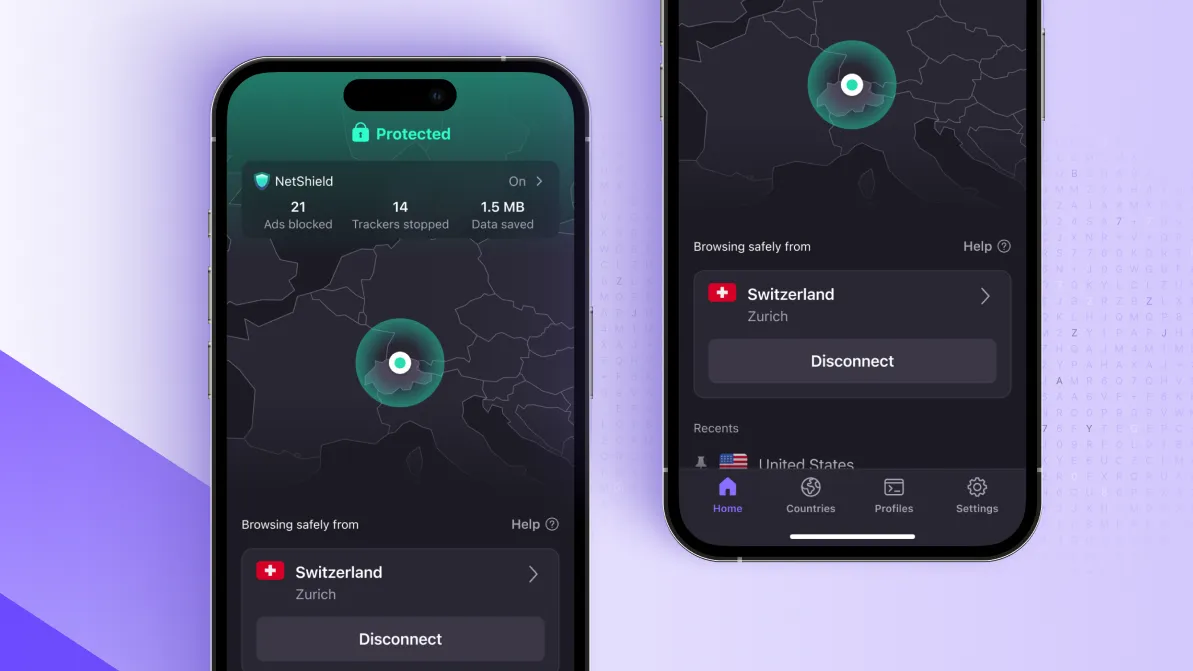
- Proton VPN iOS users get a map overhaul and smarter sorting
- Proton is also in the middle of a "speedrun" to fix the Linux and Mac UX
- After Windows and Android, Proton is steadily revamping all apps
Proton VPN has announced a fresh wave of updates across its iOS, macOS, and Linux applications, aiming to unify the user experience and bring its desktop and mobile apps in line with its top-tier Windows and Android offerings.
For users of one of the best VPN services on the market, the update addresses long-standing requests for more granular control. It follows a similar revamp released on Windows and Android apps at the beginning of February.
Historically, VPN providers prioritize Windows, often leaving Apple and Linux users with fewer interface features. Proton, however, is now signaling a major shift in its development priorities to ensure no platform is left behind.
David Peterson, General Manager at Proton VPN, detailed the progress on social media, highlighting that the iPhone ecosystem has actually overtaken other platforms in specific design aspects.
Linux and Mac VPN apps are next in line, as the company is "steadily working to bring the UX" at the same level across all apps, said Peterson.
iOS app 'skip ahead' of Android
The most immediate functional improvements are live for iOS users. In a move that highlights Proton’s focus on visual precision, Peterson noted that the iPhone app has received a unique design polish that its Android sibling currently lacks.
"Actually, if you look closely, you'll see that for iOS the map pin is on the city instead of in the middle of the country as it is on Android," Peterson explained. "So actually the iOS map has skipped ahead of Android for the moment."
We're steadily working to bring the UX of our @ProtonVPN iOS, Mac, and Linux apps up to the same level as we have for Windows and Android.Latest quality-of-life tweak for iOS: you can now find servers by city/state, and sorted by load. pic.twitter.com/cqv3BZwVuBFebruary 24, 2026
The new tools focus on precision and performance:
- City-Level Grouping: Available from version 7.1.0, users can now see map pins placed exactly on the city location, rather than a generic pin in the center of a country.
- Server Load Sorting: Users can now "sort servers by load (not just name)," a feature rolled out in version 7.0.0 to help dodge congested servers.
- OS Requirements: Peterson clarified that version 7.0.0 and above requires at least iOS 17 to function.
The Linux 'Speedrun'
While iPhone users enjoy immediate updates, the Linux community has been vocal about their platform's "basic" and "horrible" UX. Peterson acknowledged these frustrations, stating that the Linux ecosystem is currently getting the "speedrun" treatment to catch up.
The first major milestone in this process was the migration to the GTK4 framework, a technical shift we reported on last month that allows for a much smoother, more modern interface.
While the visual overhaul is still being polished "behind the scenes," this framework update is the essential foundation for a UI that will eventually match the sleek design of Proton’s other apps.
Follow TechRadar on Google News and add us as a preferred source to get our expert news, reviews, and opinion in your feeds. Make sure to click the Follow button!