


Sponsored by

Proton VPN on Android: features, requirements, how to install

Proton VPN's reputation as one of the fastest and most powerful VPNs on the market precedes it. That's in part thanks to its being based in Switzerland, which is deemed a privacy haven due to the country not having entered into any intelligence-sharing agreements like through NATO.
When it comes to Proton VPN's mobile apps, we note in our review that it's one of the best VPNs due to it "[doing] a remarkable job of [...] ensuring there aren’t huge gaps in features from one app to another".
In fact, in our Android VPN guide, we say there are so many areas to love about its Android app, from its accessible interface, to the provider's aforementioned privacy credentials, as well as "its collection of security functionalities available on-device".
From NetShield to split tunneling and P2P support, read on for the Proton VPN Android features available, and how to install its VPN app on your device.
What features does Proton's Android VPN app include?
We rate Proton VPN for its security and speed, but what about its features – and which ones are available on its Android app?
Well, it's good news. Proton VPN's Android app is loaded with features, including:
Secure Core
Proton VPN's Secure Core feature really embodies the provider and its focus on optimal anonymity while online.
Adding multiple layers of protection, Secure Core runs your connection through more than just the one server for defence against more advanced cyber attacks. These servers are also based in secure locations, including Switzerland, Sweden and Iceland.
NetShield Ad-blocker
Clean up your browsing experience with the added protection of Proton VPN's NetShield Ad-blocker. This targets malicious ads and trackers, as well as detecting websites hosting malware.
Kill switch
A kill switch is pretty much the baseline of any good VPN, but that shouldn't negate its absolutely necessity all the same.
In the unlikely event your VPN connection cuts out, Proton's kill switch activates and cuts off your internet connection. This reduces the risk of your data being exposed through a leak in that period when the VPN protection is down.

Alternative routing
Should you be in a place where use of VPNs are blocked, Proton VPN's alternative routing tool will look to establish an encrypted connection through one of its servers via another network.
This is an anti-censorship tool that looks to bypass blocks placed by governments, internet service providers, and administrator networks.
Split tunneling
Proton does have several advanced features for split tunneling. You can choose to split-tunnel both apps and IP addresses on Windows and Android, while Mac users are currently limited strictly to apps.
On these supported platforms, you can decide whether your tunnel excludes or includes what’s selected from the VPN connection.
VPN Accelerator
There's a reason Proton VPN is considered one of the fastest VPNs, and it's in part thanks to its VPN Accelerator.
The company claims it can boost speeds across all its servers and protocols by more than 400%. In our guide for the fastest providers, we said: "Proton VPN balances superb speeds with maintained performance over distance to a degree that makes it superb for almost anything."
P2P support
Make file sharing more secure with Proton VPN's P2P servers, available on the provider's Android app. This allows you to torrent without revealing your IP address to others sharing the same files. This includes via BitTorrent connections.
What version of Android to I need to get the Proton VPN mobile app?
In order to be able to install the Proton VPN Android app onto your device, you'll need a device that runs Android 8 software or above to be compatible and benefit from the provider's array of privacy features.
To check whether your device is compatible, you should be able to find this information in your Settings > About Phone > Android Version, though it may sit under different areas in your settings depending on the brand and model of smartphone you have.
How to install the Proton VPN Android app
- Visit the Play Store
- Search ‘Proton VPN’
- Tap on Install
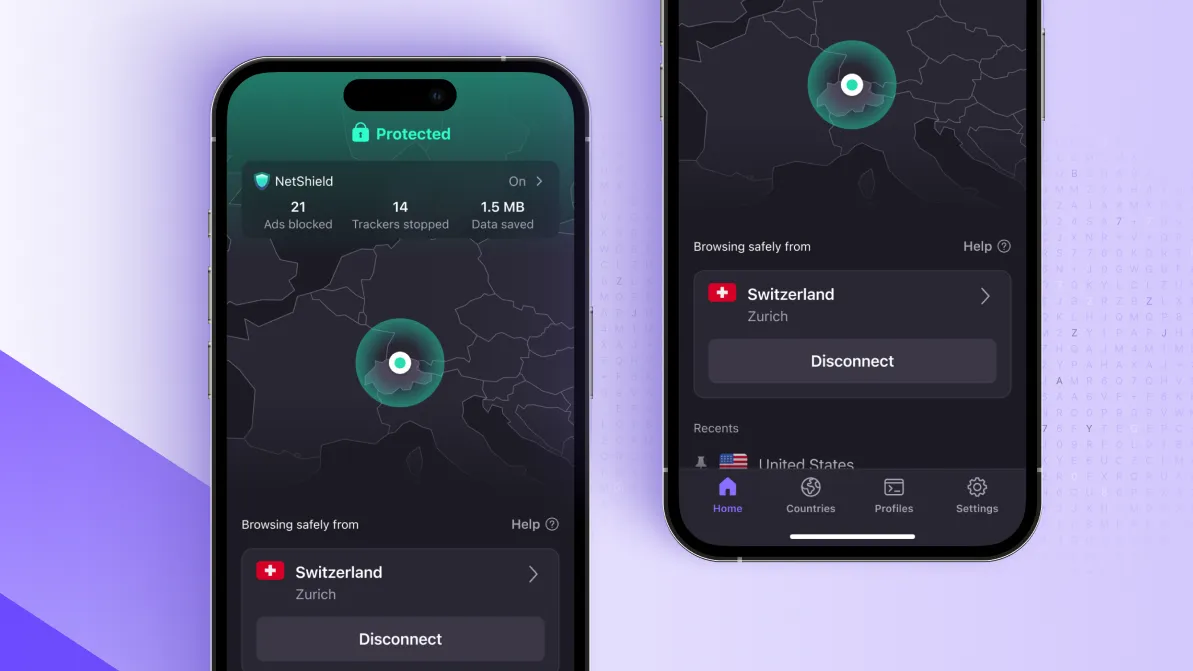
- Once installed, launch the app and sign in with your credentials or sign up to one of its plans
- You’ll also have the option to login as a guest and access Proton VPN Free’s features (Note: not all features listed above are included on the Free plan)
- Tap on Connect
- The first time you do this you’ll be asked to allow the app to configure your settings
- Tap OK
- Once connected, the interface will turn green
We test and review VPN services in the context of legal recreational uses. For example: 1. Accessing a service from another country (subject to the terms and conditions of that service). 2. Protecting your online security and strengthening your online privacy when abroad. We do not support or condone the illegal or malicious use of VPN services. Consuming pirated content that is paid-for is neither endorsed nor approved by Future Publishing.
