





Sponsored by

Proton VPN mobile app: features, price, how to install
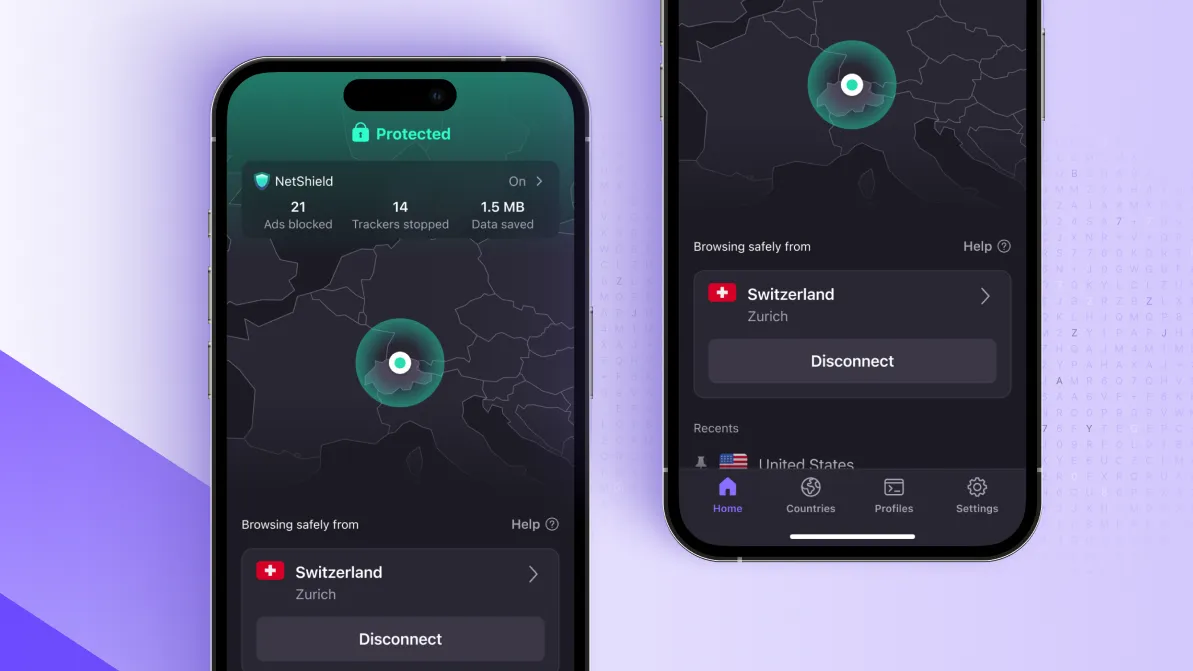
When it comes to finding your key to a freer internet, Proton VPN prioritizes access and privacy over everything – and it’s also pretty fast.
Based in Switzerland, that’s a strong indicator of a truly secure VPN given that the country is a security haven having not entered into any intelligence-sharing agreements with the likes of EU or NATO.
And you can benefit from all the power of one of the best VPNs in your pocket with Proton's mobile apps, available on both Android and iOS devices.
Read our guide explaining everything there is to know about the Proton VPN mobile apps, including what features they’re loaded with, plans, and how to install it.
What features do Proton VPN's mobile apps include?
It’s not unheard of for the mobile clients of VPNs to draw the short straw. Sometimes providers don’t equip their iOS and Android clients with all the bells and whistles of its desktop counterparts.
That’s not the case with Proton VPN, though. Both its Android VPN and iPhone VPN feature in our best lists.
And for good reason: Proton VPN’s mobile app interface is sleek, intuitive and jam-packed with many of the provider’s headline features.
Kill Switch and always-on VPN
A kill switch is pretty much the baseline of any decent VPN. It might feel basic in comparison to some of the more advanced features out there, but it’s critical in ensuring your identity and data is never left open and vulnerable to prying eyes.
Proton VPN’s kill switch does exactly what the name suggests: it pulls the trigger on your internet connection in the event you lose connection to your server, and won’t allow you to reconnect to your network until it’s restored. It comes on both the iOS and Android client.
Netshield ad-blocker
Both iOS and Android users can benefit from Proton VPN’s Netshield ad-blocker on its mobile app.
Not only does this intelligent ad-blocker make for a cleaner and faster online browsing experience, it is also able to detect and block trackers and filter out any images, sites, or script from domains known to host malware.

DNS leak protection
Rest assured your IP address will never be exposed with Proton VPN’s DNS and IPv6 leak protection available for both Android and iOS users.
Not sure why that's a good thing? Get up to speed with what DNS leaks are and whether you should be concerned.
VPN Accelerator
Get a speedy connection, even when connecting to a server physically far away, with Proton VPN’s VPN Accelerator.
This feature is available to both Android and iOS users and uses some of its most powerful servers, claiming to improve long distance performance by over 400%.
Secure Core
While most VPNs route your traffic through one encrypted server, Proton VPN’s Secure Core sends your data through multiple servers before it leaves your network.
This offers more advanced protection against network attacks, and is available on both Proton VPN’s mobile apps for iOS and Android.
Stealth protocol
Android and iPhone users can make use of Proton VPN’s Stealth protocol on its mobile apps.
This protocol is designed to bypass restrictions in countries where censorship is particularly prevalent. It works to avoid detection, claiming to “bypass most firewalls and VPN blocking methods". This is on top of Proton VPN’s other anti-censorship tools, like alternative routing.

P2P Support
Android users can benefit from Proton VPN P2P support, allowing you to share and download files securely.
Split tunneling
Android users can also utilize Proton VPN’s split tunneling feature.
This allows you to better isolate your connection, allowing you to send some traffic through the server, at the same time as accessing other websites you might not want or need the added function of a VPN for.
How much is Proton VPN?
Use of the mobile app for Android or iOS comes automatically with any Proton VPN subscription.
There’s the option of subscribing to Proton VPN’s Plus plan on a monthly, annual, or two-year plan, with the latter offering the best value for money. You’ll pay $168 upfront (at the time of writing), which works out as just $2.99 a month. Alternatively, its rolling monthly plan starts from $9.99, or you can pay $3.99 per month for a year.

It’s also worth noting that Proton VPN does offer a free plan, though this scrapes back a lot of its features and keeps things basic. Still, it’s a great option for trialling out what Proton VPN has to offer and exploring its mobile apps.
And then there's Proton VPN Ultimate, which bundles the VPN (mobile app and all) in with the company's suite of other secure tools.
How to install the Proton VPN mobile app
Installing on iOS:
- Visit the App Store
- Search ‘Proton VPN’
- Tap on Get
- Once installed, launch the app and sign in with your account details
- The app also gives you the option to create an account within its interface or login as a guest and access Proton VPN Free.
- When you first tap Connect, you’ll be prompted to configure your settings
- Tap Allow
- The interface will turn green once you’ve successfully connected to a server
Installing on Android:
- Visit the Play Store
- Search ‘Proton VPN’
- Tap on Install
- Once installed, launch the app and sign in with your credentials or sign up for a new plan
- You’ll also have the option to login as a guest and access Proton VPN Free’s features
- Tap on Connect
- The first time you do this you’ll be asked to allow the app to configure your settings
- Tap OK
- Once connected, the interface will turn green
We test and review VPN services in the context of legal recreational uses. For example: 1. Accessing a service from another country (subject to the terms and conditions of that service). 2. Protecting your online security and strengthening your online privacy when abroad. We do not support or condone the illegal or malicious use of VPN services. Consuming pirated content that is paid-for is neither endorsed nor approved by Future Publishing.
