





Finding the best desktop PC on the market right now can seem like an impossible task – and in some ways, it is. With a vast range of different designs, configurations, operating systems, and use cases, there is no single 'best computer' out there; it's just down to what you personally need most.
Luckily, I've been reviewing PCs and laptops for years, reviewing dozens of the best gaming PCs, best all-in-one computers, and more, meaning you can be sure that my recommendations carry weight.
To that end, we've structured this article a little differently from our usual buying guide format. Rather than a straightforward list, I've got our top recommendation for Windows 11 and macOS, for both conventional desktop PC and all-in-one configurations. With these guide rails, you can find the ideal intersection of your preferred design and OS, and find the ideal PC to suit your specific preferences.
What's more, our expert reviewers have personally tested hundreds of desktop PCs over TechRadar's decade and a half of publishing tech reviews, and we put them through extensive benchmarking to measure their CPU, GPU, and overall system performance.
I'm using all of that collective experience to bring together my picks for the best desktop PC on the market in 2026, so you can buy in confidence knowing you're getting the right PC for your personal needs.
This guide was reviewed and updated in August 2026. I've also reworked the format of the entire page, to bring it more in line with our other buying guide articles and improve readability on mobile devices!

I've been building, testing, and reviewing PCs (and all manner of computer hardware) for close to a decade, originally starting out my tenure as a tech journalist at the hobbyist magazine Maximum PC. I've now been with TechRadar for almost five years, and I spent most of that time as the Computing channel's UK Editor, so I've taken that experience and knowledge gained into my new role as Buying Guides Editor to ensure that I bring you only the very best purchasing advice.
The best desktop PCs in 2026
Why you can trust TechRadar We spend hours testing every product or service we review, so you can be sure you're buying the best. Find out more about how we test.
The best Windows desktop PC


✅ You want expandability in a prebuilt PC: Many prebuilt systems are difficult or even impossible to upgrade, but the Dell Tower Plus allows for easy and straightforward user improvements.
✅ You want something that looks discreet: The understated design fits naturally into professional settings, while still packing enough power for gaming after hours.
✅You want a high-performance option: If you need plenty of processing oomph for demanding creative workloads, Dell's higher-spec configurations can handle it.
❌ You want something 'exciting': It's fantastic, but it's a fundamentally pretty straightforward product. If you're looking for flashy, this ain't it.
❌ You want something small: The Dell Tower Plus is a mid-tower PC, meaning it requires a decent amount of real estate on your desk.
Of all the PCs on this list, I can't recommend the Dell Tower Plus enough as the best Windows computer for most people.
The thing to know about this deceptively simple-looking PC is that it can be configured to work for your specific needs and budget.
If you’re just looking for a new PC for tackling email, schoolwork, and video calls, the base configuration is going to feel quick and stress-free.
If you’re tackling bigger projects that need more horsepower, like photo and video editing, light 3D work, or modern games, you can step up the processor, graphics, memory, and storage to match.
The case looks clean on a desk, but it’s friendly when you want to grow, like adding more storage or swapping parts later on once you're ready to upgrade.
Day to day, there are plenty of easy-to-reach ports up front (including USB-C and a headphone jack), lots more around back, with solid wireless and wired options.
Given the Tower Plus's customizability, its performance is going to scale with the parts you pick, but even the mid-range build we reviewed here at TechRadar feels snappy for creative apps and smooth 1080p gaming.
Do be aware that some very low-end versions ship with Linux, which might be off-putting for the uninitiated, but the rest of the configurations come with Windows 11.
Overall, then, if you want a quiet, dependable desktop that can deliver exactly the level of performance you need right now while leaving room to grow with your needs, this is the Windows PC to buy.
Read the full Dell Tower Plus review
The best Mac PC overall

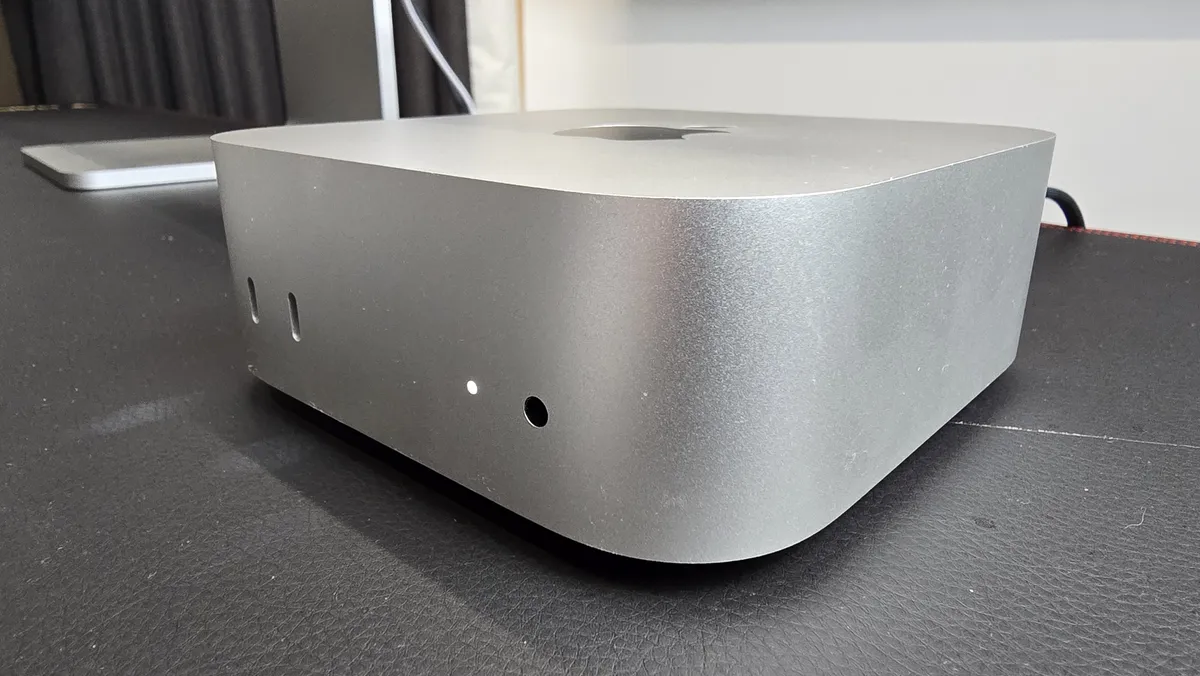


✅ You want an affordable Mac: As far as non-laptop Macs go, the Mac mini offers the single best price-to-performance ratio on the market.
✅ You're looking for a mini PC: The tiny design without compromising on performance makes this one of the best mini PCs on the market.
✅You've been waiting for an Apple 'console' for games: Its compact size and strong performance make the latest Mac mini a surprisingly solid choice for living-room gaming.
❌ You want a serious gaming PC: MacOS simply isn't quite there yet as a fully-fledged platform for PC gaming, even if the performance is good.
❌ You like to tinker and upgrade your PCs: The insanely compact design is impressive, but it precludes you from making internal upgrades.
The Apple Mac mini M4, released in 202,4 is still the best Mac desktop you can buy right now without blowing a mint on its professional workstation PCs.
Its form factor is smaller than ever, and it is whisper-quiet, even under serious load. Most importantly, it's shockingly fast for everyday work and creative tasks, offering incredible value for its base price.
If you need more muscle in your Mac, there’s also an M4 Pro option with either a 12-core/16-core CPU/GPU configuration, or a slightly more expensive 14-core/20-core SKU.
That said, the regular M4 unit we reviewed was so capable in testing that I wouldn't bother with the more expensive upgrades.
I didn't do our official review of this one, but I have used it extensively. We have one in the NYC lab that I will often jump to when I need to get some writing or photo-editing done while my own testing workstation is preoccupied (namely with component testing).
I personally love the handy front USB-C ports and the clean, compact design that can easily fit right next to my larger open testbench. Like Matt noted in his review, the power button’s placement on the underside of the PC is certainly a choice, and it can be a little awkward to pick up your desktop PC in order to turn it off.
As always with the mini, you’ll bring your own monitor, keyboard, and mouse, but that flexibility is part of the charm. For performance, quiet operation, and unbeatable value in a tiny desktop, the Mac mini M4 tops my list as the best Mac overall.
Read the full Apple Mac mini M4 review
The best Windows all-in-one PC


✅ You want an attractive all-in-one computer: The Yoga AiO 27 looks great in almost any setup, thanks to its iconic premium design.
✅ You need good PC ergonomics: With a generous selection of ports and full control over the display orientation, this PC provides a great level of ergonomic flexibility.
✅ You want something that also works as a monitor: If you want to be able to plug in a laptop for big-screen work, the Yoga AiO 27 can also pull double duty as a standalone monitor.
❌ You want upgradability: As is typically the case with all-in-one PCs, this Yoga can't really be upgraded by the user.
❌ You want a high-performance PC: It's good for straightforward office work, but lacks the power for professional creative workloads or hardcore gaming.
I've tested a lot of all-in-ones, and Lenovo's Yoga AIO 27 is the Windows model I'd recommend to my friends and family.
Its specs are closer to those found in the best Ultrabooks, but it does feature a really slim 27-inch 1440p display on a stand that pivots, tilts, and lifts so you can dial in a comfy setup or swivel the screen to share.
Day to day, the Intel Core Ultra 5/7 options with 16GB memory and SSDs keep work, browsing, and streaming snappy, and it even handles light gaming. What really clinched it for our reviewer, James Holland, was its versatility. With both HDMI in and out, you can use the screen on the Yoga AiO 27 as a monitor for another PC, or drive a second display from the Yoga when you need more screen real estate.
Port selection is generous, with USB-A, USB-C, Ethernet, and a headphone jack, so you won't have to live off dongles, and thoughtful touches help it blend into the room. A 5MP webcam with an e-privacy shutter, dual mics, and Dolby Atmos speakers are more than enough for video calls and streaming, as well.
Upgradability is limited (its RAM is soldered, and there aren't any open memory slots) and discrete graphics options are scarce outside Australia right now, so heavy video or 3D work isn't the target if you're considering one of the integrated graphics models.
But for a clean, do-everything home or office PC, its price, ergonomics, and performance, I consider the Yoga AiO 27 the best Windows all-in-one you can buy today.
Read the full Lenovo Yoga AiO 27 review
The best Mac all-in-one PC
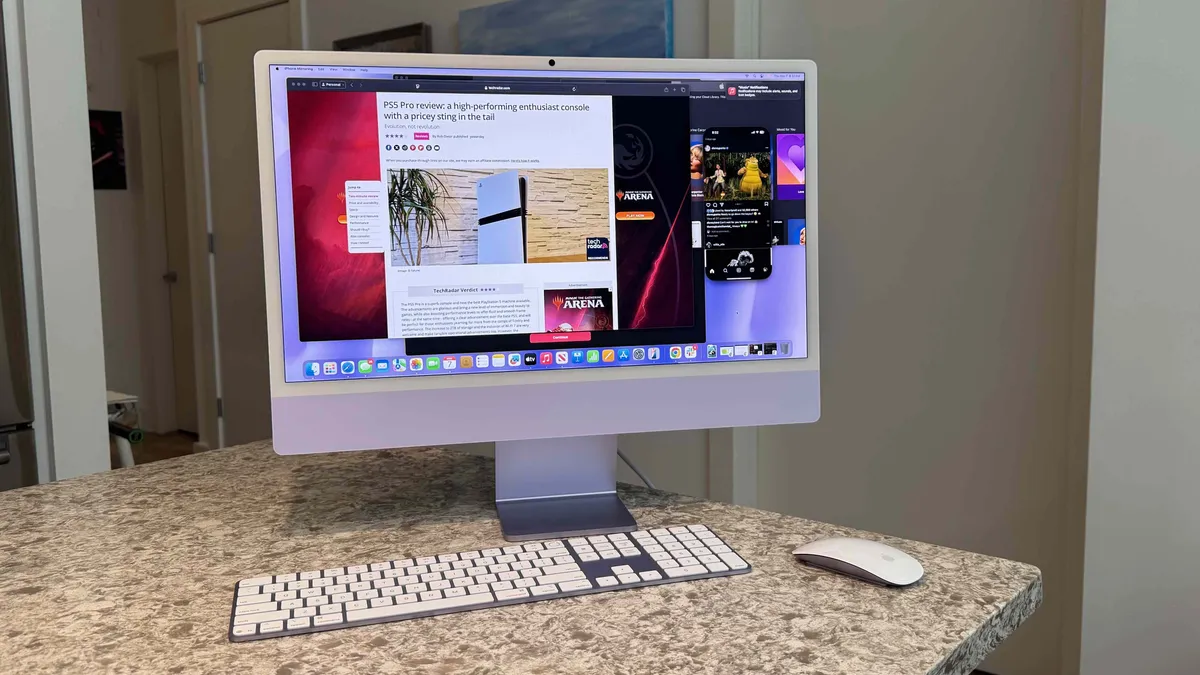


✅ You want a hassle-free Mac: The plug-and-play functionality of the iMac is one of its best features, delivering the full-fat macOS experience with minimum effort.
✅ You want a colorful and sleek desktop: Apple's range of colorways means you can get an all-in-one computer that fits the vibe of your home or office.
✅ You want an excellent webcam and audio: Many AIO PCs fall down in this area, but the integrated camera, microphone, and speakers of the M4 iMac are all great.
❌ You want the most powerful Mac: Although you do get the reasonably speedy M4 chip, there's no option for the more powerful Pro or Max variants here.
❌ You want a bigger screen: At 24 inches, the M4 iMac is actually a little on the small side for an all-in-one desktop.
We’ve reviewed all of the best iMacs of the last decade and a half here at TechRadar, and without question, the 24-inch iMac with M4 is the only one that's ever tempted me to convert from Windows PCs.
It absolutely nails the promise of an all-in-one computer. It's razor-thin, with a colorful chassis (with a variety of color options) wrapped around a gorgeous 4.5K Retina display that makes photos, video, and text look incredibly sharp and vibrant.
The Apple M4 is also a snappy little chip when it comes to overall system performance, with apps launching fast and smoother multitasking. It also wakes almost instantly and cable management is a breeze.
The six-speaker system delivers surprisingly detailed sound, and the 1080p FaceTime camera plus clear mics provide professional-looking video and sound on calls.
The stand keeps the screen perfectly steady while the color-matched keyboard (with Touch ID) and Magic Mouse/Magic Trackpad brings the whole PC setup together in a brilliant way.
Ports are neatly arranged on the back, but are limited to four USB-C Thunder 4, so you'll need an adapter or dongle if you have any older USB-A peripherals or chargers.
Is this the most powerful Mac every? Not at all, but if you want a clean, beautiful, and reasonably fast machine for home or office work that just works without much (if any) hassle, the iMac 24-inch (M4) is the best Mac all-in-one you can buy today.
Read the full Apple iMac 24-inch (M4) review
How to choose the best PC for you

Finding the best desktop PC can be challenging since there are so many different types of desktop PCs.
First, consider what you need your desktop PC to do. If all you need is general computing and productivity, with the occasional streaming video or video calls, an all-in-one desktop PC like the Apple iMac are ideal. What's more, a last-generation model is still going to be more than powerful enough for your needs while offering better affordability.
If you plan on using your PC for more serious workloads like video editing, PC gaming, or similar, a full desktop PC like the Dell Tower Plus with a good midrange graphics card like the RTX 5070 and an Intel Core Ultra 7 or Core Ultra 9 is probably your best bet. If you're looking for something for semi-professional or prosumer creative work, the Mac mini with an M4 Pro upgrade is perfect.
The most important thing, though, is to be honest with yourself about what you are actually going to need your PC to do, and purchase appropriately.
Many people approach their PC purchases by looking for the most powerful PC they can afford, but most people tend to overbuy for their needs, and it doesn't necessarily mean your PC is future-proofed either.
Another problem is to look only at the price of a PC and, in an effort to save money, purchase less than what you really need, which will only lead to frustration and extra cost later when you have to spend more to upgrade or replace a fairly new computer because it's not doing what you need it to do.
To make things easier, consider the following use cases and the corresponding specs that are appropriate for the job.
Use case |
Windows Specs |
Mac Specs |
|---|---|---|
General computing, productivity, school or office work, non-gaming entertainment |
CPU: Intel Core 5 | AMD Ryzen 5 |
CPU: Apple M3/M4 |
Content and creative work |
CPU: Intel Core Ultra 9 or Core i9 | AMD Ryzen 9 |
CPU: Apple M4 Pro |
PC Gaming (for all resolutions) |
CPU: Intel Core Ultra 7 or Core i7 | AMD Ryzen 7 X3D |
RAM: 32GB memory |
For 1080p gaming |
GPU: Nvidia RTX 4060/5060 | AMD RX 7600XT/9060 XT |
CPU: M3/M4 Pro |
For 1440p gaming |
GPU: Nvidia RTX 4070 / 5070 | AMD RX 7700XT / 9070 |
CPU: M3/M4 Max |
For 4K gaming |
GPU: Nvidia RTX 5070 Ti / RTX 4080 / RTX 5080 | AMD RX 7800XT / 7900 XT / 7900 XTX / 9070 XT |
GPU: M3 Ultra |
It's important to note that Apple Mac PCs can play PC games, but they cannot play most PC games, since only a few game developers release Mac versions of their games.
Even then, without discrete graphics, gaming performance isn't going to be great, even at 1080p resolution, without a Pro, Max, or Ultra chip, the latter two of which are only available in the very expensive Mac Studio or Mac Pro desktops.
For the same price as these Mac PCs, you can get one of the best gaming PCs with seriously powerful hardware that will run circles around anything a Mac can do.
So if what you're looking for is a PC that can play modern AAA PC games at high settings, I would not recommend buying anything else right now except a Windows PC with a discrete graphics card (not an AIO).
How we test the best desktop PCs

In order to test desktop PCs, we put each of them through an extensive battery of industry-standard benchmarks. These include Geekbench 6 and Cinebench R24 to test specific CPU performance, 3DMark to test specific GPU performance, and Crossmark to measure overall system performance and responsiveness, as well as productivity and creative prowess.
For gaming and creative workloads, we use special benchmarking tools built into games like Cyberpunk 2077 and Sid Meier's Civilization VII, as well as creative performance in real-world use like Handbrake video encoding and PugetBench for Creators Adobe Photoshop and Premiere scripts.
When comparing systems, we only look at benchmarks that are directly comparable, like 3DMark's Solar Bay test, Geekbench 6 CPU test, or Blender Benchmark 4's 3D rendering test.
We gather all this data on the systems we test and use the data to gauge how any given system matches up with its competition's results on these same tests.
To arrive at a final score, I use a geometric mean, which diminishes the weight given to extremely divergent outlier results and gives a better representation of proportional, relative performance.

| Header Cell - Column 0 | System 1 Test Result |
System 2 Test Result |
Percent Differnce |
|---|---|---|---|
Test 1 |
105,987 |
23,457 |
351.8% |
Test 2 |
1,098 |
912 |
20.4% |
Test 3 |
147 |
129 |
13.9% |
Average Result |
35,744 |
8,166 |
337.7% |
Geometric Mean Result |
2,577 |
1,403 |
83.7% |
Sorry about all the math above, but as you can see from the table, a single, very large score on Test 1 greatly throws off the average score, which isn't really a representative look at the relative performance of the two systems, where they are otherwise much closer to one another.
I don't ignore the impressive result from Test 1 above, but by using a geometric mean, I make sure that it doesn't completely overwhelm every other result and skew things unfairly.
Finally, I also consider the price of the systems (in USD for convenience, but other regions will vary) we've tested and look at their performance-to-price ratio, using the current price of the actual configuration we tested. This gives a somewhat objective perspective of a system's value; that is, how much performance you are paying for, with higher numbers representing better overall values between systems.
Of course, not every PC should be judged purely on the basis of performance alone, as there are many other valid factors people consider, such as port selection, size, operating system, and aesthetics. These are all entirely valid reasons to choose a system that has "worse" performance than another system if it, overall, best serves your needs.
Windows vs Mac

The debate about which desktop PC operating system is the "best" will never end, as there are enough passionate defenders of the big three to keep the fight going forever.
All three operating systems are great, though they all have their strengths and weaknesses, and which one you prefer is an entirely subjective matter.
| Header Cell - Column 0 | Microsoft Windows |
Apple macOS |
|---|---|---|
Technical Skill Needed |
Beginner to professional |
Beginner to moderate |
User Interface |
The OS itself has a largely unified, modern-looking design that is easy to navigate and customize, with some legacy elements from older Windows versions that still haven't been phased out. App designs can vary widely. An extensive library of built-in shortcut key combinations for various tasks. |
A fully-unified OS interface that is easy to navigate and customize. App designs largely blend into the OS without issue. An extensive library of keyboard shortcuts for various tasks. |
System Controls |
Most major OS-level system controls are accessible without much restriction, and aren't buried too deep within settings menus. |
Some major OS-level system controls are accessible, with some restrictions, and are generally kept deep within settings menus and can be hard to find |
App Ecosystem |
Enormous and unrestricted, though Mac-exclusive apps will not run on Windows |
Huge. but largely limited to Mac-specific apps |
Hardware Compatibility |
Wide peripheral compatibility with internal hardware upgrades but software driver installations can be a headache at times. |
Most peripherals and devices can work with Macs, but almost no Mac devices allow for internal component upgrades. |
Gaming |
Almost every PC game is built with Windows in mind, so Mac- or Linux-exclusive games are vanishingly rare. Many PC game developers only release their games for Windows, as game development for two different operating systems is prohibitively expensive, and nearly all PC gamers use Windows by default. |
The Mac PC game ecosystem is slowly growing, but it is nowhere close to what's available for Windows PCs, and that is unlikely to change in the future. There are apps that can run Windows software on Macs, but they aren't always stable and Windows PC games on Macs are notoriously prone to instability and crashes, if they run at all. |
Security |
Frequent security vulnerabilities that require constant patching from Microsoft, with updates themselves sometimes creating problems of their own. A wide array of third-party security software is available. Given the market share of Windows operating systems, this OS is the most frequent target for viruses and malware for consumers. |
Security vulnerabilities are less frequent than WIndows, but they do occur and require regular patching. Third-party security software is readily available. Smaller market share of macOS among customers and businesses make it a less likely target of viruses and malware, but it does happen. |
Apple macOS

In general, macOS implements Apple's "walled-garden" approach to its devices with a tighter ecosystem of Mac-specific apps and tighter control of system settings that could lead to security vulnerability or OS instability. In short, macOS is designed to "just work."
This comes at a cost though. The app ecosystem for Macs is large, but it is nothing compared to what you'll find on a Windows PC. Gaming on a Mac is also much more limited than on a Windows PC, with many of the most popular PC games out right now simply not playable on any Mac, no matter how powerful it might be.
What you do get, though, is one of the most beautiful operating systems on the market, with precisely designed interfaces using a more unified software framework so apps look consistent.
Apple app developers are also fairly dedicated to coding for Apple devices, so there is a lot more cross-interfacing between desktop Mac apps and iPhone apps. This allows you to often seamlessly transition from using some apps on your phone on the way home from work to switching over to the Mac version of the same app once you're in the door.
This simply isn't a thing on Windows PCs, for the most part. Some Windows apps do have mobile app tie-ins for both iPhones and Android devices, but they are few and far between.
Microsoft Windows
Microsoft Windows has long been designed to run on a wide variety of computers and hardware configurations, so the OS is much more open to the user and developers. This freedom comes with the benefit of a seemingly infinite software ecosystem that is readily accessible, but comes at the cost of frequent system vulnerability as regular patching of old problems or security gaps create new ones. There is also the matter of various software installations introducing vulnerabilities themselves.
That said, Windows is the most popular non-mobile operating system on the consumer market for a reason. Given a choice, people prefer the freedom that Windows provides to install the apps they want, even if it means they have to be more cautious of what they're installing.
Windows has been around a long time, as well, app developers and hardware manufacturers have long ties with the operating system's many versions, so the best graphics cards and other components are easily installed with long-established driver support.
Since it's been around so long, though, there are a lot of elements of Windows 11 that are built on top of older OS versions, even as those older elements of the OS remain part of the system. This leads to a somewhat incohesive design language with newer-looking and older-looking legacy elements appearing in parallel with one another.
Which is right for you?
There's no right or wrong answer to which OS is better. It ultimately depends on your needs and how you intend to use your PC. Either one will be good for everyday computing tasks like web-browsing, video streaming, and productivity work, so go with whichever you're more comfortable with.
If you want to do a lot of PC gaming, or you want the freedom to install all sorts of apps available online from any number of sources, then you're going to want to go with Windows.
If you're in an industry that relies on a Mac-exclusive or Mac-preferred app, or you want a one-stop shop for downloading software, the Apple App Store on a Mac offers you nearly everything you'd need in one place, with the option to install Mac apps downloaded from the internet if needed.
Frequently asked questions about PCs

Is it still worth buying a desktop computer?
Generally speaking, yes, especially if portability really isn't a big concern for you.
The best laptops are great, but their components are designed to be low-powered, given that the expectation is that they will be running off a battery, rather than a direct power connection to an outlet, for a majority of the time.
This means, ultimately, that they are less powerful than anything you'll find on a current-generation desktop PC, since desktop components don't face the same kind of power constraints.
Even all-in-one PC, which often use laptop components to some degree, typically have much higher power settings, so the same Intel Core 5 chip in a laptop will underperform that same chip inside an AIO desktop PC.
And, of course, if you go for a full Windows deaktop, like the Dell Tower Plus, you'll get much more powerful desktop processors and dedicated graphics cards, higher-powered RAM, and blazing fast PCIe 5.0 SSDs that reach speeds that you just won't find on any laptop.
You do sacrifice portability, though, since no one lugs around full tower desktop PCs with a separate monitor, keyboard, and mouse. Even the Mac mini, which you absolutely could unplug and tote around in a backpack, still needs a monitor, keyboard, and mouse in order to use.
If portability is something you need in any capacity, don't get a desktop PC, full stop. Nowadays, you can plug a laptop into a desktop monitor, keyboard, and mouse and use it like a desktop PC, albeit a less powerful one. It doesn't work the other way around, though.
What desktop form factor do I need?
If you plan on upgrading the components inside your PC or you need one that is capable of high-performance work like modern PC gaming or video editing, you're going to want a desk tower PC, not an AIO.
If you don't really plan on upgrading the individual components in your PC for a long time, if ever, or you want a relatively hassle-free setup and every-day use, an all-in-one might be the best way to go, just understand that it won't deliver the same level of performance as a tower desktop PC.
Today's best desktop PC deals
