TechRadar Verdict
The Asus app is a little rough around the edges, and the use of Wi-Fi 6 means that the RP-AX58 is very much an entry-level range extender these days. But that also means that it’s very affordable, and its 3.0Gbps Wi-Fi will still be a good option for most homes that need to deal with poor Wi-Fi in just one or two rooms.
Reasons to buy
- +
Low price
- +
Respectable 3.0Gbps Wi-Fi
- +
Ethernet port for wired connection
Reasons to avoid
- -
Unhelpful app
- -
Dual-band only
Why you can trust TechRadar We spend hours testing every product or service we review, so you can be sure you're buying the best. Find out more about how we test.
Asus RP-AX58: One minute review
Wi-Fi: Wi-Fi 6
Wi-Fi Speed: 3.0Gbps
Ports: 1x Gigabit Ethernet
Antennae: 2 (internal)
Dimensions: 150 x72 x 87mm
We liked the RP-BE58 range extender from Asus, which provides dual-band Wi-Fi 7 with good performance at a competitive price. However, most people are still using older PCs and mobile devices that don’t support Wi-Fi 7 yet.
There are also many brand-new PCs and laptops now available that don’t have Wi-Fi 7 either (yes, Apple, we’re looking at you). And, of course, there’s no need to buy a range extender with Wi-Fi 7 if you’re still using an old router that only has Wi-Fi 5 or 6. In that case you might want to look at the Asus RP-AX58 range extender instead, which sticks with Wi-Fi 6 and an even more affordable price.
Admittedly, its dual-band Wi-Fi does run at a relatively modest 3.0Gbps, but that should still be more than adequate for streaming video or gaming in most homes, and the RP-AX58 will be a good, affordable option if you just need to boost your Wi-Fi into an upstairs bedroom or other area that suffers from a Wi-Fi deadspot.
Asus RP-AX58: Price And Availability
- How much does it cost? $79.99/£64.99/AU $103.62
- When is it available: Now
- Where can you get it: US, UK, Australia
Sticking with Wi-Fi 6 means that the RP-AX58 is currently available for a very competitive $79.99/£64.99/AU $103.62.
That makes it one of the most affordable range extenders we’ve seen recently, and it’s considerably cheaper than Asus’ RP-BE58 with Wi-Fi 7, as well as rivals such as TP-Link’s BE3600. It’s available in most regions and, as Wi-Fi 6 is a few years old now, you can find it discounted online quite often if you want to shop around.
- Value: 4/5

Asus RP-AX58: Design
- Compact, slimline design
- No cables, plugs directly into mains socket
- 2x internal antennae
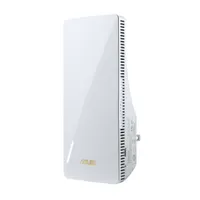
The RP-AX58 looks virtually identical to its Wi-Fi 7 stablemate from Asus, with a similar slimline design that hides its two Wi-Fi antennae inside the body of the range extender.
It measures just 150mm high, 72mm wide and 87mm deep and, like most range extenders it’s designed to plug directly into a mains power socket, so its compact design ensures that you can simply plug it into any convenient socket in any room around your home or office.
There’s a Gigabit Ethernet port on the right-hand side of the range extender that can provide a wired connection as well (although the RP-AX58 will still connect to your main broadband router via Wi-Fi).
- Design: 4

Asus RP-AX58: Features
- Supports Asus AiMesh technology
- Compatible with most routers
- App feels a little clumsy
The Asus RP-AX58 provides dual-band Wi-Fi 6, running on the 2.4GHz and 5.0GHz frequency bands, which ensures compatibility with most PCs, consoles, and mobile devices.
Its 3.0Gbps performance isn’t going to break any speed records, but it should be more than adequate for use with most home broadband services, and fast enough to eliminate any Wi-Fi deadspots in rooms or other areas that suffer from poor Wi-Fi. The RP-AX58 will work with broadband routers from most manufacturers, but it also supports Asus’ AiMesh technology, which allows it to act as part of a mesh Wi-Fi network in conjunction with Asus’ own routers or mesh systems.
The Asus Extender app has a few rough edges, though. As I’ve seen before, the opening screen of the app displays some jumbled text on the screen of my iPhone (although that’s not a problem on the larger screen of an iPad).
However, even when the text is clear it’s... well... still a bit unclear. The app tells you to enter the ‘default password’ for the Wi-Fi network created by the range extender, when in fact the network doesn’t initially require a password.
It’s only after connecting the RP-AX58 to your existing Wi-Fi network that the app gives you the opportunity to set a password. You can create an entirely new network name and password just for connecting to the RP-AX58, or if you want to keep things simple you can just tell the app to use the same name and password as your existing Wi-Fi network.
The low price of the RP-AX58 means that there’s not much in the way of additional features, but that’s not a problem as long as it delivers the goods when tackling your Wi-Fi deadspots.
- Features: 3/5

Asus RP-AX58: Performance
- Dual-band Wi-Fi 6
- 3.0Gbps speed
- 1x Gigabit Ethernet port
The use of Wi-Fi 6 and a top speed of 3.0Gbps seems almost quaint when compared to the blazing speeds of the latest Wi-Fi 7 devices. Yet few people really need multi-gig speeds for their home or office Wi-Fi, so the RP-AX58 should still provide all the speed you need for most home broadband services.
Ookla Speed Test – 2.4GHz (download/upload)
Within 30ft, three partition walls: 120Mbps / 120Mbps
20GB Steam Download - 2.4GHz
Within 30ft, three partition walls: 120Mbps
Ookla Speed Test – 5.0GHz (download/upload)
Within 30ft, three partition walls: 150Mbps / 150Mbps
20GB Steam Download - 5.0GHz
Within 30ft, three partition walls: 150Mbps
It worked well with my own Wi-Fi deadspot, located in an office towards the back of a building that my normal office router struggles to reach. I installed the RP-AX58 in a hallway just outside that office and immediately said goodbye to the dead zone – and to the PowerLine adaptors that I normally use to provide a wired connection in that room.
My office broadband runs at 150Mbps, and the slower 2.4GHz band provided by the RP-AX58 was able to provide a perfectly reliable speed of 120Mbps in the back office for Steam downloads and the Ookla Speed Test.
Admittedly, the RP-BE58 range extender from Asus ran slightly faster on that frequency band, hitting 135Mps, but the RP-BE58 is more expensive because of its up-to-date support for Wi-Fi 7, and 120Mbps will still be enough to handle web browsing and streaming video with no trouble.
And, as expected, the faster 5.0GHz band delivered the full 150Mbps available with our office broadband for both Ookla and Steam. Owners of newer devices that support Wi-Fi 7 might prefer a more up-to-date router or range extender that can deliver the higher performance of Wi-Fi 7, but if you just need to boost the Wi-Fi in one or two rooms around your home then the RP-AX58 will do the trick without breaking the bank.
- Performance: 3/5
Should You Buy The Asus RP-AX58?
Attributes |
Notes |
Score |
|---|---|---|
Value |
It’s very much an entry-level option, but the RP-AX58 is an affordable option for dealing with Wi-Fi deadspots. |
4 / 5 |
Design |
A slimline design that plugs directly into a mains power socket and doesn’t take up too much space. |
4 / 5 |
Features |
Entry-level price means entry-level features, but the RP-AX58 does the job of boosting your home Wi-Fi. |
3 / 5 |
Performance |
Dual-band Wi-Fi 6 running at 3.0Gbps is far from breath-taking, but it should still be able to handle most online tasks with ease. |
3 / 5 |
Final Score |
It’s last-gen Wi-Fi, but still a perfectly good option for those of us that haven’t upgraded to the latest Wi-Fi 7. |
3.5 / 5 |
Buy it if...
Don’t buy it if...
Also Consider
If you're undecided about the Asus RP-AX58, I've compared its specs with two other options that might be a better fit.
| Row 0 - Cell 0 | Asus RP-AX58 |
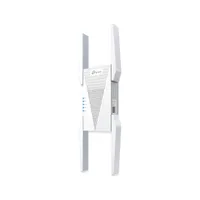
TP-Link AXE5400 |
Asus RP-BE58 |
Price |
$79.99/£64.99/AU $103.62 |
$139.99/£119.14 |
$99.99/79.99/AU$150 |
Wi-Fi |
Wi-Fi 6 |
Wi-Fi 6E |
Wi-Fi 7 |
Wi-Fi Speed |
3.0Gbps |
5.4Gbps |
3.6Gbps |
Antennae |
2 (internal) |
4 (external) |
2 (internal) |
Ethernet ports |
1x Gigabit Ethernet |
1x Gigabit Ethernet |
1x Gigabit Ethernet |
Dimensions |
150 x72 x 87mm |
348 x 106 x 80mm |
150 x 72 x 87mm |