



 Become a TechRadar Insider


TechRadar Verdict
A step up from the handsets it's replacing the HTC Desire C is a decent budget-handset, although you may want to look elsewhere if you want more bang for your buck.
Pros
- +
Attractive design
- +
ICS & Sense 4.0
- +
Beats Audio
- +
Easy to use
Cons
- -
Slow and sluggish
- -
screen unresponsive at times
- -
poor account integration
Why you can trust TechRadar We spend hours testing every product or service we review, so you can be sure you're buying the best. Find out more about how we test.
The HTC Desire C may be the end of an era for low-end handsets from the Taiwanese firm, as it has recently come out and said that it's not doing "cheap, cheap phones" anymore.
Perhaps slightly confusingly named for those who are aware of HTC's back catalogue of handsets, the Desire C actually usurps the Wildfire S at the bottom of range – instead of filling the higher-end remit of the Desire handsets of old.
As the Desire C does prop up the rest of HTC's handset range it's no surprise that it can be picked up from £130 (around $200) on PAYG, or for free on contracts starting at £13 per month for two years.


This puts the HTC Desire C on a par with the BlackBerry Curve 9320, but slightly more expensive than its other rivals – the LG Optimus L3, Samsung Galaxy Y, Huawei Ascend G300 and the slightly older, but still popular HTC Explorer.
In terms of specs the Desire C is similar to its predecessor, the Wildfire S, with the same 600MHz processor and 512MB of RAM running the show.

The screen gets a slight boost on the Desire C, growing from 3.2 to 3.5-inches, although it still keeps the HVGA (320x480) resolution of the Wildfire S.
Compare this to the 4-inch display on the £40 cheaper Huawei Ascend G300 and you may feel a little bit cheated, but it's still bigger than the Optimus L3, Galaxy Y and Curve 9320.
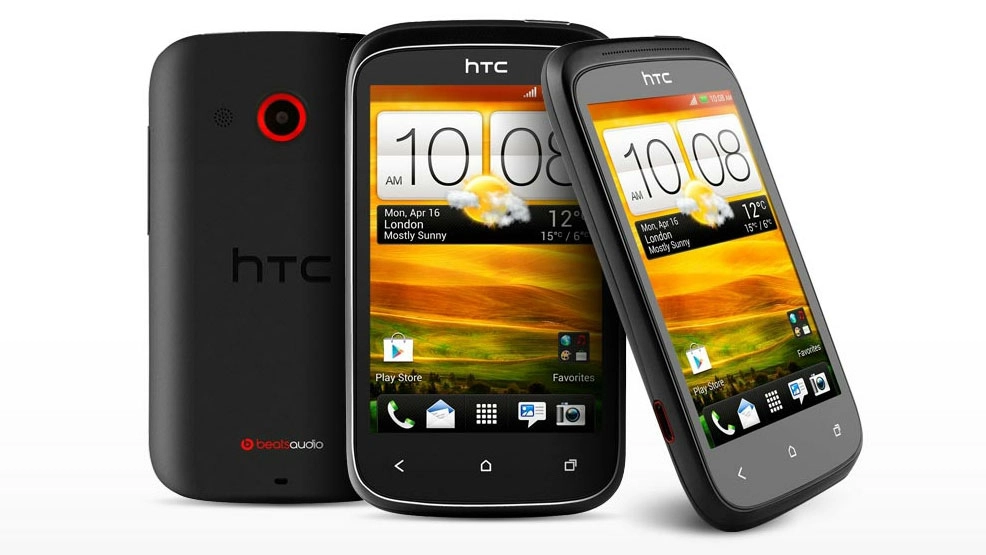
One place where HTC has hit the nail on the head with the Desire C is in the design.

It's a great looking handset, with its dinky rubberised curved chassis moulding perfectly into our palm, making us go a little misty eyed as we consider the resemblance to the Motorola PEBL.
The plastic rubber case means the Desire C is easy to grip, with no risk of it slipping out of our sweaty grasp and the construction is the same, solid HTC build quality we've seen on the more expensive One X and One S.

It's a little bigger than the Wildfire S, measuring 107.2 x 60.6 x 12.3 mm, but HTC has managed to make the Desire C 5g lighter than its predecessor, weighing in at a meagre 100g.
Below the HVGA display are three capacitive buttons, back, home and multitasking, which tell us the HTC Desire C is running Android 4.0 Ice Cream Sandwich, the latest version of Google's operating system.

Flip the Desire C over and you're greeted with a centralised 5MP camera, with a speaker to one side, but there's no flash present here.
Move your eyes down and you'll notice the Beats Audio logo at the bottom of the handset, reminding you that although the Desire C is sub-£150 phone, Dr Dre has applied his mad musical skills to this handset too.

There's just two physical buttons on the HTC Desire C, a volume rocker switch on the right hand side and a power/lock key on top, which sits opposite a 3.5mm headphone jack.
Finally on the left hand side there's a microUSB slot to connect the Desire C to a computer or charger.

Tuck your fingernail behind the power lock key and you'll be able to easily peel off the back cover, exposing the colourful innards of the Desire C.
There's a microSD slot to one side – allowing you to build on the 4GB of internal storage, and if you pop the 1,230mAh battery out you'll be able to access the SIM card slot – no microSIM business here folks.
Completing the connectivity cocktail is Wi-Fi b/g/n and Bluetooth 4.0, but there's no NFC technology present – something the Curve 9320 can boast about among the competition.
Pleasingly, the HTC Desire C comes running Android 4.0 Ice Cream Sandwich, the latest version of Google's operating system.
However, it seems like it's bad news if you're thinking of getting this handset for future-proofing, perhaps it's time to think again, as Android 4.1 Jelly Bean does not look like it's coming to the phone.

HTC said: "We know HTC fans are excited to get their hands on Google's latest version of Android. At this point in time, we can confirm that we have plans to upgrade our HTC One X, HTC One XL and HTC One S to Jelly Bean."
The brand hasn't ruled out the fact other phones may get the update, but we're not holding our breath given Android 4.0 never made it to HTC's previous budget flagship, the Wildfire S.
You'll also find the most recent iteration of HTC's Android overlay, Sense 4.0, present on the Desire C – providing a colourful and easy to use interface.
Although the Desire C packs new software, it is unfortunately stuck with the same power which graced the Wildfire S – a puny 600MHz processor and 512MB of RAM.
The lack of power really shows as well, with the general browsing experience feeling noticeably slow and sluggish.
Flicking through the five homescreens isn't slow, but it lacks the fluidity of the likes of the Huawei Ascend G300, which enjoys a 1GHz processor – although it is only running Gingerbread.

You get HTC's new unlock screen, which features the pull ring to unlock feature, as well as four app shortcuts that mirror the apps in the dock on the homescreen.
Pull an app on the lock page into the ring and you'll jump straight into it; however there is a slight delay as the lowly processor tries to process your request.
Homescreens can be edited by holding down on a free space, which opens up the widget menu.
This menu has been nicely designed by HTC, with thumbnails of all five homescreens running along the top – with the various widget options beneath.

There are also tables for apps and shortcuts, should you wish to add other bits and pieces, however make sure you don't get too carried away, as five screens is your lot – and they can fill up pretty quickly.
Thanks to the limitations in the power departments there's none of the 3D animations you see on the more powerful HTC handsets, with all screen transitions and effects staying flat, although we're not sure that will peturb many users.
Prod the multitasking key below the screen and you get the stock Ice Cream Sandwich menu system, instead of the custom HTC Sense view we saw on the One range of handsets.
Hit the app menu button in the middle of dock and the Desire C pops up the app tray. As with the homescreens, scrolling through the pages of apps lacks the fluidity we're accustomed to with other phones, but it's still perfectly acceptable.

Where the lack of power really starts to get noticeable is when you start opening apps. Receive a text and open the messaging app and there's a second delay while the Desire C remembers you've actually got a new message and displays it.
This got frustrating after a while, as it slowed down the whole user experience and with similar delays in other applications, using the Desire C day to day can feel a bit like wading though treacle.
We also found at times that the screen could be a little unresponsive, with us having to jab a finger in its direction a couple of times before it registered – however some of this was down to the slow processing of commands, rather then our touch not being received.
So the HTC Desire C doesn't have the slickest interface in the world, but let us not forget it is a budget handset and the experience is similar to the one we got on the Galaxy Y and Optimus L3 - even for the price it's not really acceptable, as cheaper phones manage to zip along with more aplomb.
Contacts

When it comes to contact management HTC is one of the best with its implementation, although the Desire C falls a little short of the high standards we're used to.
Boot up the HTC Desire C for the first time and you're encouraged to sign into your Google and Facebook accounts and the phone will then try and match relevant contacts between the two.
We witnessed the likes of the HTC One X, Desire S and original Desire magically match the majority of our contacts with unerring accuracy – although the same can't be said for the Desire C.
The Desire C only managed to successfully match a handful of our friends with their Facebook profiles, with us then having to go through and manually joining up the others one by one – frustratingly slow, especially when you know HTC has cracked this problem already.

HTC has decided that the contacts should be named 'People', so that's where you'll need to head to find all your best buds.
The People app is similar to the stock Android offering, but HTC has made some visual tweaks, which gives it a cleaner, more inviting feel.
Straightforward to use, the magnifying glass and plus sign icons at the top clearly denote search and add contact.
When you've successfully linked contacts to their Facebook profiles it pulls through their profile picture, and if you click on a contact, you'll also notice the Desire C has pulled through their status updates and pictures from the social networking site, found under the Updates and Gallery tabs respectively.
Unfortunately if you're a fan of Twitter or Google+ (anyone?) then the Desire C is going to let you down, as, for some reason, HTC does not allow you to join either of these social networks with your contacts.
We honestly can't understand why this option isn't available, as you can add these accounts on the higher powered One V and co. Disappointing.
Calling

The Phone app on the HTC Desire C is a simple affair, with a dialler taking up the bottom half of the screen, with your recent calls list appearing above.
Starting tapping out a number or name and you'll realise the Desire C has smart dial, offering up contact suggestions from your address book – helping you get to the person you want quicker.
There's no front-facing camera on the Desire C, which means video calls are out of the question, but that's no surprise for a budget handset.
Call quality is perfectly acceptable, as it is with many-a mobile phone these days, and we didn't experience any issues during our tests.

The volume goes up high enough to hear your chums, even in noisy environments; however the speaker phone can experience distortion if turned up too loud.
Once in a call you have the option to toggle between the earpiece and the built in speaker phone, as well as muting your microphone and calling up the keyboard for those annoying automated systems.
We did not experience any issues with network coverage or connection, with the HTC Desire C able to keep us online in all our normal areas of coverage.
As with most smartphones these days the HTC Desire C offers up a variety of different messaging options, so no longer are you confined to just calls and SMS.
First up are the Gmail and Mail apps, providing you with emailing solutions. The Gmail app, unsurprisingly, deals only with Google's electronic mail offering, while Mail is far more open.

You can set up a number of different accounts in the Mail app, including Gmail, and view all your messages in one universal inbox, or separately by account, depending on how you like to work.

Then there's the Messages app for all your SMS and MMS needs. It's the standard Android application with that special Sense 4.0 design on top - straight forward to use, with the ability to attach a photo or video to your message.
If you're down with the kids, or in fact are a kid, then you'll be using the HTC Desire C to check your social networks.
HTC has pre-loaded the official Facebook app onto the Desire C and you're able to sync this with your contacts list, calendar and the Friend Stream app.
Google+ also sits on the handset as standard, but doesn't enjoy any of the connectivity link ups of the Facebook app, while Twitter seems to have been completely disowned by HTC, with the Taiwanese firm not offering any integration or even an app out of the box.
A quick trip to Google Play will sort this out, but don't bother trying to link your Twitter mates to contact profiles – or head to Friend Stream to for a quick tweet, as there's no support for Twitter here either.
The separate Google+ Messenger app also comes pre-loaded on the Desire C, if you're someone who has enough friends on it to cobble together for a chat.

Friend Stream is HTC's universal inbox for social network accounts, although for some inexplicable reason you can only add Facebook and Flickr accounts to it on the Desire C.

It does defeat the point of a universal inbox if you're unable to add a host of accounts, and once again the higher-powered HTCs allow for a variety of accounts to be added – is this the Desire C's sub-standard innards letting it down here?
These messaging options do come a little unstuck when you go to type your message.
HTC is one of the better manufacturers when it comes to Android keyboards, producing a better experience than Samsung on the likes of the Galaxy Y.
However on the 3.5-inch display of the Desire C the keyboard feels slightly cramped, and the sluggish processor means the keys lack the zip of more powerful handsets.

Turn the Desire C sideways and the landscape keyboard offers more travel and a better typing experience, but you completely lose the message you were replying to – although that being said you can't see much of the message in portrait view either.
If you yearn for a better board, then pop over to Google Play where you'll be treated to a range of free and paid-for options – our favourite is Swiftkey X.
The HTC Desire C offers up by 3G connectivity and Wi-Fi b/g/n, letting you get online easily.
HTC has gone to town with its Sense overlay on the browser, which aesthetic tweaks here and there, allowing it to blend in with the rest of the user experience.
It's a clear and concise layout, which is easy to navigate, but tap in a web address and hit go and the 600MHz processor comes to haunt you.

There is a significant wait time for pages to load, with content heavy sites taking 15 seconds or so to load, even when connected to Wi-Fi.

The small screen means a lot of zooming is required on non-mobile sites and the HVGA resolution means it isn't the clearest, with text and images appearing slightly pixelated.
The larger 4-inch display on the Ascend G300, coupled with its faster processor, gives a much better browsing experience than the Desire C.
A useful addition on the browser is the Read function. This button appears next to the URL bar on certain websites, such as those with news articles, and tapping it will strip all the ads, headers and images, serving up just the text in a zoomed in view, making it easy to digest.
Zooming is easy, with the standard pinch controls, but it's not as smooth as phones with beefier chips, with text and images taking a couple of seconds to render each time you zoom in or out.
The Desire C does re-flow the text automatically when you zoom in, which is a handy feature and makes reading longer articles easier.
Bookmarks are handled in the normal Android fashion, with a thumbnail view displaying your favourite sites and a simple menu option to add a page to the list.

You can also access your browsing history, favourites and offline reading list via tabs on the bookmarking page.
As alluded to in the previous sentence, you can also save pages to a reading list – making them available to read offline; perfect if you're going to be out of signal for a while.
To make use of this feature simply select the menu option in the browser when on the page you wish to save, press Add to and select reading list.

Flash is supported on the Desire C, and pre-installed, although we had to tick the "Enable flash" box in the browser menu before we were able to view content. Simple to do, but we wonder why it's not turned on by default.
With Flash enabled you're able to watch videos on the BBC website, however load times are still very slow – although playback didn't experience any stuttering on lag once it had buffered.
The HTC Desire C comes with a 5MP camera, bettering the 3MP option on the LG Optimus L3 and BlackBerry Curve 9320 as well as the 2MP snapper found on the Samsung Galaxy Y.
This puts the Desire C on par with the similarly priced Huawei Ascend G300, as well as the more expensive HTC One V and Nokia Lumia 710.

Thanks to the slow processor inside the Desire C, the camera app takes a couple of seconds to load up, which means you won't be able to take an instant snap if cat falls into a basket or something.
You can add the camera app to the lock screen, for easy access in times or picture panic, but as with most phones nowadays there's no dedicated physical shutter button.

The Desire C also lacks a flash – something the Curve 9320 and Ascend G300 boast, so low-light shooting is a no-go here. There's also no front-facing camera in play either.
HTC's camera app is nicely laid out, with simple, easy to see buttons. A zoom bar adorns one side of the screen, allowing for easy zooming, but be warned, picture quality is drastically reduced if you use this option.

The blue-bubble effects button next to the shutter provides six options to enhance your photos; greyscale, sepia, solarise, posterize, negative and aqua.
Press the A in the opposite corner and you can pick from three scene modes; portrait, landscape and lowlight, or you can just stick with Auto and let the Desire C make up its own mind.

The settings menu offers up some more tweaks including image resolution (5MP all the way down to 640 x 416 – less than 1MP), exposure, contrast, sharpness and saturation settings, plus ISO and white balance.
For a £130 handset we were impressed with the number of settings and options the Desire C offered, making it a relatively capable snapper.
Unfortunately there's no auto-focus or tap to focus, which can result is blurry shots if you're not great at standing still – and a delay of around a second after the shutter button is pressed means you won't be able to quickly snap several pictures in succession.

Click here to see the full resolution image

Click here to see the full resolution image

Click here to see the full resolution image

Click here to see the full resolution image

Click here to see the full resolution image

Click here to see the full resolution image

Click here to see the full resolution image
The HTC Desire C does video too, with the 5MP sensor round the back offering up VGA (640 x 480) quality recording – not scintillating by any means, but just about acceptable for a low-end device.
The video recorder is accessed via the camera app, but instead of switching to a separate video mode within the app, there's just a video record button next to the shutter button.
The video settings are bundled into the same menu as the camera options, but it's laid out in a simple way, so not to confuse users.

You get the same six effects; greyscale, sepia, solarise, posterize, negative and aqua, and if you so require you can record at lower resolutions, the lowest being 176x144 – perfect for MMS.
The lack of a flash means that recording in low-light or dark places is out of the question if you want to actually see anything and with no auto or tap to focus the Desire C can find it difficult to keep on top of moving objects.
You can use the zoom before hitting record, and handily while recording too, which is not always available, even on the higher end phones - quality is reduced the further you zoom in though.
Check out our video sample below to get a real feel for the recording quality of the Desire C.
With its £130 price tag and sub-par specifications the HTC Desire C won't be the first choice for the media hungry out there, but that's not to say it won't suffice for the casual user.
HTC has squeezed in Dr Dre's Beats Audio technology to get your tunes pumping and there's also a video player if you fancy watching quick clips on the go.
The inbuilt 4GB of internal storage isn't too shabby for a budget handset, considering the still-popular HTC Explorer only offers a poxy 90MB (of the 512MB supplied) – plus HTC has now teamed up with Dropbox to offer new handset owners 25GB of free cloud storage.
And if that wasn't enough the Desire C also has space for a mircoSD card (up to 32GB) hidden away behind the rubber back plate.
You can easily pop your files onto the Desire C by connecting the handset to your computer with the bundled USB cable and simply dragging and dropping your media of choice onto the phone. Simples.
Music

The Desire C comes with a pre-installed music player, which not only offers you access to the music files you've transferred to the phone or your Dropbox account, but also to third party apps including SoundHound, TuneIn Radio and 7 Digital.
All the main music formats are supported on the Desire C including MP3, eAAC+, WMA and WAV.
The application itself is simply laid out and easy to use – with handy features such as album art updating via Gracenote, playlist generation and queue options.
Of course there's the Dr Dre Beats Audio technology, with can be toggled in the Now Playing menu under sound enhancer.

You'll need a set of headphones plugged in to the Desire C to reap the benefits of this feature, as it's not compatible with the internal speaker in the handset.
The bundled in-ear phones are sadly not the Beats-branded ones we've seen with other handsets, such as the Sensation XE, but the HTC-branded buds are good enough and there's a noticeable improvement once the doctor's wizardry is switched on – with bass given a bigger impact and notes sounding clearer.
There's a homescreen widget if you require instant access to your tunes – which also includes a SoundHound button which will give you more details about the track playing, including the lyrics so you can have a nice old sing song.
If you fancy downloading some new tunes then the 7 Digital app is on board, which gives you a decent selection of songs to choose from, with tracks usually priced around 99p (around $1.50).

It's not the slick interface we're used to from iTunes on the iPhone 4S, but 7 Digital does a good enough job at providing a relatively simple way of purchasing music, plus it's integrated with the Music player, so you can access it easily.
Certainly not a bad musical offering from a budget handset and it puts the likes of the Samsung Galaxy Y and LG Optimus L3 to shame, producing the same quality as handsets such as the One S.
Radio

There's a more retro FM radio application included on the HTC Desire C if you like getting your tunes from a more traditional source.
The smartly presented app is easy to use, with channel scan and station preset options available; however you'll need to plug in a set of headphones to use it, as the wire acts as the antenna – although you can opt to play through the inbuilt speaker if you wish.
If you're a radio fan who doesn't want to mess around with an antenna, then head over to the TuneIn Radio app, which is also accessible via the Music app, to choose from a huge range of internet radio stations.
Video
With its 3.5-inch display, offering up a middle of the road 320x480 resolution, the HTC Desire C isn't really here to sell itself on its movie playback prowess.
That said the playback experience isn't as bad as the disappointing showing on the Optimus L3 or Explorer, and we could happily watch YouTube videos on the Desire C.
The curved, rubberised back means the Desire C is comfortable to hold for extended periods of time, although we wouldn't recommend feature-length films as the small screen size doesn't do blockbusters any justice.

There's no dedicated video app as such pre-installed on the Desire C, but Play Movies does make an appearance, providing you with access to Google Play's film rental portal, with titles ranging from 99p (around $1.50) to around £4.50 (around $7), as well as a separate tab for your own videos stored on the handset.
There are a handful of HD offerings, but don't waste your money as the Desire C's 3.5-inch HVGA display won't do them justice.
The built in video player, accessed by heading to the Gallery and selecting a video to play, is a decent offering on a budget handset with the standard play/pause, skip and scrubbing functions, but the Desire C also offers brightness controls and a capture button allowing you to take a screen shot of the currently playing video.
If you fancy sticking your own TV shows or movies onto the Desire C via the microSD card or the internal memory then you'll be pleased to find the handset supports the major formats such as AVI, MP4 and WMV.
Photos
The Gallery app is the place to go for all your images and videos. You'll find it's the stock Android offering, with a thumbnail album layout allowing you to view your snaps in a clean and efficient manner.
The gallery is able to pull photos from various locations including Facebook, Flickr and Dropbox if you like to have access to every single one of your snaps in one place.

The Desire C offers some crude photo editing tools as well, with the ability to crop, rotate and add effects to images in the gallery.
The 14 effects include; auto enhance, cinnamon, high contrast, sepia, vintage, twilight and over exposure.
Battery life
The HTC Desire C packs in a removable 1,230mAh battery, but don't let that put you off, as it managed to hold onto its charge well – keeping it in line with its predecessors the Wildfire S and Explorer.
Thanks to the low powered processor and less advanced features on the Desire C, the battery isn't as hammered as it is on the higher powered, larger screened Huawei Ascend G300.

This means the Desire C will comfortably last a whole day, even with heavy usage, and if you're slightly more conservative with your use, then you can go several days between charges.
We were also impressed with the speed of charging on the Desire C, with the battery going from 50% to 90% in just half an hour – perfect if you want a quick top up.

Connectivity

There are plenty of connectivity options available on the HTC Desire C, with Wi-Fi b/g/n, Bluetooth 4.0, microSD slot and miniUSB.
There's A-GPS which helps speeds up location locks on Google Maps and keeps the turn-by-turn navigation chugging along, as well as Wi-Fi hotspots – allowing you to share the Desire C's mobile internet with other Wi-Fi enabled devices such as tablets and laptops.
HTC has included a Wi-Fi hotspot app on the Desire C, providing a simple way to set up the feature for super speedy web access.
It's no surprise that the Desire C doesn't feature NFC technology, and although the similarly priced BlackBerry Curve 9320 does, we're not too disappointed it's been overlooked at this price point.
Maps
No surprise here when we tell you the HTC Desire C comes with the excellent Google Maps pre-installed.
The feature-packed application offers up a huge array of options including traffic updates, route creation and street-view – perfect for those with a pastime in stalking.

Thanks to the A-GPS inside the Desire C the handset was able to lock down our location in around five seconds (down to just under 3 when Wi-Fi is connected) and then managed to track our movements without too much hassle, however we found it slightly lagged every now and then as the 600MHz processor struggled to keep up.
Scrolling around the maps isn't the fastest experience we've had, as there is a few seconds of waiting while the Desire C renders new areas and the experience feels stuttery as the low powered handset is pushed to its limits.

But remember the HTC Desire C is a budget handset, which also offers turn-by-turn navigation thanks to Google's free service, so considering you're also getting a sat-nav for £130, we can't complain too much.
Apps
The HTC Desire C hasn't been overloaded with additional applications, but we were disappointed to see the lack of a Twitter app pre-installed considering both Facebook and Google+ are present straight out of the box.
Due to the Desire C's budget stance, there are not as many pre-installed apps as found on its bigger brothers, the One V, One S and One X – but that can easily be rectified with a visit to Google Play, the one stop shop for all your applications needs.

However HTC also puts its own HTC Hub store onto its phones, offering a more refined selection of apps from Google Play, which saves you sifting through reams of redundant applications trying to find the one you want.
As mentioned in the media section, the Desire C comes with 7 Digital, a music store allowing you to purchase and download your favourite tracks, and the Dropbox app goes hand in hand with the free 25GB account given to all HTC owners.
The Dropbox app is easy to use, allowing you to browse all the folders and files you have stored on the cloud-based system.
You can also quickly upload content from the Desire C, and you can set the Gallery to auto-sync with your DropBox account, so all your precious snaps are saved remotely, just in case your phone meets a nasty end in a pint of beer.

Google's Play Books and Play Movies applications come pre-installed, giving you instant access to a wide range of ebooks and movies for rent.
Both apps work well, but you may find the Desire C's screen a bit small for reading and watching films – it may be worth exploring the Ascend G300 if that's you kind of thing.

If you're more business focussed then Polaris Office also sits on the Desire C, allowing you to read Word, Excel, PowerPoint and PDF documents, although once again ease of use is hampered by the smaller display on this budget HTC handset.


Polaris Office is integrated with DropBox and SkyDrive – allowing you to easily access documents stored in the cloud.
SoundHound, an alternative to Shazam, comes pre-installed on the HTC Desire C, providing a variety of options, including music recognition – hold up the handset to a song and SoundHound will tell you the name and the artist.
On top of this, SoundHound will also provide you with the lyrics, ways to purchase and download the track along with other information about the artist and song.


Although it's not much of a set up from the Wildfire S and Explorer, the HTC Desire C is a well rounded budget handset with offers more than enough at its price point, even if it is a little under powered compared to some of its rivals.
We liked
HTC produces some lovely handsets with a real focus on design: take a look at the original Desire, or the One X, and the Desire C hasn't been overlooked, with the curved rubber chassis giving a solid, comfortable feel in hand.
It's good to see a budget handset rocking Android Ice Cream Sandwich, which puts the likes of the Huawei Ascend G300 to shame, and especially the LG Optimus L3 which won't even get an update to ICS.
The HTC Sense 4.0 overlay makes the Desire C an easy to use handset, especially for those who are new to the smartphone game, and the Beats Audio technology will keep kids, which the handset is marketed at, happy.
We disliked
Unfortunately HTC hasn't deemed it necessary to give the Desire C a power boost, sticking with the same, sluggish processor found in its predecessors.
This makes the Desire C's user experience a frustrating one, as you find that the handset always seems to be one step behind what you want it to do, even with simple tasks such as reading a new text message.
We also found the touchscreen could be unresponsive from time to time, pressing the same thing three or four times before the Desire C picked up our actions.
The complete shunning of Twitter by HTC seems a little unnecessary and we were surprised to find we couldn't add more accounts to the FriendStream application.
Verdict
The HTC Desire C is better than the handsets it's come in to replace, but not by much.
The intuitive interface, attractive design and competitive price tag means the Desire C certainly has the opportunity to do well at the low end of the market – especially against the likes of the Samsung Galaxy Y and LG Optimus L3.
But for those who need a little more bang for their buck, you might want to see what the Ascend G300 or BlackBerry Curve 9320 have to offer.
