


Having just finished my Amazon Kindle (2026) review, and given how much I like it hardware, I was seriously considering swapping it out as the best budget ereader below. However, given there are no new additional features other than the body, I still think Kobo is the way to go. And so my picks of the best ereaders ahead of the Black Friday 2026 sale season remains unchanged.
I am yet to fully test the 2026 release of the Kindle Paperwhite and the Kindle Colorsoft but, until then, I think the Kobo Libra Colour remains my #1 choice for the best ereader for most people just based on its per-dollar value.
And now that we have brand-new Kindles, will Kobo deign to release new ereaders? One would hope because, in comparison, the latter's catalog is looking a little dated now, at least in terms of design, although the 10-inch Kobo Elipsa 2E now lags so far behind its competition that it's really hard to recommend at all.
I can make these ereader suggestions because I've been testing them for a decade now, having also used either a Kindle or a Kobo since 2008. I've also closely followed E Ink's development of its different screen technologies, putting in prime position to say color E Ink just isn't there yet. However, with E Ink announcing that its Kaleido 4 displays are ready, there is hope yet for new releases next year, if you want to hold off on buying a color ereader.
Until then, take a look at my recommendations of the best ereaders currently available, but please scroll further down the page to check out some worthy alternatives that didn't make the final cut but are still worth considering.
Get ready for to grab an affordable ereader
Why you can trust TechRadar We spend hours testing every product or service we review, so you can be sure you're buying the best. Find out more about how we test.
We are entering a period of regular sales and product discounts, which will peak with Black Friday and Cyber Monday in November. What uses to be a two days of sales is now more a six-week period, though the very best discounts tend to be found on those days.
With that in mind, you're likely to be able to spot a cut-price ereader, especially when it comes to Amazon's Kindles, and the widgets in this article should flag the best available prices at major retailers. So keep an eye out for bargains.

Being a voracious reader is what got me interested in ereaders in the first place. I bought my first ereader back in 2008 – a Kobo Glo – and haven't looked back. I've appeared on Singaporean radio a couple of times to talk about the best ereaders and have diligently follow developments from E Ink. Other than models from Barnes & Noble, I've tried and tested most other brands – with nearly 40% of TechRadar's ereader content carrying my byline.
The best ereader overall




✅ You want a mid-range ereader with plenty of features: The balance between price and feature set is really good, offering good bang for buck.
✅ You want to operate your ereader in one hand: The page-turn buttons and asymmetrical design makes it easy to hold and use the Libra Colour in one hand.
✅ You want a relatively open ecosystem: Other than its audiobooks, Kobo doesn't lock you into its own platform, allowing you to easily sideload files or borrow from a library.
❌ You plan to make a lot of notes: The 7-inch screen feels too small to take full advantage of Kobo's Advanced Notebooks. A larger screen would be better for that.
❌ You don't need a color display: You can save money by opting for a grayscale ereader if color content isn't important to you.
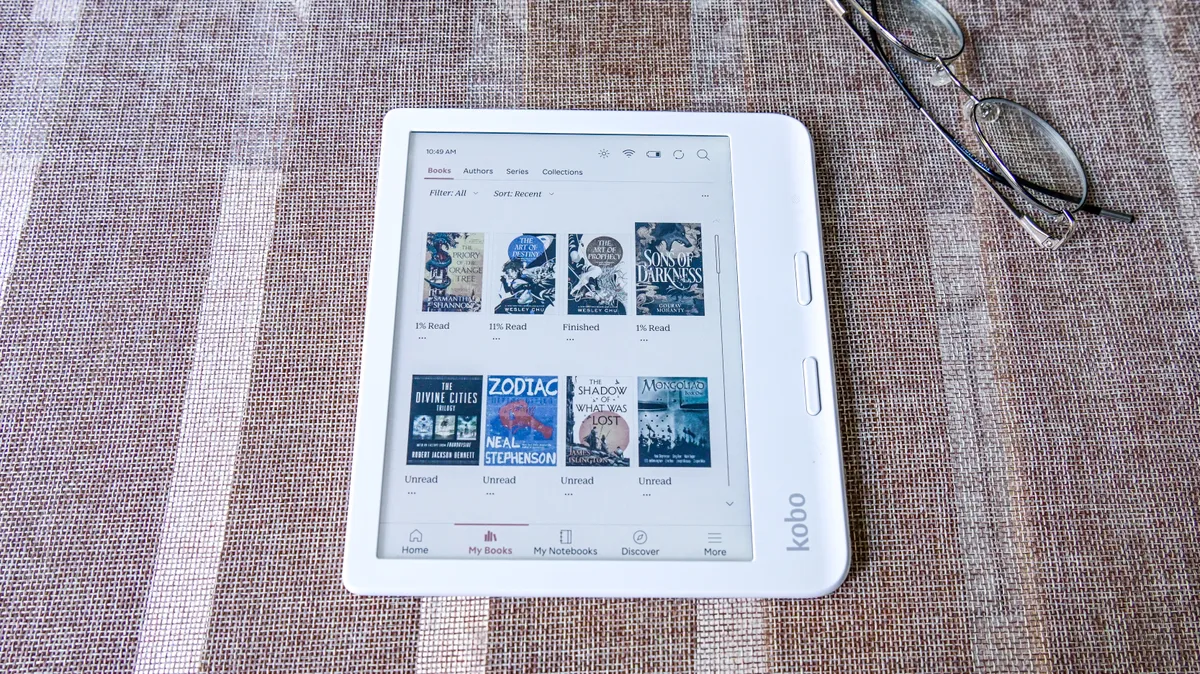
I've always been a fan of Kobo's Libra range because of the page-turn buttons and relative affordability, but I couldn't be happier with the Libra Colour, despite it now being over 2 years old.
While I was initially disappointed by the dated design, Kobo has done a very good job of optimizing the E Ink Kaleido 3 screen to make sure reading in both color or black-and-white is as good as it can be. Furthermore, that fact that Kobo has added stylus support to a device that doesn't cost all that much more over its predecessor is, in my books, fantastic value for money. Sure, you need to buy the Kobo Stylus 2 separately if you want to write on the Libra Colour, but its still good bang for buck – and that's why it's my pick of the best ereader overall.
Like the previous two Libra ereaders before it, I found the Libra Colour's 7-inch display to be just the right size for the average reader – not too small, not too large – and it retains the asymmetric design that makes it handy to use single-handed. In fact, it's a touch lighter than its predecessor, coming in at 199.5g compared to the Libra 2's 215g. It's also IPX8-rated waterproof.
The color screen is the headline here, though. Even if you don't read much color content like comics or graphic novels, I thought the reading experience was enhanced when I could see a book cover displayed the way it's meant to be – in color.
I appreciate the eco-friendly build too – the body is 85% recycled plastic and the packaging is 100% recyclable, with the ink being biodegradable as well.
What impressed me the most, though, was that Kobo's 2024 ereaders are repairable, which can save you money on the long run. A partnership with iFixit ensures you get spare parts and step-by-step guides to change out battery packs, the screen, even the motherboard, which should extend the life if your ereader.
Everything else I love about the more premium Kobo devices is here – 32GB of storage, access to OverDrive, Instapaper (which replaced Pocket recently) and Kobo Plus directly from the tablet, plus cloud file transfer via Google Drive and Dropbox. File and font support is also still pretty good.
Read my full Kobo Libra Colour review
The best budget ereader


✅ You want a great screen: The E Ink Carta 1300 made its mainstream debut on the Clara BW, beating out Amazon's base Kindle that still uses the Carta 1200 tech.
✅ Repairability matters to you: It's perhaps one of the few ereaders models that have official spare parts available via iFixit, with detailed guides on how to repair it.
❌ 6 inches is too small a screen: While many readers would prefer the compact size of the Clara BW, several others would find it too small a display.
❌ You want more features: This is a dedicated ereader – you'll need to look elsewhere if you want stylus support and other features.
I might sound biased but I think Kobo has outdone itself with the Clara BW. Adopting the latest generation E Ink display was a brilliant decision because the screen on the Clara BW is not just snappy, I found it to be the sharpest epaper display when I tested it (the Kindle Paperwhite now competes for attention for the same reason).
And while that's the only major upgrade over the Clara 2E, Kobo has added repairability to its latest range of devices. Thanks to a partnership with iFixit, spare parts are available to purchase alongside repair kits and step-by-step guides and, to me, that's a positive step towards sustainability. Whether your ereader will need a new screen at some point or a new battery – you're sorted. This extends the life of the device, keeping it out of landfills.
Its eco-friendly credentials don't stop there – like its predecessor, most of its body is recycled plastic, and the packaging is also fully recycled and recyclable too. Even the ink used to print on the boxes is soy, so biodegradable.
That's where the changes stop – you still get only 16GB of onboard storage and the same 1,500mAh battery. That said, I found the battery life to be a lot more consistent now as compared to what we experienced with the Kobo Clara 2E when a colleague tested the older model. Waterproofing has also been inherited, which adds value over its 6-inch Amazon Kindle competitor.
While you get all the other Kobo trappings here – OverDrive and Instapaper support – there's no way to easily transfer files via the cloud, like there is on the more expensive Kobo ereaders. With no Google Drive or Dropbox support, I had to resort to sideloading books via a wired connection to a laptop or PC during our testing, although it really is very easy to do by dragging and dropping.
Audiobook playback is still there but, again, only the ones purchased from the Kobo Store or downloaded as part of a Kobo Plus subscription will play.
Overall, it's a fantastic entry-level ereader that, despite costing more than the basic Amazon Kindle (2024), is actually better value (thanks to waterproofing and a better display) and hence my pick of the best budget option.
Read my full Kobo Clara BW review
The best mid-range ereader


✅ You want to upgrade from an old Kindle: If you're still holding on to an old model like the Voyage, the upgraded screen and performance enhancements are well worth it.
✅ You read a lot of graphic novels: The Frame View feature on a Kindle shows one frame at a time to make reading speech bubbles easy. And the 7-inch screen size is just right too.
❌ You don't want to source your content from the Kindle Store: You'll need to use the Send to Kindle platform to sideload content and you'll constantly be pointed towards the Kindle Store while on the Home screen.
❌ You want more features: This is a dedicated ereader – you'll need to look elsewhere if you want stylus support and other features.
The Kindle Paperwhites have been popular with readers for years as they've always managed to provide a good balance between price, features and performance. The 2024 Paperwhite breaks this mold a little by being expensive, but it's still a very good ereader, especially with its upgrades.
The headline here is the E Ink Carta 1300 display, which has darker blacks to make reading on a white (or warmer) background easier. It's also slightly larger now (7 inches compared to the previous 6.8 inches) and a much more responsive screen, so page turns are practically instantaneous.
It's even had a slight performance enhancement which, in my opinion, is all software driven, but therein lies one of my little niggles with the 2024 Paperwhite – there's only 11.5GB of usable storage out of the full 16GB. It's still a lot, but if you're paying a large sum, you should be able to get more. Sadly, the operating system is just that big and there's nothing you or I can do about it.
What I loved about the Paperwhite is the absolute lack of ghosting, which typically plagues epaper displays. I did have the ereader set to refresh with every page turn, which could have something to do with it, but I'm still mightily impressed.
I'm not a fan of the design though: the slim side bezels don't provide enough surface area for a good grip, which is needed as the rear panel is a touch too smooth and slippery. That plastic panel also attracts dust and smudges – much more than any other ereader I've tested – and I found my Black model looking scruffy within minutes of taking it out of the box. So it's a good thing it's still retains an IPX8 waterproof rating as I'm constantly tempted to wash it.
Other than that, it's a "perfectly adequate" ereader, doing what it does very well indeed. There's just not a whole lot of value here when purchased at full price, so wait for a sale.
Read my full Amazon Kindle Paperwhite (2024) review
The best color ereader


✅ You want an affordable color ereader: Arguably cheaper than any other color ereader out there, the Clara Colour is making color content more accessible.
✅ You want to borrow library books: Whether ebooks or digital magazines, if your local public library supports OverDrive, you can save money by borrowing titles.
❌ You want a stylus: This is an entry-level ereader, with no writing features.
❌ You need a larger screen: A 6-inch display isn't for everyone. If you think you need more screen real estate, opt for a 7-inch ereader instead.
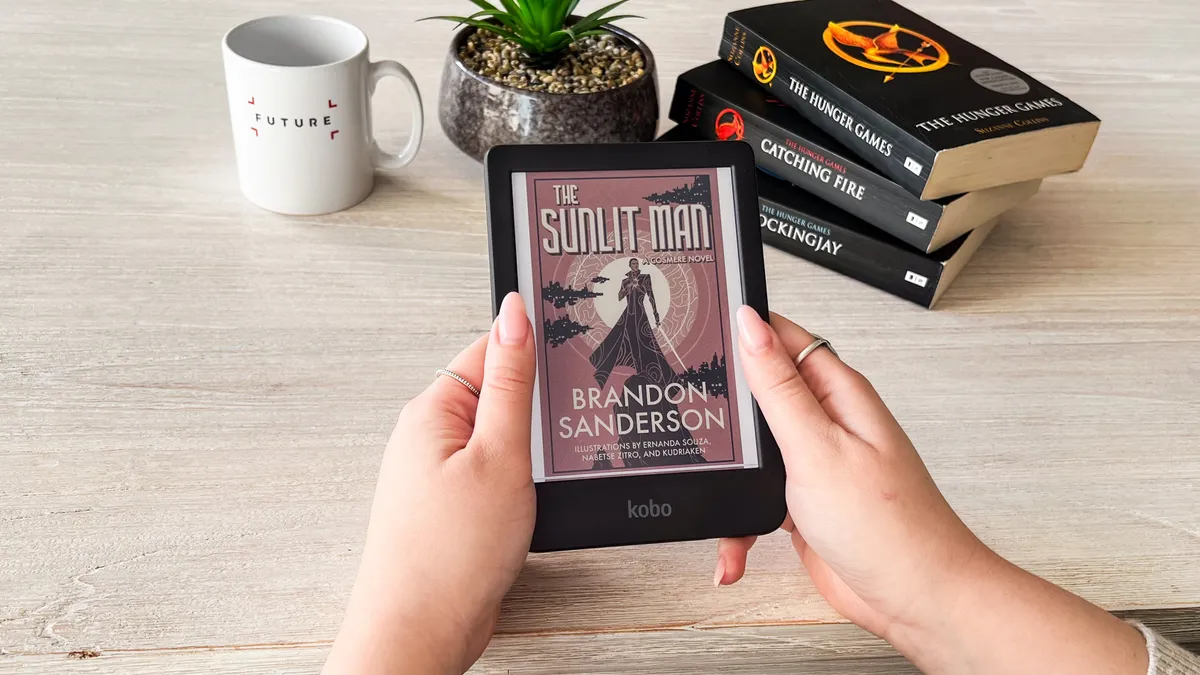
When it comes to color ereaders, it's hard to recommend any particular one as the displayed colors on all of them look slightly washed out. That's not the fault of the ereader; that's just the tech. However, if you ask me, I'd pick the Kobo Clara Colour as arguably the cheapest mainstream color ereader available right now, even though the Kindle Colorsoft has a larger screen.
While I think that the 6-inch color display may be a touch too small for comics or graphic novels, it's still a good entry point to making color content accessible. In fact, if I was asked for a recommendation, I wouldn't hesitate to say that the Clara Colour would be a good first ereader for someone looking to get started with digital reading. Sure, there are cheaper grayscale options available, but something has got be said about seeing a book cover displayed in color on an ereader.
And, as a Kobo ereader, it's got a lot more going for it with a relatively more open ecosystem than Amazon's Kindle, plus good file and font support. 16GB of onboard storage, Bluetooth connectivity to pair wireless headphones for audiobook enjoyment and IPX8 waterproofing rounds up its other important features.
Importantly, it gets an upgraded processor that I found improves performance over the Clara 2E and the 2022 Kindle base model significantly.
Like the Libra Colour and Clara BW (listed above) it was launched alongside, the Clara Colour has also been made with recycled plastic and comes in fully recycled and recyclable packing. It's repairable like both its siblings, with parts and instructions available via an official partnership with iFixit.
Read our in-depth Kobo Clara Colour review
The best Kindle


✅ You want the best Kindle to date: With a gloriously beautiful 11-inch screen and its very fast performance, this is hands down the best Kindle, and the best Scribe, Amazon has made to date.
✅ You take long notes and need quick summaries: Not only is the AI Summary for individual notes available on hand, there's now an AI search function that can summarize all notes (handwritten or otherwise) for a specific query.
❌ You're not much of a writer: If you aren't going to take full advantage of the Scribe's writing capabilities, this is an expensive ereader.
❌ Money is tight: Despite offering double the starting storage and getting new features (and a new Premium Pen), it's still hard to fully justify its high price tag.
If you aren't going to take full advantage of the writing suite on the 3rd-generation Kindle Scribe, it's a heck of a lot of money to spend on an ereader. That said, if you want the best Kindle, this one is it, despite it very premium price tag.
I've surprised myself by popping the 3rd-generation Kindle Scribe here, but it's the truth — it's by far the best Kindle I've had the pleasure of using, even better than the Kindle Scribe Colorsoft. Yes, it's frightfully expensive, and it can kinda sorta justify its price tag, but since we're talking about the best Kindle, it has to be the 2025 Kindle Scribe with frontlight.
Despite a larger 11-inch display, it's thinner and lighter than its predecessor, and you get double the storage (32GB) as the starting point. And that's important because the Kindle OS on this device is now so large, it takes up nearly 10GB of that storage.
Despite that, the performance here is the best I've experienced from any E Ink device from any brand — page turns are so quick that you barely even see them unless a full refresh is taking place (typically after each chapter of the ebook you're reading) and there's absolutely no ghosting, even when reading image-heavy titles.
Writing is an even greater pleasure than it was with the 2024 release (which was fabulous in its own right) and even though the new Premium Pen might be too slick for some users, I found it to be just perfect for me. Better yet, I experienced no input lag between stylus and mark on screen.
I even like the refreshed homepage setup with a blank quick note and the recently opened items listed beside it, but the rest of the main screen is still too cluttered with Kindle Store recommendations that I've personally never really enjoyed.
And while AI assistants have been a stalwart on Boox devices for a while now, the new AI-powered search on the 2025 Scribes is actually far more useful — just use the Kindle search bar to ask a query and your notes, even handwritten ones, will be scoured for an answer which is presented in a concise summary.
I'm hugely appreciative that Amazon has finally added Google Drive and Microsoft OneDrive support, which makes file transfer a lot less clunky than using the previous email method, although I am still a little disappointed by the overall file support on any Kindle compared to, say, Kobo or Boox.
So, if money was no object, this would be the best Kindle in my opinion.
Read the full Amazon Kindle Scribe (2025) review
The best Android ereader


✅ You don't want to get walled into Kindle's ecosystem: Android offers far more freedom and versatility to an ereader, allowing you to use it the way you want.
✅ You want a compact and lightweight ereader: It's one of many 7-inch ereaders, but it feels smaller and lighter, plus compact enough to carry anywhere.
✅ You want a good reading experience: It's the first Boox ereader whose screen is truly excellent for an avid reader.
❌ You want an easy-to-use ereader: Boox isn't known for a simple user interface – it takes time to master. If you aren't patient, looks elsewhere.
❌ You're on a tight budget: Android devices aren't as cheap as a Kindle or Kobo, so if money is tight, consider going more mainstream.
I've tested my fair share of Boox devices and while I've liked some of them, I've never truly felt like recommending any of them for a combination of reasons. The Boox Go 7 has bucked that trend and it's probably the first device from the Chinese brand that I would suggest to anyone if they want the freedom of an Android operating system.
Android gives you the option to use any reading or productivity app from the Google Play Store (well, any app, really, but you don't want to watch videos or play games on an E Ink screen) if you aren't too keen on the native apps.
Speaking of which: you don't really need to use third-party apps with the native options for reading and writing full featured. You get other apps too, including a calendar, music player and calculator, just to name a few.
What I truly like about the Boox Go 7 is the screen, which is the most important aspect of an ereader. The reading experience, no matter what app you use, is absolutely fantastic, matching the current Kindle Paperwhite on this list and the Kobo Clara BW. Sadly the writing experience isn't as good and there aren't too many compatible styli to choose from, but it does the job – you will need to purchase a stylus separately though.
Another black mark against the Go 7 is its battery life, but Android epaper tablets do have a lot more drain during use than a Kindle or Kobo. Still, a week or two on a full charge isn't competitive at all. Which makes the higher price tag a little harder to swallow. However, its performance, excellent screen and Android OS can easily justify it if that's what you're after.
Read my in-depth Onyx Boox Go 7 review
The best ereader for students


✅ You want a dedicated writing tablet: Its minimalist UI is so distraction-free, all you can do is concentrate on your work, whether that's writing or doodling.
✅ You're a student: It's not cheap, but it's cheaper than several of its competitors and, for the price, it's arguably the best writing tablet around that's well built and has plenty of useful features.
❌ You need to be able to read as well: While the reMarkable supports PDFs, it's not a tablet that's designed for reading.
❌ You prefer a frontlight: Like the reMarkable 2 that it replaces, the Paper Pure is missing a frontlight, which means it limits its use in some low-light situations.
For a student who might need to take copious amount notes and organize them a certain way, I think reMarkable offers the best solution, with the Paper Pure being the cheapest option of the current range. It's not 'cheap' but, compared to the likes of some Boox and Kindle Scribe alternatives, it's a touch more affordable.
For about the same price as the now-discontinued reMarkable 2 — which the Paper Pure replaces — you get 32GB of storage (up from 8GB), but you still miss out on a frontlight and the resolution is still 226ppi rather than the standard 300ppi. For its price, though, it's a little hard to complain.
Somehow, our reviewer found that neither of those drawbacks make a difference when it comes to usability as the Paper Pure "delivers a flawless pad-and-pen experience".
With a stripped-back interface that's designed for distraction-free writing experience more than reading, it's perfect for students, researchers, journalists or anyone who wants to concentrate on creativity or productivity. The display is still "easy on the eyes" and its lightweight design makes it comfortable to hold for extended periods.
Our tests showed that there wasn't any discernible input lag between the stylus hitting the screen and the mark made, especially when using the fineliner and ballpoint pen options, but other brush choices were a little slower in comparison. The AI handwriting conversion was found to be a little hit and miss during our testing, but it's a faster tablet compared to its predecessor.
If there's a tablet you should pick as your first foray into the world of digital writing, the reMarkable Paper Pure should be your first port of call.
Read our in-depth reMarkabke Paper Pure review
The best epaper tablet for writing


✅ You need to focus on productivity: Designed to suit users who need to take copious amounts of notes or be creative.
✅ You want a thin tablet with a case that doesn't add more weight: Not only does it look lovely, it's one of the thinnest and lighter tablets around, but its magnetic sleep case is just as light.
✅ You'd like access to Android apps: Running Android, you get full access to the Google Play Store, although pre-installed apps means you're set right out of the box.
❌ You want your writing tablet to be an ereader too: While the library app is nice, the lack of a frontlight means you can't read at certain times of the day.
❌ You don't want to spend too much: It is one of the most expensive large-screen epaper tablets on the market, and there are cheaper options available.
With the 3rd-generation Kindle Scribe and the reMarkable Paper Pure already listed on this page, do we really need another digital notebook listed? Absolutely yes, because the ViWoods AiPaper deserves a spot as being the best Android-toting epaper writing tablet.
It's in direct competition with the likes of Boox, and yet manages to offer a far simpler interface that's relatively easier to wrap your head around. And I do mean 'relatively' as there's a lot to discover on the tablet as soon as you power it up, but I'd say its the Goldilocks UX when it comes to Android E Ink tablets.
Compared to newer Boox tablets, though, its running Android 13, which is rather outdated now, but as long as you aren't going to be using it for sensitive transactions (which I doubt most users will want to do), it's fine.
Other reasons I'm not replacing it with a newer Android epaper tablet is due to its rather generous 128GB of onboard storage and a very good battery life with a screen that's slightly bigger than the average 10.3 inches.
While I found there was a little ghosting on the ViWoods AiPaper, it's markedly less than what I've experienced with Boox, and the stylus was lovely to use during my testing. The only negative comment I can make about it is that it's surprising to see limited pen types and thicknesses in the native drawing application while the writing one has seven, with several stroke options and grayscale colors.
The Google Play Store is on hand to source you any productivity app you might need but, for me, the highlight was a native Mailbox app that has not just handwriting input but also voice. AI smarts can then convert the handwriting into text to send. Have a note you've made elsewhere? The native notes app (called Paper) will allow you to email from there as well.
AI, of course, is now ubiquitous, and you have the choice between ChatGPT-4o and DeepSeek here. It harnesses AI in nearly every native application, including handwriting recognition for text conversion, analyzing notes, and checking for grammar issues. It's full featured.
And it seems to be constantly discounted now as well, which means its eye-watering price tag is now a more competitive number.
Read my in-depth ViWoods AiPaper review
The best compact ereader


✅ You want a phone-sized ereader: Because it mimics the 2:1 aspect ratio of a smartphone, the Palma 2 easily slips into a pocket.
✅ You want access to Android apps: From reading apps to mobile games, you get full access to the Google Play Store as the device runs Android 11.
❌ You want a stylus: This is an entry-level ereader, with no writing features.
❌ You need a larger screen: A 6.13-inch display with a 2:1 aspect ratio isn't for everyone.
❌ You want something cheaper: Being a unique device and boasting a lot of features makes this a rather expensive – and novel – purchase.
I loved the OG Palma for being the most compact ereader I'd ever tested and the Palma 2 takes over with a few upgrades... and at the same launch price.
The updates here include a fingerprint scanner that I found superfluous as I don't think an ereader needs as much security, but I also found it to be quite fiddly to use. The other major update is a slightly better processor but, in real-world use, I found it didn't make much difference.
That's not to say its performance is bad – it's quite good for an ereader, with not a lot of ghosting – but considering it doesn't necessarily do much more than the previous CPU used, it's just as superfluous as the fingerprint scanner.
Where the Palma 2 really stands out is in its user interface. Considering I'd reviewed the last few consecutively released Boox tablets, the difference to me was obvious the moment I powered it up. Less weight to the text and icons, the latter redesigned too, makes a world of difference. Even the page styling elements in the native library app is much better now and I hope Onyx keeps improving on this for its upcoming devices.
Another thing I really appreciated when I tested the Palma 2 was that, like many phones, it's has a lot of onboard storage, but if 128GB isn't enough for you, there's also a microSD tray to expand the capacity. That means you can load up thousands of ebooks, several audiobooks, music files (yes, there's a player app built in) and anything else you can think of to take on your travels without affecting your baggage allowance. It lacks waterproofing, though.
Like any phone today, there's a built-in speaker and, also like a phone, I found that it sounds better if you use the Bluetooth 5.1 connectivity to pair wireless headphones or one of the best Bluetooth speakers to enjoy your music and audiobooks.
Running a fat-free version of Android 13, the Palma gets you access to the Play Store and, with a decently powerful CPU (for an ereader) with integrated graphics, you can actually play some mobile games – it really is impressive how well the screen handles graphics. During my testing, I played a couple of graphics-heavy games and was impressed at how well it could handle them. That said, don't expect phone-like performance here – there is still a wee bit of stuttering and all your games will be in black-and-white only.
While there really is a lot to recommend the Palma 2, in particular its unique form factor, I think it would have been a better device if Onyx had added stylus support too. It would also make it easier to justify the high price tag as there are 6-inch ereaders that are a lot cheaper than it.
Read my in-depth Onyx Boox Palma 2 review
Alternatives to consider
If none of the ereaders and e-paper writing tablets take your fancy or don't quite fit your budget or needs, there are a couple more that did well in our tests but just didn't make the cut either due to their per-dollar value or features.

It's been succeeded by the 2026 entry-level Kindle but, as long as it's still available to buy, its lower price makes the 2024 edition an excellent budget ereader. New features are already being rolled out to this older model, so you won't be missing much.
Read my full Amazon Kindle (2024) review

It might be expensive, but with the Kobo Elipsa 2E now showing its age, this Android tablet is an excellent choice for note taking, journaling or doodling. Importantly, you get the freedom and versatility that access to the Google Play Store brings.
Read my full Onyx Boox Note Air5 C review

While color E Ink really isn't quite there yet, it's hard to pass up the Colorsoft as an ereader option if you're a Kindle fan and already part of the Amazon ecosystem. It's a slightly larger alternative to the Kobo listed above, but it also costs more.
Read our in-depth Kindle Colorsoft review
How we test the best ereaders
When testing ereaders, we take a lot into consideration, including global availability, price and features. While we don't give as much importance to design as we do the screen, interface and battery life, it is a consideration for the more premium products.
There might be ereaders aplenty in some markets, but not all of them are available extensively. So our first step in testing an ereader is to determine whether it can be purchased by a wider audience than just a single market, even if it's an import.
If an E Ink tablet meets that criteria, we then test ereaders based on the display and specs – aka the responsiveness of the touchscreen as well as clarity, plus things like storage and Bluetooth connectivity. This, in combination with its price tag, will determine its value-for-money rating, which is quite important in our, ahem, books.
We follow that up with how user-friendly the interface is and whether there's easy access to ebooks and audiobooks via a native store or third-party apps. We also take into consideration file support for each device, which is necessary if you already have an existing library of digital books.
With several years under the belt in testing ereaders in all shapes and sizes, we're confident that our star-rated reviews are the best indication of quality and usefulness of the ereaders in this list. There are no sales/marketing teams involved in our verdicts, which means if we don't like it, we simply won't recommend it.
Ereader FAQs
What is an ereader?
It might look like a boring tablet, but an ereader is designed specifically only for digital versions of books, whether novels or comics, fiction or non-fiction. All ereaders – also called ebook readers – use a special display that makes reading in any kind of ambient lighting condition easy. These displays have a look that resembles the texture of paper (not the feel), and that's easy on the eyes.
Since they perform only a single task – display ebooks – they don't use powerful processors and can be slow to refresh. However, this doesn't affect the performance of an ereader and, in fact, allows the battery life to go on for weeks on a single charge.
An ereader typically comes with 16GB of storage these days, if not more, and can store thousands of titles. That means you can carry your entire library with you on holiday.
What is the best E Ink screen type and size for ereaders?
For most people's needs, a grayscale (or monochrome) screen will suffice on an ereader, and 6 inches is the most common size. And there's only one company that supplies these screens – E Ink.
For black-and-white devices, the current screen of choice is the E Ink Carta 1300, although some devices available at the time of writing also use the previous generation E Ink Carta 1200 display. The former is just a touch faster and has good contrast – if optimized well, it makes reading a pleasure.
If you prefer a color epaper display, then E Ink's Kaleido 3 is the most common screen, but the reMarkable Paper Pro uses a custom version of the E Ink Gallery 3 technology. While the latter allows for more color saturation, a well-implemented Kaleido 3 screen will make book covers and comics pop, just not as much as on an LCD or OLED display.
My sweet spot for the best screen size is 7 inches – anything larger can become a little unwieldy to use while out and about, or when lying in bed to read. It's good to opt for a 10-inch epaper writing tablet though, as that ensures your notes are not squished into a small area.
Are color ereaders worth buying?
Whether you should opt for a color ereader is very much a personal choice, although anyone who typically reads a lot of comics or manga might enjoy the experience better. It is, however, important to keep in mind that colors on the E Ink screens appear 'washed out' or muted compared to what you'd see on your phone or tablet (like an iPad), which is due to the limitations of the screen technology.
If you mostly read text, which will anyway be displayed in black and white, you'll save money by opting for a monochrome ereader.
Kindle vs Kobo: what is the difference?
While the devices themselves are largely similar, there are a few differences between Kindles and Kobo ereaders. For starters, the former is widely available in any market Amazon operates in, but Kindles can lock you into Amazon's ecosystem by pushing you to purchase titles only from the Kindle Store.
Kobo also has its own bookstore accessible via its ereaders, but the ecosystem is a lot more open and sideloading books you already own is a lot easier. Kobo's file support is wider, as is its font support. In fact, you can even sideload Amazon's dedicated fonts like Bookerly and Ember if you prefer them.
Then there's borrowing library books – while both devices give you that option, Kindle users can only do so if they live in the US. If you happen to reside elsewhere, you might want to consider a Kobo, provided your local library has OverDrive support (you can ask them before you decide to buy an ereader).
Kobo devices are typically a little more expensive, but then you also get more device choices from the Japanese-Canadian ereader brand. And if you're after a note-taking device, we think Kobo is the way to go.
Find out more about how to choose between a Kindle and a Kobo ereader.
Which ereader is better for library books?
If your main source of reading material would ebooks from your local library, then it's best to opt for a Kindle or a Kobo device. Both with allow you to access your local library's ebook catalogue from anywhere (as long as you are connected to a Wi-Fi network), but keep in mind that Kindles only support borrowing from American libraries. If you live outside of the US, a Kobo would be a better option.
Kobo devices work with the OverDrive service that lets you borrow in regions including the US, UK, Australia, New Zealand and Singapore (amongst others). If you want to own your books, the Amazon marketplace is much larger than Kobo, and has a huge self-publishing component for finding independent authors.
Can I listen to audiobooks on an ereader?
As long as an ereader has Bluetooth connectivity, you should be able to pair a set of wireless headphones to listen to supported audio files. While brands like Onyx and PocketBook will allow you to sideload audio files, including audiobooks, Kindle and Kobo devices only support those purchased from their respective stores.
In fact, some Onyx and PocketBook ereaders have built-in speakers, so you may not even need headphones to listen. However, don't expect great sound quality from them because, like your phone, they're small drivers and the sound would be better via a connected pair of headphones.
Also keep in mind that audio files are typically larger than ebook formats, so if you're storing a lot of these on your device, you'll need to keep an eye on how much space you've got left.
What fonts can my ereader support?
Most ereaders will support some basic fonts natively and you won't need to tinker with them at all. However, if you do want to change things up, a Kindle or a Kobo is a good idea as they both make it easy to change fonts on the device.
You'll find that the Kindles have some custom fonts designed by Amazon, with Bookerly and Ember being the most popular ones. We found that the list of fonts on Kindles is extensive enough that we didn't find the need to sideload more, but you can if you need to.
Kobo devices also have their own set of default fonts, but there's no rule against sideloading more, including Amazon's own custom ones like Bookerly. And sideloading is as easy as plugging your Kobo ereader into a computer and moving your desired font to the device's fonts folder.
How to choose an ereader
While your budget is arguably the most important consideration when choosing the best ereader for you, it's also important to keep in mind what you really want from that device.
Consider the screen and the user interface as your starting points. The former should be clear and easy to read, but also feature a good light, while the latter should be streamlined and easy to use use. You also need to figure out if a grayscale display will suffice or whether you need a color screen.
Storage capacity might be important to voracious readers who would likely have hundreds of titles in their digital library, if not thousands. While 16GB of internal storage is becoming the norm – and that's plenty for thousands of titles – some brands offer expandable storage via microSD cards. These become even more important if you prefer listening to audiobooks as these files are larger than ebooks.
This means you also need to consider file formats that the ereader can support natively. Some devices offer broader file support than others, so check your existing library or online bookstores to see what the most common format is (ePUB is typically quite common). Also check if your ebook are DRM-locked as your ereader may support the file format it's in, but only without DRM. A broad font support can also be handy to have.
Lastly, if you're not keen on buying new titles, you'll want to pick up an ereader that allows you to borrow from a local public library either natively or via a third-party application like Libby.
The secondary considerations to keep in mind would be the importance of waterproofing and whether you really need stylus support.
What is the difference between an ereader and a tablet?
If you already own a tablet – whether an iPad or an Android – do you really need another device for reading digital books? An ereader has limitations, but for reading it can be far superior to a more extensible tablet.
1. E Ink technology
The main difference between an ereader and an iPad you will notice immediately. The ereader screen is almost always grayscale, using special E Ink technology that is very crisp and specialized for fonts and text. It refreshes relatively slowly and it sometimes leaves a trace (ghosting) that needs to be refreshed.
E-ink screens also don't flicker like a normal screen, making it more comfortable to read for a longer period of time.
2. Battery life
While you might hope to get a day of use out of your iPad, an ereader tablet measures battery life in weeks. Because the screen only refreshes when you turn the page, it draws very little power. Our favorite ereaders have a backlit screen, but those LED lights don't use much battery. If you read for 30 minutes a day or so, you can get a few months of battery life with our top pick devices.
3. Blue light filter
While dark mode has become quite common in recent times and many modern electronic screens automatically adjust their displays depending on ambient lighting, there's no filter to reduce blue light. The best ereaders, however, use front lights with a white to yellow hue that's better for the eyes (and your sleep pattern) as compared to phones and tablets.
4. Affordable and convenient
If you are mostly reading books, an ereader tablet is a bargain over an iPad. The base model Amazon Kindle 2022 is a bare fraction of the price of an iPad or a Samsung Galaxy Tab, while large-screen ereaders like the Kindle Scribe and Kobo Elipsa can be had for an equivalent price or for not that much more than a base model iPad (depending on where you live). If books are your main thing, stick with an ereader and save money versus a tablet.
TechRadar ereader coverage
Buying guides and reviews
- Best Kindles
- Amazon Kindle Paperwhite (2024) review
- Amazon Kindle Colorsoft review
- Amazon Kindle Scribe (2024) review
- Amazon Kindle (2024) review
- Kobo Libra Colour review
- Kobo Clara Colour
- Kobo Clara BW review
- Kobo Elipsa 2E review
- ViWoods AiPaper review
- Onyx Boox Go 7 review
- Onyx Boox Palma 2 review
- reMarkable 2 review
- reMarkable Paper Pro review
Explainers
- Kindle vs Kobo: which ebook reader is best for you?
- How to send PDF files to Amazon Kindle devices to read them like a book
- How to send an ebook to Kindle
- What is Kindle Unlimited? How to sign up, cost, and everything you need to know
- How to cancel Kindle Unlimited
First-hand experience
- Amazon, change these 5 Kindle features and you'll have the perfect ereader
- The Kindle Scribe Colorsoft is the most exciting Kindle in ages, and I have the sketches to prove it
- I ditched my iPad Pro for a rival you've never heard of, and it kicked my creativity into overdrive
- Get a Kindle for Christmas? Here are 5 tips to improve your reading experience
- You've reached the end of the page. Jump back up to the top ^
