


The best smart display can make everyday jobs around your home a little easier. Want to see who's at the door without getting up? Check the weather while you're making breakfast? Turn off the lights from the sofa or put some music on while you cook? A smart display can do all of that from one screen, using a combination of voice and touch controls.
And there's more to them than controlling your smart home. You can use a smart display to watch security camera footage, check your calendar, set reminders, follow a recipe or catch up on music and TV. With a shared calendar, it can even become a handy family planner, giving everyone a quick way to see what's coming up.
Smart displays have been a little quiet in recent years. Amazon is making its existing Echo Show devices more capable with Alexa+, while Google is putting more emphasis on AI and smarter home control. But we're still waiting for a new generation of dedicated smart displays to really shake up the category, so the best options available today remain a mix of newer and older models.
So, which one should you actually buy? We've tested the best smart displays in our own homes to find the ones that are genuinely useful day to day, and to help you find the right one for your home.
The best smart display 2026
Why you can trust TechRadar We spend hours testing every product or service we review, so you can be sure you're buying the best. Find out more about how we test.
The best smart display for Alexa


✅ You want a small smart TV: Need a compact entertainment hub to fit into your Alexa-enabled smart home? This is the display for you.
✅ You want to try Alexa+ early: If you own one of the latest Amazon Echo Show devices and you live in the US, you can be first to try the new AI-enhanced version of Alexa.
❌ You want to upgrade your original Echo Show 15: Not enough has changed from the original model to justify the purchase.
❌ You want a smart-home-first display: The Echo Show 15 leans more towards entertainment than controlling your devices.
The latest version of the Amazon Echo Show is the best smart display around if you're looking for a convenient and affordable way to interact with an Alexa-based smart home. Its generously sized screen makes it easy to tap and swipe through device settings, and its sensitive microphones mean you can easily use voice commands as well.
It's not a huge hardware upgrade from the previous Echo Show 15, with the biggest changes being an updated camera with better viewing angles, and an improved audio system, but it performs its job very well. The new speakers are better suited to the spoken word than music, making it a natural partner for Alexa - whichever version you have access to.
One of this smart display's biggest attractions is that, if you have Amazon Prime and live in the US, it will give you early access to the new AI-enhanced Alexa+, which promises to make your life easier by blurring the lines between your smart home devices and data such as your calendar for a more useful and personalized experience.
Read our full Amazon Echo Show 15 (2024) review
The best smart display for Google Home


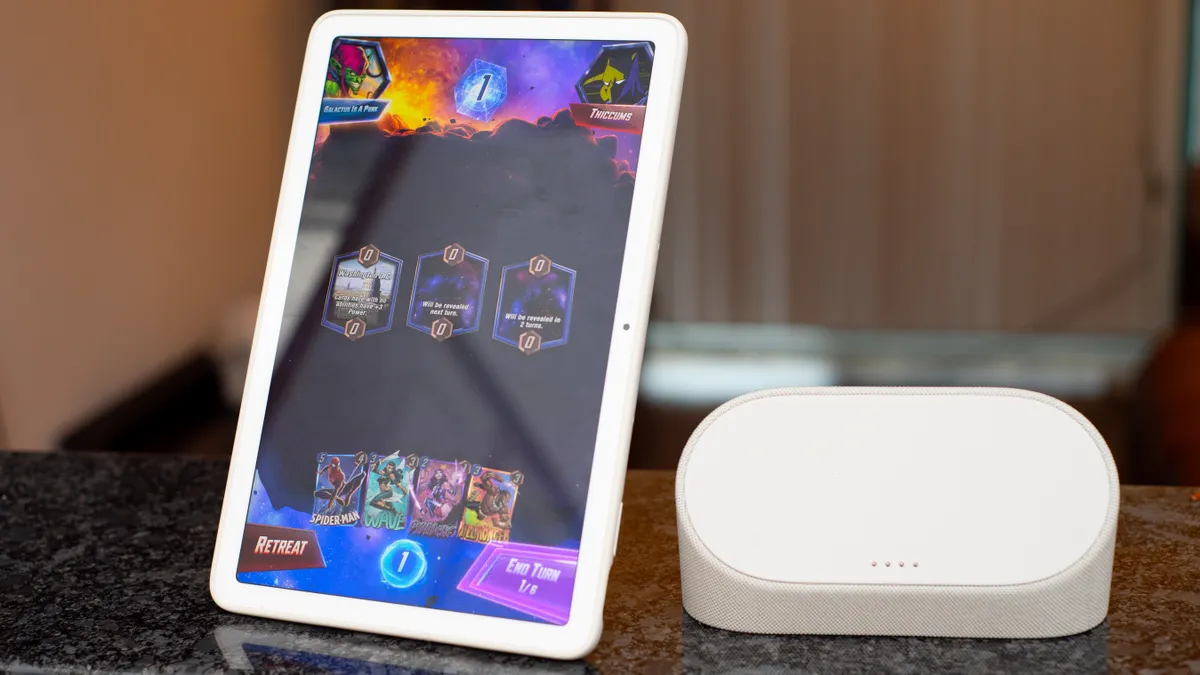


✅ You were considering getting a smart display and a tablet: The Pixel Tablet fills both niches, provided you don't want to take it out of the house.
✅ You have a Nest doorbell and cameras: The screen and great speakers are particularly well suited to streaming video from smart cameras.
❌ You want the biggest, best tablet screen: It's impressive for a smart display, but it can't compete with the best tablets for resolution and brightness.
❌ You aren't going to use the dock: The dock is what turns this into a fully fledged smart display. If all you want is a tablet, look elsewhere.
The Google Pixel Tablet is an Android slate designed to provide access to entertainment and apps anywhere in the house. or docked on the optional speaker dock to turn it into a fully fledged smart home hub. It's available by itself, but you'd be missing a lot by skipping the dock, which provides fast charging and improved sound (ideal if you're watching YouTube videos or making video calls).
With no mobile data connectivity other than Wi-Fi. and relatively short battery life when disconnected from its dock, it's not intended to be taken out of the house, but the flexible design gives you more options than most smart displays, and the tablet and dock together are great value.
It's a good-looking smart display too, with a high resolution screen, though it's the smallest of the models we've tested here and there were definitely occasions when we would have appreciated more screen real estate.
It works brilliantly with Google Assistant and Matter-compatible smart home devices. too. We tested it with a Nest camera and Philips Hue light bulbs, and controlling them all through the Pixel Tablet was a breeze.
Google is rumored to be working on a Google Pixel Tablet 2, which is said to include an optional keyboard. Those rumors began to circulate in November 2024, but we've not heard anything since, so we'll take them with a pinch of salt.
Read our full Google Pixel Tablet review
The best extra large smart display


✅ You want the largest touchscreen display: This offers almost twice the viewing area of the Amazon Echo Show 15.
✅ You want to control smart home devices: Providing support for Matter and Thread, the Echo Show 21 is a really good way of controlling your home.
❌ You just want to watch TV: Put simply, there are much better and cheaper displays out there for just watching TV or streaming services.
❌ You want a portable smart display: Designed to be mounted permanently on the wall, the Echo Show 21 is a big heavy beast requiring specialist installation unless you pay extra for a tabletop stand.
The Amazon Echo Show 21 is the best smart display if you want a device that you can mount on the wall, and will let you manage not just your smart home devices, but also plan schedules and events for the whole family.
Our reviewer Chris Price installed it on the wall in his kitchen, where he also it very useful for controlling his home's heating, and as a digital recipe book. The Echo Show 21 also has Fire TV built in, and is supplied with an Alexa remote for streaming content from services like Netflix and Prime Video, though we wouldn't recommend it as a replacement for your main TV. Instead, it serves more as a giant tablet.
One feature Chris particularly appreciated was the ability to use the Echo Show 21 to speak to family members in other parts of the house via connected smart speakers.
It's the most expensive smart display in this roundup, so take your time deciding whether your needs will be better served by this, or the smaller Echo Show 15. Whichever you choose, it'll give you early access to Alexa+ if you live in the US.
Read our full Amazon Echo Show 21 (2024) review
How to choose the best smart display for you
There’s a number of considerations to make when it comes to choosing the right smart display for you.
Start by working out which voice assistant you want baked into your smart display. If you’ve already got Amazon Echo or Google Nest speakers in your home, then it makes sense to opt for a smart display that features the same voice assistant built-in. However, if you’ve yet to settle on the voice assistant for you, Alexa vs Google Assistant can help you decide.
Where you plan to use the smart display is also important, as screen sizes, and subsequently overall footprint, vary wildly between models. Those with small screens and smaller dimensions are best suited to bedrooms, while larger screens with higher resolutions will come in handy in rooms such as the kitchen so you can glean information from recipes for example with a quick glance from the other side of the room.
If you intend to use the smart display as a way to listen to music, then consider the number of speakers, and the sound output and quality they offer. Those with smaller speakers are best suited to background music, while larger smart displays will offering a louder, more room-filling sound.
Some smart displays also feature a built-in camera for video calls, although if you’re using it in a bedroom, you may feel more comfortable with a smart display that doesn’t include a camera.
Frequently asked questions about smart displays
What can smart displays do?
Just like the best smart speakers, smart displays offer access to a voice assistant. So whether you prefer Alexa or Google Assistant - there are no smart displays with Siri built-in yet, although Apple is expected to launch display-packing HomePods later this year - a smart display can take commands from you and control your smart home kit. But they can do more thanks to their displays. which enable you to see as well as hear information.
For example, if you ask for the weather report, while the voice assistant might provide the current temperature as an audible response, on-screen you’ll also be able to see an hour-by-hour breakdown as well as additional information such as real-feel temperature and wind speed.
As you’d expect, the speakers in a smart display mean it can be used to listen to your favorite album, playlist, or track through music services including Spotify, Apple Music, and Deezer. Smart displays also have a Bluetooth connection so you can play music stored on your smartphone through its speaker, too. Smaller models are best suited to speech rather than music, but the bigger ones are very capable music players too.
Some smart displays can also be used to watch movie streaming services, such as Netflix or Prime Video, on the screen. However, it’s worth noting that the smaller display and lower resolution means this won’t be the same experience as watching the service on your TV – but it's great if you want some background viewing or YouTube recipes while you’re cooking. Not all smart displays are compatible with all streaming services, however, so make sure you check that before deciding on which one to buy.
Some smart displays also have cameras built-in so you can make video calls from smart displays, helping you stay in touch with friends and family, while the screen can even be used in place of a digital photo frame to show your favorite photos.
What’s the difference between a tablet and a smart display?
With screen sizes that ape those of the best tablets, you may be wondering just what is the difference between the two devices?
First off is the portability. Tablets have a built-in battery that means you can take them with you and use them on-the-go. However, apart from the Meta Portal Go, which has now been discontinued, there are no battery-powered smart displays on the market right now. Instead they are mains-powered and can’t be moved around when in use.
Smart displays are typically more focused than tablets. Most smart displays give you a voice assistant, and provide access to some streaming services, and let you send messages, while others with a built-in camera let you make calls. But they're limited to the pre-installed apps, whereas tablets enable you to add pretty much any app: email, chat, streaming, games... you get the idea. Pretty much any tablet can be used as a smart display, but few smart displays can be used for the same apps as tablets.
Last but not least, smart displays tend to have lower resolution displays than tablets.
Which is better, Alexa or Google Assistant?
If you're new to the world of smart displays and smart speakers, deciding which voice assistant you should plump for may leave you feeling perplexed. Both Alexa and Google Assistant are simple to use and effective at answering your burning questions, providing useful information such as weather reports and sports scores, and even controlling your smart home devices. But is Alexa or Google Assistant better?
Alexa can control a wider array of smart home devices and offers a wide range of communication options for staying in touch with friends and family. However Google Assistant is better if you want responses in different languages or help translating phrases.
It’s also worth considering the devices you already own and the music and video services you subscribe to, as Google Assistant may be a better fit - especially if you’re regularly using an Android smartphone. Read our article Alexa vs Google Assistant: which voice assistant is best for you, for an in-depth look at the subject.
What's better: a smart display or a smart speaker?
Finding it hard to choose a smart device for your home? There's now a huge number of gadgets making use of smart and voice functionality, and it can hard figuring out what you actually need or will be useful to you.
Smart speakers hit the market first, with the Amazon Echo rolling out to invited Amazon Prime members in 2014, and slowly building up momentum. By the time the Google Home launched in 2017, there was plenty of appetite for the devices.
If you're largely going to be using a device for music and audio functionality – including chatting to / ordering around a voice assistant – you'll likely be fine with a smart speaker. It's only if the screen functionality is going to be useful that you need to bother with the smart display option.
The display is useful in a number of ways: for cooking tutorials and how-to videos, accessing security camera feeds, watching video lyrics onscreen (as with the Echo Show and Amazon Music) or for easily spotting the time on a clock face. Controlling and connecting to other smart home devices through a centralized portal is also far easier with a screen, and you get far more connectivity features in these kinds of devices.
But if you think you don't want the screen attached, you can check out out best smart speakers guide instead.
How we tested these smart displays
To evaluate the best smart displays we assess the picture quality of the screen when watching streaming services, viewing recipes and even getting the weather and news reports. We also assess the sound quality of the speaker and how effective the smart displays are when making video calls, including the camera’s ability to keep you in the center of the shot if you move.
We also evaluate each model on its ability to pick up your voice when issuing commands to the voice assistant, privacy features that help ensure the smart display is constantly watching and listening, as well as how compact and durable the design is.
