


It’s been a big week for Apple Home. The entirely new HomeView is the company's first smart display, and it seems purpose-built as a stationary, in-home hub for Apple’s ecosystem. Meanwhile, refreshes to the HomePod mini and Apple TV 4K promise to bring Siri AI to other devices around the home.
I’ve already written at length about HomeView, and why it’s the smart display and home hub I’ve been waiting for. Now, I’ve had the chance to spend more time with it. Not quite enough time for a full review, and I haven't tested it in my own home yet, since all my hands-on time has been in Apple’s demo space. But I’m still optimistic about what it could offer.
It’s not that I’ve been avoiding the smart home. For me, though, it’s still very fragmented. I have HomePods, HomePod minis, and Apple TV 4Ks, but I mostly use them for quick questions, timers, taking calls, or media playback. I’ve also tried Echo Shows, Nest Hubs, and myriad other smart home gadgets like cameras, bulbs, and sensors, but none has really stuck because they aren’t part of my core ecosystem.

Amazon’s ecosystem is heavily focused on commerce and shopping. That’s not necessarily a complaint, but the experience can also feel cluttered with targeted ads, and privacy concerns can be a sticking point.
Given Apple’s broader commitment to privacy and its carefully curated user experience, HomeView could carve out its own category. For people already invested in Apple’s ecosystem, it aims to remove some of the friction that has kept other smart displays from becoming a central part of the home.
With an Echo Show or Nest Hub, someone who primarily uses Apple’s suite of services may have to move photos into another system or service to display them. The same goes for calendars, calls, and even music, depending on the services and features being used. And those devices don’t integrate with your iPhone the same way an Apple-made display can.
That’s not necessarily a bad thing, but when a smart display is something you might buy for a family member, a parent, or a friend, those differences can make for a less cohesive experience.
When you factor in the setup, the effort required to get everything working together, and the ongoing upkeep, some of the convenience promised by an Echo Show or Nest Hub starts to diminish. That’s what I’ve encountered in my own experience.
HomeView could help solve that disconnect. While the wall-mounted options seem like a less compelling value proposition to me, I can easily picture the speaker base version sitting on a kitchen island, side table, or nightstand and becoming the household's central device. And if you already know Apple’s ecosystem and its software, the learning curve could be much less daunting.
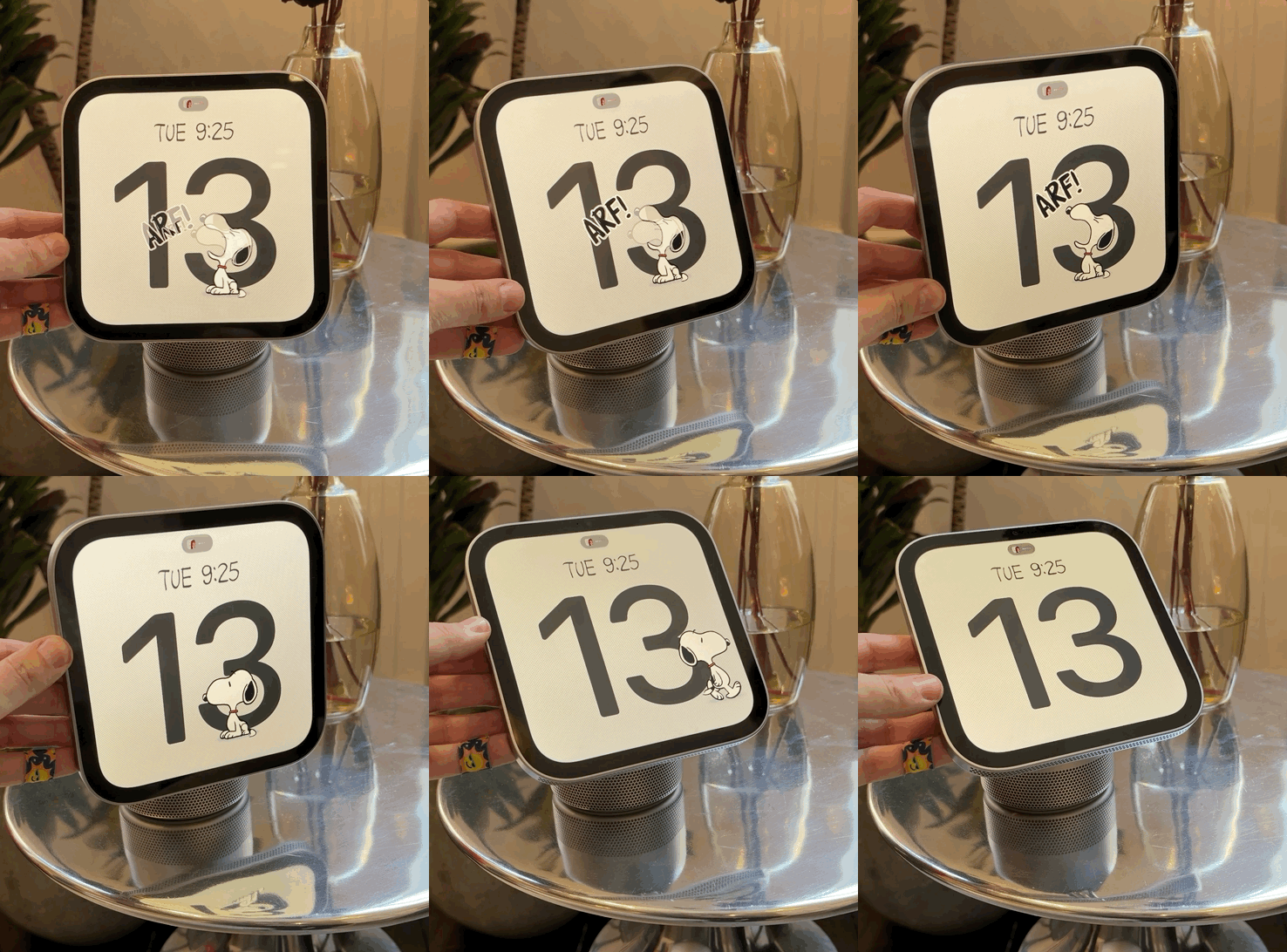
I’d already seen HomeView before, but this time I got to interact with it, starting by swiping between its different faces. I almost called them watch faces, and for good reason.
HomeView feels like an Apple Watch on steroids, with a supersized, customizable watch face essentially plopped onto a display. That’s not a knock. The interface feels familiar and is easy to get the hang of.
I especially like the Snoopy face, which offers a fun way to keep an eye on what’s happening throughout the day. You can check the weather as it rolls in, see an upcoming calendar event, or simply glance at the time with a little help from Snoopy and Woodstock. You can also go for something more functional, with modular faces that pack in widgets, or, as Apple calls them, complications, for things like your calendar, reminders, and the weather.
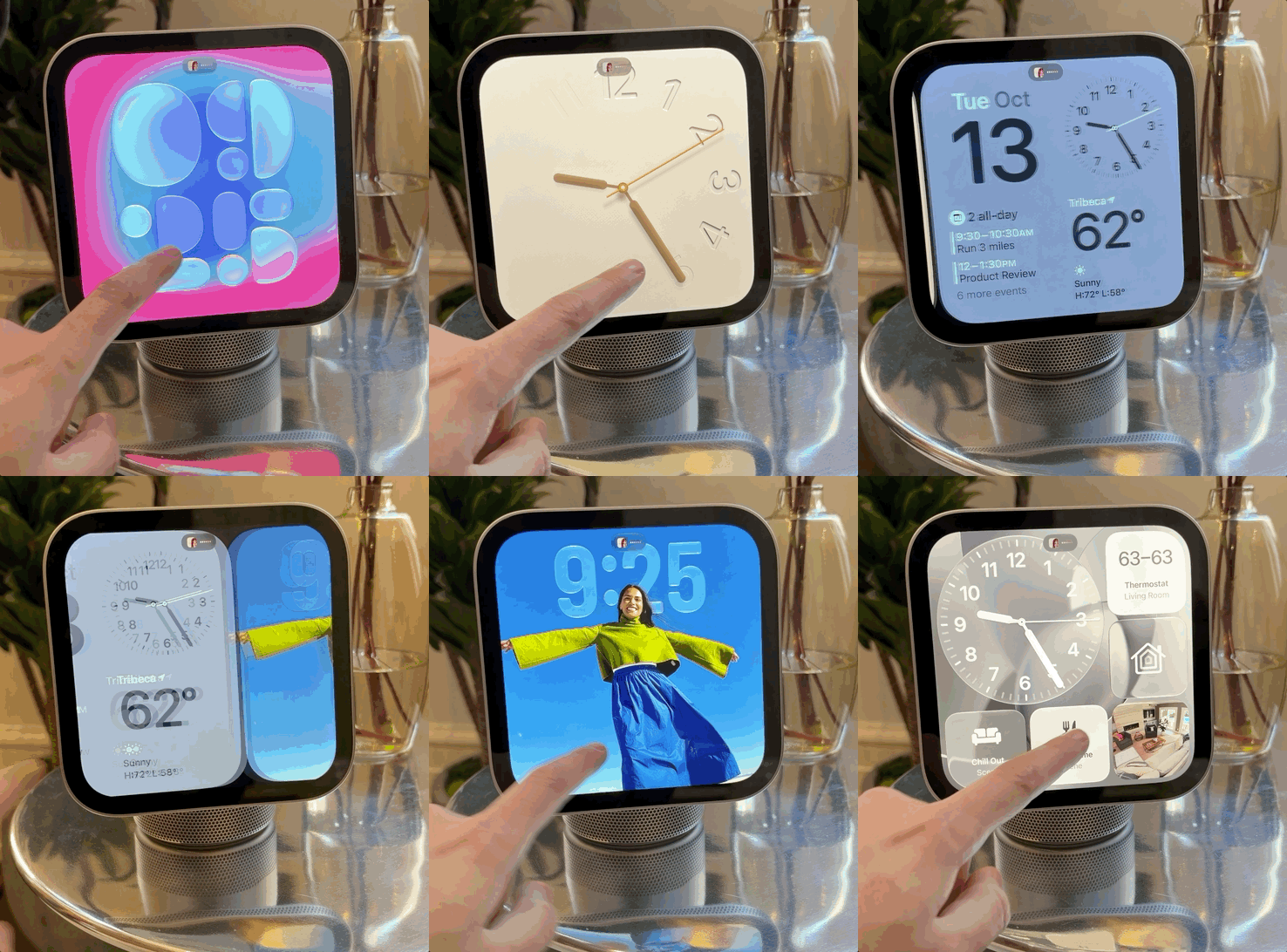
Swipe past those faces, and you arrive at the HomeView home screen. And for once, Apple’s answer to a shared household device isn’t to force you to buy one for everyone in your home. HomeView can recognize up to six people, effectively switching between their individual accounts and surfacing what matters most to each person while keeping their personal information private.
In my case, I could see myself having a HomeView setup that brings together quick controls for my thermostat, the weather, a rotating selection of photos, and, of course, a Bruce Springsteen playlist. The idea is that HomeView can surface a personalized experience when it recognizes you, with your iPhone playing a role in that process.

Privacy is central, too. If I open Messages, respond to someone, and walk away, HomeView locks the app when someone else approaches. It’s a small but important example of how Apple is thinking about a shared screen: convenient when it’s yours, but not an open book when someone else comes along.
HomeView doesn’t feel exactly like iOS, iPadOS, or watchOS. Instead, it feels like a combination of all three, with familiar elements pulled together into something designed for a display you interact with throughout the day. App icons are larger, and I’d expect the interface’s emphasis on glanceable information to be particularly useful here. Widgets, in particular, seem designed to put the details you need front and center.
Swipe up, and you’ll find the App Drawer. There’s a selection of built-in apps, but notably, no App Store. I’m actually a fan of that approach. I don’t want to be glued to HomeView; it shouldn’t become another blue-light-filled screen demanding my attention. Instead, it should be actionable and glanceable, helping me get things done without becoming another device I have to manage.
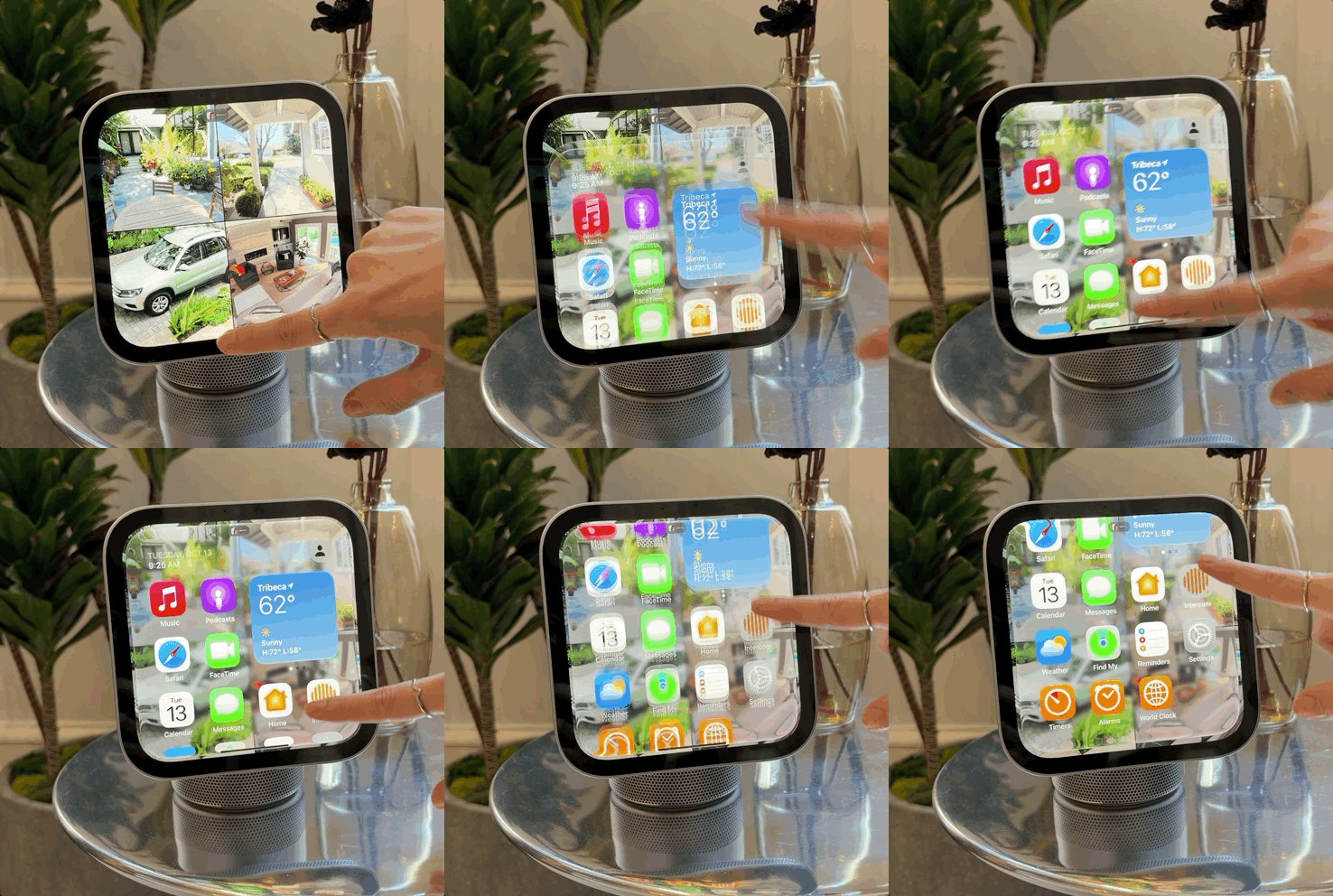
Apple has a selection of core apps ready for HomeView, including Home, Intercom, Music, News, Photos, Safari, FaceTime, Messages, Calendar, Alarms, Timers, Find My, Podcasts, Reminders, Settings, and Weather. Developers can’t build dedicated apps for HomeView, but Apple can bring compatible experiences over from the iPhone. That includes apps such as Apple TV, Audiobooks, Apple Music Classical, and News.
There’s a distinction here: some of these experiences are effectively extensions of the iPhone rather than apps running independently on HomeView. And while Apple supports third-party media apps that work with CarPlay, I wouldn’t count on specific apps such as Spotify arriving until Apple or the developers confirm compatibility. Still, the approach makes sense for a home hub. I like the idea of a curated selection of apps rather than hundreds of downloads competing for space and attention.
Music is one area where HomeView already makes a strong impression. Album artwork looks great on the display, and you can follow lyrics in real time. The built-in speakers also deliver clear, crisp, vibrant audio, although the volume wasn’t quite as powerful as I’d hoped during my time in Apple's demo space.
Even better, music doesn’t disappear into the background when you switch tasks. If you swipe over to another app, such as a cooking feature, a makeshift Dynamic Island appears at the top of the screen, giving you easy access to music controls. It’s a thoughtful touch that makes HomeView feel less like a collection of separate apps and more like a device designed around the way you actually use your home.

Smart home control is another central part of HomeView’s value proposition. Rather than opening the Home app on an iPhone, iPad, or Mac, this is a dedicated device designed to make controlling your home a more immediate, everyday experience. The Home app has been customized for the display, with larger touch targets and key information highlighted, and it looks quite nice.
You can move around elements within the app or bring them into other parts of the interface, adding controls as complications on your chosen face or widgets on the home screen. That flexibility means you can make HomeView work for the way you live, whether you want quick access to a few favorite accessories or a more comprehensive overview of your home.
The interface is the same whether you opt for HomeView on its dock or mount it on the wall. The latter does come with a trade-off, though: you lose the speakers in the base and have to pay separately for the wall mount. That makes the wall-mounted setup feel like a less compelling deal, at least to me.
Still, I can see the appeal of turning HomeView into a dedicated control panel near the front door, where it could become a natural first stop when you arrive home. It also feels like Apple is catering to people who have already invested in wall-mounted iPad setups for smart-home control.

You can interact with HomeView directly through its touchscreen, which reaches up to 500 nits of brightness and can dim as low as 0.3 nits — the lowest brightness Apple has engineered for a display. But touch is only part of the experience. Four built-in microphones are designed to pick up your voice while reducing background noise, whether you're making a FaceTime call or asking Siri for help.
Siri is central to the experience, and it’s clear that HomeView is designed with Apple's new Siri AI capabilities in mind. My time testing them was brief, and I sometimes had to repeat a request, but I was able to ask Siri to handle basic smart home controls, start routines, and play music, as well as tackle more involved requests.
On my Mac, I’ve particularly enjoyed typing to Siri for several tasks, including creating calendar events based on what's on my screen, but on the iPhone or iPad, I use it for multistep or topic-specific tasks. It is not always the fastest, but it is night and day over the former.
During my time with HomeView, I saw a similar approach in action for more complex questions. I saw a demo of Siri being asked what time someone was landing at an airport, then asked when that person would arrive home if they took a train. After a few seconds, Siri answered by drawing on information from Messages, its broader knowledge, and estimated transit times.
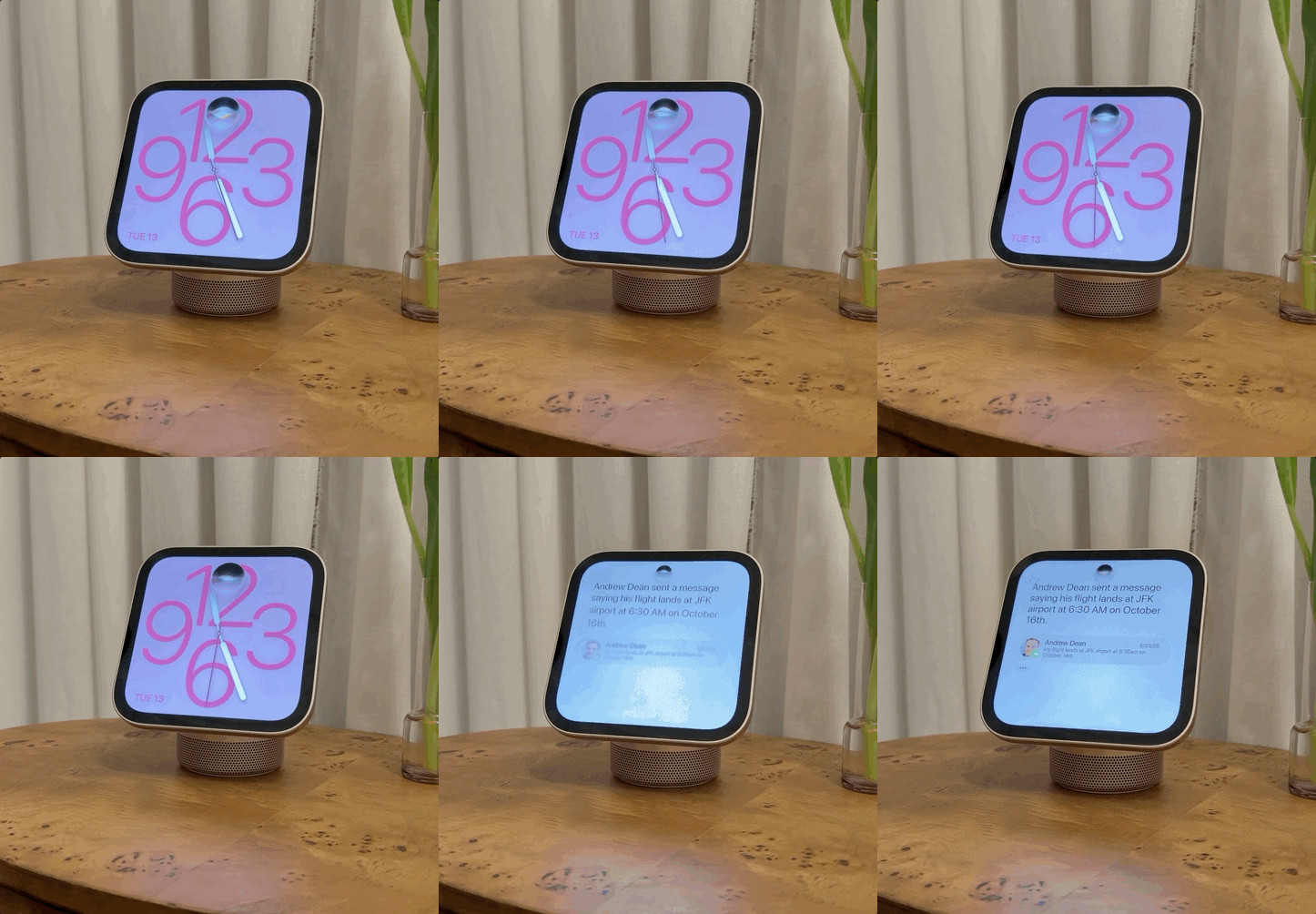
It was a brief demonstration, but I could immediately see how useful this could be for quick questions and more involved requests. For instance, my friend Benjamin and I love sharing music. If I missed a song he recommended, I could imagine asking Siri to identify that Chuck Berry track while cooking dinner or getting on with something else around the house.
That’s where I think HomeView could really distinguish itself from the ever-popular Echo Show. Amazon's displays can connect to a range of services and smart home devices, but for someone already invested in Apple, they remain part of a separate ecosystem. HomeView, by contrast, is designed to work with the devices, services, and information you already use. If Siri can reliably bring all of that together, HomeView could be considerably more useful than a smart display that simply answers questions or controls a few connected devices.
That integration extends to moving between devices, too. When I get home, I could transfer whatever I'm listening to on my iPhone simply by tapping it against the front of HomeView. That's iPhone Handoff, and it's a brilliant implementation of a feature that makes the most of Apple's hardware working together. The same idea extends to calls, episodes of content, and even Safari webpages, making it easier to pick up where you left off without having to start over on another device.
An ambient smart display, rather than another screen demanding attention

A few other details from my brief hands-on stood out. For one, HomeView doesn't have notifications, and I actually like that decision. It means there's less reason to linger in front of the display or constantly check it for updates. Instead, HomeView feels like an ambient device, designed to be useful when you need it and easy to ignore when you don't. It's arguably Apple's strongest implementation of that idea yet, and it already feels more purposeful than StandBy on the iPhone.
It still has familiar Apple touches, of course. You can pull down from the top-right corner to access Control Center and quickly reach key settings. The built-in 12-megapixel camera, which recognizes users and serves as the main lens for FaceTime, can also make HomeView double as a mirror. Who knows, perhaps the Photo Booth could return and find a home here, too.
I still need to spend more time with HomeView, particularly in my own home, before I can say whether it delivers on all that promise. But after getting hands-on with it, I'm even more convinced that Apple is approaching the smart display from the right angle. Rather than giving me another screen to manage, HomeView looks set to bring together the devices, services, and everyday tasks I already rely on. And for someone who's been waiting for Apple's smart home to feel more connected, that's an exciting prospect.
Of course, Siri AI still needs to deliver on that promise, but after the long wait, it's encouraging to see Apple finally moving in the right direction.

Follow TechRadar on Google News and add us as a preferred source to get our expert news, reviews, and opinion in your feeds. Make sure to click the Follow button!
