TechRadar Verdict
Clumsy in places, but on the whole this is a great value DVD/HDD combi with loads of useful features
Pros
- +
Excellent features and recording quality
- +
Gorgeous looks
Cons
- -
Remote needs a revamp
- -
Complex series recording
Why you can trust TechRadar We spend hours testing every product or service we review, so you can be sure you're buying the best. Find out more about how we test.
If you're looking for an affordable digital recorder that doesn't skimp on features, LG is always a good place to start. Its latest DVD/HDD range includes three models and the RHT497H is comfortably the cheapest.
The 160GB hard disk equates to a reasonable recording time of 477hrs in the lowest quality or 43hrs in best, which should be fine for most people, although hardcore telly addicts will probably fill it up in no time.

TWIN TURBO: The rear of the LG RHT497H reveals an RF loopthrough with twin tuners and an HDMI port capable of outputting 1080p upscaled images
Compensation comes in the form of the inclusion of Freeview+ features such as Series and Split recording that ensure you never miss your favourite programmes.
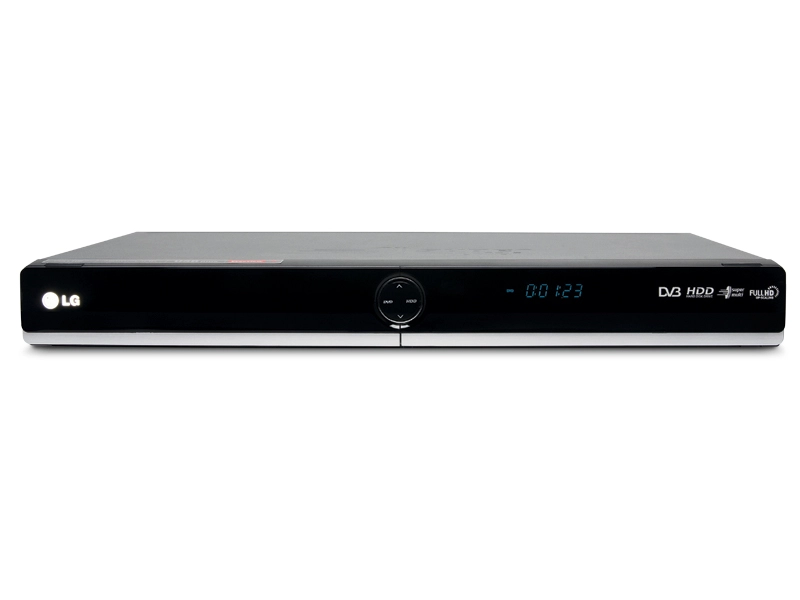
Thanks to a major revamp, the RHT497H is one devilishly good-looking recorder, with an all over black finish, bare fascia and circular drive selection buttons surrounded by a ring of light.
You can copy DivX, MP3, WMA and JPEG from USB memory stick to the hard disk and create your own content library, plus the deck will also play DivX HD. 'Timeshift' is LG's pause live TV mode, which stores everything in a temporary buffer, but lets you keep sections permanently using Clip Record.
There's no smart chaptering mode like you'll find on the latest Panasonic models, but these can be added manually or automatically at 5, 10 or 15-minute intervals. For recordings on DVD-RAM/-RW (VR) or the hard disk, you can perform a range of non-linear editing features, while RAM and –RW discs also enable you to make playlists from titles or chapters.
Installation
The LG gets off to a good start with an auto installation mode that guides you through the basics, including digital and analogue channel tuning. For the main menu, LG keeps faith with its well thought out Home Menu system, which lists the options across the top with a drop-down menu for each one. All of your recordings and digital content can be accessed from here.
The 7-day EPG looks basic, but is easy to navigate and superimposed over live TV. You can switch between a channel overview and a now/next layout, and unusually you have to enter the date you want to look at instead of jumping forward or back 24 hours.
Unfortunately, Series recording is far more complicated than it needs to be. Select something to record from the EPG and up pops a menu packed with pidgin English. We know what they're getting at, but this deck definitely needs to sharpen its communication skills.

We're not particularly fond of the remote, either. Its layout is cluttered, the buttons are too small for comfort and many of the important keys aren't prominent enough. It also lacks a button to toggle through the recording modes, forcing you to enter the setup menu.
Picture quality
Thankfully the LG's recording quality is up to scratch. Recordings from the Freeview tuner in XP mode are virtually indistinguishable from the original broadcast, boasting high levels of detail, sharp edges and bold colours.
There isn't a dramatic drop in quality in SP mode and when taking advantage of LP's extended recording time, the increased amounts of noise are perfectly tolerable, although the pictures don't hide their lower bitrate as well as the equivalent mode on Panasonic's latest recorders.
EP recordings are inevitably riddled with artefacts, but you could just about put up with them if you stick to programmes without fast movement or loads of detail. No one in their right mind would find the soft and juddery MLP recordings enjoyable to watch.
Pre-recorded DVD playback is on a par with a budget DVD deck – upscaled 1080p images are solid across the board, boasting decent levels of colour and detail with no obvious artefacts, although they lack the wow factor of a decent mid-range or high-end disc spinner.
Dolby Digital-encoded stereo sound is open and audible, even through bog-standard TV speakers; movie soundtracks bitstreamed to an amp are as crisp and dynamic as you'd expect and CD playback through the analogue or digital audio outputs is at least enjoyable.
Two hundred smackers is an absolute steal for a good-looking combi with this many features on board: multiformat DVD recording, a reasonably sized hard disk and excellent digital media support, plus a healthy range of Freeview features. It also boasts solid recording quality and enjoyable DVD playback.
That said, it's a shame that LG hasn't ironed out the flaws found on last year's models that are still present here, such as the muddled Freeview+ function and poor remote. One reason why you might be tempted to pay a bit more for one of LG's slicker rivals.
Follow TechRadar Reviews on Twitter: http://twitter.com/techradarreview