
 Become a TechRadar Insider





If you spend a lot of time in front of your computer, whether that's for working, gaming, or creating, having one of the best keyboards for your setup can really make a difference.
For you, that might be a compact keyboard that suits small desk workspaces, or it could be a chunky full-scale gaming keeb with customizable switches for lengthy sessions in online raids.
Whatever your type is, I've put this list of keyboards together with you in mind. I cover all shapes and sizes here, from full-size premium options like the Keychron V6 Max, which is an absolute joy to type on all day long, to funky yet functional mini boards like the Apex Pro Mini Gen 3.

If you're into PC gaming, I have you covered there, too. Check out our list of the best gaming keyboards for more options, but I narrowed it down to the Razer Huntsman V3 Pro as the best gaming option overall. It has everything you need for a silky smooth gaming experience, including linear optical switches and dedicated media controls.
And if you're looking for quality on a budget, I recommend the Gamakay TK75 V2. It's easily one of the best keyboards at under $100 for the value it offers (thanks to its buttery keystrokes and surprising amount of extra features).
At TechRadar, our expert Computing team (including yours truly) goes hands-on with dozens of keyboards every year. We spend at least a week with each model, testing their typing feel, durability, software, and reliability. Our opinions come solely from our own analysis, so you can trust our buying advice to be both fair and accurate.

I've been reviewing PC hardware and peripherals for nearly a decade, starting out at Maximum PC magazine before beginning my tenure on TechRadar's Computing team. As a lifelong PC gamer who had to get by with cheap equipment for many years, I know the difference a good keyboard can make; every keeb in the list below has been carefully curated based on our expert reviewers' analysis and my own personal experience, bringing you only the very best options so you can make an informed purchasing decision.
Our Computing experts have gone hands-on with each and every recommendation in this list. Our opinions are entirely our own, and we always spend at least a week testing each keyboard so we can give a fair, honest assessment.
I've narrowed this list down to the best we've tested based on budget, features, typing feel, design, and customization options. Read on for the best keyboards in 2026.
The best keyboard overall


Few keyboard manufacturers are as consistently as impressive as Keychron. It was one of the first keyboard makers I saw shipping boards with pre-lubed key switches, and until you've used them, you don't know what you're missing. They feel incredibly smooth on the V6 Max, especially if you go for the linear Keychron K Pro Red switches.
If you're not keen on those switches, though, or you're not sure what you like yet, there's another big upside to the V6 Max: it's hot-swappable. That means you can pull the switches straight out of the keyboard with a tool that comes bundled with your board (even while it's still on) and slot in any 3- or 5-pin MX mechanical switch you like.
This is part of what makes mechanical keyboards so interesting to me; you can have a fantastic stock keyboard like the V6 Max and have a perfectly good experience, then decide you want to change things up and throw in new switches and a new set of key caps for an entirely new typing feel.
The V6 Max also features Double-shot OSA PBT keycaps out of the box. They have a really nice way of cupping your finger as you glide from switch to switch, making the typing feel both quick and precise. It also has south-facing RGB lighting in case you need to see in the dark or add some colorful flair to your setup.
The benefits don't stop there - the V6 Max also comes equipped with screw-in stabilizers, allowing for easy repairs if you drop the board or slam your space bar a little too emphatically.
And if you care about the sound a keyboard makes when you type - I absolutely do, I need my "creamy" thocks - you'll be happy to know that the V6 Max ships with a silicone pad and sound-dampening foam packed inside its lightweight ABS plastic frame.
All of that has to be pretty expensive, right? Nope. Keychron is letting all that value go for under $100.
Read our full Keychron V6 Max review
The best budget keyboard


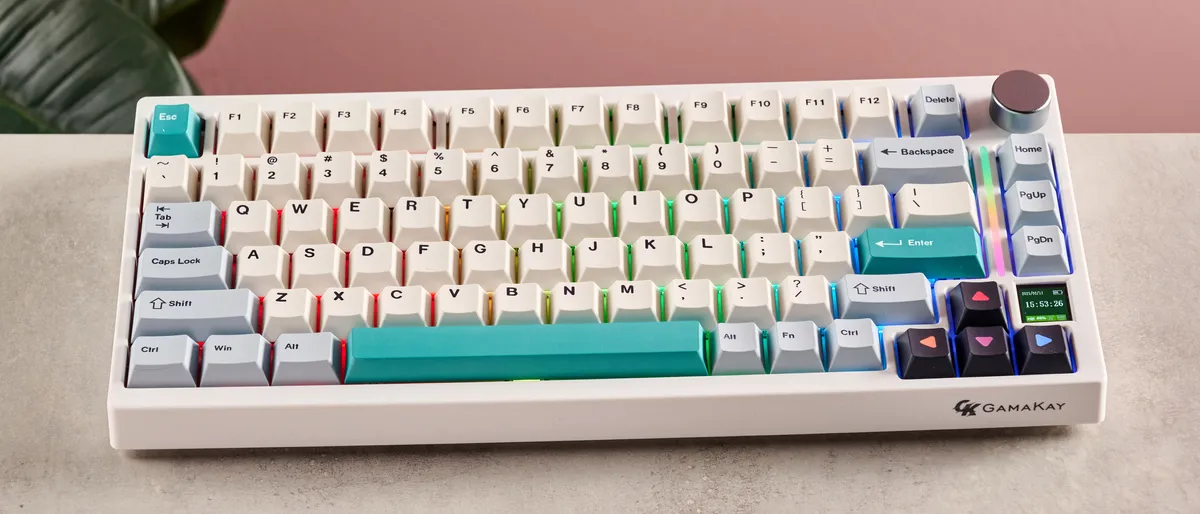
If you need quality on a budget, the Gamakay TK75 V2 mechanical keyboard is your best bet. It sells for about $70 on Amazon, and it frequently goes on sale (it's down to $61 at the time of writing).
But, despite the price, it offers so much value to your PC setup. The Gamakay TK75 V2 is a 75% layout, meaning it has everything from a full-size keyboard minus the numpad and a few navigation keys (like Insert). This is one of my favorite layouts next to TKL because it gives you everything you actually need on a daily basis while still keeping its desk footprint relatively small.
It looks beautiful for a budget board too, with a bright PBT Cherry Profile keycap design and per-key RGB backlighting. And of course, you can't forget the ever-important vertical volume knob (I wrote about why I prefer them over horizontal volume wheels in These 5 awful keyboard trends need to stay in 2024).
It's hot-swappable, too, so you can change out those Gamakay switches to whatever you like if and when you decide it's time. And in case you missed it, there's a little TFT screen that you can use to display key info like battery life or play cute little GIFs to keep you entertained.
Plus it's wireless with Bluetooth and 2.4Ghz connectivity, but you can also use it as a wired keyboard with USB-C.
The versatility on offer here definitely does not scream "budget," and yet you can find boards that offer a lot less for a lot more money.
Read our full Gamakay TK75 V2 review
The best gaming keyboard


It was tough to pick from the sea of worthy competition, but I have to give the best gaming keyboard to the Razer Huntsman V3 Pro. In my eyes, performance is paramount when it comes to gaming keyboards.
Sure, it's great if it looks nice, and the asking price can't be out of this world, but the first thing I'm looking for is: will it give me an edge over the competition?
The Razer Huntsman V3 Pro is built to do exactly that. It features a lightning quick 8000Hz polling rate, snappy Razer Analog Optical Gen-2 switches, and a host of software boons like Razer Snap Tap and Rapid Trigger Mode that make all of your moves considerably quicker and more precise.
It's a full-size board too, so all of the key binds and media control keys you may want for your games and movies are right at your fingertips. And it gets extra points from me for having a vertical volume knob.
Of course, Razer wouldn't miss a chance to show off its gorgeous Chroma RGB, which you can customize in Razer Synapse to create mesmerizing dynamic light shows or simply give your setup a touch of static RGB personality.
Is it cheap? No. That's where the main drawback lies. But you absolutely get what you pay for, and the Razer Huntsman V3 Pro exudes top-tier quality. Not to mention Razer routinely runs some great sales around Black Friday, Prime Day, and other holidays.
Read our full Razer Huntsman V3 Pro review
Take a look at our Razer discount codes for the best Razer offers and savings.
The best keyboard for work


✅ Loud typing noises distract you: The P65’s sound-dampening measures and refined acoustics deliver a muted, pleasant typing sound that minimizes distractions, especially in shared workspaces.
✅ You want a durable keyboard: With its CNC aluminum frame, the P65 shrugs off heavy daily use and is easy to maintain or repair, making it ideal for power users who expect longevity from their gear.
✅ You use your keyboard with multiple devices: Tri-mode connectivity (wired, Bluetooth, and 2.4GHz wireless) makes it easy to jump between laptops, tablets, or desktops without fuss or dropped connections.
❌ Switch variety matters to you: Currently, the P65 comes only with Zebra tactile or Wisteria linear switches—both high-quality, but limiting if you crave more variety or hot-swap flexibility.
❌ You want lots of software tweaking options: While the P65 offers QMK/VIA support, its software is less robust than what you’ll find on some competitors, so advanced remapping and macro needs may feel constrained.
The Epomaker P65 stands out for its robust all-aluminum chassis and a deeply satisfying, muted sound profile, making it an immediate contender for demanding work setups. Its CNC-machined case not only looks sharp but is designed to withstand years of daily typing without flex or rattle, while the thoroughly dampened acoustics mean every keystroke feels and sounds premium, with no distracting ping or hollow thud.
Typing comfort is core to the P65’s appeal. The five-layer gasket mounting system, paired with integrated sound dampening, cushions each press and promotes fatigue-free sessions even during marathon workdays. Out of the box, you can choose between Epomaker’s Zebra tactile switches or Wisteria linears, both pre-lubed for consistency and smoothness, with a distinct feel that never feels mushy or cheap.
Backing up the engineering, our testers consistently hit 129 WPM at 97% accuracy on the P65, which is comfortably above average typing speeds. One reviewer described the tactile switches as “crisp and springy, with just the right pop,” a welcome change from the flat or overly sharp feedback on more generic boards.
Connectivity is another strong suit. With tri-mode support—wired USB-C, Bluetooth, and 2.4GHz wireless—the P65 reliably juggles multiple devices. Switching is instantaneous, and our long-term testing found no stutters or dropped connections, which is vital for anyone working across laptops, tablets, or desktops.
Stacked up against the Keychron V6 Max and Razer Huntsman V3 Pro, the P65’s straightforward aluminum build and refined typing response clearly favor productivity. While the Razer is a top pick for gaming and the Keychron excels in modding flexibility, neither matches the P65’s focus on comfort and work-oriented stability.
All that being said, switch options are currently limited to Zebra and Wisteria models, which might leave some enthusiasts wanting more variety. While ergonomics and software polish are generally solid, they may not stand out as groundbreaking.
In our view, the Epomaker P65 is best for power users and professionals who want a quiet, sturdy, and comfortable typing experience, and can live with a few minor tradeoffs.
The best mini keyboard


The best keyboards for traveling are compact, lightweight, and reliable. Those are three words that fit the SteelSeries Apex Pro Mini Gen 3 perfectly.
It's a 60% layout, so you won't have a numpad, function row, or any dedicated navigation keys, but you can use FN with another key to access these controls. At the same time, those missing keys means you get a slim and portable board that goes wherever you do.
And it's great if you're starved for desk space, too. I played for years on an old night stand turned PC desk, and I would've loved to have something so svelte in my setup. Then I might've actually had some room to maneuver my mouse.
The reason I picked it as the best mini keyboard, though, is because it doesn't compromise on performance in pursuit of small stature.
In fact, the magnetic Hall effect switches inside are some of the quickest you can get. It also comes with customizable RGB, actuation adjustment settings, and satisfying, consistent keystrokes.
Read our full Apex Pro Mini Gen 3 review
The best keyboard for Mac


One of the key advantages of Apple products is the ability to stay in the ecosystem. That's exactly what the Logitech Signature Slim K950 lets you do with the help of multipoint Bluetooth connectivity.
The Slim K950 can connect to three devices at a time, including a Windows PC, your Mac, and an iPhone all at once. Simply switch to the device you want to type on using the built-in keys and type away.
The keycaps themselves also have Mac-specific ledgers, so you don't have to try to remember where the cmd key is supposed to be on a Windows layout.
It features a low-profile, snappy typing feel that's perfect for gliding across the board. You also get customization options in the Logi Options+ app for macros and hot key assignments, which can significantly cut the time down on repetitive workday tasks.
It is battery-powered, though, so you'll need some AA batteries handy. At least that doesn't sting as much when you see that the price tag is under $100.
Read our full Logitech Signature Slim K950 review
Check out our Logitech promo codes to get the best deal on your next purchase.
FAQs
Are mechanical keyboards better for typing?
While there’s no objective right or wrong answer here, it’s true that many people find mechanical keyboards to be a lot more comfortable for long typing sessions. That’s because the tactile feedback and longer travel distances of each key can subtly help with typing accuracy by reducing the chances of accidental presses and “bottoming out,” where the key hits the floor of your keyboard’s chassis (which can strain your fingers).
As well as that, there’s a huge range of mechanical switches available, each with a different sound and typing feel, which means you stand a good chance of finding one that feels comfortable for you. With membrane keyboards, there’s no such choice.
Still, some people prefer membrane keyboards for typing, as their keys require a little less force to press. But if you find yourself spending long hours typing every day, it’s worth testing out a few mechanical keyboards to see if they could improve your experience.
How to choose the best keyboard for you
It goes without saying that if you demand the look and feel only mechanical switches can provide, rather than those that are slim and stealthy, we suggest perusing our best gaming keyboards round-up instead.
Gamers prioritize the actuation that clicky feeling mechanical keyboards bring, whereas traditional home and office users are more about practicality. That said, the sheer magnitude of sound produced by a lot of mechanical keyboards is offputting to some. For those folks, we have some membrane keyboards to recommend as well.
How we test keyboards
Testing peripherals is a serious matter, even if most people might feel like they come secondary to everything else. That's especially true for keyboards. After all, it is your main interface for interacting with your PC or laptop, and most people use it all day long. That means that not only does it have to be reliable and to perform well, but it has to also be comfortable and satisfying to use.
So, we take our keyboard testing seriously. Each keyboard that lands on our desks is treated and utilized as our main keyboard for a week or more. That's the best way to ensure that we're not only experiencing it the way consumers would in the real world, but also coming across any quirks, flaws, and issues.
We also take a look at its design and ergonomics. A top priority for keyboards is that they have to minimize finger, wrist, and shoulder fatigue. For compact keyboards, we also test out just how travel-friendly or ideal for small setups they are.
If a keyboard is wireless or has wireless connectivity, we take a closer look at that connection – just how solid it is, whether there are discernible lags, and what its range is. If a keyboard has additional features, we test those out as well, checking how effective they are and how they useful they can be in real-world scenarios. Finally, we take everything we've learned and compare them with the keyboard's price to gauge if it's a great value or if it's too overpriced to be worth recommending.
Today's best keyboard deals
