
 Become a TechRadar Insider





Looking for a new storage option? Does your data consumption lead you to buy a lot of storage devices? Fret not. Amazon's Great Indian Festival is here and with it come some really mouth-water deals and offers on storage devices. There are some highly discounted products on sale across Hard drives, Pen drives and memory cards to choose from during the sale.
We witnessed the first phase of the sale event in late September, so if you missed out on your favourite deal last time then it's your chance to grab it. We have also compiled the best deals the following categories, don't forget to check these-
If you're looking to buy a new laptop, here are the best deals on laptops
Amazon Great Indian Festival: Best deals on laptops
Some great offers on wearables
Amazon Great Indian Festival 2017: Best deals on wearables
Huge discounts on portable wireless speakers
Amazon Great Indian Festival: Best deals on speakers
Best discounts and offers on mobile phones
Amazon Great Indian Festival 2017: Best deals on mobile phones
Offers on storage solutions: Hard disks, pen drives, and more
Amazon Great Indian Festival 2017: Best deals on Hard disks, Pen drives and more
The best power bank deals on Amazon are now live
Amazon Great Indian Festival 2017: Best deals on power banks
For the audiophiles out there, here's what Amazon is offering on headphones
Amazon Great Indian Festival: Best deals on Headphones and Speakers
So before you head over to these categories, check out the best deals on storage solutions.

Western Digital My Passport 4TB External HDD for Rs 9,498 @ Amazon
Get this Western Digital hard disk with a humongous storage of 4TB at just Rs 9,498 only. During the Amazon Great Indian Festival, the 4TB variant of WD My Passport will fetch you a discount of Rs 501.
If you have a need for higher storage capacity devices, this WD My Passport HDD should not be missed. The hard disk is also available in some funky colour options.
Western Digital My Passport 2TB External HDD for Rs 5,798 @ Amazon (Save Rs 201)
A 2TB variant of the My Passport is also up on sale during the Amazon Great Indian Festival for a price of Rs 5,798. Users interested in a lower version of the Western Digital My Passport should definitely look at it.
Western Digital My Passport 1TB External HDD for Rs 3,798 @ Amazon (Save Rs 201)
There's also a 1TB version available of the WD My Passport external hard disk which budget users can look to if they want to purchase a storage device.

Seagate Backup Plus Slim 2TB External HDD for Rs 5,898 @ Amazon (Save Rs 201)
If you're in for a lower storage device option, we have got you the Seagate 2TB Backup Plus Slim HDD which will help you in everyday tasks and then some. The Seagate HDD is retailing for Rs 5,898 which is a discount of Rs 201 on Amazon India.

Lenovo 1TB External HDD for Rs 3,499 @ Amazon (Save Rs 400)
Lenovo's 1TB external hard disk drive has also received a price cut of Rs 400 and is up for sale for Rs 3,499. The external HDD by Lenovo looks sleek and handy when it comes to portability and will get one through their storage needs, provided it's used for basic storage.

Buy Toshiba Canvio Basics 3TB HDD for Rs 6,499 @ Amazon (Save Rs 500)
Toshiba Canvio Basics 3TB external hard disk drive is now with a discount of Rs 500 and is up for sale for Rs 6,499. You might get better deals at cheaper prices but Toshiba promises to offer high transfer speeds, security and better durability.
Buy Toshiba Canvio Basics 2TB HDD for Rs 5,299 @ Amazon (Save Rs 200)
For those who ask for less and can do away with slightly lesser storage can go for the 2TB variant of the Toshiba Canvio at lesser price.
Buy Toshiba Canvio Basics 1TB HDD for Rs 3,699 @ Amazon
If you can do away with 1TB space on your HDD and don't wish to shed a lot of cash on a storage device, this one is just for you.
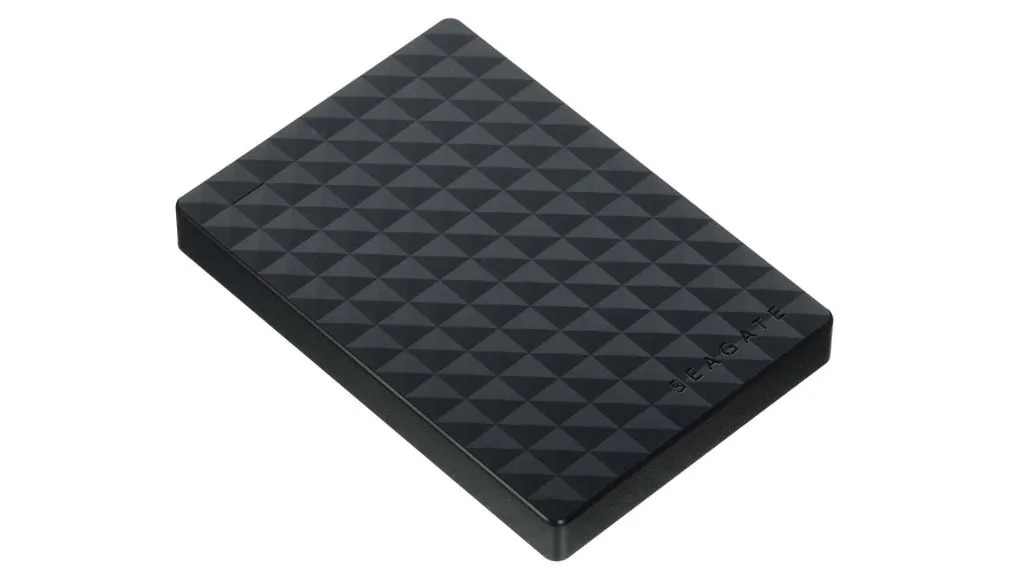
Seagate Expansion 1.5TB Portable External Drive at Rs 4,399 (save Rs 200)
Seagate Expansion 1.5TB Portable External Drive comes with USB 3.0 connectivity option which ensures faster transferring of data. It is easy to connect the drive with the computer as it does not require any software for installation. Users can save their files easily by just dragging and dropping them to the drive.
Seagate Expansion 4TB USB 3.0 External Hard Drive at Rs 9,399 (save Rs 366)
This hard drive has a storage capacity of 4TB and ensures faster data transfer with USB 3.0 connectivity. Apart from this, the other features are similar to the above mentioned hard drive.

SanDisk Ultra 32GB Memory Card for Rs 749 @ Amazon (Save Rs 278)
Looking for a value for money microSD card for your smartphone? Look no further than this SanDisk Ultra 32GB memory card which is now available for as low as Rs 749 during the Amazon Great Indian Festival sale.

SanDisk Ultra Dual 64GB USB 3.0 OTG Pen Drive (Gold) at Rs 1,399 (save Rs 227)
The OTG enabled pendrive allow the users to transfer their files directly from their mobile devices to laptops and PCs. It also ensures a transferring speed of up to 130mbps with its USB 3.0 connector. With the SanDisk Memory Zone app, users can easily manage their photos and videos.

HP V232w 16GB Pen Drive at Rs 419 @ Amazon (save Rs 148)
The 16 GB storage device comes with a metallic finish to ensure great protection against scratches. Apart from this, the pen drive is also shock proof, temperature proof and shock proof.

Sony Microvault Tiny 8GB Pen Drive (White) at Rs 299 (save Rs 121)
With its 8GB storage capacity and amazing transferring speed, users can store their files easily on the device. It also has an illuminated LED light which blinks when you plug your micro vault tiny into any compatible device.
