


As someone who loves listening to music and has been writing about tech for a living for a very long time (more than two decades at this point), I of course signed up for Spotify as soon as I could — which in the UK was February, 2009.
A lot has changed since then, both inside and outside the digital music industry, as Spotify told us about in an exclusive interview for its 20th birthday today. But I've kept up a Spotify Premium subscription through it all — it's an app I load up most days and am still writing about.
What you might not know if you're a Spotify user is that there are a host of plug-ins and extensions available for the music streaming platform that add extra features and functionality — a bit like extensions for your web browser. They tap into the Spotify app to do something different, and to enhance the experience in all kinds of ways.
I've tried out multiple different add-ons since I first opened my Spotify account, and these are the most useful I've come across. Check them out and see if any of them appeal: you can be up and running with any of these plug-ins in minutes.
1. Last.fm
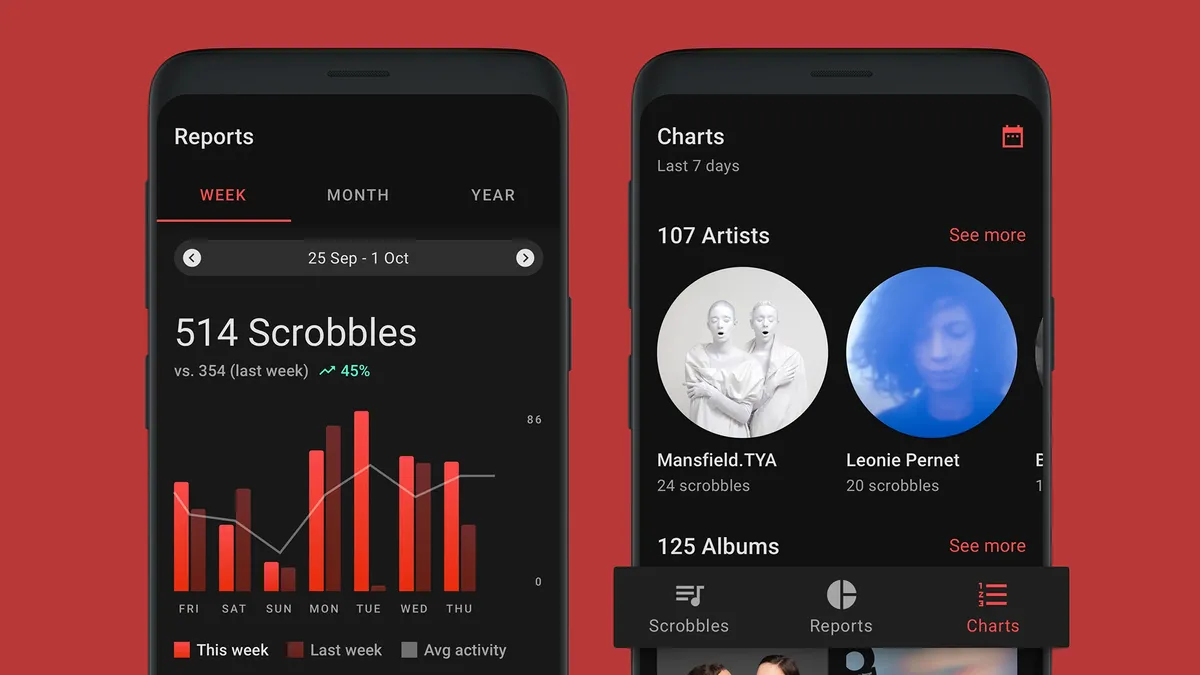
Spotify of course offers its own listening statistics, with Spotify Wrapped at the end of each year and more detailed breakdowns now available whenever you want, but Last.fm remains the undisputed champion of tracking your listening habits — something that's known as 'scrobbling' in Last.fm parlance.
Once you've connected your Last.fm and Spotify accounts, you can dig into a host of charts and reports around your music listening, whether it's your favorite genre of all time or the artist you loved the most this month (or this month five years ago). Plus, it can track your listening across all your other audio streaming apps too, and recommend new music.
2. Spicetify

If you want to be able to customize the interface of the Spotify desktop player for Windows or macOS, then Spicetify is the extension for you. It gives you controls for adjusting fonts, colors, and more besides, and there are hundreds of premade themes you can pick from with just a couple of clicks — and tweak to suit your own tastes.
Besides the themes, Spicetify also offers numerous little edits that you can apply to the Spotify desktop player, whether it's adding extra visualizers or removing a button or interface element that you don't like or need. It's all backed up by a busy community of users who are constantly coming up with new customization ideas.
3. The Playlist Miner

Head over to The Playlist Miner if you want some extra inspiration for your Spotify playlists. After connecting to your Spotify account, it searches through the public playlists available on the platform to find a mix of songs tailored specifically for you, whether you're looking for tracks for working out or chilling out.
How you search for new songs really is up to you: maybe you could try building a playlist around "inspiration" or around "high energy". As long as there are enough public playlists matching the search criteria for The Playlist Miner to work with, it'll select the most popular picks across those playlists.
4. Oscurify

Music is more fun if you're sharing it and discussing it with other people — or at least comparing your taste with the wider world, which is something that Obscurify lets you do. Connect your Spotify account, and you get a fascinating breakdown of how eclectic your choice of tunes is compared to other Spotify users.
You get shown the most obscure artists and tracks that you listen to, and the plug-in can also dig down into stats on how happy or sad your music tastes are — as well as telling you how that's changing over time. There's also a recommendations section you can use to check out new artists you might not have already come across.
5. TuneEase

Sometimes the best extensions are the simplest ones, and that's the case with TuneEase. It'll run as a pop-up inside Google Chrome or indeed any browser based on Chromium (including Microsoft Edge and Opera), and gives you control of the Spotify desktop or web player through a little browser control deck.
It doesn't sound like much, but if you do a lot of your computing inside a browser, TuneEase will save you a significant amount of time switching between windows and tabs when you want to pause your music or skip to the next track. You can toggle shuffle settings, adjust the volume, and favorite songs as well.
Follow TechRadar on Google News and add us as a preferred source to get our expert news, reviews, and opinion in your feeds. Make sure to click the Follow button!
And of course you can also follow TechRadar on TikTok for news, reviews, unboxings in video form, and get regular updates from us on WhatsApp too.
