TechRadar Verdict
The Sat HD 100 won't tempt enthusiasts away from the Humax Foxsat-HD, but on its own merits it performs reasonably well. Multimedia playback is a nice touch in particular. Perhaps the forthcoming PVR will be Metronic's ace in the hole
Pros
- +
HD and SD pictures via HDMI
- +
Multimedia playback
- +
Easy navigation
Cons
- -
Slow scans
- -
Scart pictures could be better
Why you can trust TechRadar We spend hours testing every product or service we review, so you can be sure you're buying the best. Find out more about how we test.
The launch of Freesat was marred slightly by an initial shortage of boxes but now the second wave of product launches is getting underway.
This HD zapper hasn't garnered as much attention as the first Freesat PVR from Humax, but it does give us a glimpse into what Metronic's own PVR could be like when it appears in early 2009.
Simple styling
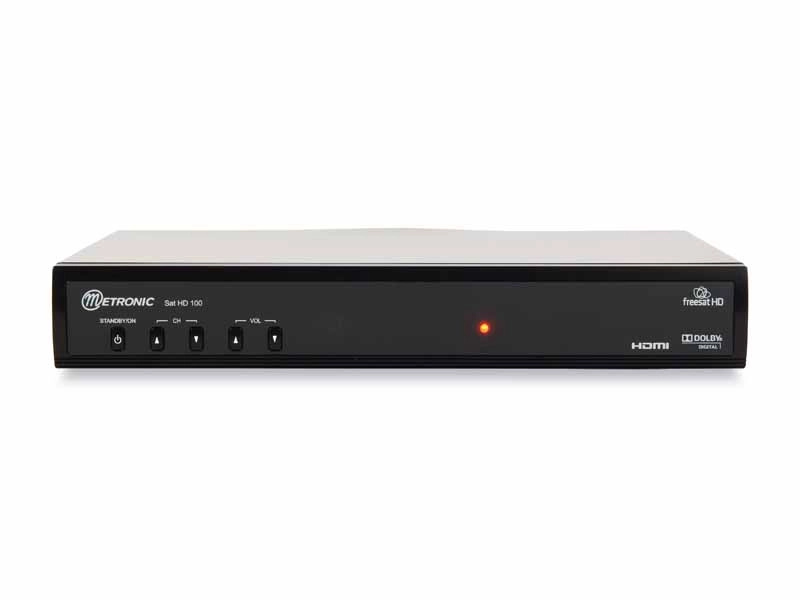
Aesthetically, the Metronic doesn't deviate too far from its Freesat siblings; its all-black stylings and diminutive size fall in line with boxes from Grundig and Bush.
The plastic fascia has no display to speak of – just an LED indicator – but does have a row of five buttons for volume, channel-changing and power. There's no CI slot – this is strictly FTA.
Backplate connectors include an LNB loopthrough but, unlike the Humax Foxsat-HD, there is no DiSEqC software installed.
Deck connectivity
Sign up for breaking news, reviews, opinion, top tech deals, and more.
AV connectors lean pleasingly towards the higher end of the quality spectrum. An HDMI output is 1.2 standard, but you have the ability to 'turn off ' HDCP in the menus should this create an issue for your TV.
Add to this twin Scarts, both with S-video and composite output, plus RGB out on the TV Scart (the receiver can output via Scart and HDMI at the same time). There's also an optical digital audio output with Dolby passthrough but no phono option.
Data ports comprise Ethernet for the promised Freesat on-demand services while a USB port sits between the HDMI and power input. This can be used to install software updates from a flash drive (also achievable via satellite) and adds the bonus of multimedia playback, although chunky drives can be a tight fit. Happily, the power supply is 12V, making the Sat 100 suitable for watching FTA channels in a dish-equipped caravan.
The remote control is clearly designed with the forthcoming PVR in mind, having prominent VCR-style buttons. It has a few too many similarly sized pads organised in neat rows to be considered intuitive, although they are reasonably easy to see in the dark.
Quick setup
Freesat channels are tuned automatically after punching in your postcode to gauge which region you're in, and therefore which version of BBC One and Two should sit at 101 and 102 in the EPG (you can choose alternatives afterwards). This took two minutes.
Or you can use the manual setup. Here you can opt to scan transponders from a list, by NIT, or scan an entire satellite. Yes, you can scan other satellites but this can be slow (a full Astra 2/Eurobird scan took 22.5 mins), you can't specify FTA only, and there's no DiSEqC.
The single list of FTA and scrambled channels can be sorted A-Z, Z-A into SD and HD channels, or by network You can also put channels into groups labelled Movie, Music, Sports, Shopping, Guide, News, Scramble FTA and favourites 1 or 2 and pin-lock them.
Detailed menus
The menu system looks great and is easy to navigate.
The quickest way to call up channels is to press the list button, while pressing Info or Up on the remote calls up the programme information banner. This includes details and a progress bar for the current programme, and it can be expanded to view synopses.
Pressing the left and right menu buttons lets you scan ahead to see what's coming up on the current channel, but this proved rather erratic with some SD channels.
Browsing info for Five, for example, we found occasional gaps in information ranging from three to 12 hours, suggesting that a few bugs still needed attention.
Comprehensive EPG
The Freesat EPG looks a little prettier and more hi-res than that found on Freesat zappers from the Alba group. Nevertheless, it functions in pretty much the same way. You can bring up a guide for all channels or choose to view only data for channels that conform to a certain genre, such as news or movies.
Information is displayed as a smoothly scrolling full-screen grid of up to seven channels at a time which can be skipped in periods of 24 hours up to seven days in advance with synopses shown at the top.
From here, you can schedule timer events with once, daily and weekly repeat options.
Non-Freesat channels get a programme banner and their own EPG. This shows a list of data for the selected channel only, which can be browsed day by day, while the selected channel is shown on the right in a window.
You can also play MP3 files and JPEG images from flash drives inserted in the USB port, giving the HD 100 the edge on other HD zappers.
We had no trouble playing files in these formats, although the receiver had a tendency to automatically re-size images in an odd fashion. It will also play MPEG-2 video files.
Smooth HD images
Available picture output settings are PAL, 576p, 720p and 1080i, although SD is not upscaled.
There's an array of picture-tweaking options available, including sharpness and hue and even a noise-reduction option (if your television set doesn't have one already, that is).
Predictably, it's the HDMI output that wins in the picture stakes, delivering smooth and natural-looking results from SD channels while those from BBC HD look as sharp as you'd expect. Unfortunately, RGB Scart pictures tend to look pale – especially skintones – something that is not fully overcome by altering the picture settings.
Stepping down, as expected S-video and composite pictures show another slight dip in quality.
Sound quality is reasonably crisp, however, especially when pumped through the optical output.