


It's hard enough keeping your own PC secure without worrying about other computers.
But if you do need to access the web, email or an important document on another computer, you need to be sure you're not compromising yourself by doing so.
With a portable flash drive, you can build a collection of portable tools that will keep your data and identity secure, plus help you ascertain if that PC is safe to use.
Note: If the target PC is infected your portable flash drive won't be able to protect you against any identity or data-stealing malware. If you have any doubts about the PC in question, don't use it.
1. Rohos Mini Drive
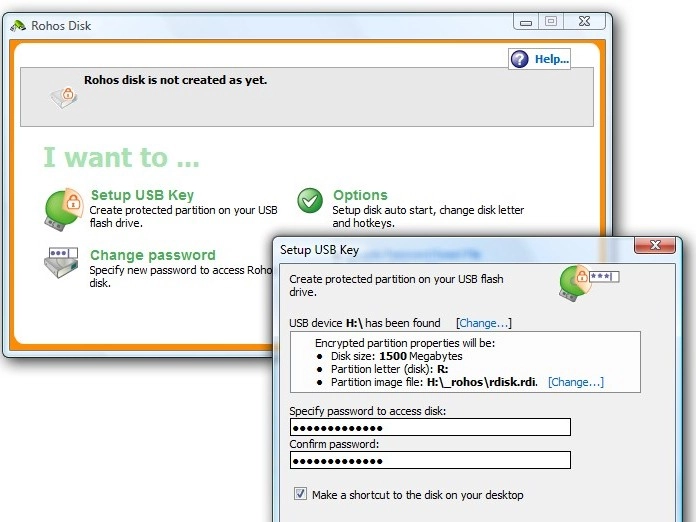
Secure the contents of your flash drive from loss or theft by creating a special, hidden encrypted partition. Rohos Mini Drive lets you create an encrypted partition up to 2GB in size for free (upgrade for US$25 for unlimited space and other enhancements), and will run on PCs without requiring administrator privileges. For additional security, we recommend installing all of your portable apps to this encrypted partition.
2. Portable Firefox
This comes as part of the PortableApps collection, and enables you to browse the web without worrying about leaving any tell-tale traces of where you've been: everything from your cookies to your browser history is stored on your encrypted volume.

3. Essential add-ons
Once Portable Firefox is installed choose Tools > Add-Ons and install the following add-ons for increased security, privacy and convenience: Xmarks to synchronise bookmarks between your flash drive and other computers, Web of Trust to provide safety ratings for web sites and search engine results, and LastPass for secure password and form filling.

4. Portable KeePass
This comes as part of the PortableApps suite - it doesn't offer the secure form-filling capabilities of LastPass, but it will store passwords for more than just Firefox. If you eschew Firefox in favour of another portable browser such as Opera@USB or Portable Chrome then it's a must.
5. Portable Thunderbird
The biggest problem with using Portable Thunderbird for checking your mail is keeping it synchronised with your home PC - either leave a copy of your mail on the server after downloading it, or use IMAP if your account supports it to remain perfectly in sync.

6. Pidgin Portable
This lightweight instant messaging tool boasts compatibility with all major IM protocols, including Yahoo!, AOL and Windows Live/MSN, so you can chat from any PC. If you and your mate install one of the two encryption plug-ins you can chat securely too.

7. Clamwin Portable
If you want to scan the PC you're working on for possible infection before using it, the portable version of this open-source tool can be run and set to scan for nasties. Remember, no security tool is infallible, but it'll give you a headstart.

8. a-squared HijackFree
Once installed directly to your flash drive (don't create any shortcuts when prompted), you can use this app to take a closer look at the PC you're using. You'll need administrator privileges to do so, but if you pass muster you can take a look at running processes, Services and take a peek into areas of the PC where infections are likely to occur.

9. Portable Applications
The Portable Applications suite includes many of the tools already mentioned, but because it's not updated as regularly as individual applications you might prefer to install just the core version and then download the apps themselves separately.
If you're worried about what temporary files might be created when working on a host PC's own installed applications, use your own instead. Take a look at the growing number of portable Office and viewer apps out there: AbiWord, OpenOffice, Sumatra PDF Portable, and VLC Media Player Portable are just four examples.

10. Eraser Portable
If you end up using your host PC's hard drive to store files on, you may want a means of securely shredding that data when you've finished; Eraser Portable will do the job, but avoid using it on your own flash drive's files (if your data is stored on your encrypted partition it's not required anyway).

- We’ve chosen the best identity theft protection solutions of 2018