





I've tested over 200 machines, and these are the best inkjet printers on my roster. I've chosen a selection of traditional cartridge-based models and cartridge-free inkjet printers for the home and home office.
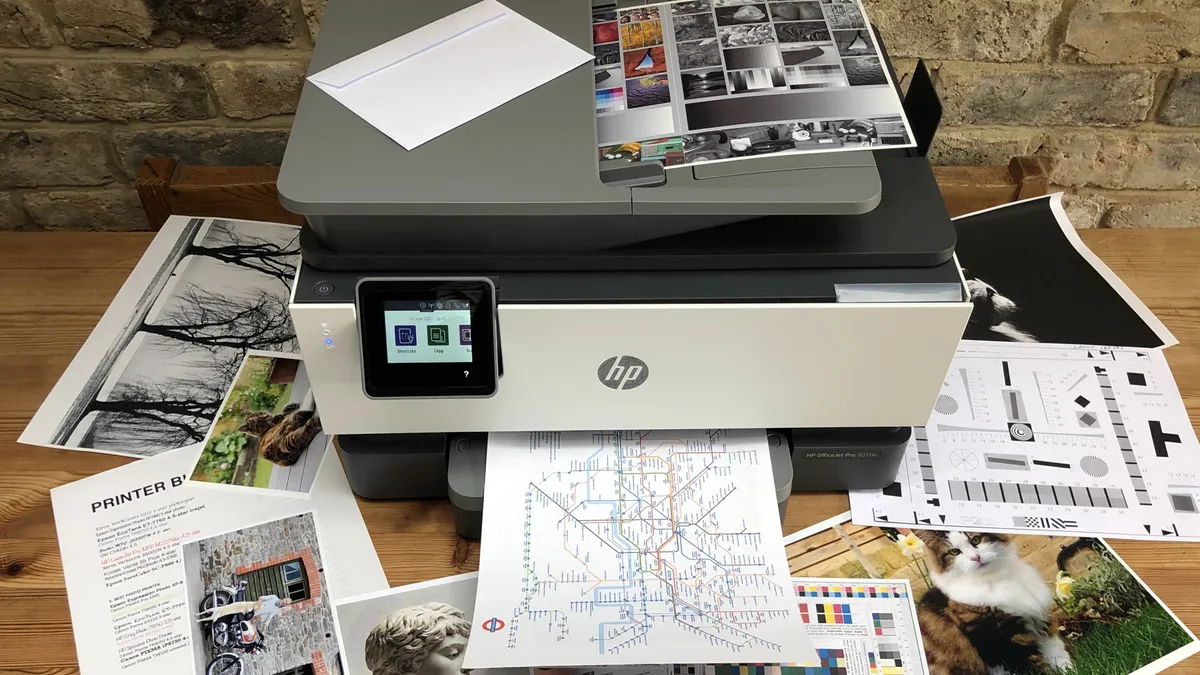
In my experience, the HP OfficeJet Pro 9015e (9010e) stands out as the top traditional inkjet printer. It's a 4-in-1 model, so it can print, scan, copy, and fax - and during tests, it handled it all with total ease. Print quality proved excellent, but even better is just how fast the print speeds were. It's one of the fastest standard inkjet printers I've used.
You can read my full review below, alongside both classic and cartridge-free inkjet alternatives. For more top-rated models, read my guide to the best home printers covering the ink tank, laser, and inkjet units that impressed me most.
Best inkjet printer overall


✅ You want a prompt printer for the home or home office. I was delighted with the overall speeds of this inkjet compared to cheaper models.
✅ You need an inkjet printer that does it all. This is an all-in-one model with print, scan, copy, and fax features that all worked very well in my tests.
❌ You only print on a casual basis. If you don't need a daily printer for regular use, this is probably overkill.
❌ You want speedy double-sided printing. While fast for single-sided prints, I found duplex mode felt slower than I expected.
The HP OfficeJet Pro 9015e (known as the 9010e or 9012e in the UK and Europe) is a feature-rich inkjet printer that does it all.
As a 4-in-1 model, it has print, scan, copy, and fax capabilities - all of which worked very well during my testing. And the features don't end there, with duplex mode, automatic document feeder being highlights for those who print regularly.
Performance proved excellent across the board. First off, it's pretty fast for an inkjet printer. I measured it at around 22 pages per minute when printing black and white documents. However, that did slow right down when printing double-sided, which may be a deal-breaker for some. Printing, scanning, and copying all worked very well.
Text documents appeared bold and legible in both monochrome and color, and photos on standard paper is fine. Where it falls down here is if you're printing large areas of black (where I spotted horizontal lines) or photographs on glossy photo paper (where it lacks details).
But for general inkjet printing, most users won't see that as an issue. I found in most areas print quality remains very high, very accurate, making it well-suited for home and home office use.
Read our full HP OfficeJet Pro 9015e (9010e) review
Best inkjet printer on a budget


✅ You want a cheap inkjet printer. For the price, there's plenty to like about this printer, including the double-sided printing and overall output quality.
✅ You print a lot of photos. Where this HP printer shone in my tests was the overall image quality for photographs.
❌ You're prioritizing speed. This inkjet is slow to print in mono and color, and slow to scan, too - although the results were worth the wait.
❌ You print regularly. I found this printer used up a lot of ink, so I needed more inkjet cartridges - it's better for casual or general users.
The HP Envy 6555e (6530e outside the US) is a cheap inkjet that's got plenty going on with it, considering the affordable price. While I'd characterize it as a printer for the home or student dormitory, it still has a decent amount of business-centric features like the automatic document feeder, self-healing Wi-Fi, and a mobile fax tool.
If you're looking for an all-in-one inkjet that doesn't cost to much and prints well, then this is it. It prints, scans, and copies. I found mono and color document printing looked nicely crisp and bold, and photos were vivid, popping off the glossy paper I used during testing.
Where it stumbles is speed, which is slow enough just for black-and-white text documents - it's even slower for color prints and scanning. However, I can't complain with the overall print quality, especially at this price. It also chews through inkjet cartridges, which means it's very cheap to buy but not so cheap to run.
Overall, though, it's a highly capable home inkjet printer, particularly for casual users rather than those printing a lot every day.
Read our full HP Envy 6555e (6530e) review
Best inkjet ink tank printer with refillable tank


✅ You print a mix of documents and photos. Print quality is superb across the board, and the printer especially shines in its photo quality.
✅ You want to save money on printer ink. As a cartridge-free ink tank printer, the ET-4950 is a whole lot cheaper to run than a traditional inkjet model.
❌ You need professional-grade business documents. While the EcoTank handles mono text printing perfectly, the text isn't as dark and sharp as you'd get from a business-class laser printer.
❌ You want a cheap inkjet printer. Ink tank units tend to be more expensive, but you'll save more on ink refills over time.
First, let me explain. The way the market's moving, traditional cartridge-based inkjet printers are fast falling out of favor, replaced with ink tank printers. Operationally, they're the same - spraying ink droplets on to the page. But instead of cartridges, they use bottled ink refills. That means the ink tank printer is more expensive to buy, but cheaper to run, faster to print, producing less waste.
One of the best example of an inkjet printer with refillable ink tanks is the Epson EcoTank ET-4950. I've tested over 200 printers, and I struggle to think of a more feature-packed printer with so much ink included in the box (Epson estimates it'll last you up to three years).
Performance proved good throughout my review tests, with monochrome text documents looking detailed, and color documents and photos proved incredible vivid. Just don't try to copy thick, glossy photo paper - the only time I had a paper jam is when I tried it. Printing on photo paper is fine, though.
Like a lot of ink tanks, speeds are good - it's the intermediary between a standard inkjet and a fast laser printer. Here, it's 35 pages per minute, which is great. For an all-rounder inkjet printer for the home or home office, the ET-4950 is an excellent choice.
Read our full Epson EcoTank ET-4950 series review
Best inkjet printer for the home office


✅ You need a reliable inkjet for the home office. This printer comes with all the features I'd expect from a small business model, from 4-in-1 functionality to high paper tray capacity.
✅ You print a lot. One of the things I really like about the printer is the sheer number of ink you get right out of the box, letting you print often and regularly before needing to top up.
❌ You're printing a lot of color documents. I found colors were somewhat muted when printed - which isn't an issue for most business and home office use, but may not be ideal for everyone.
❌ You need a printer with a double-sided scanner. While this all-in-one has plenty of features, dual-scan isn't one of them.
The Brother MFC-J4535DW (known in the UK and Europe as the MFC-J4540DW) is a superb inkjet printer for the home office.
And I say that specifically because it's a relatively compact 4-in-1 model that prints, scans, copies, and faxes. More importantly for those who need a reliable business-focused printer, it has a very large paper tray capacity. This printer has two paper trays, one holding 250 sheets, the other holding 150, alongside a 20-sheet ADF. So, less time should be spent prepping the printer for its next job.
In terms of performance, I have little to complain about. Text documents appear crisp and consistent, and almost as good as a laser printer in my experience. Color printing is also good, although it's let down by results using glossy photo paper, where they looked somewhat flat and less vibrant to me. I also found it prints fast - around 20 imprints per minute in black and white, and almost as quick for color, which is rare for an inkjet.
For me, this printer comes with everything I'd expect from a home office inkjet printer minus double-sided scanning. It's very easy to use, print-outs are great and, for documents, it's impressively quick and detailed.
Read our full Brother MFC-J4535DW review
Best inkjet printer for cheap photo printing


✅ You want affordable photo printing. With support for a range of paper types, I found this printer was a great pick for anyone printing pictures without breaking the bank.
✅ You want a refillable inkjet printer. Helping make this a good pick for cheap photo printing is the fact that it's an ink tank model, which is more economical to run.
❌ You want top-end features. This printer is lacking in a lot of features some users may need, including a touchscreen for controlling prints.
❌ You need to print on A3. Some photographers may want a bigger canvas than the G620 provides - in that case, I recommend the Epson EcoTank ET-18100
The Canon Pixma G620 (known as the G650 in the UK) is my top overall pick in my guide to the best photo printers. It's not rich in features, but output is excellent for the price, and for most people, it's going to deliver precisely what they want from an inkjet when printing photos onto glossy paper.
As I say, features are light. There's no touchscreen, few ports, and only manual duplex mode. But it delivers outstanding value for money and for printing photos, it absolutely excels.
The printer accepts a wide range of paper types and thicknesses - ideal for printing images onto glossy photo paper or even printable fabrics. And the quality of the print-outs impressed us. The unit's six color dyes produce excellent color fidelity.
Better still, this is an ink tank model, which lets you refill via ink bottles, making it cheaper in the long run compared to traditional cartridge-based printers.
For a more feature-filled inkjet printer for photos that's suitable for more professional use, check out our Epson EcoTank ET-18100 review.
Read our full Canon Pixma G620 review
Best inkjet printers: FAQs
Which is best - inkjet printer, ink tank, or laser?
Whether it's the best small business printer for your office or one for home use, when it comes to inkjet vs laser, there are some clear differences.
The best Inkjet printers are fairly inexpensive to buy, but they're slower to print and use ink cartridges that can be expensive in the long term.
Laster printers, on the other hand, are typically very expensive to buy - and are often aimed at professionals and business. However, they have excellent printing speeds and toners are cheaper to buy in the long run.
An ink tank printer works in the same way as an inkjet printer, but instead of using inkjet cartridges, you refill the printer's tank with bottled ink. They're more cost-effective and less wasteful than a traditional inkjet printer, and faster to print, too. However, the initial outlay is usually more expensive.
How to choose the best inkjet printer
Why you can trust TechRadar We spend hours testing every product or service we review, so you can be sure you're buying the best. Find out more about how we test.
When choosing which inkjet printer is best for you these are the top considerations:
Print-only or multifunction?
If you only need to print, and don't need scan, copy, and fax capabilities, you can generally save some money compared to a multifunction printer (MFP), also known as an all-in-one (AIO). However, you may also miss out on key features like automatic document feeders by opting for a print-only device. We tested out the best all-in-one printers.
Home or office?
Printers for the home tend to be cheaper, smaller, and less robustly built - and in most cases, home printers will be inkjets. For businesses, printers are typically focused on high-speed, high-volume print jobs conducted by multiple users. In many cases, businesses opt for laser printers, as they produce better quality documents.
Should I sign up to a subscription plan?
Subscription services like HP Instant Ink offer cheap ink cartridges mailed to your door before you run out. If you're printing a lot and regularly, it can make sense to set up a subscription, but it's generally not necessary for most general users.
What features do I need?
Most printers print on any size paper up to Letter, or A4. And that's fine for most people. However, the best large format printers and the best A3 printers we've reviewed are best for bigger prints. You'll also want to check for ADF and auto-duplex printing (and scanning, too, if you need it). These features help you stay more productive, letting the printer do the work for you, although expect to pay for these.
What’s my budget?
In our experience, most of the best cheap printers are inkjet printers. These models are affordable to buy, with companies making money on more expensive ink cartridges. Initial outlay on laser printers is more expensive, but toners cost less. However, for the most economical on-going costs, we recommend ink tank printers, letting you refill the printer with bottled ink. We've also seen a lot of great Prime Day printer deals and Black Friday printer deals when the sales are live, so keep your eyes peeled around that time.
How we test the best inkjet printers
As the senior printer editor at TechRadar Pro, I’ve tested hundreds of products, from the best small business printers, and the best printers for Mac, and I’m always improving my methodology. The process starts right from the unboxing and initial set-up, which is timed. If there’s a problem with unsustainable packaging or a baffling user manual, I’ll call it. If it’s a pleasure to use, that’ll be reflected in the final score too. I always test both wired and wireless connections and explore the various remote printing companion apps offered by brands such as HP and Epson as these often enhance the user experience.
For the performance tests, I have a folder of test cards, photos and text documents designed to assess detail resolution, contrast, color accuracy and gamut. Some test images are particularly good for spotting feathering and smearing among inkjets. A ten-page text document is useful for measuring print rates because I never take manufacturer's claims at face value. Having said that, the quoted print and scan speeds are usually accurate enough that I rarely contradict them.
I print each test page on a range of standard paper stock from cheap 75gsm sheets to 600gsm card, as every printer has its limits and preferences when it comes to paper quality. And if the manual claims you can print on envelopes, labels or t-shirts, I test that too.
Features such as auto-duplex scanning or copying multi-page documents via an ADF (automatic document feed) are evaluated, and an assessment of build quality and design contributes to the overall rating. I pay particular attention to the COO (cost of ownership) because cheap printers can often give lower value for money when you calculate the ongoing consumables cost.
Find out more about how we test, review, and rate printers on TechRadar Pro.
Get in touch
- Want to find out about commercial or marketing opportunities? Click here
- Out of date info, errors, complaints or broken links? Give us a nudge
- Got a suggestion for a product or service provider? Message us directly
- You've reached the end of the page. Jump back up to the top ^
