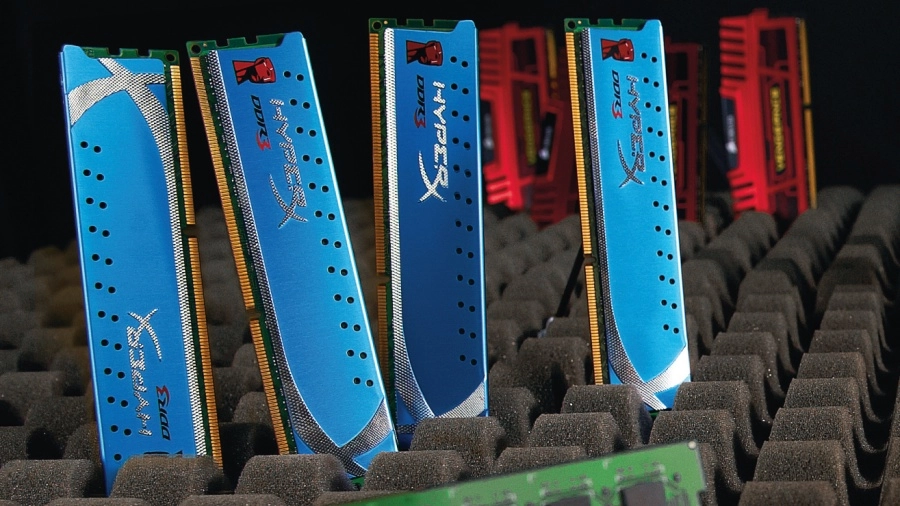
There are so many puns we could use to kick off an article on memory, but we will resist that particular temptation.

What we have here, ladies and gentlemen, is everything you need to know about memory – the standards, speeds and, most importantly, what you should be looking for in your PC.

The processor and memory are a closely-knit double act, without a stream of data whizzing back and forth, the world's fastest processors are so many silicon sandwiches.

The development of high-speed processors is irretrievably linked to the development of high-speed memory chips sitting on an ever-faster memory bus. Just as with the development of processor, every time a wall is reached some clever sausage finds a way to make memory run even faster.

Now we've got double data rates, deep prefetch buffers, quad pumping buses, dual and triple channel and so on. We've tested all the famous names in memory circles: Corsair, Kingston, Crucial, OCZ, Patriot and more. We've modules with heat spreaders, flashing lights and we've plain-Jane types too. We've run single, dual and triple channel systems from 800MHz to 1,600MHz to see how fast data is shifted in practice.

Do the fancy-pants sticks live up to their overblown names (usually sporting a dubious use of the letter X for some reason)? How important are latency timings and does technical speed translate into actual gains that come in useful when you need it? How much better is dual and even triple channel? All shall be revealed.

A brief history of RAM

The development of modern transistor-based memory dates from 1964 and the first commercially available DRAM chip: the Intel 1103, was released in 1970. This replaced magnetic core memory which used a matrix of magnetic rings that acted as little switches to control current. DRAM is essentially a matrix of little capacitors and transistors laid out in rows and columns, only in a very, very tiny form.

Between then and now there have been a slew of memory types and technologies, including Fast Page RAM, Extended Data Out, plus lots of different physical standards and technologies, all which would fill pages, so we'll whiz forward in time.

The two main types of modern volatile memory (turn off the power and the data is gone) are Dynamic Random Access Memory and Static Random Access Memory, or, as you see them on the packet, DRAM and SRAM. While SRAM is faster, it's more expensive and you can't fit much capacity on a chip. It's used in caches and embedded devices, your processor's on-die cache is SRAM.

PC main memory is based on DRAM. It's simpler and enables huge capacities. DRAM developed into SDRAM, which is synchronised with your system bus (timing is everything), the faster the system the faster the memory as its locked to the FSB.

As processors became faster their appetites for data quickly outstripped SDRAM. The main thrust of memory development over the last few years has been Double Data Rate, or DDR, which first appeared in 2000. This can transfer data on both the rise and the fall of a signal, which is really, really clever.

It means that for one click of the clock cycle two 64-bit data blocks are transferred from the internal buffer though to the memory bus. It also has a 2-bit internal prefetch between the internal I/O buffer and the memory chips. Since its 64-bits wide this is also quoted as a two-word prefetch.

To take a DDR-400 module for example, internally it fetches two bits per cycle at 200MHz across a 64-bit bus. While externally it transfers two blocks of 64-bits on one cycle. There now follows some maths.

The internal data rates match the external data rate, of course. For our DDR-400 internally we've 200 (the internal clock frequency) times 2-bits (the 2-bit prefetch); times 64-bits (the bus width); divided by 8 (to render it in bytes rather than bits). This gives us our 3,200MB/s theoretical maximum data transfer rate.

Externally, we've 200 times 64-bits; times two (the double data rate part); divided by 8 again, which gives us the same transfer rate. Thus on a 200MHz bus you've doubled the data transfer rate at a stroke and produced an effective speed of 400MHz.

Doubling the doubler

DDR2 does the same trick, but widens the prefetch to 4-bits per click. This means the internal clock only has to run at half the speed of DDR to achieve the same performance, which uses less power, or you can leave the internal speed alone and it'll double the internal transfer.

DDR2-800 sits on the same 200MHz memory bus (now quad-pumped to cope, transferring four blocks of 64-bits per cycle) and gives us an effective speed of 800MHz. DDR3 doubles things again using the same trick, delivering a healthy eight bits per cycle internally. We now have an effective 1,600MHz memory module, still running on the same 200MHz internal clock but requiring a quad pumped 400MHz FSB to keep up (which is about as fast as it'll go without major engineering).

Officially data transfer should be quoted in MT/s, MegaTansfers per second, which give the raw data transfer rate without using clock cycle speeds, which are rather misleading. But, high clock speeds sell well and sound good.

All sorts of speeds in MHz are thrown around: the true speed, the I/0 bus clock, the data rate and so forth, few are actual physical frequencies employed. Still, what would PCs be without some obfuscating jargon?

What type and what minimum speed you need is defined by your motherboard. Delivering more data to the data lines than it can transfer is pointless, again the limiting factor is the memory bus speed and width. RAM sticks matched properly to your board deliver exactly what the memory bus can handle.

A 64-bit bus at 100MHz has a maximum of 800MB/s, which PC-100 SDRAM is designed to deliver. Move to a 200MHz FSB with four data transfers per cycle (quad pumping) and we reach 6,400MB/s, the standard for DDR2-800. Thus overclocking memory is about overclocking the bus.

Knowing your timings

As with processors the same silicon can be run at different speeds. For memory modules on top of the basic bus speeds there are the internal timings and how fast data can be retrieved from the matrix of transistors once the module has received the address along the control wires. This is given as a set of three or four numbers separated by hyphens.

These are the CL, RCD, RP, and RAS timings, this last one is often omitted and often just the first value is quoted.

These numbers are [another deep breath] Column Address Strobe Latency (how many clock cycles it takes to select a particular memory column), Row Address to Column Address Delay (self explanatory really), Row Precharge Time (the time taken to switch to a new row), and finally Row Active clock (the cycles to access a new row).

Timings are all in clock cycles, unlike older asynchronous memory, which is quoted in nanoseconds (if you can remember back that far). Basically the lower the timings are the better. Often the first three values are the same, hence just the CAS latency is enough to give you an idea of a module's speed.

A CL of five, for example, means the memory controller will have to wait for five clock cycles before the requested data is delivered. The timings for DDR2 are slower than those for DDR and DDR3 are even slower still.

However since it's measured in clock cycles it doesn't translate directly as the increased clock frequency makes up the time. DDR3-800 running at CL6 has the same effective latency as DDR2-400 running at CL3 since the 'true' clock is twice as fast (the 'true' clock speed, is actually the effective internal clock speed due to the larger prefetch).

All aboard the bus

Ideally you want memory to run at he same speed as the processor. Unfortunately this is next to impossible given the phenomenal frequencies possible on a chip. Processors have been improving faster than memory speeds and the transfer rate of data between processor and main memory has become a bottleneck.

You can't just crank up the Front Side Bus either, running very high frequencies over a whole PCB is not easy. The traditional PC design (if we can call it that) has two main motherboard chips, called the northbridge and the southbridge.

The northbridge's main job is as the memory controller and running the AGP and PCI-e bus. It is connected to your RAM with a set of data lines to transfer the bits, and the address and control lines, which send the memory locations to the RAM.

The northbridge is connected to the processor through the Front Side Bus, everything taking its basic timings from the main clock generator. It's this chip that defines what type and speed of memory you'll need, and those data lines limit the transfer speeds.

The FSB bus speeds and widths have risen from the heady days of the PC-AT with its 8MHz clock and 16-bit data lines. Initially, bus speeds matched the processor, however processor speeds soon outstripped the ability of motherboards to cope reliably and cheaply, and the processor clock multiplier was born.

The PC bus is now 64-bits wide and runs at up to 400MHz (on Intel's finest). Data capacity is increased by shifting two bits per cycle (as with DDR memory), or quad pumped and shifting four bits per cycle, using something called 'Gunning Transceiver Logic', which runs two cycles at 90° to each other, this turns your 200MHz base clock into an effective 1,600MHz bus.

Speeds have pretty much topped out now, limiting data transfer to 12,800MB/s. Both AMD and Intel have developed new standards for shifting data about, AMD's has HyperTransport and Intel has its QuickPath Interconnect. Both are point-to-point systems that trounce the FSB. Both controllers are on the processor, giving the CPU direct access to the main memory, which is jolly good news.

The simplest application of Intel's QPI adds a connection between the processor and a much reduced northbridge chip, more complex applications have QPI connections all over the shop. Intel added QPI controller on its LGA1156 and 1366 chips and AMD uses HT on the AM2/2+ and AM3 chips.

Onboard memory controllers mean lots more pins, hence it requires new socket standards. Both systems offer non-uniform memory access, great for multiprocessor systems.

The first version of QPI offered double the theoretical data rate of Intel's fastest FSB. Speeds are quoted as the equivalent of shifting 64-bits every two clock cycles in each direction. It actually has 42 lanes and shifts 80-bits in two clock cycles, 64-bits of data and 8-bits error correction and an 9-bit 'header'. Calculating actual theoretical data rates is a tad complex, but 3.2GHz equals 25.6GB/s.

AMD's HyperTransport is not dissimilar in intent if not in the exact form, at full speed it also runs at 3.2GHz. It actually shifts data in 32-bit packets over up to 32 links. Again, the maths is a bit complicated but magically arrives at the same 25.6GB/s figure. What are the chances?

Enter the officials

Where would we be without rules? Enter JEDEC, the Joint Electron Devices Engineering Council, who sets the standards. It has defined a set of parameters for memory modules to ensure that everybody gets on and everything works as advertised.

So that your motherboard knows what memory it has onboard there's a little EEPROM chip on the module with 128 bytes of identifying data, the SPD and Serial Presence Detect chip. You need this for JEDEC certification.

Where you have standards you always get people trying to better (or break) them. The SPD holds all the timing information (up to three variations for DDR and DDR2), manufacturing details and various bits and bobs. Can you see what's coming next? Yep, others started adding more information to the ROM.

Generally a 256 byte ROM is fitted which leaves plenty of room for manufacturers to add extras. Enhanced Performance Profiles is an extension of the SPD developed by Nvidia and Corsair which adds extra timing and voltage profiles to make it easier to push your memory in compatible boards. Its works with Nvidia's nForce 5,6 and 7 mobo chipsets.

Extreme Memory Profile is a similar effort from Intel, which holds more extreme memory settings available to compatible boards. Both are excellent when it all comes together but it does mean you need to match memory and motherboard carefully, which was what the JEDEC standards was trying to avoid in the first place. Still it is worth considering if you are specifying a system.

RAM-ping up the OC

Yeah, this is PC Format so we have to mention overclocking at some point. Most overclocking is centred around pushing the processor. Either upping the clock multiplier and/or increasing the bus speed.

The first won't effect your memory but fiddling with the FSB will overdrive your RAM, which may or may not be happy about that. Fitting compatible modules which are rated faster is an easy fix if that's the case.

Increasing the memory voltage can help stability too, although it is not without some risk. This is where specialist memory comes into its own: can it survive higher voltages? You will need to know.

The JEDEC specification does allow some room: DDR3 is rated at 1.5V, but the specification allows for an absolute maximum of 1.975V before permanent damage is done, whether it works at that voltage is another matter.

What memory overclocking options are available will depend on your mobo, better ones aimed at tweakers will offer a multitude of options and support an asynchronous memory controller. This will enable you to run the memory bus at a different speed to the processor bus (some fraction or multiple), useful if your memory has more potential than your processor.

Pushing up (that is to say down) the timings can also improve memory performance. Some boards enable you to adjust each timing separately, others just allow the main CL timer. Lowering the timings will – fingers-crossed – raise performance but the modules are generally sold at the best timings they can comfortably achieve, so it's not always a success.

Raising the latency is another way to make modules stable at higher clock rates, although this doesn't always mean better overall performance – more benchmarking and experimentation is required. What fun.

Overclocking QPI and HT systems is a similar affair. Fiddling with the base clock will overclock QPI, for example, on Intel systems, which is on a multiplier (18 or 24 of 133MHz). You can play with the VVT and Unicore. The Unicore is the L3 cache and memory controller and runs at twice the memory base clock. It also controls the L3 cache, which may upset the latencies, which isn't a good thing.

Both QPI and HT are very capable sub-systems, which are mostly doing their thing fast enough, so you won't see much gain tying to get just the memory running faster. Note also that the HT bus can be rather sensitive to tweaking and things will get unstable fast.

Changing the CPU multiplier is a more successful approach. The best bet for maximum performance is to go for the lowest latency modules you can. You can struggle to mess about with bus speeds to gain a few MHz, but opting for a CL4 over CL5 modules, for example, drops latency by 20 per cent at a stroke and gives a appreciable performance gain without tears. All clear now?

Now we know what is what, its time to see what's out there in memory land to see if it is worth buying fl ashy memory or just sticking to a bog standard sticks. All the major players are here, so let's get to it...