


I’ve been a long-time user of Logitech’s MX Master line of productivity mice, and have recently upgraded to the newest MX Master 4 for work. Like the MX Master 3 I use at home, it’s the perfect mouse for me — but at AU$199 RRP, I’m hard pressed to recommend it outright, especially since there’s a much cheaper alternative to consider.
The just-as-excellent predecessor, the MX Master 3S, is currently discounted to AU$99.99 in Amazon’s Mid-Year Sale and, despite being an older pointer, it’s staying firmly as our recommendation as the best mouse overall. That’s thanks to its long battery life, quiet tactile button clicking and 7 customisable buttons.
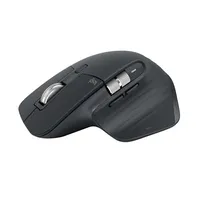
If you’ve never used Logitech’s MX Master mice before, I’d argue the biggest difference to your productivity these pointers can bring is the horizontal scroll wheel that sits close to where you rest your thumb. You can keep it as is for scrolling spreadsheets or documents horizontally, or you can customise it through the Logitech Options software for a different action like scrolling through your open internet browser tabs or zooming in and out of your video editing software’s timeline. And yes, the 3S can do that too.
Speaking of customisation, the 7 buttons on the 3S can be remapped to make them do whatever you need to do to streamline your workflow. For example, as a Mac user who doesn't always have access to Apple's Magic Trackpad, I’ve mapped one of the buttons to trigger Mission Control to help me navigate through all my windows, but I’ve mostly kept everything else as the default inputs.
One complaint I have with my MX Master 4 is that it’s heavier at 150g, compared to the 3S’s 141g. You’d have less wrist and forearm fatigue with the latter over an 8-hour workday. The MX Master 4 is also larger than the 3S (128.2mm x 88.4mm x 50.8mm vs 124.9mm x 84.3mm x 51mm), so those with smaller hands are better off with the predecessor.
Admittedly this isn’t the cheapest the Logitech MX Master 3S has been — that was AU$95 in December last year — but this offer isn’t far off and is arguably one of the better mouse deals on Amazon right now.
