





TechRadar Verdict
Don’t be fooled by this camera’s cute looks, complete with removable bunny ears. Despite looking like a gadget for kids, it’s actually a very advanced piece of kit intended for the home security professional. A 360-degree pan-and-tilt model ideal for tracking human or pet movement around a room, the Aqara features a dual-lens system, comprising 4K wide angle and 2.5K telephoto lenses. It also boasts a wide range of AI features including, somewhat unusually, the ability to detect different sounds such as a baby crying or a dog barking. Billed as the world’s first Matter 1.5-certified camera, the Aqara G350 is compatible with all the major smart home ecosystems including Apple HomeKit Secure Video, Google Home, Alexa and Samsung SmartThings. Footage can be recorded in the cloud with a HomeGuard subscription or on a MicroSD card (not provided).
Pros
- +
Playful, family-friendly design
- +
MicroSD card slot for video storage
- +
Compatible with multiple ecosystems
Cons
- -
Subscription needed for advanced AI features
- -
Quite fiddly menus
- -
Camera mount and USB plug not provided
Why you can trust TechRadar We spend hours testing every product or service we review, so you can be sure you're buying the best. Find out more about how we test.
Aqara Camera Hub G350: two-minute review
Owned by Shenzhen’s Lumi United Technology, and backed by Chinese mobile phone/EV giant Xiaomi, Aqara offers a wide range of AI-driven automation products including sensors, cameras and controllers. I’ve previously reviewed the Aqara G100, a versatile indoor/outdoor security camera which I was very impressed with. However, I was less impressed with the company’s battery-powered video doorbell, the Aqara G410 Doorbell Camera Hub, which not only looks big and clunky but isn’t waterproof — surely a failing for any doorbell camera?
The Aqara Camera Hub G350 under review here is very different. Finished in white, it is — unlike the company’s doorbell camera — very well designed. Though the removable bunny ears may not be everyone’s idea of great design, it is at least good fun and does feel like a piece of tech you wouldn’t be ashamed to put on a bookshelf or fireplace. However, it’s much more than a pretty face. It’s also a heck of a powerful and versatile home security camera.

Unlike most indoor cameras, the G350 features a motorized base which provides a 360-degree field of view with zero blind spots. This is paired with a dual lens setup that allows you to track a subject (human or animal) using the wide-angle lens or zoom in to an area of detail using the telephoto lens. A 9x hybrid zoom is provided which really does allow you to get close up to your subject with reasonable picture quality.
Like all security cameras these days, setup requires downloading an app (the Aqara Home app) and scanning a QR code from the back of the device. However, rather confusingly, this camera features three QR codes — two on the back for setting up the camera with the app and with third party Matter devices (it supports Matter 1.5) and one on the base for Apple HomeKit Secure Video. While you can use the Matter QR code for connecting to Apple devices, it will currently only connect as a bridge rather than a camera.

Importantly, if you are using Apple HomeKit Secure Video to control the Aqara camera via your iCloud subscription you will only be able to view footage with a maximum resolution of 1080p. You will also not be able to access many of the camera’s features including its pan and tilt options. Instead, if you want full functionality you will need to use the much more advanced Aqara app instead.
Like many security devices these days, the Aqara G350 is packed full of AI features. This includes sophisticated on-device detection that can identify different types of motion, from humans and pets to specific hand gestures for home automation. Particularly impressive is the AI sound detection, which can recognize and alert you to specific audio events such as a baby crying or a dog barking. This makes it an ideal choice for parents and pet owners who want more nuanced alerts rather than generic ‘noise detected’ pings.

While Aqara provides a monthly subscription option for storing video clips for up to 90 days and some advanced AI functionality (including AI video search — see below), the good news is you don’t have to pay a fee to use most of the device’s features, as you do with some manufacturers. Instead, you can store video clips on a MicroSD card of up to 512GB (not provided) and still use most of the product’s extensive feature list. For those worried about storing videos of loved ones in the cloud for cybersecurity reasons, investing in a MicroSD card is not only a cheaper option but a potentially more secure one too.
Aqara Camera Hub G350: subscription options
HomeGuardian One: £3.99 (about $5.40 / AU$7.60) per month, or £39.99 (about $54 / AU$76) per year for a single device. Includes: 90 days of video event history, person, animal, vehicle, package, and fire detection.
HomeGuardian Unlimited: £7.99 (about $11 / AU$15) per month, or £79.99 (about $110 / AU$150) per year. Same as above but also includes Premium AI Event Detection including AI Video Summary (one sentence summary of videos) and AI Video Search (enter keywords to search video). Support for unlimited cameras in one home.
Aqara Camera Hub G350: price and availability
- How much does it cost? $139.99 / £139.99 / AU$249
- When is it available? Since March 2026
Generally, security cameras are not expensive to buy. For example, EZVIZ now offers a 4K indoor camera with pan and tilt for under £50 (about $67 / AU$95) on Amazon in the UK, so £139 (about $190 / AU$270) does seem slightly pricey at first glance.
However, one key difference is that the Aqara offers a dual lens system, complete with 133° wide-angle lens and 43-degree telephoto lens for zooming in to areas of detail. Another is that it’s more than just a camera. It’s really a central hub for your smart home, supporting Matter 1.5, Zigbee 3.0 and Thread formats. It also works with all the major smart home ecosystems including Apple Home, Alexa, Google Home and Samsung SmartThings. This makes it a truly versatile piece of kit.
While this level of integration might not be essential for everyone, for those building a smart home system comprising different components such as window locks, lighting, switching and smart locks it is extremely useful.
- Value score: 3.5/5
Aqara Camera Hub G350: design
- Solidly built
- Playful design with removable bunny ears
- Can be mounted on the ceiling (with additional hardware)
When thinking about this camera’s design, it’s difficult to overlook the distinctive bunny costume (the ears of which are bigger than those of its predecessor, the Aqara Camera Hub G3). Yet focusing extensively on its removable plastic cover is to do the Aqara Camera Hub G350 a major disservice as it’s actually a very well-designed camera indeed.
Not only does it look good (with or without bunny ears) for placing in your home, it’s also solidly built. One feature I like is the privacy mode which physically moves the dual lenses, which look like open eyes, to the back of the device’s ‘head'. These are replaced with two sleeping eyes with the MicroSD card slot forming a mouth underneath. Again, it’s a bit of fun but it clearly shows the camera is asleep (privacy mode can be scheduled for certain hours of the day — for example when you know lots of family members are going to be in the room).

A small button on the front is usually illuminated blue during operation, but turns red to indicate it is recording while next to the two lenses is a microphone for two-way communication (a speaker can be found on the camera’s rear). A USB-C port can be found on the base, and a USB-C to USB-C cable is provided, but you will need a USB-C plug unless you use a different cable.
Finally, for those looking to mount the camera on a wall or ceiling, the camera features a standard ‘tripod-style’ threaded screw hole on the base. However, the actual bracket and mounting hardware (wall plugs etc) are sold separately for non-bookshelf installation.
- Design score: 5/5
Aqara Camera Hub G350: performance
- 4K image quality
- Overly complex menus
- Very useful
It’s really when it comes to performance that the Aqara justifies its higher-than-average price tag. During testing I used the camera in my home office, where I wrote most of this review, and in the kitchen/dining room where my dog Poppy was recovering from a serious operation.
The ability to track her every move automatically using the pan-and-tilt motor was invaluable. I could easily check that she wasn’t getting her stitches caught in the furniture, even when she wandered out the initial field of view. What’s more, using my phone to draw a box on the screen, I was able to zoom in on areas of the frame I wanted to focus more clearly on.


Thankfully, the 360-degree rotation is nearly silent, which isn’t so much of an issue when monitoring my dog, but could be if you are using the camera as a baby monitor and you don’t want to wake a sleeping child.
Whereas many manufacturers now put their most advanced features behind a subscription paywall, the vast majority of those on the Aqara G350 are free — at least for now. For example, you can set up the device to get alerts if it hears a baby crying or dog barking, or if you want it to distinguish between different types of motion such as a person or a pet. It’s even possible to add faces to the device’s face management system so that it recognizes certain people.


However, you will have to pay a subscription fee if you want more advanced AI functionality such as AI Video Summary that provides a one sentence summary of videos and AI Video Search that enables the device to find certain clips — for example someone wearing a red T-shirt or with blond hair.
Finally, while I mostly used the Aqara app to view images in stunning 4K quality and navigate hundreds of different menu options (including the ability to change the look and feel of onscreen menus) I also connected the camera up to Apple HomeKit Secure Video. Here image quality was limited to the much lower 1080p and I wasn’t able to use the pan-and-tilt or zoom features which are really useful.

However, it was possible to save and record footage using my iCloud+ subscription rather than using a MicroSD or subscribing to Aqara’s Home Guardian service.
- Performance score: 4.5/5
Should you buy the Aqara Camera Hub G350?
Attribute |
Notes |
Score |
|---|---|---|
Value |
More expensive than many of its counterparts because you are paying for the device’s impressive dual-lens system and compatibility with various smart home ecosystems |
3.5/5 |
Design |
Much more than a camera in a bunny costume, the Aqara 350 is a solidly built unit which wouldn’t look out of place in any smart-looking smart home |
5/5 |
Performance |
The Aqara Camera Hub provides high quality images from its 4K wide angle and 2.5K telephoto lenses, as well as offering a wealth of useful AI features. |
4.5/5 |
Overall |
A versatile 360-degree camera that can be used either alone, or as a hub forming part of a complete smart home system. Combines great 4K performance with striking looks and advanced AI functionality. |
4.5/5 |
Buy it if
Don't buy it if
Aqara Camera Hub G350: also consider
| Row 0 - Cell 0 | Aqara Camera Hub G350 |
Ring Pan-Tilt Indoor Camera |
Blink Mini 2K+ |
Eufy 4K S330 security camera |
MP |
Subscription price |
From £3.99 a month |
From £4.99 a month |
From £2.50 a month |
None |
Row 1 - Cell 5 |
Viewing angle |
360° pan |
360° pan |
138° horizontal |
360° pan |
Row 2 - Cell 5 |
Network connection |
Wi-Fi (2.4GHz/5Hz) |
Wi-Fi (2.4GHz) |
Wi-Fi (2.4GHz) |
Wi-Fi/4G |
Row 3 - Cell 5 |
Audio |
Two-way audio |
Two-way audio |
Two-way audio |
Two-way audio |
Row 4 - Cell 5 |
Video |
3840 x 2160 (wide angle lens), 2560 x 14440 (telephoto) |
1080p |
2K video resolution (2560 x 1440 pixels) |
4K video resolution |
Row 5 - Cell 5 |
Power |
Mains |
Mains |
Mains |
Battery, solar |
Row 6 - Cell 5 |
Hardware price |
£139 |
£35 |
£39 |
£189 (with solar panel) |
Row 7 - Cell 5 |
If you're not sure whether the Aqara Camera Hub G350 is right for you, here are two other options to think about.
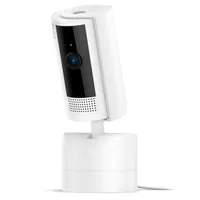
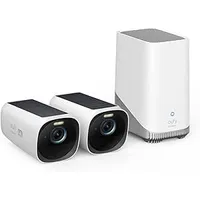
How I tested the Aqara Camera Hub G350
- I used the camera indoors in two locations
- I installed it myself
- The camera was connected to the Aqara app and Apple Home
Initially, I set the Aqara up in my office to get a feel for how it worked and how to use the pan and tilt functionality to focus on certain parts of the room. However, it soon became apparent that this camera really thrives in a busy environment where you can really put the motion tracking to the test.
So, I put it in the kitchen where it could track other family members as well as my dog who was recovering from an operation. This perhaps wasn’t as straightforward as I’d hoped as it required reinstalling to operate on a different Wi-Fi network, but that didn’t take too long.
After a while, other family members began to find the camera a little ‘big brother-y’ in the way it tracks you with its eyes as you move across the room (though it is exceptionally quiet). However, it was highly effective at monitoring the dog while everyone else was out during the day and I placed it in privacy mode during the evening when everyone was home.
For more info, check out how we test, review, and rate products at TechRadar.
