TechRadar Verdict
While I’m generally impressed with the design and some of the features, including the teleprompter, news feed, and occasionally useful Even AI, I was left with a feeling of, “Why do we need these?” The quick access to some information — such as it is — is not life-altering, and too many of its other features are subpar and would force me to pull out my phone, which, of course, defeats the entire purpose of smart glasses. If I’m going to pay that much for a pair of smart glasses — and invest in prescription lenses for them (another $150 to $350) — I want the full raft of capabilities (yes, including a camera) and deep access to all the features of my smartphone so that my smart glasses feel truly smart and useful.
Reasons to buy
- +
No camera!
- +
Stylish and comfortable
- +
Teleprompter is a cool feature
Reasons to avoid
- -
Touch operation is finicky
- -
Software lacks true hooks into your smartphone
- -
Maps intentionally lacks driving directions
Why you can trust TechRadar We spend hours testing every product or service we review, so you can be sure you're buying the best. Find out more about how we test.
Even Realities Even G2 Smart Glasses: 30-second Review
It's a weird time for smart glasses. After a moment in the sun (as sunglasses!) where companies like Meta sold millions of frames to willing customers seeking on-their-face intelligence and the ability to life-log with ever-present, eyebrow-level cameras, the worm has turned. Now people refer to smart glasses with cameras as "pervert glasses". Even Realities Even G2 smart display glasses (Even Realities G2) would seem to be the antidote to those concerns.
The relatively stylish specs live up to the smart expectations by connecting you to phone-based AI and delivering useful information to your eyes where and when you need it, but without the concerning cameras.
In some ways, Even Realities' approach is rather quaint. Instead of Augmented Reality, you get binocular, monochromatic waveguide displays that offer eye-level access to notifications, notes, translations, news, even a teleprompter, that only you can see. The imagery is sharp, but not rich. It's glanceable info that could be handy in a pinch, but is also stuff you can easily ignore.

These are smart lenses in the narrowest sense. They have four mics for listening, but no speakers. The microphones let you summon the AI (Even AI), which lives on the Even Realities iPhone app, but with no speakers, Even can't talk back to you. Even AI's responses appear before you as text on the waveguide screens.
The AI is not quite good enough to fully control the glasses, but that's where the gestures come in. While Even's G2 glasses look much like any other analog pair you'd wear, each arm ends in a large pill shape that houses the batteries and touch sensors. If you don't want to keep touching behind your ear, you can buy the $249 Even R1 ring, which Even Realities did supply to me. You wear the R1 on your index finger and use your thumb to recreate the taps, long presses, and swipes you'd do on the glasses. The Ring also records temperature, heart, and step measurements, readouts of which you can view on the glasses.
It's easy to see (pun intended) how useful these could be for turn-by-turn directions delivered from the app's map to the screen, and teleprompter text gently scrolling up, but inconsistent operation, missing features, finicky controls, and an overall feeling of, "Do I really need this?" left me wondering if half-way smart glasses are worth making the trip at all.
Even Realities Even G2 Smart Glasses: Price and availability
Even Realities G2 smart glasses were unveiled earlier this year and are now shipping for $599 / £599 / AU$649. If you need prescription lenses, which they do support, be sure to factor that into the price (expect at least another $150). My review unit arrived with my prescription in place, and I often forgot I was wearing them.
Even in monochrome, in-lens displays are a premium feature, which accounts for a price tag that’s considerably more than, say, Meta’s recently launched $299 EssilorLuxottica smart glasses, which do feature a camera and speakers.
- Value: 3.5/5
Even Realities Even G2 Smart Glasses: Design
- Thin, light, and durable
- Premium materials
- Mostly look like regular glasses
- Comfortable
- Stem bulbs look a little odd but are mostly hidden


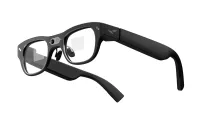
Even Realities G2 display smart glasses are easily the most normal-looking smart glasses I've ever seen or worn. The gray titanium-and-magnesium frames are thin, light, and quite stylish. Where many smart glasses are bulky, heavy, or uncomfortable (or look ridiculous), Even Realities G2 frames are as comfortable as my regular prescription glasses. Yes, the stems end in pill-shaped nodules that house sensors and the batteries, but those elements are mostly hidden behind the ears.
The glasses ship with extra stem covers for comfort and a larger set of nose pads, though I was fine with the default set. There’s also an included charging case.
I didn’t think they looked bad, though my wife, who noticed that, unlike standard glasses, the fronts of the G2 lenses are flat and reflective, called them weird. “They don’t have cameras," I added hopefully.
I asked her if she could see anything on the lens, meaning the display I was viewing. She said no, but still remained unmoved. Some people are never gonna love smart glasses of any stripe, even ones I think look almost like regular glasses.
- Design score: 4/5
Even Realities Even G2 Smart Glasses: Display
- Solid waveguide technology
- Low resolution but mostly fit for purpose
- Virtually large enough to be useful
- Plenty bright


Even Realities G2 glasses use micro-LEDs embedded in the frames and waveguide technology, which basically guides the 640 x 350 monochrome (day-glo green) imagery in front of both eyes. Remarkably, the embedded displays are almost imperceptible to the naked eye (even with content running on them).
With my prescription lenses, the single-floating-image effect is perfect. The bright green imagery looks like a monochrome, 15-inch display floating in front of my face. It sits slightly above my eyeline, meaning I could easily look below the display to see what’s in front of me or just slightly up to see the display. It’s not so high on the frame that if you’re looking at the display, someone will think you’re not looking at them.
Even in daylight, the 1,200 nit display is clear, sharp, and very viewable. There are settings to adjust the display brightness, and while the resolution sounds low, you don’t need much for what is essentially CRT-grade imagery.
- Display score: 4/5
Even Realities Even G2 Smart Glasses: Software and Performance
- There aren't a lot of features
- Main menu access takes practice
- Teleprompt is a highlight
- News feed is nice to have
- Translate could be useful if you remember to pre-set your language choices for the location
- Navigation purposely is missing a key feature
- No real access to smartphone features
- AI shows promise but has noted limited access

While you might imagine a certain level of complexity with smart glasses, Even Realities keeps it pretty simple. The Dashboard, which you raise with a double tap on one of the stem sensors (or on the optional ring), reminds me of one of those old 1990s personal assistant devices or even a slightly more informative digital clock. There’s a large time readout on the left, with smaller, dare I call them digital watch-like complication elements arrayed around it. At the top is the day and date. To the right is the battery life of the glasses and, if you have it, the R1 smart ring. On the bottom left is the local temperature, and to the right of that is the number of notifications. To the right is a large square news feed.
With another sensor tap, I can open the feed and swipe backwards on the sensor to scroll through it. One more tap opens a news item, which, yes, I can scroll through by swiping on the stem sensor. You can see why someone might want to opt for the R1 ring. Who wants to be touching and swiping near their ear all the time?

Double taps pull you back out of the news feed, all the way to the Dashboard.
One of the less obvious interactions is how you bring up the main menu. I must admit, it took me a while to get the hang of the tap-and-hold gesture to open it. Once you master that — assuming you do — you get just seven options:
- Notifications
- Conversate
- Teleprompt
- Translate
- Navigate
- Dashboard
- Silent Mode
You can swipe up or down to go through them and tap to open one. The gesture-based control system is so finicky that I often ended up in the wrong place, and there’s no confirmation; the system simply starts, for instance, “Coversate,” which is basically a speech-to-text note-taking app.
More interesting is Teleprompt, the one feature that could potentially be the reason someone invests in these glasses. As the name suggests, it puts a teleprompter that no one else can see in front of your face.

To test it, I imported some text into the app (it supports txt, Docx, and PDFs). The app lets you expand or contract the margins, which controls the length of each line you read, but it lacks a way to control the line spacing — a key teleprompter feature. On the glasses, the text appears in front of you, and voice recognition detects you saying each word. As a result, there’s no need to mess with speed or stop and start the text scroll. It’s all controlled by your voice. That’s pretty cool.
Unfortunately, you might look a little odd while using it. I took a picture of myself while reading a script and noticed that I was looking up instead of at the audience in front of me. The key to teleprompters is that they're usually projected over, say, a camera lens, so you are reading while looking directly into the camera. To use Even Realities G2 for this task, you have to look up just a little bit.

Navigate launches turn-by-turn directions, but you can’t do much until you put locations in the iPhone app’s navigation section. I added my home and office addresses and then used them to start navigating from my current location. The only two navigation options are walking or cycling. That's because Even Realities intentionally excluded driving directions, as they might be too distracting in a heads-up display. I disagree with their exclusion.
Glancing at monochrome, see-through, heads-up directions while driving should not be distracting, but I'm not going to argue with the safety concern. Still, I suggested to them that they think about enabling driving directions that can be reviewed before starting the trip and then use detection of the iPhone's Driving Mode to disable that feature as soon as you start driving.
As for what navigation looks like, there’s a small turn-by-turn map on the lower left, distance and time to destination on the upper right, time and a walking icon on the upper left, and next turn on the lower left. Another tap on the sensor shows the full map route, which is a bright green line on a dimmer green map with no labels. I'm not sure how useful that is.
The Translate feature works pretty well, although despite the onboard mics, it does not auto-detect languages. Instead, I had to choose the to-and-from-translation languages in the app. Then, when I played a Spanish-language video, I watched the live translation on screen. Basically, before you go to a different country, you’d want to pre-load the appropriate language settings.

Silent mode instantly turns the G2 frames into dumb glasses, silencing all notifications and ensuring the screen doesn’t turn on, which it can even when you tip your head up. To un-silence it, you put one finger on each sensor.
Of course, there is AI, in the form of Even AI, which I summoned by saying, “Hey Even”. It wasn't the best at listening and getting my requests right, and there are many, many things it cannot do. Even AI has no access to your phone at large, just the app and its relatively limited features.

I did have some success. For instance, when I asked about the latest news on tech companies, I got a nice summary that I could read on the display.
I struggled to get notifications working, though. I was unaware of texts, Slacks, and incoming emails – basically anything I really needed.
Things did not improve when I tried to get clever. I had this idea that I could have the shopping list in my iPhone Notes app float in front of me while I walked around the grocery store. Yet, when I asked Even AI to read my files from the Notes app, it told me it couldn’t access them, but I could access the App’s Quick List. So I tried to build a Quick List, but every time I tried, the glasses would state “Quick List saved” before I even gave it a list. Then it had a bug where it told me the “Command execution” failed. Not useful.
- Performance score: 3.5/5
Even Realities Even G2 Smart Glasses: Battery
- Small-ish battery on the glasses (to save the design)
- Sizable battery is included in charging case

Even Realities G2 smart glasses are equipped with a 192mAh battery rated to last two days. My first charge ran out after three days of intermittent use. The included charging case has a 2,000mAh battery for up to seven recharges.
Considering there’s no camera, I would expect a longer battery life, but I think Even Realities purposely sacrificed some battery capacity for its exceptionally svelte style.
- Battery score: 3.5/5
Should you buy the Even Realities Even G2 Smart Glasses?
Attribute |
Comment |
Score |
|---|---|---|
Value |
A bit pricey for what they do. You end up paying a premium for the impressive waveguide technology and their normal-glasses style. |
3.5/5 |
Design |
The rare smart glasses that's thin, light, and kind of attractive, if you ignore the oddness of the flat lenses (only on the front). |
4/5 |
Display |
The low resolution waveguide displays are used to mostly good effect here. Everything is bright, sharp, and readable. |
4.5/5 |
Software and Performance |
Even Realities software and operation on the G2 smart glasses is a true mixed bag, with inconsistent performance and only occasional delight. The relatively spare features do not really sell it as a must-have wearable. |
3.5/5 |
Battery |
Tiny batteries on the glasses can stretch to a few days use, but it's the charging case that saves the day. |
3.5/5 |
Buy it if…
Don’t buy it if…
Also consider
How I tested the Even Realities G2 display smart glasses
I spent the last week or so wearing these glasses instead of my normal prescription eyewear. I tried all the features and sometimes used the smart ring to control them.
- First reviewed September 2026