





The best gaming monitors on the market today will give your gaming setup the visuals it deserves, whether that be on PC or console. Not just in sharp image quality, but also with blazing fast refresh rates, ultra-low response times, and most importantly, for a price that's worth it. With years of testing under my belt, I'm here to help you find the right monitor.
We here at TechRadar don't just look at the spec sheet and call it a day. My team of monitor experts has done extensive hands-on testing on the latest displays, checking out brightness, color accuracy, and visual clarity while we play everything from fast-paced competitive titles to visually stunning cinematic games. And yes, we've found many gaming monitors we'd want on our desks.
But there are monitors of all shapes and sizes, from compact 1080p screens with high refresh rates to massive 4K ultrawide displays with glorious OLED panels. That's why I've narrowed down my top picks for the best gaming monitors of 2026 across three resolutions, various price points, and different display technologies.
Whether it's time for an upgrade or you're looking for a display, our pick of the best gaming monitors will point you towards a display that's fit for your setup.
The best gaming monitors in 2026 you can buy today
Why you can trust TechRadar We spend hours testing every product or service we review, so you can be sure you're buying the best. Find out more about how we test.
The best 1080p gaming monitor overall


✅ You're hunting for value on a budget: Go with the Legion R25f-30 if you're looking to get the most bang for your buck in a 1080p monitor.
✅ You need to keep up with the competition: It's not quite as quick as my pick for the best 1080p monitor overall, but at 280Hz refresh and a 0.5ms response time, this panel still packs a punch.
❌ You might upgrade your PC soon: If you're thinking about upgrading soon, your new specs might line up better with a more premium option.
❌ You're looking for extra features: A smart monitor with great speakers and a place for your headset the R25f-30 is not. It trades those quality of life boons for solid performance at an entry-level asking price.
If you’re shopping for the best 1080p gaming monitor right now, the Lenovo Legion R25f-30 is hard to beat. For an accessible price, it delivers performance usually found in higher-end models. The 24.5-inch VA panel runs at 280Hz with a 0.5ms response time, giving ultra-smooth motion for fast-paced competitive games.
It covers nearly all of the sRGB and about 90% of the DCI-P3 color gamuts for vibrant, accurate color, plus it includes AMD FreeSync Premium to reduce tearing and stuttering.
There are compromises for the price, though. The design is modest, so don’t expect flashy aesthetics or premium extras. The built-in speakers are weak, and there are limited USB ports and built-in on-screen overlays. It also trades feature breadth for value, focusing more on what gamers need rather than what looks cool.
If your priorities are high refresh, low lag, good image quality, and staying under budget, this monitor offers exceptional bang for buck. It beats many rivals in its price range for raw gaming performance and should be strongly considered if you're after an amazing price-to-performance ratio.
Read our full Lenovo Legion R25F-30 review
The best 1440p gaming monitor overall


✅ You want blur-free gaming with value: With a 280Hz adaptive refresh rate and 1440p resolution, the InnoCN GA27S1Q is one of the few monitors that truly delivers both clarity and speed for competitive play at this price.
✅ You prioritize ergonomic comfort and connectivity: The fully adjustable stand and dual HDMI 2.1/DisplayPort 1.4 inputs make this an easy fit for multi-device setups and long gaming or work sessions.
❌ You're an HDR enthusiast: Despite its VESA DisplayHDR True Black 400 certification, the GA27S1Q’s HDR mode is limited by modest brightness and lacks the deep contrast of OLEDs.
❌ You need a bright display: While it boasts sharp details and colors that pop, 250 nits of brightness is a little dim to really capture it all.
If your goal is a 1440p gaming monitor that deftly balances sharp visuals and competitive speed, the InnoCN GA27S1Q stands out with its class-leading 280Hz adaptive refresh rate. This high-speed panel delivers the motion clarity and low input lag needed for fast-paced shooters and esports, without sacrificing the crispness that makes 1440p a real upgrade over 1080p.
What sets the GA27S1Q apart for gamers who also stream or create is its exceptional color coverage: 98% DCI-P3, 100% sRGB, and 99% AdobeRGB. Whether you're editing highlights, designing overlays, or just want games to pop, this monitor ensures colors look vivid and accurate right out of the box.
What's more, the fully adjustable stand, offering height, tilt, swivel, and pivot, makes long gaming or even work sessions comfortable. Dual HDMI 2.1 plus two DisplayPort 1.4 inputs mean you can connect multiple devices, from consoles to a work laptop, with no hassle.
For mid-to-high-end gamers who want a monitor that looks sharp, plays fast, and doesn’t compromise on versatility, the InnoCN GA27S1Q hits a sweet spot, especially with its impressively thin design. It's a dream to game on, but watch out for its low brightness; at 250 nits, there are plenty of other brighter monitors around.
Read our full InnoCN GA27S1Q review
The best 1440p budget gaming monitor


✅ You want the most value for your money: The Gigabyte GS32QC delivers a clear 1440p display alongside a solid 165Hz refresh rate. All at an affordable asking price.
✅ You need a lot of screen real estate: At 31.5 inches, this is no small monitor. The GS32QC is a great choice for immersive single-player games and settling in for movie night.
❌ You need an adjustable stand: The stand on offer here only lets you tilt the screen up and down - no height adjustments or portrait more here.
❌ You're looking for extra features: Like most of the budget options on this list, the GS32QC had to make some sacrifices to keep the asking price down.
If you want the best budget 1440p gaming monitor going, the Gigabyte GS32QC delivers more than enough for its price.
It offers a 31.5-inch curved panel with 2560 x 1440 resolution and a refresh rate of 165Hz, which you can overclock to about 170Hz. With FreeSync Premium support to reduce screen tearing, it also has a very fast 1ms response time and covers about 109% of the sRGB color gamut for vibrant color.
You won’t get flashy extras, such as USB ports or built-in speakers, and its adjustability only allows tilting the monitor up and down.
The design is simple, with no RGB or aggressive styling, focusing instead on functional performance. HDR is supported but requires tweaking to look decent, and its default image quality is flat. Still, SDR performance is strong: deep blacks, bold colors, and good contrast make everyday gaming and general use look very good.
If you’re on a tight budget but want a 1440p gaming monitor that punches well above its weight, the Gigabyte GS32QC is arguably the best value out there.
Read our full Gigabyte GS32QC review
The best 1440p premium gaming monitor


✅ You're a competitive gamer: The MSI MPG 341CQR QD-OLED X36’s 360Hz refresh rate and QD-OLED panel give a competitive edge with fluid, blur-free motion, which is ideal for high-level gaming.
✅ You want an ultrawide main monitor: At 34 inches and with a wide 21:9 aspect ratio, this 1440p monitor will give you all the screen real estate you could want.
❌ You're after the same specs for less: This one is a pricey ultrawide monitor, even with its 1440p resolution. If you're looking for high refresh rates in an OLED panel, you'll find other options.
❌ Your room gets lots of sunlight: That glossy screen finish can reflect light sources, which may distract in sunlit spaces, even though the image quality is otherwise superb.
The MSI MPG 341CQR QD-OLED X36 is an outstanding choice if you're after all the premium perks a curved, ultrawide gaming monitor could offer. Gorgeous OLED detail? Check. Remarkably fast refresh rate? It's got it. A super-bright panel? You know it. Just watch out for that price.
Speed is where this monitor truly excels. With an incredibly low 0.03ms response time paired with a 360Hz refresh rate, it delivers exceptional clarity during rapid action. In our hands-on tests, every fast-paced game felt razor-sharp and free from blur, making it a top pick for those who demand split-second precision.
HDR performance is another highlight. With an impressive measured peak brightness of 1,300 nits in HDR, the panel produces jaw-dropping contrast and vivid highlights. Whether you're gaming in bright daylight or watching movies in a dim room, the colors and detail remain consistently stunning.
What's more, premium monitors should offer premium connectivity, and the 341CQR QD-OLED X36 delivers: DisplayPort 2.1, dual HDMI 2.1, USB-C with 98W charging, and multiple USB-A ports make it easy to use with gaming PCs, work laptops, and peripherals alike.
The one trade-off is the glossy finish. It's brilliant for image quality but prone to reflections in bright rooms. Regardless, the sense of depth, vibrancy, and fluid motion makes this MSI gaming monitor feel like a true leap forward for anyone chasing ultimate gaming and creative visuals.
Read our full MSI MPG 341CQR QD-OLED X36 review
The best 1440p ultrawide gaming monitor


✅ You're building a panoramic gaming setup: The Evnia 49M2C8900’s 32:9 aspect ratio and vast 5120x1440 resolution in a 49-inch size offer a panoramic view that makes multitasking and immersive gaming feel truly expansive.
✅ You love colors that pop on screen: Its QD-OLED panel delivers a level of color vibrancy and contrast that makes both games and movies look stunning compared to standard LED or mini-LED displays.
❌ Top-tier HDR performance is a must for you: The Evnia is less sharp and not as bright in HDR as its competitors, making it less ideal for those who demand top-tier HDR or razor-sharp detail at this size.
❌ You don't have the space: At 49 inches, not only will you need a wide enough desk to fit this on, but also room to make sure it's not being squished in tight rooms.
If you want a gaming monitor that delivers the most expansive ultrawide sweep and multitasking real estate available, the Philips Evnia 49M2C8900 stands out with its 32:9 aspect ratio and huge 5120 x 1440 resolution. This format creates an uninterrupted, panoramic workspace that works for both immersive gaming and side-by-side productivity.
The Evnia’s QD-OLED panel brings a real leap in image quality over typical LED and mini-LED monitors. Colors are rich and vivid, giving movies and single-player games a cinematic depth that goes beyond conventional screens.
It's only made better with its fast 240Hz refresh rate and low 0.03ms response time for buttery smooth gameplay. In hands-on play, the Evnia’s combination of high refresh and low input lag made even demanding titles feel fluid and snappy, a real asset for anyone who values quick reactions and visual clarity.
Our reviewer wasn't too impressed with the Amboglow RGB features, as on a display this wide, the ambient lighting effect feels spread too thin. Plus, the Auto Brightness Limiter can make adjustments that make the display look far too dim.
Those aren't massive dealbreakers, though, and after using this massive screen for a while, you'll find it hard to go back to smaller displays. If your priority is maximum ultrawide immersion paired with credible gaming credentials, this 1440p ultrawide monitor is the one to beat.
Read our full Philips Evnia 49M2C8900 QD-OLED review
The best 1440p OLED gaming monitor

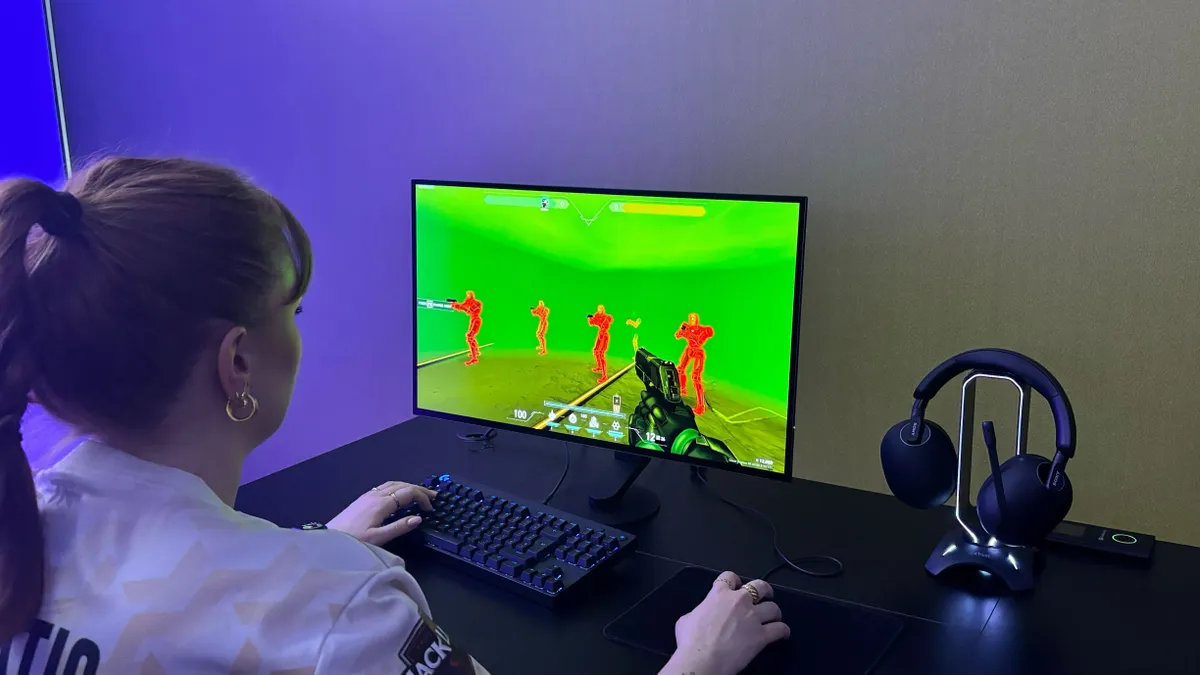


✅ Performance is paramount: That 480Hz refresh rate and 0.03ms response time is no joke. Plus, you still get that OLED quality.
✅ You want stellar image quality without 4K: The Sony Inzone M10S is about as good as 2K gets. If you're not quite ready to make the leap to the resource-intensive and often expensive 4K mark, this is a fantastic compromise.
❌ You don't play online games: All of the performance-heavy metrics will be wasted on single-player story driven narratives or easy-to-run indie titles like Megabonk.
❌ You won't take care of an OLED display: OLED burn-in is very real, and if you're not keen on keeping up with the maintenance required, you're going to have a bad time.
If you want the best OLED 1440p gaming monitor, the Sony Inzone M10S is tough to beat. It brings together a 27-inch QHD (2560 x 1440) OLED panel with a blistering 480Hz refresh rate and an ultra-fast 0.03ms gray-to-gray response time, which means fast-paced shooters feel exceptional no matter how chaotic the match gets.
The 1,500,000:1 contrast is jaw-dropping thanks to OLED’s true blacks, and it’s bright enough that HDR pop feels real rather than just gimmicky.
Sony doesn’t just focus on raw specs, though. The Inzone M10S includes some added features that serious players will appreciate, including a '24.5-inch mode' that gives you the feel of a tournament-standard display when desired, while modes like FPS Pro+ help key visuals like enemy outlines stand out.
The stand is compact yet solid, and things like swivel, height, and tilt adjustments are very well implemented.
On the flip side, this kind of performance comes at a premium price, and you’ll need a very strong GPU to push many games toward the FPS required to fully take advantage of the 480Hz.
Read our full Sony Inzone M10S review
The best 1440p mini-LED gaming monitor


✅ You want superb image quality: Cooler Master's Tempest GP2711 is an excellent choice if you're looking for a mini-LED display without breaking the bank.
✅ You play, work, and watch: This monitor works beautifully as an all-in-one solution for gaming, movies, and productivity.
❌ You want a robust feature set: There isn't much to the Tempest GP2711 beyond what you see once it's set up.
❌ You care about resolution more than refresh rate: At around the $500 mark, you're paying for the sweet spot of a mini-LED panel and 165Hz refresh rate here. But for around the same price, you can land a solid 4K monitor with slightly weaker specs.
The Cooler Master Tempest GP2711 is the go-to pick if you're in the market for a 1440p mini-LED display. It combines a 27-inch VA panel with mini-LED backlighting and quantum dot enhancement film to deliver excellent image quality for its price.
With HDR1000 capability and over 500 local dimming zones, it gives deep blacks, strong contrast, and vivid highlights without the usual halo effects.
In SDR mode, it reaches around 600 nits, and in HDR, it peaks even higher, making visuals pop whether in bright or mixed lighting. The color gamut coverage is wide, spanning near-full DCI-P3-95% and excellent sRGB performance, so both gamers and creators will benefit.
Performance-wise, it offers a 165Hz refresh rate with a 1ms MPRT and roughly 4ms GtG response time, which keeps fast motion smooth and helps competitive titles feel snappy. The monitor also includes handy extras like a KVM switch so one keyboard and mouse can work across multiple devices, display overlays like FPS counter or crosshairs, and good ergonomic adjustability.
Though built-in speakers are modest and local dimming can sometimes be aggressive, these are relatively small trade-offs given the quality of the visuals on offer.
Read our full Cooler Master Tempest GP2711 review
The best 4K gaming monitor overall


✅ Clarity comes first and foremost for you: At 27 inches, a 3840x2160 resolution, and 240Hz refresh rate, you're going to have a hard time finding a better display than the Alienware AW2725Q QD-OLED.
✅ You use HDR: This monitor has fantastic HDR capabilities thanks to its QD-OLED panel and glossy finish.
❌ You're hunting for 4K on a budget: A low price tag is not a plus for this monitor - but you get what you pay for.
❌ You need more screen space: A 27-inch monitor certainly isn't small, but in the realm of 4K displays, it's certainly not on the bigger side. If you like to multitask on a single-monitor setup, this isn't the best choice.
If you want the best 4K gaming monitor going, look no further than the Alienware AW2725Q QD-OLED. It offers a 27-inch QD-OLED panel with 3840×2160p resolution and a blazing 240Hz refresh rate alongside a 0.03 ms gray-to-gray response time, making motion crisp and input lag imperceptible.
It delivers some of the highest pixel density of a 4K display, so everything from fonts to game textures looks ultra-sharp. Its HDR performance is likewise outstanding, especially in darker scenes where contrast and deep blacks really shine. The color reproduction is vivid thanks to quantum dot OLED tech and wide DCI-P3 color gamut coverage.
Additional features include solid ergonomics, a robust stand, multiple connectivity options like DisplayPort and HDMI 2.1, and a three-year warranty that helps ease concerns about burn-in.
That said, the monitor is expensive, and while its full-screen brightness is solid, it isn’t the brightest in brighter rooms, so ambient light can impact its HDR pop. The semi-gloss screen finish also means reflections and glare might be more noticeable in well-lit settings.
Finally, to fully saturate the 240Hz refresh rate at 4K, you're going to need a very powerful and expensive graphics card, which can greatly increase the practical expense of this upgrade.
Read our full Alienware 27 AW2725Q review
The best 4K budget gaming monitor


✅ You want 4K clarity for less: You don't get a 240Hz refresh rate or a crisp OLED panel, but you do get 3840x2160 resolution for an affordable price.
✅ You'll make use of KVM: Since this monitor is a solid jack of all trades, it pays to have multiple systems (like a gaming PC and work laptop) to swap between with the built-in KVM capabilities.
❌ You need a higher refresh rate: 144Hz is definitely respectable, but if you're trying to push 200+ FPS in a competitive game, this isn't the best choice for you.
❌ Your PC isn't up to snuff: 4K resolution, even at 60 FPS, can be very taxing on your system. If you haven't upgraded for a few years now, you may be better off with 1440p.
For the best budget 4K gaming monitor, you actually have to look back a bit to the Lenovo Legion Y32P-30.
Despite being a couple of years old at this point, it is still a standout choice thanks to its 31.5-inch IPS panel with 3840×2160p resolution and 144Hz refresh rate, delivering sharp detail and excellent clarity whether you’re gaming or working.
The rapid response time ensures responsiveness in competitive titles, and for a monitor at its price point, the image quality is surprisingly strong, with rich color reproduction and crisp contrast that make both games and movies visually satisfying.
Beyond visuals, the monitor features HDMI 2.1, DisplayPort, and USB-C connectivity, which allow you to plug in a range of devices, while picture-in-picture and split-screen modes make it equally effective for multitasking.
The built-in KVM functionality also adds flexibility for switching between systems with ease. Although its HDR performance is fairly basic and the speakers don’t impress, the Y32P-30 manages to combine speed, resolution, and versatility in a package that remains the best value 4K gaming monitor for budget-minded players.
Read our full Lenovo Legion Y32P-30 review
The best 4K premium gaming monitor


✅ You want the best of the best: The Samsung Odyssey OLED G81SF certainly isn't cheap, but it has the quality and the features to back it up.
✅ You don't want a massive monitor: Many 4K monitors feature panels at 32 inches or larger, but the Odyssey OLED G81SF keeps it modest - perfect for a dual-monitor setup.
❌ You're on a budget: If there's one drawback to the Samsung Odyssey OLED G81SF, it's the price tag.
❌ You don't need 240Hz: While 240Hz is a major win for online esports players, it's overkill for single-player focused gamers and you'd be better off saving some scratch.
If you are after the best premium 4K gaming monitor, the Samsung Odyssey OLED G81SF delivers a remarkable blend of speed, clarity, and visual impact.
Its 27-inch OLED panel features sharp detail and lifelike textures that make both games and media look stunning. With a 240Hz refresh rate and lightning-fast 0.03ms response time, it ensures smooth, responsive gameplay that competitive players will appreciate while still offering breathtaking cinematic immersion.
This monitor also excels in image quality, with OLED’s deep blacks and vivid color reproduction enhanced by Samsung’s anti-glare finish, making it usable in a variety of lighting conditions.
Features like DisplayHDR True Black certification and advanced cooling technology provide both superior contrast and reliable long-term performance.
While it lacks extras like USB-C connectivity, built-in speakers, or KVM support, its core strengths more than justify its premium status.
Read our full Samsung Odyssey OLED G81SF review
The best 4K 4K ultrawide gaming monitor


✅ You're big on multitasking: If you like playing a game while listening to music and chatting on Discord, a massive screen like this will help you keep track of it all.
✅ You want a huge OLED display: Not only does the LG Ultragear GX9 give you clean 4K, OLED image quality, but it also does it at 44.5 inches.
❌ You're not completely sold: This is the perfect monitor for some; for others, it's an expensive, bulky, unnecessary commitment.
❌ You're looking for a big screen on a budget: The LG Ultragear GX9 comes in at $1,999, which is about as far from budget as you can reasonably get.
For the best 4K ultrawide gaming monitor, look no further than the LG Ultragear GX9 45GX950A-B. It sports a massive 44.5-inch OLED panel with a 5120×2160 resolution, giving you more vertical pixels than the usual ultrawide 5120×1440 displays.
The curve is steep (800R), which wraps around your field of view for big, immersive scenes in single-player and open-world titles. With a 165Hz refresh rate, blisteringly fast 0.03ms grey-to-grey response time, and support for variable refresh rates, fast motion feels clean and responsive.
Colour performance is strong, with rich hues, deep contrast, and good HDR via DisplayHDR True Black 400. Built-in speakers deliver decent sound for a monitor, and port selection is generous: USB-C with power delivery, DisplayPort 1.4, and dual HDMI 2.1s, so the GX9 works well with PC and consoles alike. The stand is solid, though adjustments are modest given its size.
It’s expensive, though, and its sheer width can overwhelm in competitive-game HUDs or if your workspace is limited. Still, for those who want breathtaking picture quality, enveloping visuals, and ultrawide scale at 4K, the LG Ultragear GX9 is the premium ultrawide gaming monitor to buy right now.
Read our full LG Ultragear GX9 review
The best 4K OLED gaming monitor


✅ You want punchy OLED visuals: The X24’s true 3840×2160 OLED panel delivers exceptional sharpness and pixel density, making games and content creation look incredibly crisp.
✅ You need clarity and performance: With HDR peaks near 1,000 nits, QD-OLED’s deep blacks, and a 240Hz refresh at 4K, this one's ideal for cinematic and competitive play.
❌ You want maximum value for your budget: To fully take advantage of the X24's premium specs, a high-end graphics card is needed; mid-range systems may not make the most out of its 4K resolution and 240Hz refresh rate.
❌ You're looking for a multitasking machine: Yes, 32 inches is sizeable enough, but at this price, you can also find ultrawide monitors that offer more screen real estate.
The MSI MPG 322UR QD-OLED X24 brings Samsung's third-gen QD-OLED panel technology to the 4K gaming monitor space, and it's a sight to behold. You'll be getting an eye-popping visual treat no matter what's shown on display, only made better with premium gaming features.
With its true 4K resolution and measured HDR peaks at a super-bright 1,000 nits, this monitor is built for gamers who crave razor-sharp visuals and punchy highlights. In our hands-on tests, the X24's QD-OLED tech, with its ultra-fine 4K pixel grid, delivered images that leapt off the screen, and the color vibrance and depth stand out in a way that only QD-OLED can deliver.
A 240Hz refresh rate at full 4K means this monitor doesn't just look spectacular, it feels lightning fast. Motion blur is minimal, and that makes competitive gaming and cinematic story-driven epics look silky smooth. Pair that with 4K visuals, and you can expect sharp details with colors that pop. And a shout-out to its connectivity, with HDMI 2.1, DisplayPort 2.1, and 90W USB-C charging onboard.
Like any gaming monitor, it's not perfect. The glossy finish means more reflections in bright rooms, and while 32 inches is already sizeable, you'll find that ultrawide options (around the same price) deliver more value for multitasking.
For the ultimate 4K OLED experience in a beautifully built screen, the MSI MPG 322UR QD-OLED X24 is about as close to perfection as the current tech we see today allows.
Read our full MSI MPG 322UR QD-OLED X24 review
The best 4K mini-LED gaming monitor


✅ You want 4K, mini-LED: 4K mini-LED displays offer some of the best image quality you can get without having to worry about OLED burn-in.
✅ You create as well as game: With the 1000 nits of peak brightness on offer here thanks to solid HDR, and 99% DCI-P3 and Adobe RGB color coverage, this monitor is a fantastic choice for those who are into photography, videography, or graphic design.
❌ You need something affordable: With the quality and feature set on offer here, it's no surprise that the BenQ Mobiuz EX321UX isn't cheap.
❌ You like online PvP games: While this monitor looks fantastic, there are more performant options at lower price tags. If most of your playtime is in something like Marvel Rivals, you have better options on offer.
For the best 4K mini-LED gaming monitor, the BenQ Mobiuz EX321UX absolutely tops the list.
It brings together a 32-inch IPS display with mini-LED backlighting, delivering superb brightness up to 1,000 nits and certified HDR1000. The screen features 1,152 local dimming zones, which helps with contrast and deep blacks, while color coverage is excellent with 99% Adobe RGB and 99% P3.
For gameplay, the EX321UX supports FreeSync Premium Pro for adaptive sync and reduces tearing, offers a 144Hz refresh rate and 1ms response time, enabling fluid motion in fast shooters and smooth transitions in the latest gaming titles.
BenQ also includes plenty of features to make this more than just a display. KVM support lets you switch keyboard and mouse between devices, and there are overlays for frame rate counters and crosshairs for competitive play.
The monitor is loaded with ports, including HDMI 2.1, DisplayPort 2.1, USB-C with power delivery, and even an eARC HDMI for high-quality external audio output.
Its weakness lies in its price and lack of built-in speakers. But if you prioritize image quality, high refresh rate, and strong hardware features, the EX321UX definitely needs to be on your shortlist.
Read our full BenQ Mobiuz EX321UX review
Also tested
How to choose the best gaming monitor for you
How to choose the best gaming monitor for you
Shopping for the best gaming monitor for your needs and budget can feel overwhelming, but understanding a few key specs will make it easier to find the right one for your setup without overspending on extras you won’t use.
Screen size: Bigger displays pull you deeper into your games, but they also take up more desk space and usually cost more. Make sure the size fits both your room and your budget. Closely tied to size is aspect ratio, which determines the shape of the screen. The standard 16:9 format is still the most common, but ultrawide monitors with 21:9 ratios are increasingly popular for their wider field of view, while older 4:3 monitors feel dated.
Resolution: Higher resolutions like 1440p (2560 x 1440) and 4K (3840 x 2160) deliver sharper visuals than Full HD (1920 x 1080), but they also demand more power from your graphics card. Once you’ve settled on a resolution, consider the refresh rate. A higher number, such as 144Hz or 240Hz (and beyond), means the screen can display more frames per second, giving smoother motion in fast-paced titles.
Response time: This is important for competitive players, as lower values reduce lag and ghosting. The panel technology also affects performance: OLED panels are the quickest, while IPS offers great visuals with slower response times, and VA sits in between but isn’t as common for gaming.
Viewing angles: This matters if you often share your screen, while adaptive sync technologies like Nvidia’s G-Sync and AMD’s FreeSync help prevent tearing and stuttering for a smoother experience. G-Sync tends to raise costs, while FreeSync models are usually more affordable.
The best gaming monitors: FAQs
What kind of monitor is best for gaming?
The right gaming monitor depends heavily on how you play. The best models emphasize superior image quality, offering higher HDR performance, stronger contrast, and richer brightness levels, which makes colors pop and gameplay feel lifelike. Standard displays may look less striking, but they can still provide a solid experience if you don’t need the absolute best visuals.
Screen size is another key factor. Gaming monitors typically range from 24 to 50 inches, so choosing the right one means balancing your available space with your budget. Ultrawide monitors are especially popular among players who want greater immersion, since their 21:9 aspect or even 32:9 aspect ratios expand the field of view compared to the 16:9 format of traditional displays. That extra width can give you a more cinematic perspective, though not everyone will find it practical.
You’ll also want to consider adaptive sync technology. Nvidia’s G-Sync helps eliminate screen tearing but only works with compatible Nvidia GPUs and relies on DisplayPort connections. AMD’s FreeSync, on the other hand, functions over both HDMI and DisplayPort, making it a flexible alternative.
Finally, responsiveness is critical in competitive play. Fast refresh rates and low response times can mean the difference between landing a decisive shot or missing entirely. That said, even super high refresh rates at 240Hz and ultra-low response times at 0.03ms can seem overkill to casual players, as even anything above 144Hz or around 1ms is more than enough for fast-paced, responsive gameplay.
Is a higher refresh rate better?
Essentially, this largely depends on your system.
As an example, 240Hz is faster than 144Hz, so in a perfect environment, it will produce smoother visuals. However, lower refresh rates like 144Hz monitors have become the sweet spot for many gamers, thanks to affordability and wide availability.
Higher refresh rates, like 240Hz, provide smoother motion; that's true, but they often require the best graphics cards available, especially for demanding resolutions like 4K.
At 1080p or 1440p, it’s much easier to push frame rates past 120 frames per second (FPS) with more accessible graphics cards, making displays with relatively lower refresh rates more practical, since you can fully saturate the refresh rate with rendered frames.
Since 240Hz+ monitors are pricier and the benefit is wasted if your system can’t meet a baseline of 240 FPS, a strong 144Hz model is often the smarter buy, but if you have a very premium GPU, a 4K 240Hz monitor is definitely a splurge worth buying.
How we test gaming monitors
Evaluating gaming monitors is more detailed than simply plugging one in and playing a few games, though hands-on testing is still an important part of the process.
Real-world use shows how a display performs in an average day for a gamer. Still, we also run focused checks on core specifications such as resolution, refresh rate, response time, color accuracy, and viewing angles.
Fast-paced games help reveal how well a monitor handles high refresh rates, while we also test added features like HDR, adaptive sync technologies such as G-Sync and FreeSync, and blue light filters. Design plays a big role too, so we consider build quality, stand stability, port selection, and overall appearance.
Once testing is complete, we weigh performance and features against cost to determine whether a monitor offers genuine value for gamers.
Today's best gaming monitor deals
