



 Become a TechRadar Insider


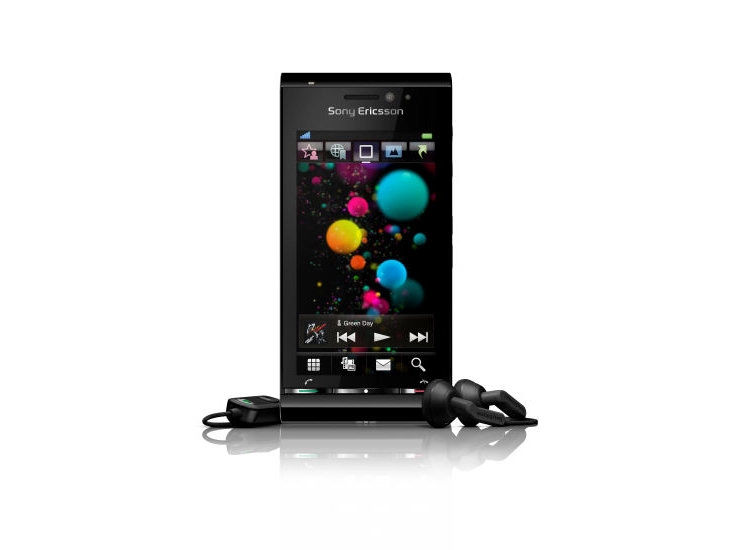
TechRadar Verdict
A good media device that doesn't quite beat the likes of the Samsung i8910HD in terms of overall performance
Pros
- +
Great camera
- +
Good range of media options
- +
Nice chassis
- +
Clear and simple RSS reader
Cons
- -
Poor battery life
- -
No 3.5mm jack
- -
Slightly unresponsive touchscreen
- -
Internet browser not powerful
- -
OS is laggy at times
Why you can trust TechRadar We spend hours testing every product or service we review, so you can be sure you're buying the best. Find out more about how we test.
Update: read our Vivaz review (the successor to the Satio).
Sony Ericsson has finally launched the Satio, the phone it showed off back in February under the guise of Idou, packing the best of all its brands into one phone. But can the sheer range of gadgetry and a new OS be enough to lure customers back to the brand?
Not content with being leaders in cameraphone and multimedia technology, Sony Ericsson has decided to put the two Walkman and Cybershot brands together in the new Satio. This means an industry-leading camera, a full range of multimedia playback options and it's based on Symbian S60 5th edition to boot.

The overall feel of the handset is odd. Thanks to the sheer range of camera-related gadgetry on board the rear of the phone has a massive camera section bolted to the back, which makes it a little chunky.
- Also read: 15 best mobile phones in the world today
But weirdly the phone didn't feel heavy at all – in fact we thought the battery needed to be put in, it was so light, but the power pack was snugly under the cover, so this is pretty impressive.

The Satio feels OK in the hand – it's not snug, but the 3.5-inch touchscreen (although sadly resistive rather than capacitive) is well positioned, and most of the functions are within a thumb's reach.
The front of the phone is very minimal – it's got a call, hang up and menu key, and that's about it. We would have quite liked to see a cancel/back button too, but that obviously wasn't on Sony Ericsson's agenda with the new Symbian OS it's packing.

There is a front facing video camera on there too for all that video calling fun everyone has these days, but it's down the sides of the phone where the button frenzy really begins.
On the left-hand side is the slider for unlocking the phone (which is in just about the right place for most hands), the standard Sony Ericsson port for USB connection, charging and headphone connection (boo!). Below that lives the microSD slot, which is covered by a nice hinged flap.
Over on the right side of the phone we get the camera controls, with the zoom buttons doubling as the volume up/down keys, despite having the 'proper' zoom icons on.

Below this is the photograph playback key, allowing quick access to your snaps in both camera mode and standby. There's also a video/camera swap hard key as well, which we're trying to work out if it has another function in other applications. It appears not to.
And below that is the stylishly hewn shutter for the camera. This side of the phone is well put together, laid out in the right manner and given the Satio's penchant for touch operation, a welcome addition.

On the back we've already mentioned the massive camera section, and while the cover might be massive it still has a really pleasing action to it, uncovering the decent lens underneath.
It's not the most wieldy of phones, we'll admit, but given the sheer amount of technology under the hood we're happy to say this is pretty much the best job Sony Ericsson could have done.
In the box
The Satio is being tipped as a multimedia device, and to that end the box is filled with audio and visual goodies. We've already pointed out how very, very disappointed we are there's no 3.5mm headphone jack on the Satio, but Sony Ericsson has tried to temper that problem with a variety of headphone options in the box.
The connector also comes with a music controller, which works pretty well for both media and as a hands free unit. The bundled buds are of a slightly better quality than the usual pin-thick ones Sony Ericsson puts in the box, but we quickly changed these to some better options.

However, if you do want to use them, there's a variety of ear buds to fit your ears, which we liked.
Video-wise, Sony Ericsson wants you to see the Satio as more of a multimedia hub, and to that end has popped a video out cable in the box (and a pretty rugged, rubberised one at that). It connects using the standard port on the side, and allows you to pump whatever you want to the TV from the phone.
Beyond that, there's a charger, a USB cable and a stylus – you might as well have this if you're using a resistive screen, and handwriting recognition works better with it.
And there's no installation CD in the box – Sony Ericsson has placed that on the phone in the bundled 8GB microSD card. We like this idea a lot, as it just simplifies the process, so well done to SE.
