Updated 1 hour ago

12847 products + 14143 members

Palm Pre review

Palm's great hope finally makes its debut on UK shores

Our Score

Last reviewed: October 8th

Interestingly, making phone calls – like on the iPhone, but not as much with the G1 – seems secondary, almost as an afterthought for people who actually still talk to each other occasionally.

The truth is, the Palm Pre is a better voice device than the iPhone and is actually one of the better smartphones for making phone calls.

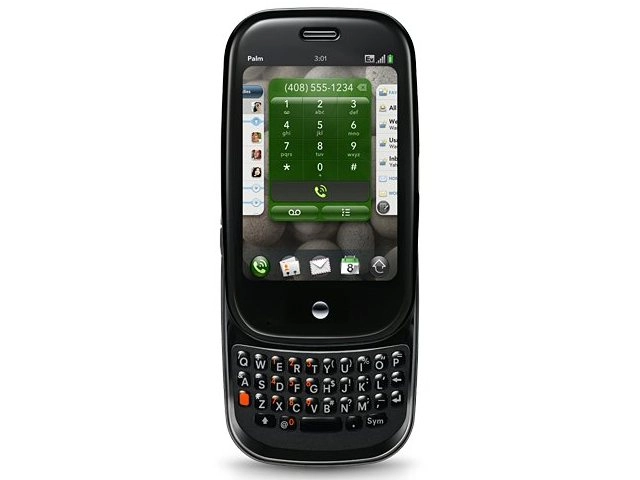
Palm pre

CALL: Dial a number or select a contact from your contacts book

Palm likely learned its lesson with the Centro and previous devices – voice communication better work, because without good voice controls and quality, a smartphone can die a quick death.

Crisp voice

In a series of calls made during all times of the day, each call sounded crisp without any of the strange audio delay found with lower-end smartphone models.

contact listcontact

CONTACTS: Selecting a contact is easy and intuitive

The speakerphone is loud and picks up extremely well; it works better than the iPhone. However, while the calls sounded good in the sense that there was no artifacting or distortion, there was a lot of audio compression.

This means voice chats tended to have a bit of a robotic tone to them rather than sounding full and life-like – for example, calls were clear, but highly compressed.

Making calls is extremely easy – you press the green phone icon and can start typing a number. Or, you can use universal search. Here, you can just start typing the name of any contact to find the phone number for that person.

Easy operation

Once you find a contact, you just click the number to dial. The Palm Pre does not support visual voice mail - a text indicator about who called, or the fancier transcription features in Google Voice that take a voicemail and convert it into text for you – but the Pre does use alerts to let you know when you do have a voicemail.

Unlike the HTC Hero, which shows alerts in a small portion of the screen above the main apps, the Palm Pre shows alerts below the main screen, and they are quite large.

The only downside: if you happen to get an alert at the exact same time as another incoming call or when you are about to dial a number, the alerts obscure part of the phone dialer screen.

The dialer is functional and easy-to-use, although we would have preferred a dedicated hardware button for making a phone call.

Soft keys on the phone dialer are responsive enough even for fast dialers – we never had any problems dialing numbers.

dividerSee all Palm Pre deals:

All deals | Pay monthly | Pay as you Go | SIM free

divider

Next Page: Palm Pre: Messaging

Your comments (3) Click to add a new comment

pablo


Wednesday at 20:07 GMT

3. Palm forgot [or are incompetent] to load the right settings/application to get the information off the ms Exchange software and on to the Palm. Blog or forum it if you dont believe me. This is a massive downfall as I have MS exchange and even with that it needs an enormous brain IT guy to fix the trail and destruction this leaves.

4 hours on the phone to Geek squad - who couldnt sort it. Hours of my time on the forums and all because Palm cant load the right software on the phone.

This has put a MAJOR downer on this purchase. And left me with post-purchase trauma like no other.

We all love a new gadget but this experience is the worst it can get. Great product ruined by stupid incompetence that renders it near useless.

p.s. sim to sim transfers dont work anymore.

Alert a moderator

carlossantana


October 31st

2. I got a Palm Pre in a O2 store in London. I was expecting a much better experience from a phone that have an average ownership cost of £700.-. Among an unstable/beta operating system and standard applications I would like to mention that:

- The phone’s plastic case is cheap and fragile. Even more, the entire phone looks (and is) fragile. I would like to see how many if these palm pre phone will be around in a year time.

- The standard microUSB port for both data transfer and charging needs you to open a plastic flap on the phone every time that you need to plug it to your PC. This flap is very cheap and it has the impression that it would last days attached to the phone. Therefore, think about adding a Touchstone Wireless Charger (another £40?)

- The phone stopped from working a day before I got it. When I slider closed the keyboard, the screen whet blank and the phone was not responding any longer.

Conclusion: I return it after 24hs and got another phone (not a palm pre this time). I have to say that the current Palm pre is a nice phone. But, there's no doubt that there's plenty of room for improvement in the webOS and its devices. My independent advice is: Wait for the next Palm Pre version.

Alert a moderator

irwinhugh


October 29th

1. Purchased the Palm Pre from O2 store after explaining my requirements but when I tried to sync with my MS Outlook it failed to connect. The sales person was absolutely convinced that it would but when I spoke to the O2 techie in Scotland, he eventually confessed that I needed to purchase another package from a 'carrier' who would decode the info and forward it to the phone from my ISP. This rendered the 'fantastic' (sic) Palm useless for me and I ended up buying a Blackbury instead. Sooooo much more efficient and user friendly. So, my view is that Palm need to sort our 1. the connectivity without people having to have/obtain MS exchange and the outlets need to train their staff, properly.

Alert a moderator

Tell us what you think

You need to Log in or register to post comments

By submitting this form you agree to our Terms of Use and so are legally responsible for anything you submit. DO NOT submit anything which may violate the Terms of Use or another person's rights including copyrighted or offensive materials.

Product Summary

Pre

Palm Pre

Price at launch

£499.00

Key specs


WiFi: Yes |
E-mail Client: Yes |
3G: Yes |

Full spec

For

>

Multi-tasking apps

>

Great media phone

>

Accurate touch screen

>

Responsive

>

Card interface is powerful

>

Push e-mail from Exchange

Against

>

Cheap plastic case

>

No video recording

>

Fiddly keyboard

>

Interface requires practise

>

Poor app selection

Share this article

tweet

What's this?

Close

Post a question to other registered users whom have had first hand use of this product.