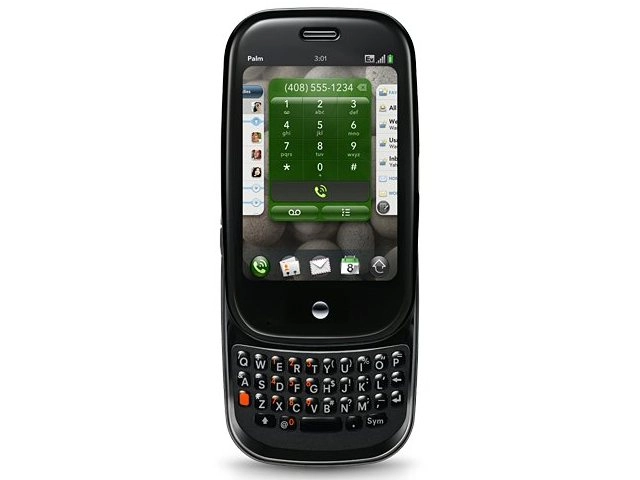
The Palm Pre is a good messaging phone, but not the best we have ever tried. It beats the iPhone, which is why we think the Palm Pre has a better shot as a business phone than a personal media player.
Keys on the slide-out keyboard are quite small. They are a hair smaller than the soft keys on the iPhone. In fact, you will likely be able to type faster on the Palm Pre because of the tactile feedback.
You can press quickly and move on, but the iPhone soft keys provide no sensation when you press – unlike the Samsung Instinct, which uses haptics to give you feedback on finger presses.

TYPING: The slide-out keyboard is a real asset
We typed dozens of messages, both in Gmail, as SMS and instant messages in AOL IM (the only supported IM client that anyone actually uses). We loved the @ symbol being on the keyboard itself rather than having to access it with a modifier key, because it meant typing email addresses much faster.
The real advantage to using the Palm Pre is that you can run multiple apps at once and copy and paste between them.
Say you just got an email from a business associate and you want to send the text as an SMS to someone else. This simple activity is not possible on the iPhone.


ATTACHMENTS: Adding attachments to messages is very easy
On the Pre, you hold down the Shift key, highlight text, and then access the Edit function (you click the menu in the upper left corner). Then, you switch over to the SMS app, start a new text message, go to the menu again, and click Paste to paste in the text. It's useful – and unique to the Palm Pre, for now.
The Pre uses Microsoft Direct Push technology when you are connected to an Exchange server.
This means the phone operates like a BlackBerry in that you will receive emails without having to click refresh or send/receive. You can use one inbox for all of your messages – from Yahoo, Hotmail, Gmail.


EMAIL: Setting up your mail is easier than on many smartphones
The Pre uses a new Palm feature called Synergy that automatically syncs contacts form Facebook, Exchange, and Gmail. It means you will have one long contact list, which sounds more cumbersome than it actually is in practice.
Also, the Pre uses the Google model of search rather than the Microsoft model of organisation. For example, you can just start typing a name – such as Jack – and you will see anyone with that name. Then, you can click their email address and start typing the message, regardless of whether they are an Exchange, Gamil or Facebook contact.

COPY & PASTE: You can copy and paste text between apps and messages
A few complaints about messaging, though.
At times, the curvature of the device made it a little hard to type on the keyboard. As we mentioned earlier, we feel this smartphone has potential in business – because of the support for Microsoft Exchange, a hardware keyboard and other factors.
However, it is a bit crippled by the curved keyboard. In a hands-on comparison between the Blackberry 8900 and the Palm Pre, it was no contest – we could type circles around the Pre because the keys on the 8900 are just big enough and separated from each other such that you can type much faster.
The Pre also has a limited auto-correct system that contains only common words such as 'the' and 'and' compared to the iPhone and Blackberry, which fill in words from a database of thousands. In typing messages on the Palm Pre, we only saw the auto-correct feature kick in a couple of times.
See all Palm Pre deals:
All deals | Pay monthly | Pay as you Go | SIM free


Your comments (3) Click to add a new comment
pablo
Wednesday at 20:07 GMT
3. Palm forgot [or are incompetent] to load the right settings/application to get the information off the ms Exchange software and on to the Palm. Blog or forum it if you dont believe me. This is a massive downfall as I have MS exchange and even with that it needs an enormous brain IT guy to fix the trail and destruction this leaves.
4 hours on the phone to Geek squad - who couldnt sort it. Hours of my time on the forums and all because Palm cant load the right software on the phone.
This has put a MAJOR downer on this purchase. And left me with post-purchase trauma like no other.
We all love a new gadget but this experience is the worst it can get. Great product ruined by stupid incompetence that renders it near useless.
p.s. sim to sim transfers dont work anymore.
Alert a moderator
carlossantana
October 31st
2. I got a Palm Pre in a O2 store in London. I was expecting a much better experience from a phone that have an average ownership cost of £700.-. Among an unstable/beta operating system and standard applications I would like to mention that:
- The phone’s plastic case is cheap and fragile. Even more, the entire phone looks (and is) fragile. I would like to see how many if these palm pre phone will be around in a year time.
- The standard microUSB port for both data transfer and charging needs you to open a plastic flap on the phone every time that you need to plug it to your PC. This flap is very cheap and it has the impression that it would last days attached to the phone. Therefore, think about adding a Touchstone Wireless Charger (another £40?)
- The phone stopped from working a day before I got it. When I slider closed the keyboard, the screen whet blank and the phone was not responding any longer.
Conclusion: I return it after 24hs and got another phone (not a palm pre this time). I have to say that the current Palm pre is a nice phone. But, there's no doubt that there's plenty of room for improvement in the webOS and its devices. My independent advice is: Wait for the next Palm Pre version.
Alert a moderator
irwinhugh
October 29th
1. Purchased the Palm Pre from O2 store after explaining my requirements but when I tried to sync with my MS Outlook it failed to connect. The sales person was absolutely convinced that it would but when I spoke to the O2 techie in Scotland, he eventually confessed that I needed to purchase another package from a 'carrier' who would decode the info and forward it to the phone from my ISP. This rendered the 'fantastic' (sic) Palm useless for me and I ended up buying a Blackbury instead. Sooooo much more efficient and user friendly. So, my view is that Palm need to sort our 1. the connectivity without people having to have/obtain MS exchange and the outlets need to train their staff, properly.
Alert a moderator
Tell us what you think
You need to Log in or register to post comments