



 Become a TechRadar Insider


TechRadar Verdict
A capable business phone with all the right work options, but limited fun potential
Pros
- +
Slide-out QWERTY keypad
- +
HSDPA
- +
Wi-Fi
- +
Windows Mobile 6 Standard
- +
push email
Cons
- -
Heavy
- -
only 2 megapixel camera
- -
average music player
- -
only 65,000-colour screen
- -
no GPS
Why you can trust TechRadar We spend hours testing every product or service we review, so you can be sure you're buying the best. Find out more about how we test.
There's no ambiguity with the latest addition to O2's Xda smart phone range. No attempt to gild its utilitarian lily with sparkly fun accoutrements beyond what decency demands.
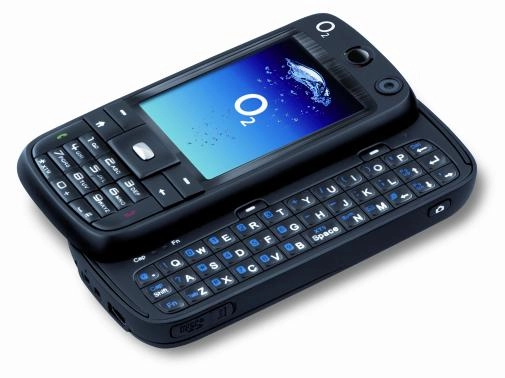
It's a slick black brick of a work phone that focuses firmly on the business side of life with Windows Mobile 6 and all its related apps, HSDPA, Wi-Fi, push email and slide-out QWERTY keyboard.
Like the other phones in the Xda range, the Atmos is actually made by Taiwan's HTC, which provides similar Windows Mobile smart phones for Orange and T-Mobile and is also doing very well under its own name with its clever Touch series. In fact the Atmos has another life as the SIM-free HTC S730 though you may have trouble tracking one down in the UK.

Don't touch!
There's no touchscreen with the Atmos, which uses Windows Mobile 6 Standard (the non-touch screen version of the occasionally quirky Windows OS) and relies on more conventional soft keys and D-pad for navigation, which was initially slightly confusing for our touchscreen savvy fingers.
The casing is uniform matt black and extremely serious and business-looking, clad in a rubberised black plastic that manages the trick of allowing it to slide into the pocket without much resistance, but will cling to desktops without unnecessary sliding.
Part of the reason for that desktop cling however could be due to the weight. It's a 150g brick of a handset that is only slightly offset by its compact dimensions.
The large 2.4in screen has just 65,000 colours, which rather underlines the handset's all work no play approach. It's perfectly fine for viewing documents and emails but you may hanker after the finer detail offered by some other phones.
Take the shortcut
The screen defaults to the usual Windows Mobile 6 home screen, which is again plain but functional with up to ten shortcut icons across the top for accessing your most-used apps, as well as showing date, time, calendar entries and messages.
The screen's size seems to squash the numerical keypad into the bottom third of the handset, but thankfully the buttons are well spaced and easy to use. On the side is a dedicated comms manager button, which allows you to access your Wi-Fi and Bluetooth links, establish Microsoft's Direct Push email and launch airplane mode. It's a useful tool on a device like this, which also boasts 3.6Mbps HSDPA fast 3G connection among its connection options.
The QWERTY keyboard slides out to the right and is as good an example of such a thing as you'll find anywhere. The slide feels sturdy and secure, and the screen automatically flips to landscape mode when the keyboard is in use.
The keys themselves are tiny, but a little clever design renders them perfectly useable by having a slightly raised central pad within each, which goes a long way towards helping your thumbs find the right keys.
Keys double up
There are only three lines of keys, with the numbers doubled up on the letter keys. These and additional characters are accessed by Fn and Shift keys (with little LEDs which light up to show you which of these is in use). There are also a couple of additional short cut keys for accessing keyboard-friendly functions like email and Internet Explorer.
For web browsing, it only comes with Internet Explorer, unlike HTC-branded devices which also bundle the faster Opera browser, though you can always download this for yourself. This version of the Explorer browser feels decidedly clunky these days.
There's no zoom option, and although you can adjust the text size and choose to leave out pictures, it still feels like an unappealingly limited way to get around the web.
No flashy photos
The camera has just 2 megapixels, which is pretty much bog standard these days, and there's no flash. It will take passable photos in good light and fairly quickly too, since it springs to life in about a second after pressing on the dedicated shutter button (which oddly, sits on the left once you turn the handset to landscape camera mode).
But despite having a multishot option, it doesn't take good motion pictures and don't even get us started on the poor quality of the video camera. There is however a 2x digital zoom and a basic post-pic editing suite.
The music player will organise your tunes well enough and it's easy to drag and drop from your PC. But the headphones, however, are particularly tinny and nasty, and since there's no 3.5mm jack plug, you won't be able to add your own upgrade without a USB adaptor, which will set you back another £15 or so.
Thanks for the memory
Memory-wise there's 256MB on board, with the option to add more via microSD card expansion. There's none supplied but it will handle up to 32GB versions.
The 400MHz processor makes a pretty good fist of whipping around the applications though with just 64MB of RAM things can slow down quite a bit when you've got several apps running at once.
A 60-day trial version of Office Mobile is included, which lets you create and view Word, Excel and PowerPoint documents, plus Adobe Acrobat Reader for viewing PDFs.
Considering this is a device that's designed for working hard, the battery felt a little light, though we did get two days of moderate use out of it. With heavier use of Wi-Fi and Bluetooth however this dropped considerably.
More work than play
As a work phone, the Atmos does what it needs to, without frills, but the curtailed entertainment functions keep the fun factor down.
Looks:
7
Ease of use:
8
Features:
8
Call quality:
8
Value:
7
Network Availability:
'Cinergy' O2