





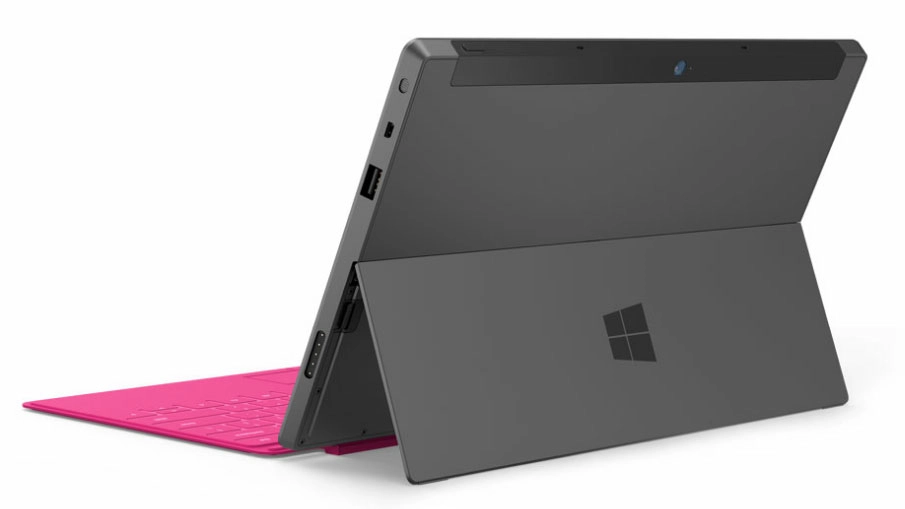
The Surface tablets that Microsoft will start selling on 26 October at Microsoft Stores (and in temporary 'holiday stores' in twelve US cities including New York) are only the first of a planned family of Windows devices and Surface 2.0 is already under development.
Although Microsoft corporate communications chief Frank Shaw said recently that calling Surface "our new family of PCs built to be the ultimate stage for Windows" was no more than "literary licence" and that there was nothing more than the two tablets already announced, the Surface team is "currently building the next generation" of "devices that fully express the Windows vision" - according to more than a dozen job adverts posted on the Microsoft Careers site between June and August.
The ads are all dated after the name of the original table-size Surface changed to PixelSense, so they're not left over from that and all the ads begin like this:
"The Surface Team focuses on lighting up Microsoft experiences with touch first computing. A fundamental part of our strategy is having desirable and powerful devices that enable the experiences people want, and elicit their excitement. Creating these devices involves a close partnership between hardware and software engineers, designers, and manufacturing. We are currently building the next generation and Surface needs you!"
New Surface?
Does the "next generation" of Surface devices mean a new Surface tablet? One job advert for a mechanical engineer does reveal that Microsoft is looking for "understanding of touch display architecture and experience in mechanical integration of large touch displays into electronics products" so the Surface team may also be working on the successor to the 80" Perceptive Pixel wall screen. Microsoft has said it wants to make these cheaper.
But the Surface team is definitely working on mobile computing devices, because one senior electrical engineer will work on "the electrical design and qualification of AC-DC power supplies and adapters" and you only need those for battery-powered devices.
Surface 2 features
It would be more surprising if Microsoft wasn't working on the next generation of Surface; Apple is certainly working on the new iPad and Android tablets will continue to evolve. But the scope of the jobs Microsoft is recruiting for shows that this isn't just keeping Surface up to date with future processor improvements. It's building up a full product design and development team to keep innovating (and keeping PC OEMs on their toes with some healthy competition).
Positions range from mechanical engineers to component specialists and materials experts to driver developers and audio engineers (plus manufacturing and packaging designers), in addition to the substantial team of industrial designers and engineers already on the Surface team.
Every job description mentions "fast-paced product development cycles" so we expect Microsoft to be keeping up with the launch schedules of other PC and tablet makers.
Surface 2 innovations
But the plans for the next generation of Surface are as ambitious as the innovations of the Touch Cover. Microsoft is looking for a materials engineer to work with "new materials including metals, ceramics, plastics and thin films" as well as "finishing processes such as paint, plating and PVD". (Physical Vapour Deposition coats surfaces with a micron-thick layer that won't wear off; it's used to make Formula One engines run cooler, as well as giving luxury watches their hardwearing finish and with the right coating it can make phones waterproof.)

Intriguingly, one senior engineer will be looking at designs including "alternative power sources". Could Microsoft be considering fuel cells or new battery chemistry to give the successor to Surface Plus the ARM-like battery life Intel has always struggled to deliver?
Another mechanical engineer will be working on both "passive and active cooling thermal designs that best balance performance, cost, manufacturability, acoustics and reliability".

In retrospect, giving the new tablets the Surface name was a very clever move. Not only is it far too good a name to waste on expensive commercial offerings like table-size multi-person devices, but it must have helped keep the tablet project secret.
If the intense security slipped and someone saw a reference to 'the Surface team' or touch technology being used for Surface or Surface hardware mentioned in the same breath as Xbox and Zune (as it was in a number of job adverts earlier this year), there wasn't an intriguing codename to get excited about - just an existing product that many people had written off as clever but unlikely to go mainstream. If necessary, Surface could hide in plain sight.
We expect Microsoft to keep the details of what's in the second-generation Surface just as secret, but we anticipate seeing the result of those "fast-paced product development cycles" sooner rather than later. There's been a new iPad every year; it wouldn't be surprising to see a new Surface, with a Windows RT update, just as often.