


Looking for a new mouse? You're spoilt for choice; the market is positively rammed with great options, and narrowing it down to the best mouse to suit your specific needs and budget can be tricky.
That's where I come in. I've tested and reviewed more mice than I can remember, and I've carefully curated this list to include only the very best recommendations for every user, as well as answering questions you might have before making a purchase. But before you scroll down and get your answers, ask yourself one question first: what do you use your mouse for?
✅ More than 30 mice reviewed over the last year
✅ 15 years of product testing
✅ Over 16,000 products reviewed in total
✅ Nearly 200,000 hours testing tech
If long hours of office work and browsing the web come to mind, you'd likely benefit from a vertical mouse like the Ugreen M571. It's designed to put your hand in a position that relieves some of that wrist pain you get from gripping a mouse for hours on end.
But if you're a gamer rather than an office worker (or perhaps you're both!), you might be better served by the Razer DeathAdder V4 Pro's excellent battery life, swift performance, and sleek design.
Whether you're after a reliable budget mouse that simply gets the job done, or a no-holds-barred premium gaming mouse, my recommendations in this guide will help steer you in the right direction.
Our hardware experts, myself included, have tested hundreds of mice over the years at TechRadar, and we know what separates the best from the rest. Scroll on down, and check out our top picks for the best mouse in 2026.

I've practically been a PC gamer since I was old enough to understand what a PC was, and in that time, I've been through multiple mice, keyboards, monitors - you name it. I've got a certain loyalty to my trusty Logitech G502 Lightspeed, but don't worry; I've kept this list as bias-free as possible. As a tech journalist with more than eight years of experience testing and reviewing PC hardware, I've gone hands-on with everything from vertical ergonomic designs to the best gaming mice on the market, so you can trust that my recommendations are backed with insight and experience.
The best mouse in 2026
Why you can trust TechRadar We spend hours testing every product or service we review, so you can be sure you're buying the best. Find out more about how we test.
Every mouse I recommend in this list has been personally tested by me or another member of the TechRadar team.
We've been reviewing computer mice for well over a decade and have gone hands-on with hundreds of different models. So you can trust our independent opinions to guide you to a mouse that we would use ourselves as tech experts.
The Best mouse overall


✅ You want to curate your perfect click: The revolutionary haptic trigger system lets you manually adjust the actuation point and physical click feedback, ensuring every click feels exactly how you want it to.
✅ Precision matters for your work and gaming: With its HERO 2 sensor, the G Pro X2 Superstrike delivers precise and responsive performance across both work and gaming tasks.
✅ Frequent recharging interrupts your workflow: We measured up to 90 hours of battery life, so you can use it all week without worrying about running out of power.
❌ You use your mouse left-handed: There’s currently no left-handed or ambidextrous version of the G Pro X2 Superstrike, so it’s not a good fit if you’re a southpaw.
❌ You need lots of buttons: While the G Pro X2 Superstrike offers solid customization options, MMORPG gamers and hardcore macro users will likely want more buttons to play with.
The Logitech G Pro X2 Superstrike sets a bold new standard for what gaming mice should be, and that's thanks in part to its unique HITS buttons. That's short for 'haptic inductive trigger system', and it essentially boils down to giving you total control over what every click feels like.
Because the two main buttons use electrical induction inputs rather than traditional mechanical switches, they're almost completely silent, and you can freely customize the actuation point and haptic click feedback to ensure that the tactile experience is exactly how you want it to feel. It's a genuine game-changer, and while it means this is a fairly pricey mouse, I can personally attest that it's worth the cash.
Under the hood, the HERO 2 sensor delivers pinpoint tracking and swift response. Fast and smooth movement is especially great for shooters, enhancing gameplay precision. The generous feet give a smooth glide, reinforcing the sense of control across both hard and soft mousepads.
You won’t have to worry about charging midweek, either. The G Pro X2 Superstrike lasted 90 hours on a single charge in our real-world use. Wireless connectivity with the low-latency dongle is great too, with no noticeable input lag in my testing. The physical design is straightforward and ergonomic, comfortable for all grip types and hand sizes.
Compared to the Asus ROG Harpe Ace Mini, which is lighter and more compact, the G Pro X2 Superstrike pulls ahead with a more advanced sensor and broader customization. It also holds its own versus the Razer DeathAdder V4 Pro, balancing pro-grade adjustability and everyday usability in a way that suits most users, not just esports specialists.
The biggest drawback is the lack of a left-handed model, so southpaws are out of luck, and the flagship price may give pause. After eight days of daily tasks and late-night gaming, I kept returning to the G Pro X2 Superstrike for its blend of comfort, precision, and control. If you want one mouse to do it all, this is the one I keep reaching for; it might even dethrone my beloved G502 Lightspeed as my daily driver.
Read our full Logitech G Pro X2 Superstrike review
The best budget mouse


The Logitech POP Mouse doesn't come jam-packed with extra buttons, features, or supercomputer sensors. But it does come with Logitech build quality and a price tag that will put a smile on your wallet's face.
✅ You want quality on a budget: The POP mouse comes with Logitech build quality at an affordable $29.99 price point.
✅ You're looking for quiet, satisfying clicks: The muted clicks of the POP mouse are incredibly satisfying.
❌ You need lots of buttons: One of the main trade offs for its low price point is the absence of any side buttons.
❌ You want a rechargeable battery: The POP mouse uses a single AA battery, rather than featuring a rechargeable design.
This simple Bluetooth mouse is the perfect option for those that want a reliable left- and right-click without having to worry about fiddling with customization software and fine tuning their DPI by 50.
I like that the mouse clicks are nice and quiet, too. It may not sound like much, but just like I said for the MX Master 3S, cutting out that constant background noise can be a huge help for video calls and content creation.
Logitech also puts the POP Mouse's battery life at a staggering 24-months on a single charge, so if you want a moues you can set and forget for under $50, this is the perfect pick for you.
Read our full Logitech POP Mouse review
Check out our Logitech promo codes to get the best deal on your next purchase.
The best premium mouse
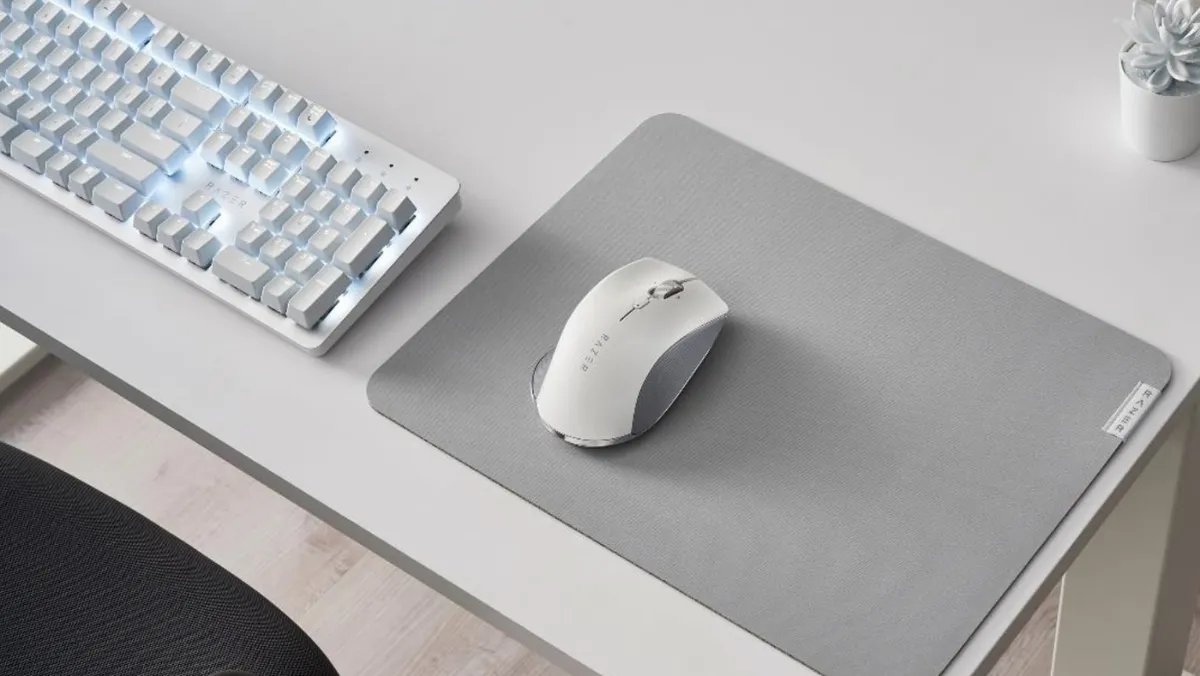


Why go for the mediocre when you can have a productivity mouse that’s stunning, feature-rich, and extremely functional?
✅ You use your mouse for work and gaming: The Razer Pro Click offers a fantastic middle ground between professional elegance and esports dominance.
✅ You use multiple computers: Using multipoint Bluetooth tech, the Pro Click can connect to up to three devices at a time.
❌ You need lots of buttons: One of the main trade offs for its low price point is the absence of any side buttons.
❌ You're left-handed: There's only one right-handed design available here.
Even after nearly four years since its release, the Razer Pro Click is one of our favorites out of all the mice we've tested. If macros are your life – whether you know Adobe Premiere like the back of your hand or rely heavily on graphic design – this is the mouse you've been searching for, with 8 fully programmable buttons at your disposal.
Razer also equipped it with a powerful 16,000 DPI sensor for a silky smooth experience, and it tacked on multi-host connectivity to fuel your multi-tasking machine. This is one of the most responsive office mice we've ever tested, as well as the most comfortable to use.
Of course, being the modern professional or creator that you are, you do things in style. This mouse has that covered as well with its gorgeous and sleek white on gray design.
Read the full Razer Pro Click review
The best portable mouse


While the ROG AimPoint Pro optical sensor was previously limited to other, more expensive models, the Asus ROG Harpe Ace Mini crams all of its power into a tiny, 49g (1.72oz) shell.
✅ You need something light and small: At just 49g (1.72oz), this is one of the lightest mice on the market.
✅ You want outstanding performance: With up to 42K DPI and ROG 100M Optical Micro Switches, this tiny mouse doesn't sacrifice quality in the pursuit of portability.
❌ You want an ergonomic design: While it is mini, and pretty comfortable to use, it's not designed to help with wrist pain.
❌ You're hunting on a budget: At its original price of $129.99, you'll want to look elsewhere if you're looking for a cheap mouse.
I think this is the perfect travel mouse because it's svelte form factor doesn't detract from the performance, design, or functionality. You're getting a premium mouse with an outstanding sensor, responsive switches, and reliable wireless connectivity. What more could you ask for?
If you chimed in "how about a price tag under $100?" then you're in luck. While its original retail price is $130, you can often find this small but mighty mouse on sale for $90. Pick it up, slip it in your bag, and take it with you wherever you go.
Read our full ASUS Rog Harpe Ace Mini review
The best vertical mouse


If you've felt the bitter sting of wrist pain that stemmed from repetitive strain at a computer, a vertical mouse may help alleviate that issue.
✅ You get wrist pain from traditional designs: The Ugreen M571 is specifically designed to combat wrist pain and soreness while you work.
✅ You're on a budget: You're getting an ergonomic design for just $29.99 here.
❌ You want a rechargeable battery: This mouse uses a single AA battery rather than a rechargeable design.
❌ You're big into gaming: This mouse doesn't have the performance metrics or extra features you'll find in the best gaming mice.
Vertical mice are designed to keep the wrist and hand in a more natural position, more akin to a handshake than a typical computer mouse. The Ugreen M571 features an extremely comfortable design, quiet clicks, a solid battery life, and a surprisingly affordable price tag.
One contributing factor to that low price tag is the exterior plastic build material. This was one of our few pain points with the M571; it doesn't feel like the most premium material.
That said, with a sub-$50 price tag and a pain-free vertical design, it's an excellent choice for those who don't need a 16K DPI sensor and a carbon fiber finish.
Read our full Ugreen M571 Vertical Mouse review
The best gaming mouse


✅ You want esports-level performance: This mouse features a max DPI of 45,000, a lightning-quick 8,000Hz polling rate, and Razer HyperSpeed Wireless Gen-2 wireless connectivity.
✅ You want great battery life: With up to 150 hours of active use on a single charge, this is one mouse you'll rarely need to plug in.
❌ You're on a budget: At nearly $200, you get the quality you pay for. But if you're just looking for something simple and affordable, there are better options out there.
❌ You want customizable RGB: A departure from Razer's usual Chroma designs, the DeathAdder V4 Pro does not have any RGB lighting.
It takes a lot to crown the king of mainstream gaming mice. However, when an option like the Razer DeathAdder V4 Pro comes along, the decision becomes a whole lot clearer.
Looking for an elegant design, a battery life that rises to the occasion, a sensor that gives us an edge, and the buttons you need to keep important keybinds at your fingertips? The DeathAdder V4 Pro ticks every box.
It's incredibly comfortable to use and lightweight; it features durable switches rated at over 100 million clicks, it's packing a ludicrous 45K DPI sensor and 8,000Hz polling rate - and it's available for order now.
Now, you do have to be willing to drop close to $200 on a gaming mouse. But as an investment for a tool that you'll use for your hobby day in and day out to perform at a high level, I firmly believe you get what you pay for with the Razer DeathAdder V4 Pro.
Plus, it boasts a 150-hour battery life so you won't have to worry about needing a charge during those all-night gaming sessions (as long as you remember to plug it in in the morning).
Read our full Razer DeathAdder V4 Pro review
Take a look at our Razer discount codes for the best Razer offers and savings.
The best mouse in 2026: FAQs
What's the best mouse for carpal tunnel?
Trying to use a mouse when you have carpal tunnel can be extremely uncomfortable and even flat out painful. Thankfully, there are a few options that can help mitigate that pain. I'd opt for something vertical and ergonomic, like the Ugreen M571 Vertical Mouse. This helps keep your wrist in a more natural position, rather than making you meet the mouse where it is.
What's the best gaming mouse?
The best gaming mouse for you and your needs will offer a sensor that reaches up to at least 12K DPI, side buttons for quick keybinds, a design that fits your setup, and a connectivity option that you like (such as wired or Bluetooth). I can easily recommend the Razer DeathAdder V4 Pro to most people looking for a new gaming mouse.
Today's best mouse deals
