



 Become a TechRadar Insider


TechRadar Verdict
LG's KF300 focuses on user-friendly buttonry in a low-spec flip phone design
Pros
- +
Large buttoned easy to use numberpad
- +
Fast access function hotkeys under the display
- +
2-megapixel camera
- +
Music player
- +
MicroSD card expansion
- +
Solid design, built to be easy to use
- +
FM radio
- +
3.5mm headphone adapter supplied
- +
Speaker is loud
Cons
- -
Limited set of features
- -
Mediocre camera quality
- -
No 3G
- -
Low spec browser
- -
Basic music player user interface
- -
Video recording quality poor,
- -
No USB cable supplied
- -
Low internal memory storage
- -
No MicroSD card supplied in-box
- -
MicroSD card slot under battery
Why you can trust TechRadar We spend hours testing every product or service we review, so you can be sure you're buying the best. Find out more about how we test.
It's not always about how much high-tech gadgetry you can squeeze in.
With the KF300, LG has introduced a mobile phone that takes a significantly more low-key approach than its recent attention-grabbing models like the Renoir, putting simple usability high up the priority list.
The LG KF300 doesn't do touchscreen operation like the Renoir or Cookie, touch sensitive control like the KF600 and Secret, or hot-shot 8-megapixel snapping like the KC780.

It's a more modestly equipped flip-phone that's targeted at mobile buyers after a straightforward to use handset that's not old-fashioned basic but which has a dash of undemonstrative style to it.
Budget spec
Arriving in the UK on an Orange exclusive, the KF300 doesn't have 3G multimedia functionality, though it does have quad-band GSM GPRS/EDGE connectivity. Its features include an MP3 player and FM radio plus a 2-megapixel camera, and it supports MicroSD card expansion, but doesn't have any of the high-end stuff like Wi-Fi, GPS or multi-gigabyte memory.
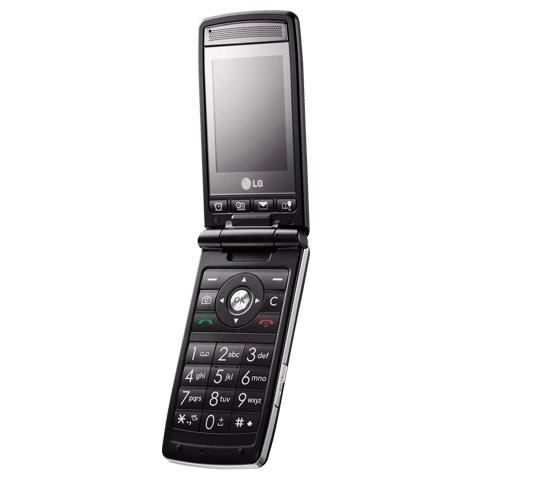
Instead, much of what makes this phone stand out happens directly under the flip lid. It has large, finger-friendly numberpad keys with big, easy-to-read characters, while the control panel is similarly well spread for comfortable keying. This is a phone that's meant to be easy to use.
Running with that theme, LG has stuck four additional hotkey buttons under the phone's display, giving users quick and obvious access to handy functions, with each of them labelled with symbols for specific purposes - Alarm clock, Calendar, Images, and Favourites (a user-definable list of most-wanted apps).
And out of the box, LG goes easy on the eyesight with extra large fonts set as default for the menu system – though this can be easily changed if your prefer.
Understated phone
The KF300 is no super-skinny flip phone. It has a substantial footprint, measuring 98.8(h) x 49.5(w) x 16.2(d)mm, and weighing 97g. Of course this gives it enough room for the expansive numberpad and extra buttonry, though the screen under the flip is still an average 2.2-inch QVGA 262K-colour affair.
On the outside, the casing is mature-smart rather than stylish, with rubber-feel black bodywork with chrome-look trim, and a reflective front panel fully covered by a sheet of plastic.
Its understated shell hides a secondary external display on the flip, which lights up when the flip's opened, providing caller info too when a call or text comes in. The camera perches neatly on top of the fascia on a chrome strip.
Simple menus
Although designed to go easy on eye-work, the matt black numberpad is easy on the eye too. The number keys are simply arranged, are a good size for error-free punching, and are firm and responsive for texting and number tapping.
The controls, built around a large navigation pad laid out in conventional phone style, are roomy too. It has shortcuts on the directional keys, which can be user defined if required, icons for which are displayed onscreen (they can be switched off if desired).
Although LG has scaled up certain elements and added buttons, it hasn't reinvented or oversimplified the control system underpinning the KF300 – it's very much familiar LG stuff we've seen before. The main menu, laid out in gird format, leads to further sub-menu lists, which can be scrolled through to select, or selected quickly by pressing the appropriate number key next to the option.
Handy hotkeys
In practice, this makes it pretty straightforward for anyone familiar with conventional phone layouts to get to grips with, while the extra shortcut buttons make life easier for those who just want to access certain functions quickly.
The Favourites hotkey button under the screen is a particularly handy one, which can be set up easily as a fast access list for as many as 12 features or apps of your choosing, from Bluetooth or games to radio or vibrate alert. Useful if you want to skip delving into the menus for most-used functions.
Although these hotkeys are practical, the positioning of them may initially get some users inadvertently pressing them rather than the softkeys next to the navigation pad when selecting onscreen softkey options. The hotkeys sit almost directly under the screen options, so at first it's natural to reach for them rather than look to the lower half of the phone. You soon get used to it, however.
Some may prefer a larger menu font, but we tended towards the more practical normal sized, which makes it easier for menu browsing and seeing selection options. We'd have also preferred more choice of simplified fonts for number dialling, as the standard LG ones used here are too tacky or quirky for such a middle of the road phone.
Basic snapper
The LG KF300 has a serviceable set of additional features, without any real stand-out applications.
The 2-megapixel camera is a run-of-the-mill, low specced shooter. It's fired up from the D-pad, with shots framed and taken in portrait mode, with the viewfinder showing the image in a band across the screen (or unsatisfactorily cropping bits of the image if you go for full screen mode).
With this sort of camera, without flash or autofocus system, you get what you'd expect; image quality is limited. It's fine for quick snaps, and reasonable within its point-and-shoot fixed focus limitations, but shots aren't particularly detailed and colour performance is sometimes muted in lower light conditions. In darker conditions, image quality is poor.
Video capture doesn't impress much either. Shooting at average QVGA maximum resolution, footage is typically low-grade mobile quality.
Stingy storage
The KF300's music player software does an acceptable job of playing back tunes, although you'll need to slot in a MicroSD memory card if you're to fully enjoy its functionality, as the phone has a mere 14MB of internal storage. You don't get one in-box, but as MicroSDs are now pretty cheap, it's an inexpensive recommended upgrade if you want to load up more than a couple of tracks.
The music player interface is functional and a little basic looking, but easy enough for anyone to operate using the D-pad controls.
Copying over tracks isn't helped by the absence of a USB cable in-box, though it's possible to Bluetooth them over from a PC or phone, or copy onto an aforementioned MicroSD card.
Shouty speaker
The supplied earphones are a pleasant surprise, however, with a quite well balanced performance including reasonably good bass – and come with a 3.5mm standard headphone adapter socket on the two-part headset, so you can add your own better quality earwear easily enough.
The headset, which plugs into the side-mounted multi-connector port on the phone, is necessary for using the phone's decent quality FM radio, though it can also be played through the loudspeaker – which can be cranked up pretty loud (albeit with the usual tinniness).
Other features are predictable for a phone of this class, with organiser functionality such as calendar, convertor, memo and to do lists, various clock functions, voice recorder, plus email alongside text and MMS messaging.
There's a standard Wap browser for mobile internet perusal; links for the Orange World content and information portal are provided on Orange models. A couple of sensible games, backgammon and chess, also add to the sedate features list.
Battery life
One of the advantages of a more low-key features set is the relative lack of potentially power-draining, tempting-to-play-with features that you get on higher-end models.
Still, with no 3G and a down-range set of features, LG's quoted optimum battery life of up to 200 hours on standby or talktime of up to 2 hours is quite low; we'd have expected a lot higher for a non-3G handset. In typical usage tests, however, we managed to keep the phone operational for up to 3 days with little music playback and average amounts of calls and texts.
The performance on voice calls was dependably good, with no problems during our tests, and clear, loud speech through the earpiece.
Low-key mobile phone
Although it's grabbed headline with some head-turning handsets, the LG KF300 is a more modest sort of handset that's not aimed at the gadget-loving mobile buyer.
Its low level features list covers the basics without much to excite, and its flip phone look is steady rather than stunning. Its chief attraction is the added usability layered on a familiar LG user interface experience, with that large clear numberpad and easy-access hotkeys bound to appeal to some users.
While it may not be one for everyone's mobile phone wish list, there's certainly a market for this sort of low-key handset.
Network availability: Orange
Looks: 3.5/5
Ease of use: 4/5
Features: 2.5/5
Call quality: 4/5
Value: 4/5