Create the ultimate work from home setup: 21 business-grade essentials to boost your productivity
Transform your home office into a productivity powerhouse with the office gear essentials we've tested, reviewed, and love to use
Looking for inspiration for a great home office setup? At TechRadar Pro, we're all about creating the best work from home setups with the best-performing office gear for modern professionals.
Our experts test thousands of essentials from the best laptops for working from home to office desks and peripherals. Now, we're drawing on all that hands-on testing, experience, insights, and reviews to build the ultimate home office desk setup that works for you.
For boosting productivity, adding extra style and comfort, and organizing your workspace, here's the office gear we recommend.
Business laptop
A laptop is an essential bit of kit, and with the shift to Windows 11, we've selected the top all-rounder for serious work. For more options, we've also tested the best business laptops for professionals.
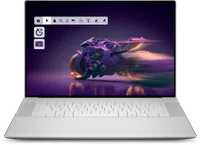
The Dell 16 Premium is a high-performance mobile workstation capable of chewing through all demanding tasks, from 3D modeling and video editing to intense coding and even dozens of browser tabs. Our benchmarks showed it can even rival the esteemed MacBook Pro 16-inch. On top of robust internals, you also get a sleek 16.3-inch 4K OLED touchscreen with 120Hz refresh rate.
Office chair
Comfort, support, and ergonomics are important when kitting out your home office. We've picked out the top choice for modern professionals, and we've tested almost 100 of the best office chairs if you need more inspiration.
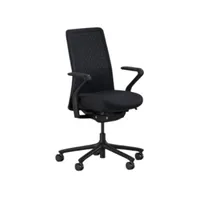
We've tested 94 office chairs, and nothing comes close to the Branch Verve for blending style, quality, and comfort for the modern workspace. It's seriously adjustable, and after using this chair for up to 12 hours a day, we fell in love with the breathable 3D-knit backrest, which provides excellent support while at your desk.
Standing desk
The right desk is one of the first choices to make for the ultimate home office setup, and this is our favorite one. With over 60 tests under our belt, our guide to the best standing desks offers even more professional-grade picks.
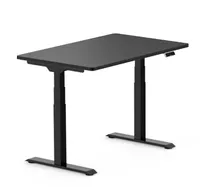
The FlexiSpot E7 is our top choice standing desk, running exceptionally well in our tests and delivering a great blend of performance, build quality, and price. It's available in a wide range of sizes and styles. And all the core features we expect to see are here, including a keypad with four programmable heights, USB-A port for charging devices, and anti-collision detection.
Printer
We love a good printer - absolutely critical office gear for the home office. Check out our top pick here. But after over 200 reviews, we've also hand-picked the best home printers and best small business printers.
Sign up to the TechRadar Pro newsletter to get all the top news, opinion, features and guidance your business needs to succeed!
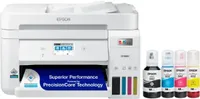
Epson EcoTank ET-4850 is an ink tank printer that uses bottled ink refills, making it cheaper to run than using inkjet cartridges or laser toners. It delivered excellent print quality for both images and documents in our tests, and boasts automatic double-sided printing, automatic document feeder, a touchscreen, fax, and an ADF. We also liked its 250-sheet main tray and overall ease of use, large touchscreen, speed, and, of course, affordability. Excellent choice for a home office.
Monitors
For general office tasks, you have a lot of options when choosing a monitor for your workspace. This one really stands out but for more choices, we've rounded up the best business monitors and the best portable monitors if you need a second screen for your laptop or for business travel.
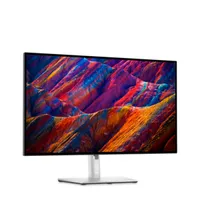
The Dell UltraSharp U2723QE offers a stunning full UHD 3840x2160/60Hz screen with great visuals and huge screen real estate to maximize your workflow and office space. It also includes a built-in hub with fast USB 3.2 Gen 2 ports, an RJ45 network port, and an audio output port in an aesthetically pleasing design. You get a wide range of built-in color settings, positioning options, and Low Blue Light output for long screen sessions.
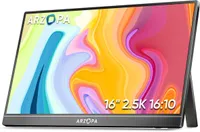
If you're looking for a portable monitor that's budget-friendly with a crisp, large screen and high resolutions, the Arzopa Z1RC is a great pick. This 16-inch IPS display offers a 2.5K resolution, dual USB-C ports, and a mini HDMI port. Average color coverage (100% sRGB, 89% AdobeRGB, 95% P3, 69% of Rec 2020) make it a solid choice for professional use.
Keyboard & mouse
Every good work-from-home setup needs a reliable keyboard and mouse. These picks come highly rated, but we've tested out plenty of the best mouse and the best keyboards for getting work done.
We've always had good experiences with Logitech's value-driven peripherals, and the Signature K650 keyboard is the perfect example. It’s not short on productivity-oriented, time-saving features, with dedicated buttons for mic mute/unmute, web browsers, and screenshots. A single charge can last you up to 36 months, and the typing experience is incredibly comfortable and satisfying.
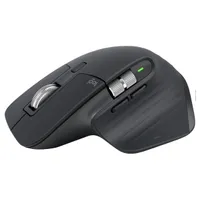
If you're in the market for good value mouse, the Logitech MX Master 3S is virtually impossible to look past. We found it brought several improvements over previous iterations. Logitech says it's around 90% quieter, making it good for shared home office workspaces. It features seven fully customizable buttons, three connectivity options, a 70-day battery life with USB-C charging, and an 8K DPI “track anywhere” sensor that works even on glass.
Wi-Fi router
Staying connected is a must when you're working from home. There are a number of Wi-Fi, mesh, and mobile routers worth checking out. For more networking solutions, check out our guide to the best Wi-Fi routers.
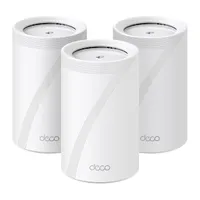
TP-Link Deco BE63 features state-of-the-art Wi-Fi 7 support for fast speeds and a dependable wireless signal. During our hands-on testing, it gave our test network an instant speed boost, with no fluctuations as we moved around the building. It also includes free parental controls, making it the best mesh Wi-Fi system for large households. Setting up is incredibly simple too: our three Deco units connected to each other automatically.
Monitor mount
Monitor mounts and stands are a great way of freeing up desk space and giving you a little more flexibility in the way you work. You can see more top-rated options in our best monitor stand guide.
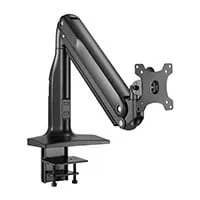
The Monoprice Workstream single-monitor desk mount is an ideal choice for most single-monitor setups. It can hold both standard and ultrawide monitors up to 39.6 pounds, thanks to its gas-spring internals. It also includes a removable VESA mounting plate for hassle-free monitor swaps, a fully rotatable mounting head for horizontal or vertical positioning, and built-in cable-management channels, as well as a large clamp that we found fits around most desks.
Docking station
One of the biggest issues with modern laptops is lack of ports. So, if you want to hook up a range of displays and peripherals, the best laptop docking stations like this one are a great way of opening up what you can do in your work-from-home space.
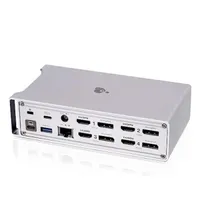
The IOGear Dock Pro expands a single connection into 12 additional ports, including up to four display outlets, and each one can be either DisplayPort or HDMI. It worked really well even when we changed setups or updated screens. At the front, you get a microSD card reader, a USB-A port for charging, two USB-A data ports, an SD card reader, a headphone jack, and a USB-C port. It also has a rugged metal casing that looks premium and definitely improved the style of of our home office setup.
Portable storage
It's always worth giving your storage a boost with an external drive like this one. It's a great way to keep digital files and media safe. And for more high-capacity storage solutions with fast transfer speeds, we've benchmarked the best portable SSDs.
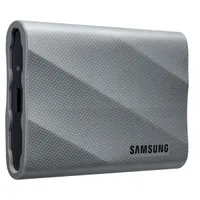
The Samsung T9 is the successor to the classic T7 and the best portable SSD we recommend for most users. It has a great design, robust build quality, and impressive Gen 2x2 performance with maximum read/write speeds of 2,000 MB/s. In our hands-on testing, we recorded 1,700-2,000 MB/s reads and 1,300-1,900 MB/s writes. To further enhance your experience, Samsung has implemented a caching system to maintain writing performance.
Cloud storage
We always recommend getting cloud storage alongside physical storage - it's a good way to keep off-site backups of important documents that can be accessed from all your devices. This is our favorite, but you can explore more of the best cloud storage we've used.

iDrive: $4.98 for the first year
iDrive tops our best cloud storage list thanks to its huge assortment of features, fast upload speeds, compatibility across Windows, Mac, Linux, iOS, and Android, and outstanding value for money. At just $4.98 per year, you get 10TB of storage, with upgrade options up to 100TB and a free 10GB tier. It uses 256-bit AES encryption for data transfers, backs up unlimited devices to a single account, supports Microsoft Office 365, Google Workspace, Dropbox, and Box, and even provides a physical recovery option.
Audio & visual
No more "can you hear me now?" Investing in a reliable headset and webcam is a must for remote working for all those video meetings (even if some of them really could've been an email). These are top picks for us, but we've tested more of the best headsets for working from home, best USB microphones, and best webcams.
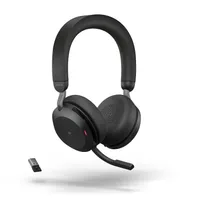
The Jabra Evolve2 75 headphones are the only ones we’ve tested that feature 8-microphone technology to deliver outstanding audio quality. Another impressive feature is HearThrough, which cancels external noise or, if you prefer, picks up outside sound and plays it into your earbuds. You get two charging options, with a full charge taking about 1 hour and 20 minutes. The charging time is slightly longer, but in our testing we got around 6 hours from just 15 minutes of charging.
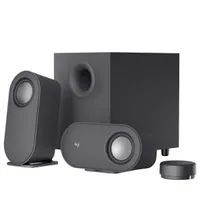
The Logitech Z407 boasts impressive sound quality, rumbling bass, and several connectivity options in a classy, versatile, compact design at just $79. These capsule-shaped speakers provide wireless connectivity, two physical inputs, and a wireless control puck for adjusting volume, playback, and bass, or powering the system on or off from up to 20 meters away. We found the dial not very intuitive at first, but eventually got the hang of it.
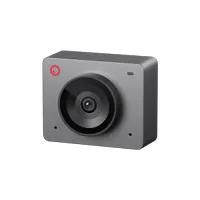
The Obsbot Meet SE offers some of the best image quality in its price range. In our testing, we recorded brighter, more detailed images than the Logitech C920, even in challenging lighting. So, we rate it as the best webcam for both work-from-home users and anyone starting streaming. It's plug-and-play and packs AI-powered gesture controls, autofocus, and auto-framing, and you can go as high as 1080p at 100 fps.
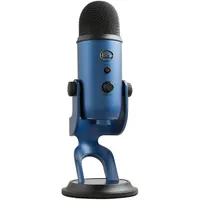
You'd be hard-pressed to find a better all-arounder mic than the Blue Yeti. It has an incredibly straightforward setup that requires no additional software, plus four audio pickup patterns and the ability to mount the mic to almost any stand, making it the best microphone for both newbies and experienced creators. In our testing, it was prone to picking up keyboard sounds and background noise, but for the price and general performance, it’s hardly a complaint.
Security software: VPNs, antivirus, password managers
It's so important to keep yourself, your devices, and files secure when working online. So, we've picked out the best VPN, best antivirus, and the best password manager for your home office setup.
NordVPN tops our VPN rankings, offering the most well-rounded package we’ve seen, and at a very competitive price. You get one of the fastest VPNs, audited privacy credentials, servers in over 126 countries, and excellent unblocking. And for less than a dollar more, Nord’s Plus package adds Threat Protection Pro, a password manager, and data breach monitoring. Try it out with a 30-day money-back guarantee.
NordPass is available as a free add-on with NordVPN’s Plus Package or as a standalone product. This proved an excellent password manager in our testing, it offers an intuitive interface across multiple platforms, including browsers, making it great for both beginners and professionals. It’s the only password manager using XChaCha20 encryption, plus there’s email masking to hide your real email behind an alias. NordPass's free tier is handy in a pinch, but the Premium plan delivers far more value.
Bitdefender is our favorite antivirus software, with excellent detection rates that block malware files before they even begin downloading and clear warnings for dangerous websites. Bitdefender Total Security, the provider’s all-in-one solution, includes a VPN, scam detection, a firewall, webcam protection, parental controls, and a password manager. It's also easy to install and use, lightweight, and while scans can take longer, you'll still be able to use your device.
Creative software
Canva is an online graphic design app ideal for small businesses creating marketing and social media content. Its free version is easily one of the best logo designers we’ve tested, with customizable templates, text effects, and styles. The paid-for version unlocks Canva’s full design toolkit, including video and website builder tools, geometric shapes, graphics, photos, and frames. One of the standouts is its beginner-friendly approach, making it perfect for non-designers and professionals alike.
Krishi covers buying guides and how-to's related to software, online tools, and tech products here at TechRadar. Over at Tom's Guide, he writes exclusively on VPN services. You can also find his work on Techopedia and The Tech Report. As a tech fanatic, Krishi also loves writing about the latest happenings in the world of cybersecurity, AI, and software.
You must confirm your public display name before commenting
Please logout and then login again, you will then be prompted to enter your display name.