





When it comes to curating the perfect PC gaming setup, few purchases can make as big a difference as one of the best gaming mice. If you're a fan of twitchy competitive shooters, love fast-paced MOBAs, or you're just looking to stave off wrist pain from lengthy gaming sessions, I've got you covered.
I've been gaming on PC since I was old enough to hold a mouse (Cool Math Games, anyone?), and while I might not have started out with anything as fancy as a Razer DeathAdder, I've since tested and reviewed dozens of gaming mice. I used that experience, along with the hands-on analysis of our expert reviewers - myself included - to carefully curate the gaming mice included in this guide.
When it comes to the best overall gaming mouse for most people, I'd be remiss not to recommend the latest addition to the DeathAdder lineup, the Razer DeathAdder V4 Pro. It has that Razer build quality and design you know and love married with the most performant sensor the company has introduced to DeathAdder mice.
But if you're looking for something a little more affordable, or something with loads of buttons for your MMO quick binds, don't worry; I've got mouse suggestions for all kinds of gamers here. And if you haven't gotten one in a long time, check out our list of the best mouse pads to pair with your new gear.
The best gaming mouse 2026
Why you can trust TechRadar We spend hours testing every product or service we review, so you can be sure you're buying the best. Find out more about how we test.
These are my top picks for the best gaming mouse in 2026, broken down by category, price, and feature set to help you land a mouse you'll be happy with.

I've been writing about computer hardware for more than eight years, starting at Maximum PC magazine before making the leap from print to digital and joining TechRadar's Computing team in 2020. I've been a PC gamer for even longer, and I put every bit of experience and insight from both my professional journalistic career and my gaming hobby into my recommendations, so you can rest assured that they're reliable and bias-free.
The best gaming mouse overall


Narrowing down my pick for the best overall gaming mouse was tough given the amount of competition in front of me, but I had to go with the DeathAdder V4 Pro thanks to the versatility and polish it offers, making it a fantastic all-around choice for most gamers.
Now, there are going to be specific playstyles and use cases that benefit from a gaming mouse with 12 side buttons or, but if you like to hop between genres with your friends (like FPS, RTS, and chill games like Minecraft) then the DeathAdder V4 Pro is the perfect choice.
It's not the cheapest mouse on the market with a retail price of $169.99 (£169.99), but it's an investment for your setup and you definitely get what you pay for here.
And what you're paying for is a lightweight 56g design, a Focus Pro 45K Optical Sensor Gen-2 with up to 45K DPI, 8,000Hz polling rate, six programmable buttons, Razer software support, and up to 150 hours of battery life on a single charge.
Read our full Razer DeathAdder V4 Pro review
The best budget gaming mouse
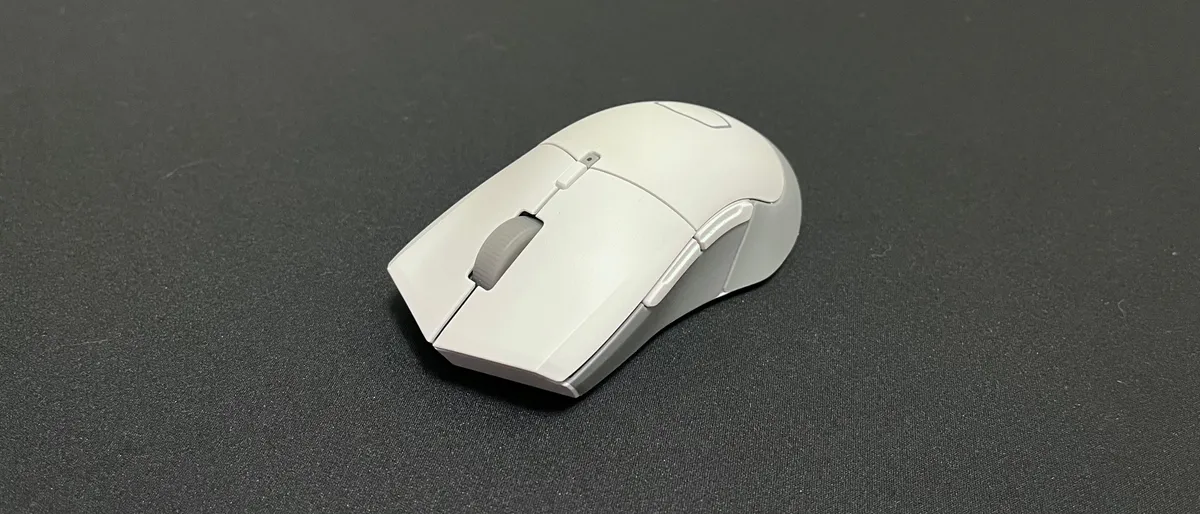


The Cooler Master MM311 is a few years old now, but it still punches far above its weight, especially for a budget gaming mouse. It might not be the fastest or more feature-rich option on the market, but for something so cheap, it delivers a speedy, smooth, and accurate performance.
It also boast with a DPI range that’s good for most gaming situations as well as a symmetrical, ergonomic shape that we found to offer comfortable gaming, whether you’re a rightie or leftie. Meanwhile, the mechanical switches have a satisfying sound when pressed - not to mention that they seem to actuate pretty quickly as well.
It does compromise where it can. For one, it requires a mousepad for that great performance, as its feet struggles on some surfaces. It also isn't rechargeable. The good news is that it does make those AA batteries last a while. And, unless you need a lot of buttons or an extremely high DPI, it will more than keep up with your gaming needs.
Read our full Cooler Master MM311 review
The best gaming mouse for FPS games


When it comes to competitive FPS titles, performance matters above all else. The Logitech G Pro X2 Superstrike delivers on precision and speed with its featherlight 61g build and the HERO 2 sensor, both engineered for pinpoint aim and rapid flicks. The sensor supports a maximum of 44,000 DPI and an 8K polling rate, equipping it for high-speed gaming.
In our hands-on sessions, the mouse’s tracking felt exceptionally sharp, and our lead tester described the click response as crisp and reassuring, with reliable actuation even during marathon match sessions. Build quality is robust, with every component feeling engineered for serious play.
The standout feature, though, is the Haptic Inductive Trigger System (or HITS for short), a revolutionary new switch design housed under the two main buttons that lets you customize the actuation and tactile feedback of every click to your liking using Logitech's software. It's genuinely clever stuff, rendering clicks near-silent by eliminating mechanical switches, and it's a big part of why I awarded it a coveted five stars when I reviewed it.
Compared to the Razer DeathAdder V4 Pro at the top of this list, the Superstrike does have shorter battery life. The price is also steep, and left-handed users are out of luck due to its right-handed-only design.
But if you prioritize sensor precision, satisfying clicks, and a lightweight shell over battery stamina or extra features, the Superstrike serves as a focused tool that excels in fast-paced shooters as well as just generally being a good mouse for everyday use. It’s a recommended choice for players who value speed, accuracy, and a no-nonsense design above all else.
Read our full Logitech G Pro X2 Superstrike review
The best midrange gaming mouse


While Corsair’s M75 Wireless Mouse is not a cheap peripheral, it’s not the priciest gaming mouse out there that offers wireless connectivity either, and in fact for what you’re getting, this is a good value package.
Not only is the M75 a well-built gaming mouse, but it’s nicely thought out too, as Corsair has made it ambidextrous – including having identical side buttons, on both sides – and there’s a nifty touch in terms of connectivity. You can switch between two PCs, one on wireless, one on Bluetooth, at the press of a button, without having to move the wireless dongle.
The M75 is also very lightweight (considering it’s wireless, so needs to pack a battery), but the one design snag is that Corsair put the DPI button on the bottom of the mouse – making switching DPI on-the-fly while in-game impossible. That said, you can remap the DPI to another more easily accessible button (providing you’ve got a free one in your control scheme).
Otherwise, this is a high-quality wireless mouse, impressively fast and responsive, plus you get RGB lighting thrown in too, if that’s your bag. Boasting a nice balance of features, performance, and value, this is a well-judged offering from Corsair worthy of the outlay. (Also note that you can save some money by opting for the wired version of the M75, too, if you don’t mind a cord).
Read our full Corsair M75 Wireless Mouse review
The best gaming mouse for MMOs
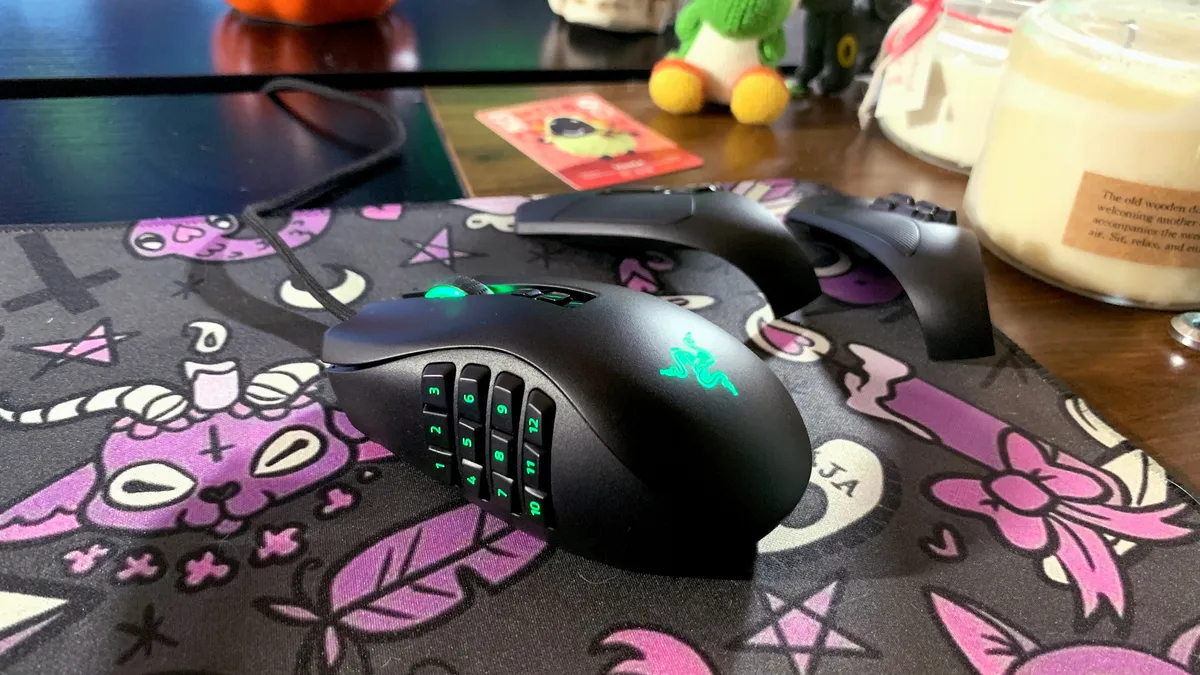


I know what you're thinking MMO enthusiasts: finally, a mouse made to house my lengthy list of obscure but necessary key binds.
Years after the success of the Razer Naga and Naga Trinity comes the Razer Naga Pro, a stronger MMO-focused contender that takes everything great about its predecessors and hones them. What you get is the best gaming mouse that's refined for MMO but lends its prowess to FPS and Battle Royale titles as well.
We were impressed with its top-notch skill set during testing. Among those skills are its up to 150 battery life, three types of connectivity including 2.4GHz wireless, and an on-board memory than lets you store up to 5 profiles.
The marquee feature here, however, is its swappable side plate, of which it comes with three: the typical 2-button side plate for FPS, a 6-button one for Battle Royale, and a 12-button one for MMO... because you shouldn't have to stick to just one genre.
Read our full Razer Naga Pro Wireless review
The best ergonomic gaming mouse


The unique shape of the Cooler Master MM720 may harken back to some of Cooler Master’s older designs but there’s more to this mouse than the way it looks. It’s incredibly light, thanks to its honeycomb posterior, and performs wonderfully since it has up to 16,000 DPI on tap.
Our testing really allowed its optical switches to showcase their prowess. We found that they only required a very light touch to deliver fast, accurate responses. This gaming mouse was speedy and responsive on testing, whether we were quickly switching weapons or blasting away demon hordes. It more than kept up with games like Doom Eternal and Cyberpunk 2077.
Its unusual shape and pancake-flat design might be a little weird, but it offers better ergonomics and a more comfortable gaming experience. Although it is better suited for gamers who have a claw grip and, with that ring finger rest, right-handed ones.
Read our full Cooler Master MM720 review
FAQs
Are gaming mice actually better?
Most gaming mice offer advantages over typical computer mice in a few ways. First, the sensor that tracks your movement is usually much more capable in a gaming mouse - this is why you see DPI and polling rates thrown around so often. Second, gaming mice typically come with some level of software support that allows you to customize macros, RGB, and more. Lastly, the best gaming mice often feature genre-specific advantages, like extra buttons or an ultra lightweight design.
Can a gaming mouse be used for work?
Absolutely! There's nothing holding you back from using a DeathAdder V4 Pro to sort some spreadsheets. If you primarily work on a computer and PC gaming is also a pastime of yours, this can make a lot of sense.
How to choose the best gaming mouse
There’s a ton of complicated technical jargon that goes into the best gaming mice – terms like polling rates and DPI ratings that a regular buyer may not be familiar with. For the record, you’ll want to aim for around 12,000 DPI (much higher is unnecessary and any lower may not be the best sensor), and preferably a 4,000 or 8,000Hz polling rate (though many gaming mice offer 1,000Hz, which is fine).
For newcomers to the world of PC gaming, when you come across the term DPI, that is shorthand for ‘dots per inch.’ The higher the number, the wider the range wherein you can specify how sensitive your mouse is. If you don’t have a lot of desk space available, but you still want accuracy and precision, then opt for the best gaming mouse with a higher DPI rating that can toggle to a lower DPI, in case you get a bigger desk.
Meanwhile, a high polling rate means you’re getting faster response times. The polling rate is measured in hertz; for example, 1,000Hz means that your mouse’s position is reported to your computer 1,000 times per second.
Other key gaming mouse factors you’ll want to keep in mind are ergonomics – particularly if you’re left-handed – weight, design aesthetics, budget, and whether you want wired or wireless.
How we test gaming mice
Gaming mice come in all shapes, sizes, and quality, so of course we test each one that lands on our desks. There’s a lot that we do to ensure that every mouse is up to gamers’ standards, but naturally, we start with the design. We take a look at its aesthetics as well as its ergonomics and ease of use, making sure that it feels as good as it looks. If there’s RGB lighting, we test that as well, checking to see if it works as it should.
Then we move on to its performance – from its responsiveness to its accuracy and speed. We use it extensively to play the latest and greatest games, ensuring that it delivers as promised. If it comes with software customizations for RGB lighting, macros, and key remapping, we check those too. If it’s a wireless gaming mouse, we also test its connectivity, range, and battery life.
Finally, we gather all the information we’ve collected and decide if it’s worth the price and if it’s of great value to the target audience.
Read more about how we test, review and rate on TechRadar.
Today's best gaming mouse deals
