


Today's non-linear, high-frequency video production has revealed an uncomfortable truth: traditional keyboards were never made for modern editing, and using one means constant visual switching that breaks your creative flow and focus.
That's why the XPPen Pilot Pro was created. It’s an editing controller unlike anything else on the market.
With an S-curved silhouette inspired by spacecraft forms and sports car waistlines the Pilot Pro’s design is the result of years of prototyping to ensure both exceptional comfort and exceptional efficiency. Designed for editors of all kinds – documentary, film and episodic editors, advertising and commercial editors, short video and vlog creators – the Pilot Pro Editing Console delivers true one-handed, eyes-free control across your entire workflow, reducing finger fatigue and wrist strain and delivering instant access to the tools you use every day.
The Pilot Pro is XPPen's first professional editing console, and it joins XPPen's extensive portfolio of powerful and ergonomic tools for creators of all kinds.
Industry-first design and innovation
The Pilot Pro is a highly integrated editing console that combines buttons, dials and an all-way joystick into a single compact surface. Its ergonomic design follows the natural resting position of the hand for comfort, and the three-dimensional button layout enables you to distinguish controls by feel alone. By putting every control right where your finger expects it, it enables true eyes-free operation. And with 16 programmable keys, 7 custom themes and cumulatively up to 100+ customizable commands, Pilot Pro provides you with abundant shortcut commands.

The Pilot Pro was created to solve professional editors' and creators' pain points, including literal ones. As XPPen's senior industrial designer Li Jiang explains, "A professional editor might execute over 2,000 keyboard shortcut combinations in a single session — and over time, that takes a real toll. Industry research indicated that more than 60% of practitioners had developed occupational injuries such as carpal tunnel syndrome, most of them attributable to prolonged use of conventional flat keyboards and mice... we wanted to build something that supported both the quality of the work and the long-term wellbeing of the people doing it."
A key goal of the Pilot Pro was to reduce high-frequency operation steps by more than 50% through innovative hardware, and to lower wrist injury risk by over 30% – "without compromising the precision that professional work demands," Jiang says.
That goal led to the development of a very different kind of editing controller, and it differs from other controllers in two particularly important ways. The first, as Jiang explains, is “the asymmetric three-dimensional stacked form. "Unlike the conventional flat keyboard-like controllers on the market, Pilot Pro features a vertical 3D layered and zoned structure.”
“Conventional controllers are either flat or set at a fixed angle, neither of which reflects how the hand naturally rests," Jiang says. Instead, Pilot Pro follows the actual wrist curve of your left hand in a relaxed grip with full palm support. "This allows the hypothenar muscle group (the outer side of the palm) to rest supported on the desk surface, eliminating wrist suspension entirely and the chronic pain that comes with it."
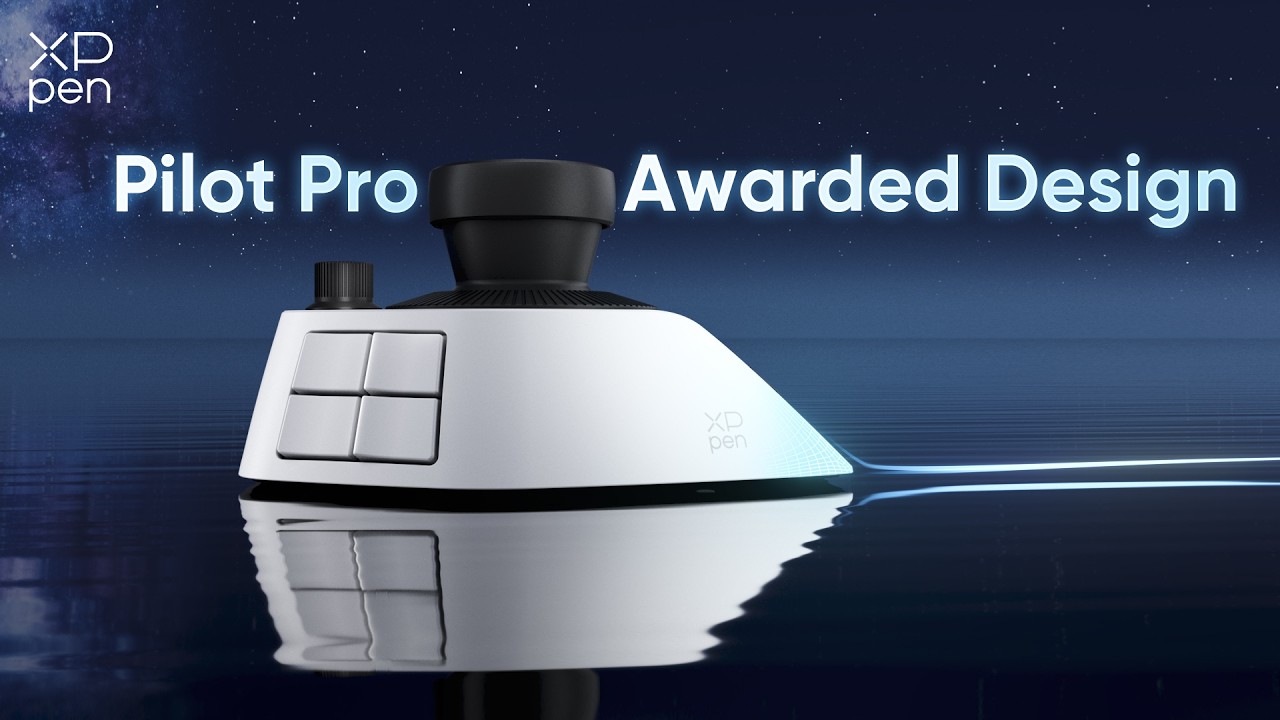
The second key difference is what XPPen calls "dynamic virtual layer interaction". Instead of adding additional physical buttons for every additional function, which causes tension between capability and compactness, Pilot Pro uses the joystick as a central switching mechanism. "A single directional input moves the user between functional layers – media manage, fast edit, fine edit, color grading – media manage, fast edit, fine edit, color grading – without adding physical complexity," Jiang says. The result is a device that's 30% smaller in visual volume, that covers the full range of editing commands, and reduces high-frequency operation by over 50%.
Li Jiang is particularly pleased that Pilot Pro has already been recognized by the iF Design Award 2026 and the Good Design Award 2025: that was "meaningful validation that the approach resonated beyond our own team." As the iF Design Award put it, the Pilot Pro’s design philosophy “balances technological innovation and humanistic care”, leading the industry’s move from efficiency first to health and sustainability.

Unparalleled speed and an immersive workflow
Pilot Pro is designed to make your editing workflow faster and easier. Its joystick makes color wheel grading silky-smooth and perfectly precise with no need for modifier keys. And its 4- to 8-way directional commands quickly deliver your most-used features, such as tilting left or right for variable speed playback, pushing up to select clips or pushing down to cut. In addition to setting your own custom themes there are also predefined presets for key apps including DaVinci Resolve, Premiere Pro, Photoshop and Lightroom as well as fully editable preset files, which are custom shortcut presets created by top editing experts. As you switch between apps, the console loads the matching preset automatically: no setup hassles, no steep learning curve.

There are 8 command buttons, and 4 directional buttons, all of them assignable to your most-used shortcuts. And the ABCD buttons at the top make theme switching instant: simply double-tap to activate and jump into your next edit. And a single click of the OK button brings up the HUD with every bound command in view; one more click and you're back in the edit.
Every button on the Pilot Pro Editing Console is precisely tuned for light, responsive actuation to reduce finger fatigue, and all the control shapes are deliberately differentiated so you can recognize them by touch. The three assignable dials deliver instant haptic feedback with every rotation, so you can feel what you're doing with tactile clarity. And there are three vibration modes to make each interaction feel the way you like it.
Extensive connectivity and compatibility

The Pilot Pro supports wired connections and wireless Bluetooth and USB receiver, enabling you to connect to your computer or laptop in the way that suits you best. All three methods deliver stable, low-latency performance, and the built-in battery with USB-C charging offers simplicity as well as stamina: you can expect up to 15 days of battery life based on 4 hours of use per day, ensuring that your Pilot Pro can handle even the most demanding editing sessions.
The Pilot Pro Editing Console works with Windows 10 or later and macOS 11.0 or later, and it's compatible with Photoshop, Lightroom Classic, Premiere Pro, DaVinci Resolve and CapCut. And at just $209.99 / €199.99 / £169.99* with an extra 5% launch discount, you don't need a big budget to add it to your setup.
* Prices may vary by region