



 Become a TechRadar Insider


TechRadar Verdict
A modest feature set, but this phone offers a superior music package for a bargain price
Pros
- +
High quality Walkman music player
- +
Budget price
- +
Slimline flip design
- +
External music player controls
- +
512B M2 memory card
- +
Decent earphones supplied
Cons
- -
Basic 1.3-megapixel camera
- -
No flash or autofocus for camera
- -
No video capture facilities
- -
No 3G
- -
Poor loudspeaker quality
Why you can trust TechRadar We spend hours testing every product or service we review, so you can be sure you're buying the best. Find out more about how we test.
The W350i Walkman phone is Sony Ericsson's latest effort to attract the eye and ear of music mobile buyers on a credit-crunched budget.
It may be a low cost handset, but alongside its core music player credentials Sony Ericsson has given the W350i some fashion savvy appeal, with a lightweight, ultra slim body, a retro-ish flip and some smart-looking music controls on the front.
Basic feature set

Its numberpad-covering flip looks like an homage to turn-of-the-century Ericsson handsets, and its 11mm thin profile is a design nod towards the stylish W890i.
But this budget mobile has few of the headline features of its higher end Walkman stablemate – and an obviously lower build quality.
The onboard camera, for example, is a basic 1.3-megapixel affair with no flash or video capture capability. There's no 3G connectivity for fast multimedia downloading, nor any other headline-grabbing features.
The additional features list is, in fact, all standard issue Sony Ericsson rather than more eyebrow-raising stuff; an FM radio is built in, there's a video player and a web browser, plus you get all the usual extensive organiser gear.
Flimsy flip
The small, lightweight feel of the W350i – it measures 104(h) x 43(w) x 11(d)mm and weighs a mere 75g – is achieved partly by some very thin plastic used on the back panel cover and flip.
The rubber-alike feel of the back casing is good to the touch, but we were concerned about how well the cover – which houses the phone's Memory Stick Micro card slot and SIM holder – would hold up to regular card swapping.
The flip feels particularly flimsy and easy to bend, which might be of more concern when considering wear and tear – though it is easily removable, so could probably be replaced if necessary.
The flip does the old answering and ending calls routine well. It covers a commendably responsive and nicely-worked numberpad – it has large, smoothly curved keys that are fine for quick tapping.
But the flip also hosts on the outside a set of rather natty looking music controls, so you can work the player with the phone closed.
Distinctive design
Naturally, music takes centre stage, with the Walkman player interface even engaged as the default screen when the flip is shut.
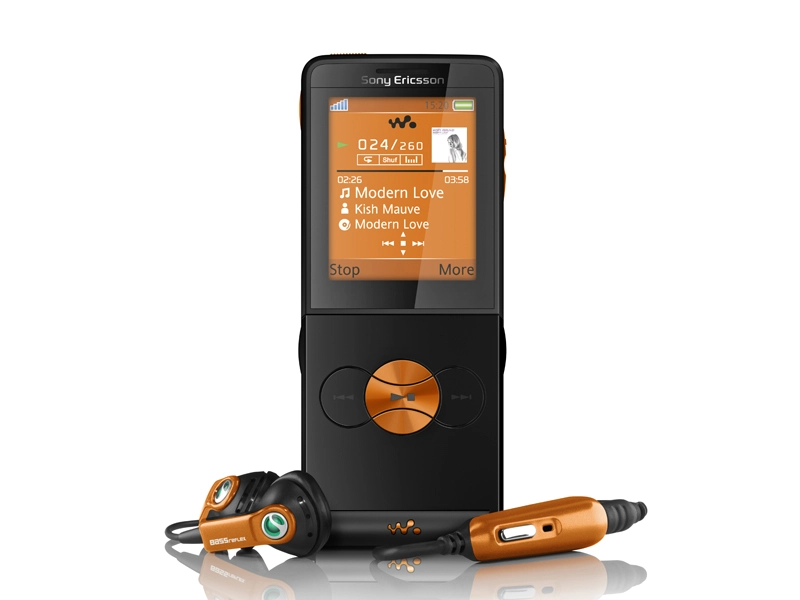
The curvy front panel music buttons, which are accented by the W350i's distinctive colour schemes (black with orange or purple trim, white with graphite, light blue with silver), give the phone an almost standalone music player look.
Intuitive layout
The phone's display takes up the upper portion of the body. It's a 262K-colour, 1.9-inch screen with a lower than average176x220 pixels resolution.
While it's perfectly adequate for viewing menus and options, it's not particuarly detailed for looking at images, video clips or web pages.
Its menu system and user interface will be familiar to Walkman phone owners. It's fairly intuitive and easy to navigate.
And although it doesn't use the latest, more conventional key arrangement of newer Sony Ericsson handsets – most of which now have standard call and end keys – the W350i utilises a Sony Ericsson control button configuration we've seen many times before, based around the a navigation D-pad, with adjacent softkeys, back button and clear key.
Excellent Music player
Firing up the Walkman player, it's clear that Sony Ericsson hasn't cut corners with the sound quality.
You get a very impressive audio performance, with great balance and a good depth of sonic detail. It not only looks like a standalone music player, it does a fine job at being one too.
The supplied earphones are better than the average sort you find boxed with mobile phones. They do a pretty good job, particularly for a phone at this price level, with plenty of bass punch too.
The loudspeaker on the phone, on the other hand, is tinny and bass-light, so will do your music no favours.
Adding higher quality headphones is an easy option, thanks to the two-piece headset supplied, which has a standard 3.5mm socket for plugging in your own cans.
This is recommended if you want to enjoy the full audio delights of the Walkman player – through our Sennheiser reference headphones, music playback sounded very pleasing indeed .
Easy to use Walkman
Operating the Walkman player is an easy ride too. It has a straightforward, intuitive user interface, and the outside flip controls – which enable you to fast forward or rewind through tracks, pause/play songs, or scroll up and down lists – work efficiently.
Haptic feedback lets you know buttons have been properly pressed with a small vibration, while a small Walkman button on the side toggles you back to Walkman menu options when the flip is closed.
There's a neat slider button on top, too, to stop accidental pressing. In fact, you'll rarely need to open the phone while you're listening to music.
Uploading music to your phone
Tracks can be loaded up on to the phone from a PC using supplied Sony Ericsson Media Manager software and USB cable, or by dragging and dropping files with the phone in mass storage mode.
Phone storage is a measly 14MB, but a 512MB Memory Stick Micro card is included in-box to give you room for more than 450 tracks.
Sony Ericsson's nifty TrackID music identification software is also included, so you can quickly identify tunes you hear around you, or on the FM radio that's built into the phone.
Camera quality
Unlike the Walkman player, the camera is a pretty basic effort. Its 1.3-megapixel maximum resolution is entry-level stuff for a UK cameraphone in 2008.
Controls are limited, there's no flash or autofocus system, though there are the usual standard effects, white balance options and so on.
Quality isn't great though. In decent light, image quality is relatively poor, with a lack of detail and softness in shots; low light snaps are worse. It's essentially a camera for quick snaps, picture messages, and so on, but don't expect good quality prints.
Sony Ericsson's now-standard option to upload images straight to a Blogger account is offered too, though there's no facility for shooting even basic quality video footage on this camera.
It can play back video clips in certain formats copied to the phone or downloaded over the air (though GPRS/EDGE speed downloading is slow).
Web browsing features
The W350i has an Access NetFront web browser embedded, which provides a way of checking out websites.
Its opening screen has a Google search option, which is handy, though browsing the full internet isn't as satisfactory as faster, more capable Sony Ericsson handsets.
In default mode, web pages are optimised for the mobile screen, and there's a Smart-Fit option for small screen scrolling, but trying to view full web pages in their natural state can be slow and frustrating.
Mobile internet-optimised pages, including operator portals and Sony Ericsson's Play Now download site, however, render speedily.
RSS feeds are supported too, so you can view updates from favourite websites or blogs more easily and speedily.
Additional tools
Sony Ericsson has packed the W350i with a standard kit of organiser tools – calendar, tasks, notes, alarms, timer, stopwatch, calculator and code memo – plus there's a convertor app and voice recorder facility.
Another Walkman standard, the Music Mate guitar and piano chord guide app, is pre-loaded too, plus three games are included.
Impressive performance
Voice calls made and taken on the W350i were clear and fine, with no problems with reception.
In case you were wondering, the microphone is on the main body of the phone rather than the flip, so its flimsiness isn't an issue at all.
The power performance of the W350i was acceptable too. Estimated by Sony Ericsson to provide up to 7 hours of talktime or 300 hours in standby, or up to 15 hours of music playback, we found that in our average usage tests, we managed around three days between charges, with a small amount of music playing.
Factor in heavier tune playing – as you'd expect from a Walkman phone – and standby and talktime will fall accordingly.
Fantastic music phone
Sony Ericsson's Walkman range now seems to have most bases covered when it comes to different types of phones for different categories of music listener, and the W350i's budget-buyer appeal is clear.
While its specification may not be the finest around, particularly the disappointing camera, and the curiously flimsy flip, it still has a good level of standard Sony Ericsson functionality underpinning it.
If imaging quality is a priority or you want 3G multimedia functionality, you should look elsewhere.
But the real deal-maker for cash-short music mobile buyers will be its core music capabilities and eye-catching skinny looks; the high quality Walkman player delivers a fine performance, while the slimline retro-chic design hits the right notes too.
Network availability: T-Mobile, O2, Orange, Vodafone, Virgin Mobile
Looks: 4/5
Ease of use: 4.5/5
Features: 3/5
Call quality: 4/5
Value: 4/5