
 Become a TechRadar Insider





These are the best home printers of 2026 for general and home office use. I've tested over a hundred of the best home printers and business printers - and from those in-depth reviews, I've selected the models most suitable for home printing. Whether that’s printing family photos or duplicating documents these are the printers and multifunction devices to consider first.
To help you find the best home or home office printer, our expert review team evaluate scan quality for image clarity and fidelity, color accuracy and reproduction assessments across various paper types, how easy it is to maintenance and upkeep whether you print daily or once a month. We perform ink and toner yield testing to calculate real-world operating costs, ensuring you won't be surprised by high recurring expenses or frequent, frustrating refills.
Meet our expert

Jim has been evaluating printers for more than twenty years. From pocket printers to industrial dye sublimation, Jim has been there, run the tests and printed the t-shirt. His expertise extends to consumables (paper, ink, toner) and his printer buying guides make it easy to compare these essential peripherals.
Best home printer overall


✅ You print a lot. This printer excels at high-volume printing since it has fast speeds, particularly in black-and-white, automatic document feeder, and you get loads of printer ink in the box that depending on use should last for years.
✅ You're scanning lots of documents. Unlike a lot of home printers, the EcoTank ET-4950 series of printers features double-sided scanning - which is practically unheard of at this price.
❌ You just want a printer for occasional use. Given the 4-in-1 features and specs, this is expensive overkill for occasional print-outs - and like all inkjet printers, regular use and maintenance is a must to keep the nozzles clear.
❌ You want a wide range of connectivity. Unfortunately, this printer has no Bluetooth, NFC, a USB Host port for printing from or scanning to a USB stick - it's not a deal-breaker by any means, but it's worth pointing out.
The Epson EcoTank ET-4950 series is a feature-laden four-in-one inkjet aimed at the home office or small business and being a refillable tank printer, it has a very low running cost with bottled ink costing 95% less than cartridge ink.
I found it a pleasure to print with, thanks to a combination of good design, a responsive touchscreen, prompt print speed and some useful features. Advantages I noticed over the Epson EcoTank ET-4850 predecessor, are an improved print speed and the ability of double-sided scanning in addition to duplex printing, a feature usually reserved for premium printers.
Epson’s hybrid pigment and dye-based bottled inks produced some vividly colored and detailed test pages. I felt that the rival Canon MAXIFY GX4020 managed a slightly higher level of detail with photos, while the HP Smart Tank 7001 offers larger ink tanks. But overall, the Epson’s all-round performance and superior feature set make this one of the best home office printers, and I can’t find another mid-price printer so loaded with features and ink.
Read our full Epson EcoTank ET-4950 series review
Best home printer for refills


✅ You print a lot of color pages. Canon’s vibrant bottled ink is so much cheaper than cartridge ink, the cost per page is hard to beat.
✅ You print photos as well as documents. I found photos looked more realistic here than with most office inkjets.
❌ You insist on a touchscreen. Plenty of printers at this price have an interactive display, but not this one.
❌ You also need to copy and scan. This print-only device can’t do that, but the multipurpose Canon MegaTank GX6550 certainly can.
This color MegaTank printer will appeal to both business and home users thanks to its blend of high build quality and very low running cost. While the price tag is rather expensive for a print-only inkjet, Canon’s inexpensive bottled ink keeps the total cost of ownership competitive. With cartridge ink costing around 85% more you’ll soon see a saving, especially if you print a lot.
The design is practical and appealing with ample room for paper and ink. In each case, you can view at a glance how much is left through the clear plastic windows. There’s no touchscreen, sadly, but it prints quickly in auto-duplex mode and to a high quality. Text documents and photos look great and it’ll print on a wide variety of media, including banners. I’d recommend the Canon MAXIFY GX5020/GX5050 for high volume printing where quality is a priority.
Read our full Canon MAXIFY GX5020/ GX5050 review
Best cheap home printer


✅ You print documents including photos regularly but not in big volume. The print quality here is great, but the cost per page is not so competitive.
✅ You do everything from your smartphone. HP has an excellent companion app that makes printing, scanning and faxing via the cloud especially easy.
❌ You print a lot. HP’s cartridges are expensive and the tri-color cartridge will need replacing the moment one of its three inks runs low.
❌ Your Wi-Fi network is unreliable. There’s no Ethernet port on this wireless printer, so you can’t hard wire it to your router.
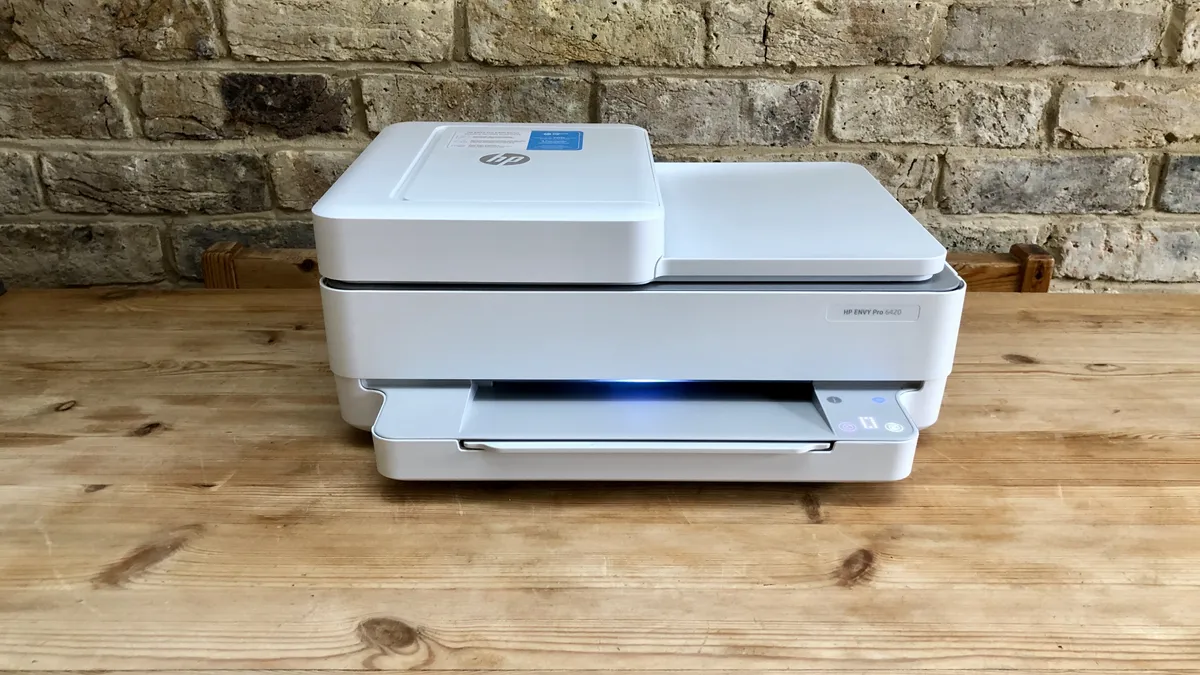
Looking for a budget-friendly home printer?? With the ability to print, scan, copy, and even fax (via your smartphone), the HP Envy Pro 6420 is my recommendation.
While the print speed may be slow, the Envy Pro 6420 can duplex print and photocopy stacks of up to 35 pages with its inbuilt ADF (automatic document feeder). Instead of an Ethernet port, it has Bluetooth and self-healing Wi-Fi built in, making mobile printing with the HP iOS/Android app a breeze.
Despite its limited paper capacity and slow print speed, I was impressed with the overall print quality of the Envy Pro 6420. Replacement ink cartridges are expensive, unless you commit to HP's Instant Ink subscription service, although personally, I’d rather shop around myself for the cheapest cartridges. Another thing I found it excelled at during review is is photos, which makes this one of the best printers for the family to share.
Overall, I found the HP Envy Pro 6420 is a solid choice for those needing a compact and affordable home printer. Find the best deals on HP printers with our HP discount codes.
Read our full HP Envy Pro 6420 review
Best home printer for wide-format business printing


✅ You need to print documents of all sizes. This printer is equally adept at printing passport photos as it is A3+ posters.
✅ You print brochures and handouts that need to be vivid, long-lasting and smudge-resistant. Epson’s pigment-based ink is all of those things.
❌ Your print volume is very high. Epson’s DURABrite ink cartridges are expensive.
❌ You mostly print photos. It can print a reasonable photo, but the pigment inks are better at vivid documents. Photo printers tend to use soluble dye inks which are better suited to photo paper and are usually cheaper.
It might look a little bulky, but I found the Epson WorkForce Pro WF-7310 is actually quite compact considering it can hold a whole ream (500 sheets) of Tabloid/A3 paper in its two paper trays. Add a multi-purpose tray that can take pretty thick card and you’ve got a printer for the home office that can handle a heavy workload.
Under tests, I was impressed by its rapid print rate in auto-duplex mode and the print quality. It’s using pigment-based inks that give you bold colors and more durable prints. There’s no touchscreen on this model, but it’s easy enough to operate using the tilting control panel with its 6.1cm LCD. Wi-Fi and AirPrint connectivity are built in, while the motorised output tray is a nice touch. The only real catch is the cost of the DURABrite cartridges, which push the CPP (cost per page) over 12 cents (or 10 pence) for color pages.
Thanks to its specs, its speed, its print size capabilities, and its generous sheet capacity, this Epson is a great home office printer for professionals such as architects, designers, marketers, and anyone printing spreadsheets and posters. It's not as feature-rich as the Epson EcoTank ET-4950, but supports A3 printing. A good all-rounder that impressed me during review.
Read our full Epson WorkForce Pro WF-7310 review
Best home printer for inkjet


✅ You print photos as well as documents. This inkjet can handle both, which gives it an advantage over a laser printer.
✅ You print on a variety of paper stock. With multiple input trays and ample room in each, you can load it up with different paper sizes and select the desired type remotely.
❌ You need to copy large documents. Though it can print on Tabloid/A3 paper, the scanner is limited to Letter/A4 paper.
❌ You’re pushed for space. With its high paper capacity and bulging cartridge compartment, this 21kg printer is a big unit.
The Brother MFC-J5945DW is a high-spec feature-packed four-in-one business printer aimed at the home worker with heavy print demands.
It’s an inkjet, although it prints faster than some laser printers I've reviewed and it can take extra-large inkjet cartridges that promise a page yield up to 6,000, which is comparable to laser toner cartridges.
Thankfully, it’s smaller than a wide-format laser printer, and there’s room for 250 sheets of paper in its twin input trays. I was disappointed that the scanner is only Letter-sized, but apart from that limitation, this premium printer copies documents quickly and reliably with its 50-sheet ADF, while doubling A4 documents to A3-size if required.
This is a step-up from your average home office printer, but I found the print quality and broad feature set justify the price.
Read our full Brother MFC-J5945DW review
Best home printer for color laser printing


✅ You want a compact laser printer for the home or office. This is a well-sized multi-function printer that won't take up a lot of space compared to a lot of other laser printers.
✅ You want a strong printer performance. Considering the cost of this printer, I was heartily impressed with the results this color laser model delivered for mono and color documents and images during my tests.
❌ You want to print a lot of images. Printing images is excellent here, but for the best performance, I'd still recommend an inkjet photo printer for lots of photographs.
❌ You want a larger paper tray. Arguably the biggest issue with the C320 is that the paper tray is capped at 250 sheets, which won't be ideal for larger business operations.
The Xerox C320 is a great pick if you're printing both text and images to a high degree of quality. As a laser printer, it's well-placed for crisp and quick document printing, and that's certainly what I found in my tests, making it a clear versatile pick for home offices and small business use.
But it's the photo printing that really surprised me. Considering this is a color laser unit, the enhanced 4800dpi resolution meant photos came out with the sort of detail I usually only see from inkjet printers.
The 2.8-inch display makes it easy to control print-outs, and the USB Host option gives it real use for workgroups if you do decide to move it out of the home office. At 250 sheets, paper tray capacity isn't the highest, so it's not recommended for busy offices or ultra high-volume print jobs. However, the C320 does also have a single-feed tray for one-off jobs like addressing envelopes.
It's worth noting that this is a print-only unit with double-sided printing. If you need print, scan, and copy capabilities, the Xerox C325 is the upgrade to go for, while the older Xerox C235 is still an excellent all-in-one, too (see my review here).
My only real complaint is the build quality, which felt insubstantial for a Xerox machine. Beyond that, there's a lot to like here at a reasonable price.
Read our full Xerox C320 review
Best home printer for photos


✅ You print a lot of photos. This home printer is perfectly specced for photographic print-outs up to A3, with the six inkjet cartridges offering better color accuracy than most general printers.
✅ You want to scan photos to create digital copies. While the scanner is limited to A4, the reproductions are high-resolution, making it ideal for turning physical images into digital copies for storing online.
❌ You need a fast printer. There aren't many downsides to this printer, but it's notably slower than a lot of home printers - mainly because printing images is generally slow anyway.
❌ You need the widest color gamut. This printer is great for printing photos for the home, but if you're a professional photographer, the expensive Canon imagePROGRAF PRO-310 is superior in this regard.
The Epson Expression Photo XP-970 is easily one of the best home printers for photos around - it boasts print, scan, and copy capabilities and supports paper up to A3-sized. But there are two major factors that, for me, really seal the deal.
First, the printer uses six inkjet cartridges to deliver superior color accuracy compared to traditional inkjets and a lot of photo printers. That does push prices up, but ultimately, if you want great-looking, hi-res results, it's worth it.
Second, the A4 scanner offers very high resolution scans, which makes it a good option for those looking to turn physical photographs into near-identical digital copies. So, an exceptionally well-specified printer for images all-round in my book.
Where it does fall down slightly is the print speeds, which aren't particularly fast, and the lack of fax, which a lot of people won't need anyway.
Other than that, it's difficult to find fault with the printer at all. You can get an idea of what to expect from performance by checking out my Epson Expression Photo XP-960 review - it's almost entirely identical to the XP-970.
Best home printers: Also tested
I've tested more than 200 of the best printers for home and office use - and while they may not make my full round-up, the models below warrant honorable mention.
HP OfficeJet Pro 9015
This all-in-one printer offers fast printing speeds, automatic document feeding, and smart features such as mobile printing and scan to email. It's also energy efficient, earning an Energy Star certification.
Epson WorkForce WF-110
One of my favorite portable printers, it might be slow to print, but it's versatile, can be charged on the go via USB, and the crisp quality of prints are uniformly excellent.
Brother MFC-L8395CDW
The Brother MFC-L8395CDW (also known as the MFC-L8390CDW) is a laser printer boasting rapid print speeds, essential office-based features like auto-duplex printing, and built to tackle high-volume print runs.
Epson EcoTank ET-2850
It might be a bit basic for some, lacking a few key features I like to see on printers I review, and the print quality is just ok. However, the Epson EcoTank ET-2850 is an efficient device that delivers great cost-per-page.
Brother HL-L8245CDW
This laser printer, also known as the HL-L8240CDW, is a serious workhorse that features all the essentials required for higher volume print jobs, including speedy auto-duplex printing, touchscreen, NFC and USB Host port. But there's no scan, copy, or fax facilities here.
Canon Color imageCLASS MF753Cdw
Also known as the i-SENSYS MF754Cdw, the Canon Color imageCLASS MF753Cdw is an ideal pick for heavier print runs, particularly for SMBs and home offices. However, I did find that running costs weren't exactly competitive, and it lacks core features like NFC.
Best home printer: FAQs
What are the best printer brands?
There are ten big printer manufacturers that have won prestige and market share through consistent innovation and reliable products, plus a few emerging names of note. Epson and Canon are two of the largest inkjet manufacturers, while Xerox and Lexmark specialise in laser printers. HP and Brother continue to develop both technologies and like the aforementioned brands, they sell printers for both work and home use. Brands like Kyocera, Oki, Ricoh and Konica Minolta are not such familiar household names, but they’re big players in commercial printing. In areas where print technology is changing rapidly, such as fabric and 3D printing, new brands including Procolored, Sawgrass and Creality are the ones to watch. For more like this, we've tested out all the best 3D printers.
What is a home printer?
A home printer is a device designed for personal use in a home setting, typically for printing documents, photos, and other materials. Home printers are typically smaller and more compact than the best workgroup printers and are intended for low-volume use.
What are the different types of home printers?
There are several types of home printers available, including inkjet printers, laser printers, and multifunction printers. Inkjet printers use liquid ink to create prints and are good for printing photos and color documents. Laser printers use toner to create prints and are good for printing text documents and graphics. Multifunction printers combine the capabilities of a printer, scanner, copier, and sometimes a fax machine in one device.
For some recommendations, we reviewed the best inkjet printers, best ink tank printers, and the best laser printers.
How do I maintain my home printer?
To maintain your home printer, you should regularly clean the printer, replace the ink or toner when necessary, and make sure the printer is not overcrowded with paper. You should also keep the printer in a dust-free environment to prevent debris from clogging the machine.
What is the cost of ink or toner for home printers?
The cost of ink or toner for home printers can vary significantly depending on the printer and usage. Some printers have high-capacity ink or toner cartridges that last longer and can save you money in the long run, while others have smaller cartridges that need to be replaced more frequently. It is important to consider the cost of ink or toner when choosing a home printer, as this can be a significant ongoing expense. Some companies offer subscriptions or bulk purchasing options to help reduce the cost of ink or toner. It is also a good idea to shop around and compare prices from different retailers.
What’s the best ink, pigment or dye?
Inkjet printers use two kinds of ink to suit different situations. Pigment inks contain colored particles in suspension. The non-soluble particles bond quickly with the paper leaving bold prints that are less prone to smudging, running or fading under UV light. Pigment ink works well with smooth high-quality paper and is ideal for text documents. With dye-based inks, the colorant is in solution so it needs to soak into the paper and the prints are more susceptible to running and less UV resistant. Dye works well with cheap paper and also coated photo paper thereby making it ideal for photos. Many inkjet printers use both black pigment ink and colored dyes in combination.
Which home printer has the cheapest ink?
The home printer with the cheapest ink will depend on a variety of factors, including the type of printer (inkjet or laser), the brand, and the type of ink or toner it uses. In general, inkjet printers tend to have cheaper ink than laser printers, but the cost can still vary widely. It's a good idea to compare the cost of ink or toner for different printer models before making a decision.
How long do home printers last?
The lifespan of a home printer can vary depending on the brand, model, and how it is used. Some printers may last for several years with proper maintenance, while others may have a shorter lifespan. It's important to consider the overall cost of ownership, including the cost of ink or toner, when deciding whether to purchase a printer for home use.
What are the different types of printer?
There are three main types of printer: inkjet, laser, and ink tank.
Inkjets are all-rounders using liquid ink for high-quality text, graphics and especially photos. They're your classic home printer, although there are plenty of office inkjets out there. They're small, simple to use, For low-level printing jobs, they're perfect. The printers are cheap to buy, but the high price of ink cartridges make it more expensive long-term.
Laser printers use toners, providing crisp, detailed documents - they're a mainstay of offices. Instead of using liquid ink, lasers use a powder that's heated on the page. As a result, print speeds are faster - more ppm the better. They don't tend to handle photos as well as an inkjet, they're expensive to buy but the replacement toner is cheap, so they're a long-term investment,
Ink tank printers, like laser printers, the initial cost is higher - but they offer a lot of bang for their buck. Like an inkjet, it uses liquid ink in bottles, letting you refillable individual colors as you use them. This leads to reduced running costs and reduced waste. While ink cartridges last for a few hundred pages, ink tank printers can print thousands of pages before needing to be refilled. The overall economical choice.
But these are far from the only printers on the market, as we saw in our guide Inkjet vs Laser vs LED: What’s best for you? The category is incredibly diverse. In our experience, there's always a way to print almost anything - the difference mostly comes down to the type of inks or dyes used.
How to choose the best printer for you
When choosing which printer is best for you, there are a number of factors to consider:
Inkjet or laser?
If you print photos, the answer is inkjet. With thousands of nozzles applying liquid ink dots onto plain or coated paper, inkjets achieve superior image quality, while being generally smaller and cheaper than lasers. However, the dry toner used by laser printers is more efficient and allows for faster, cleaner and more consistent printing at higher capacities.
Monochrome or color?
If you don’t need to print in color, monochrome laser printers are significantly cheaper to buy and run than their color counterparts. They’re also simpler and have more space for higher capacity black cartridges. The same cannot be said of inkjets which are able to deliver all colors via the same printhead, so there’s little advantage in having just one.
Print-only or multifunction?
The essential difference between a pure printer and an MFP (multifunction printer) also known as an AOI (all-in-one) is the integrated scanner. Naturally, this feature adds size and cost, but a flatbed scanner will capture documents more satisfyingly than an app on your smartphone and it effectively turns any printer into a photocopier. The more expensive MFPs will also offer an ADF (automatic document feeder) for passing a stack of pages over the scanner for you. We tested out the best all-in-one printers.
Home or office?
Printers designed for domestic use tend to be compact and affordable inkjets which can print family photos as well as work documents. In the office, printing at faster speeds and higher volumes is more important than size and operating noise, so lasers are more common. Business printers usually have stronger security and can be accessed by whole networked workgroups.
Subscription plans?
Services like HP Instant Ink provide cheaper cartridges in the mail before you run out. It makes sense if you print regularly, but it’s not always right for occasional users and getting out of the contract can be difficult.
Essential features?
Most printers print on any size paper up to Letter, or A4, so if you need the best large format printers or the best A3 printers, you can expect to pay more. Most devices have Wi-Fi built in as well as an Ethernet port, but you need to check. Also consider the type of media you will be using and the quantity. If you print a lot, it will be worth avoiding inkjet cartridges in favour of refillable ink tanks. If you want to print on card, check the specifications for the maximum compatible paper weight. A printer offering manual duplex is unable to print on both sides of the page automatically, so unless you don’t mind turning over every sheet by hand, make sure it can auto duplex.
Budget?
The best cheap printers are usually inkjet models, but their expensive cartridges are the catch. Always check the price of your printer’s consumables before you buy. Bottled ink costs around eighty percent less than cartridges, so a more expensive ink tank device will give you long term savings. We've come across some excellent Prime Day printer deals and Black Friday printer deals when the sales are live, so keep your eyes peeled around that time.
Have a preferred brand? We’ve tested, reviewed, and rated the best HP printers, the best Epson printers, and the best Brother printers.
Jim's buying advice
Why you can trust TechRadar We spend hours testing every product or service we review, so you can be sure you're buying the best. Find out more about how we test.
TechRadar Pro's printer specialist offers his thoughts on selecting the best printer for your needs:
"The question is, what kind of home printer are you looking for?
Inkjet is the most popular technology for home printing because inkjet printers tend to be smaller and cheaper than laser printers. You can expect high-resolution full-color prints from a compact cartridge-based inkjet costing under $100. But the catch with cartridges is the price. An inkjet that takes bottled ink — known as an ink tank or super tank printer — will be larger and considerably more expensive, but will soon save you money because of their much higher page yield.
If you tend to print many pages at a time, or if you print intermittently, laser devices have two key advantages. They print faster and they don’t mind sitting unused for long periods because instead of using liquid ink that can dry and block inkjet nozzles, laser toner is a powder. They’re ideal for printing crisp text documents, but they can’t print on coated photo paper, so they can't match the best photo printers."
How we test the best home printers
Having been the printer specialist at TechRadar Pro for some years, I’ve tested hundreds of products, from the best sublimation printers to the best label printers, and I’m always improving my methodology.
The process starts right from the unboxing and initial set-up, which is timed. If there’s a problem with unsustainable packaging or a baffling user manual, I’ll call it. If it’s a pleasure to use, that’ll be refelected in the final score too. I always test both wired and wireless connections and explore the various remote printing companion apps offered by brands such as HP and Epson as these often enhance the user experience
For the performance tests, I have a folder of test cards, photos and text documents designed to assess detail resolution, contrast, color accuracy and gamut. Some are good for spotting feathering in inkjets, while others highlight banding in lasers. A ten-page text document is useful for measuring print rates because I never take manufacturer's claims at face value. Having said that, the quoted print and scan speeds are usually accurate enough that I rarely contradict them.
I print each test page on a range of standard paper stock from cheap 75gsm sheets to 600gsm card, as every printer has its limits and preferences when it comes to paper quality. And if the manual claims you can print on envelopes, labels or t-shirts, I test that too.
Features such as auto-duplex scanning or copying multi-page documents via an ADF (automatic document feed) are evaluated, and an assessment of build quality and design contributes to the overall rating. I pay particular attention to the COO (cost of ownership) because cheap printers can often give lower value for money when you calculate the ongoing consumables cost. You can find out more about our comprehensive testing process in our guide to how we test, review, and rate printers on TechRadar Pro.
Get in touch
- Want to find out about commercial or marketing opportunities? Click here
- Out of date info, errors, complaints or broken links? Give us a nudge
- Got a suggestion for a product or service provider? Message us directly
- You've reached the end of the page. Jump back up to the top ^
