


I've tested over 200 of the best home printers, and right now, these 6 are the ones that tick every box. From cheap printers for casual family and student use to high-volume models suitable for the home office, I've went hands-on with each one reviewing overall performance, print quality, accuracy, and speeds.
For home use, I recommend the Epson EcoTank ET-4950. This impressive ink tank printer packs in every feature most families need - whether that's for students, and work-from-home professionals - and with plenty of free ink in the box, I found it offered excellent value for money. Considering the price, feature-set, and all that free ink, nothing else I've reviewed can match it.
You can read more in my full review below. You'll also find five more color home printers suitable for a range of budgets and uses, including printing text documents and photos.
Meet our expert

Jim has been evaluating printers for more than twenty years. From pocket printers to industrial dye sublimation, Jim has been there, run the tests and printed the t-shirt. His expertise extends to consumables (paper, ink, toner) and his printer buying guides make it easy to compare these essential peripherals.
Why you can trust this guide
Our printer recommendations are backed by a team of technology experts who rigorously test each device in real-world professional and home scenarios. We maintain strict editorial independence, meaning we never accept payment for reviews and will always give you our honest assessment, highlighting both a product's strengths and its flaws.
- Rigorous, Real-World Testing: Every printer undergoes a minimum testing period where it is pushed to its limits through both everyday tasks and specialized use cases.
- Data-Driven Scoring: We evaluate devices based on strict weighted criteria: Print Quality (50%), Print Speed (20%), Features (20%), and Price (10%).
- Standardized Benchmarks: We measure performance using specific standardized tests, including gradient scales, text documents, and high-quality photo prints to verify manufacturer claims.
- Comprehensive Feature Checks: Beyond basic printing, we thoroughly test secondary features like scanning clarity, copying accuracy, and seamless wireless connectivity across multiple devices.
Best home printer overall


The Epson EcoTank ET-4950 series is a feature-laden four-in-one inkjet aimed at the home office or small business and being a refillable tank printer, it has a very low running cost with bottled ink costing 95% less than cartridge ink.
I found it a pleasure to print with, thanks to a combination of good design, a responsive touchscreen, prompt print speed and some useful features. Advantages I noticed over the Epson EcoTank ET-4850 predecessor, are an improved print speed and the ability of double-sided scanning in addition to duplex printing, a feature usually reserved for premium printers.
Epson’s hybrid pigment and dye-based bottled inks produced some vividly colored and detailed test pages. I felt that the rival Canon MAXIFY GX4020 managed a slightly higher level of detail with photos, while the HP Smart Tank 7001 offers larger ink tanks. But overall, the Epson’s all-round performance and superior feature set make this one of the best home office printers, and I can’t find another mid-price printer so loaded with features and ink.
Read our full Epson EcoTank ET-4950 series review
Best home printer on a budget


If you're looking for a cheap printer for the home, then I think the HP Envy 6555e (also called the 6530e outside the US) is one of the best you can get. It's not ultra-fast - in fact, it's relatively slow and drinks a lot of ink. But overall, I found it a fair trade-off for what you get for the money.
During my testing, quality proved good across document and photo printing. It's exactly what most people will expect from an affordable inkjet, with text looking sharp and bold, while images on glossy paper popped off the page.
What really seals the deal, though, is that's a true three-in-one home printer. It prints, scans, and copies without any issues at all. Add in an option to fax via mobile, and you have a very well-rounded device for homes and dorm rooms.
Overall, the HP Envy 6555e is a solid pick that produces good results if you just want a reliable unit that doesn't cost too much.
Read our full HP Envy 6555e (6530e) review
Best ink tank home printer on a budget


If you're looking to save money on both the printer and the running costs, a budget ink tank is the way to go - and for my money, the Canon Pixma G3270 (also called the Canon Pixma G3570) is my top recommendation.
As an ink tank, the bottled ink is cheaper to buy than inkjet cartridges. And the unit itself is also very affordable compared to printers like the EcoTank ET-4950. So, it's the best of both worlds.
This entry-level home printer lets you print, copy, and scan, and I experienced no issues with any of these features during my tests. The only feature I would've liked to see here is automatic two-sided printing, but not many budget printers have this anyway. Wishful thinking on my part!
As a printer for the home (as opposed to one designed for office use), both speed and paper tray capacity are about average. I clocked printing at 11ipm in black-and-white, with the unit holding 100 sheets.
Overall quality for both documents and photos is good - bold, bright, and consistent throughout my review process. For the price, I can't really fault it.
Editor's note: For an alternative to this MegaTank, I also like the Epson EcoTank ET-2400 from Amazon. In the UK, it's known as the EcoTank ET-2860 / ET-2861. It costs around $160 / £160.
Read our full Canon Pixma G3270 / G3570 review
Best home printer for color laser printing


For some users - I'm thinking home office and small businesses - a color laser is the essential pick. Laser printers excel at document printing above all else, and I don't think home-friendly units get much better than the Xerox C325.
This printer prints, scans, copies, and faxes, and even boasts two-sided printing and scanning. To my mind, this is all absolutely essential for work printing at home. What really drives it home, though, is the print speeds, which hit 33ppm. If you're all about productivity (and spending less time at the printer), that's a serious boon.
In my own tests, I found the C325 printed with absolute speed and accuracy. Text documents were incredibly sharp and detailed. But, surprisingly, so was the color printing I undertook. Compared to home laser printers I've used, these were far brighter and far more vivid than anything else.
The scanning is worth a special mention here. It's one of the easiest I've ever tested, with outputs faithfully replicating the original to the point where it's hard to even tell them apart.
If you need a laser printer for home use, this is one of the best around in my experience.
Editor's note: If you just need a print-only color laser printer, see my HP Color LaserJet Pro 4201dw for another of my favorites.
Read our full Xerox C325 review
Best home printer for photos
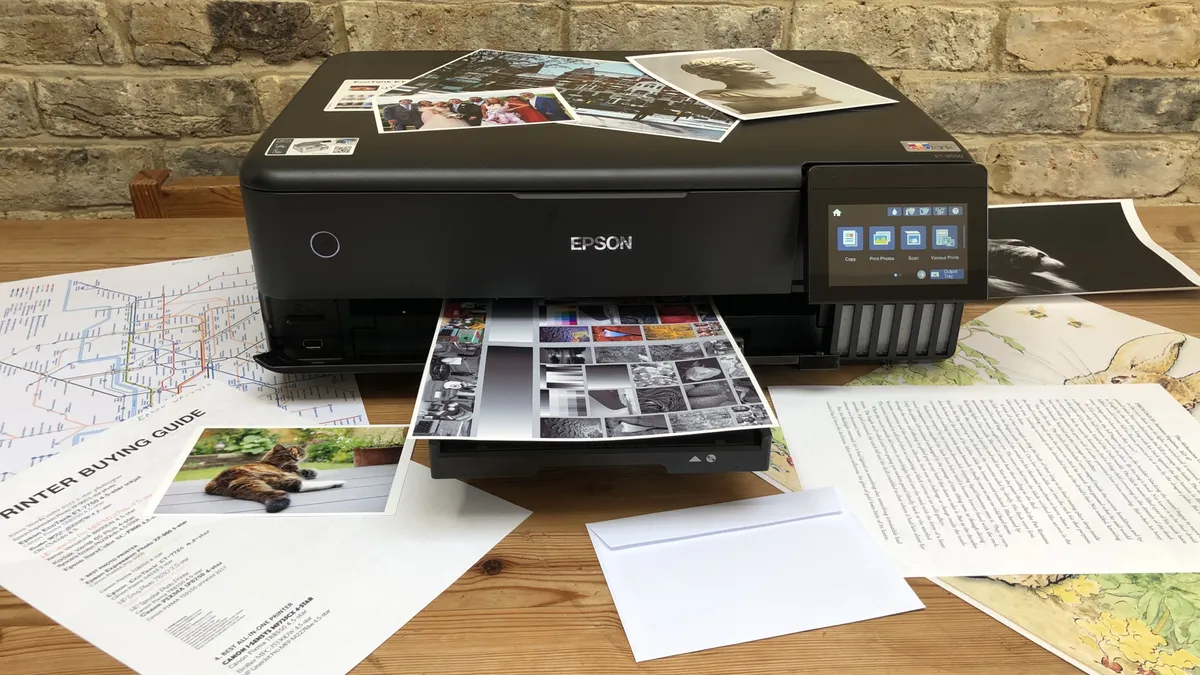


If you want the absolute best results from printing photographs at home, the Epson EcoTank ET-8550 is a clear winner in my book. Yes, it's expensive, yes, it's hardly compact (although it is pleasingly low-profile). But the results for images here make it suitable for everything from pictures to professional photography.
A large part of that quality is down to the six-color Claria ET ink system that delivered brilliantly detailed and accurate images throughout my testing. Bonus points, too, for letting you print on cardstock and Tabloid/A3 paper sizes. A rear-tray also lets you print banners if you need it.
Beyond photo printing, it prints, scans, and copies, which most people will want - cleverly, you can also enlarge smaller print-outs when photocopying, too. There's even automatic two-sided printing. So, all in all, I find it very well-rounded in terms of features.
Now, it may be more than some need - and for that, I recommend checking out the other ink tank printers in this round-up like the EcoTank ET-4950 and Canon MegaTank G3270. They're more than good enough if you're just whipping off a few holiday snaps. For those than want the best quality photos and excellent document printing at home, though, the ET-8550 is an easy recommendation for me.
Read our full Epson EcoTank ET-8550 review
Best printer for home offices


For dedicated home office and small business set-ups looking for an ink tank printer, I really like the performance of the Canon Maxify GX4020 (depending on where you live, it's also known as the GX4050 or GX4060).
Now, it's important to note that I generally recommend laser printers for office document printing. But the versatility of Canon's MegaTank printer means you'll get plenty of use in the home across text and colored documents, as well as cards and photos.
This 4-in-1 home printer lets you print, scan, copy, and fax, and throughout my tests, it delivered great results. Text appeared sharp on all my test, and mixed color documents like maps especially caught my eye with their vibrancy and detail. It's not as fast as a laser printer, but the 9-second first print out time is very quick, and the overall 18ipm print speeds are better than many inkjets.
The 250-sheet paper tray makes it perfect for high-volume printing in a home-based workspace. But the best design aspect in my opinion is the rear flat tray, which supports printing on hard Paperboard and card stock up to 0.7mm thick.
Overall, the Maxify GX4020 is the ideal hybrid for the home and home office. While you can use it for work, it'll easily pull double-duty for the rest of the family.
Read our full Canon Maxify GX4020 review
Best home printers: Also tested
I've tested more than 200 of the best printers for home and office use - and while they may not make my full round-up, the models below warrant honorable mention.
HP OfficeJet Pro 9015
This all-in-one printer offers fast printing speeds, automatic document feeding, and smart features such as mobile printing and scan to email. It's also energy efficient, earning an Energy Star certification.
Epson WorkForce WF-110
One of my favorite portable printers, it might be slow to print, but it's versatile, can be charged on the go via USB, and the crisp quality of prints are uniformly excellent.
Brother MFC-L8395CDW
The Brother MFC-L8395CDW (also known as the MFC-L8390CDW) is a laser printer boasting rapid print speeds, essential office-based features like auto-duplex printing, and built to tackle high-volume print runs.
Epson EcoTank ET-2850
It might be a bit basic for some, lacking a few key features I like to see on printers I review, and the print quality is just ok. However, the Epson EcoTank ET-2850 is an efficient device that delivers great cost-per-page.
Brother HL-L8245CDW
This laser printer, also known as the HL-L8240CDW, is a serious workhorse that features all the essentials required for higher volume print jobs, including speedy auto-duplex printing, touchscreen, NFC and USB Host port. But there's no scan, copy, or fax facilities here.
Canon Color imageCLASS MF753Cdw
Also known as the i-SENSYS MF754Cdw, the Canon Color imageCLASS MF753Cdw is an ideal pick for heavier print runs, particularly for SMBs and home offices. However, I did find that running costs weren't exactly competitive, and it lacks core features like NFC.
Best home printer: FAQs
What are the best printer brands?
There are ten big printer manufacturers that have won prestige and market share through consistent innovation and reliable products, plus a few emerging names of note. Epson and Canon are two of the largest inkjet manufacturers, while Xerox and Lexmark specialise in laser printers. HP and Brother continue to develop both technologies and like the aforementioned brands, they sell printers for both work and home use. Brands like Kyocera, Oki, Ricoh and Konica Minolta are not such familiar household names, but they’re big players in commercial printing. In areas where print technology is changing rapidly, such as fabric and 3D printing, new brands including Procolored, Sawgrass and Creality are the ones to watch. For more like this, we've tested out all the best 3D printers.
What is a home printer?
A home printer is a device designed for personal use in a home setting, typically for printing documents, photos, and other materials. Home printers are typically smaller and more compact than the best workgroup printers and are intended for low-volume use.
What are the different types of home printers?
There are several types of home printers available, including inkjet printers, laser printers, and multifunction printers. Inkjet printers use liquid ink to create prints and are good for printing photos and color documents. Laser printers use toner to create prints and are good for printing text documents and graphics. Multifunction printers combine the capabilities of a printer, scanner, copier, and sometimes a fax machine in one device.
For some recommendations, we reviewed the best inkjet printers, best ink tank printers, and the best laser printers.
How do I maintain my home printer?
To maintain your home printer, you should regularly clean the printer, replace the ink or toner when necessary, and make sure the printer is not overcrowded with paper. You should also keep the printer in a dust-free environment to prevent debris from clogging the machine.
What is the cost of ink or toner for home printers?
The cost of ink or toner for home printers can vary significantly depending on the printer and usage. Some printers have high-capacity ink or toner cartridges that last longer and can save you money in the long run, while others have smaller cartridges that need to be replaced more frequently. It is important to consider the cost of ink or toner when choosing a home printer, as this can be a significant ongoing expense. Some companies offer subscriptions or bulk purchasing options to help reduce the cost of ink or toner. It is also a good idea to shop around and compare prices from different retailers.
What’s the best ink, pigment or dye?
Inkjet printers use two kinds of ink to suit different situations. Pigment inks contain colored particles in suspension. The non-soluble particles bond quickly with the paper leaving bold prints that are less prone to smudging, running or fading under UV light. Pigment ink works well with smooth high-quality paper and is ideal for text documents. With dye-based inks, the colorant is in solution so it needs to soak into the paper and the prints are more susceptible to running and less UV resistant. Dye works well with cheap paper and also coated photo paper thereby making it ideal for photos. Many inkjet printers use both black pigment ink and colored dyes in combination.
Which home printer has the cheapest ink?
The home printer with the cheapest ink will depend on a variety of factors, including the type of printer (inkjet or laser), the brand, and the type of ink or toner it uses. In general, inkjet printers tend to have cheaper ink than laser printers, but the cost can still vary widely. It's a good idea to compare the cost of ink or toner for different printer models before making a decision.
How long do home printers last?
The lifespan of a home printer can vary depending on the brand, model, and how it is used. Some printers may last for several years with proper maintenance, while others may have a shorter lifespan. It's important to consider the overall cost of ownership, including the cost of ink or toner, when deciding whether to purchase a printer for home use.
What are the different types of printer?
There are three main types of printer: inkjet, laser, and ink tank.
Inkjets are all-rounders using liquid ink for high-quality text, graphics and especially photos. They're your classic home printer, although there are plenty of office inkjets out there. They're small, simple to use, For low-level printing jobs, they're perfect. The printers are cheap to buy, but the high price of ink cartridges make it more expensive long-term.
Laser printers use toners, providing crisp, detailed documents - they're a mainstay of offices. Instead of using liquid ink, lasers use a powder that's heated on the page. As a result, print speeds are faster - more ppm the better. They don't tend to handle photos as well as an inkjet, they're expensive to buy but the replacement toner is cheap, so they're a long-term investment,
Ink tank printers, like laser printers, the initial cost is higher - but they offer a lot of bang for their buck. Like an inkjet, it uses liquid ink in bottles, letting you refillable individual colors as you use them. This leads to reduced running costs and reduced waste. While ink cartridges last for a few hundred pages, ink tank printers can print thousands of pages before needing to be refilled. The overall economical choice.
But these are far from the only printers on the market, as we saw in our guide Inkjet vs Laser vs LED: What’s best for you? The category is incredibly diverse. In our experience, there's always a way to print almost anything - the difference mostly comes down to the type of inks or dyes used.
How to choose the best printer for you
When choosing which printer is best for you, there are a number of factors to consider:
Inkjet or laser?
If you print photos, the answer is inkjet. With thousands of nozzles applying liquid ink dots onto plain or coated paper, inkjets achieve superior image quality, while being generally smaller and cheaper than lasers. However, the dry toner used by laser printers is more efficient and allows for faster, cleaner and more consistent printing at higher capacities.
Monochrome or color?
If you don’t need to print in color, monochrome laser printers are significantly cheaper to buy and run than their color counterparts. They’re also simpler and have more space for higher capacity black cartridges. The same cannot be said of inkjets which are able to deliver all colors via the same printhead, so there’s little advantage in having just one.
Print-only or multifunction?
The essential difference between a pure printer and an MFP (multifunction printer) also known as an AOI (all-in-one) is the integrated scanner. Naturally, this feature adds size and cost, but a flatbed scanner will capture documents more satisfyingly than an app on your smartphone and it effectively turns any printer into a photocopier. The more expensive MFPs will also offer an ADF (automatic document feeder) for passing a stack of pages over the scanner for you. We tested out the best all-in-one printers.
Home or office?
Printers designed for domestic use tend to be compact and affordable inkjets which can print family photos as well as work documents. In the office, printing at faster speeds and higher volumes is more important than size and operating noise, so lasers are more common. Business printers usually have stronger security and can be accessed by whole networked workgroups.
Subscription plans?
Services like HP Instant Ink provide cheaper cartridges in the mail before you run out. It makes sense if you print regularly, but it’s not always right for occasional users and getting out of the contract can be difficult.
Essential features?
Most printers print on any size paper up to Letter, or A4, so if you need the best large format printers or the best A3 printers, you can expect to pay more. Most devices have Wi-Fi built in as well as an Ethernet port, but you need to check. Also consider the type of media you will be using and the quantity. If you print a lot, it will be worth avoiding inkjet cartridges in favour of refillable ink tanks. If you want to print on card, check the specifications for the maximum compatible paper weight. A printer offering manual duplex is unable to print on both sides of the page automatically, so unless you don’t mind turning over every sheet by hand, make sure it can auto duplex.
Budget?
The best cheap printers are usually inkjet models, but their expensive cartridges are the catch. Always check the price of your printer’s consumables before you buy. Bottled ink costs around eighty percent less than cartridges, so a more expensive ink tank device will give you long term savings. We've come across some excellent Prime Day printer deals and Black Friday printer deals when the sales are live, so keep your eyes peeled around that time.
Have a preferred brand? We’ve tested, reviewed, and rated the best HP printers, the best Epson printers, and the best Brother printers.
Jim's buying advice
Why you can trust TechRadar We spend hours testing every product or service we review, so you can be sure you're buying the best. Find out more about how we test.
TechRadar Pro's printer specialist offers his thoughts on selecting the best printer for your needs:
"The question is, what kind of home printer are you looking for?
Inkjet is the most popular technology for home printing because inkjet printers tend to be smaller and cheaper than laser printers. You can expect high-resolution full-color prints from a compact cartridge-based inkjet costing under $100. But the catch with cartridges is the price. An inkjet that takes bottled ink — known as an ink tank or super tank printer — will be larger and considerably more expensive, but will soon save you money because of their much higher page yield.
If you tend to print many pages at a time, or if you print intermittently, laser devices have two key advantages. They print faster and they don’t mind sitting unused for long periods because instead of using liquid ink that can dry and block inkjet nozzles, laser toner is a powder. They’re ideal for printing crisp text documents, but they can’t print on coated photo paper, so they can't match the best photo printers."
How we test the best home printers
Having been the printer specialist at TechRadar Pro for some years, I’ve tested hundreds of products, from the best sublimation printers to the best label printers, and I’m always improving my methodology.
The process starts right from the unboxing and initial set-up, which is timed. If there’s a problem with unsustainable packaging or a baffling user manual, I’ll call it. If it’s a pleasure to use, that’ll be refelected in the final score too. I always test both wired and wireless connections and explore the various remote printing companion apps offered by brands such as HP and Epson as these often enhance the user experience
For the performance tests, I have a folder of test cards, photos and text documents designed to assess detail resolution, contrast, color accuracy and gamut. Some are good for spotting feathering in inkjets, while others highlight banding in lasers. A ten-page text document is useful for measuring print rates because I never take manufacturer's claims at face value. Having said that, the quoted print and scan speeds are usually accurate enough that I rarely contradict them.
I print each test page on a range of standard paper stock from cheap 75gsm sheets to 600gsm card, as every printer has its limits and preferences when it comes to paper quality. And if the manual claims you can print on envelopes, labels or t-shirts, I test that too.
Features such as auto-duplex scanning or copying multi-page documents via an ADF (automatic document feed) are evaluated, and an assessment of build quality and design contributes to the overall rating. I pay particular attention to the COO (cost of ownership) because cheap printers can often give lower value for money when you calculate the ongoing consumables cost. You can find out more about our comprehensive testing process in our guide to how we test, review, and rate printers on TechRadar Pro.
Get in touch
- Want to find out about commercial or marketing opportunities? Click here
- Out of date info, errors, complaints or broken links? Give us a nudge
- Got a suggestion for a product or service provider? Message us directly
- You've reached the end of the page. Jump back up to the top ^