Updated 20 minutes ago

How to secure your passwords

Guide: Create strong passwords and easily test their strength

January 7th 2010 | Tell us what you think [ 2 comments ]

l0phtcrack

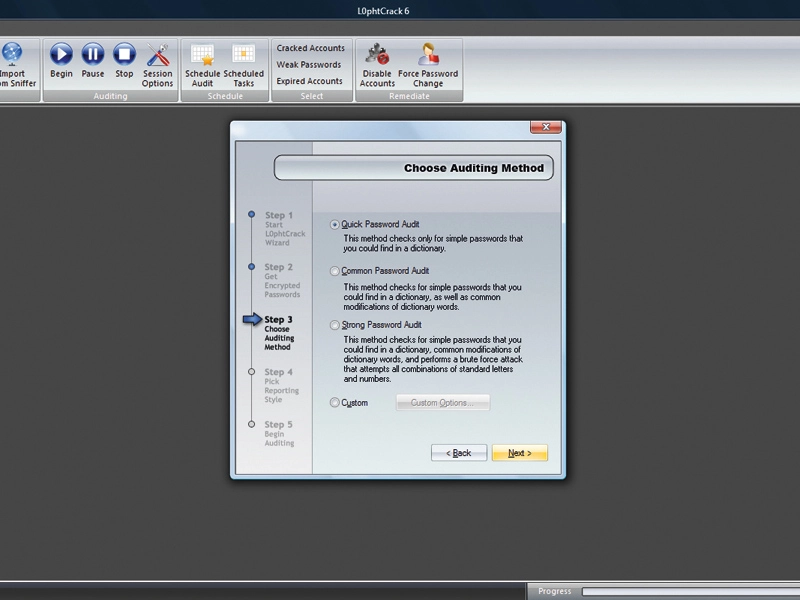
Accept the defaults on L0phtcrack's wizard to crack passwords in seconds

Back in 2002, UK based network security company NTA Monitor surveyed its clients and found that, on average, users needed to remember 21 passwords, ranging from the PIN used to access a cash machine to the password used to log onto their office computer.

That figure has surely risen in the intervening years as more aspects of our lives have shifted online. Count up the number of services, community sites and forums you use on a regular basis and you're sure to be surprised at the number of passwords you type in an average week.

But what is a password, why are they so ubiquitous and how do you choose ones that are both difficult to crack and yet easily remembered? What is a password?

Strictly speaking, a password is any secret piece of knowledge used to grant access to something. Passwords take many forms, ranging from snippets of text entered into a computer keyboard to the number combinations punched in at a cash machine.

The recorded use of passwords dates back at least to Roman times, when guards would challenge people trying to gain access to areas or buildings for a secret word or phrase. The password would change each day and each update would be distributed on a wooden tablet.

Each guard would make his unique mark on the tablet as he accepted the new information. Eventually the tablet would make its way back to the camp's commander, who would know by the marks that all guards had received the new information.

In computing, passwords are nearly as old as the time-sharing operating systems they protect. Their first use was probably in MIT's Compatible Time Sharing System of 1961. Since then, the twin arts of creating and cracking passwords have been locked in an arms race that has driven forward the art of encryption.

Storing passwords

In the intervening decades, computer science has developed many different methods of storing, sending and checking passwords, from the secure to those now regarded so insecure they should no longer be used.

The least secure method is to store password and username combinations in a database in plain (encrypted) text. Anyone who can gain access to the database has access to this data and can subsequently log in as any user.

Equally insecure is transmitting passwords and username pairings from a client computer to a server in plain text. This leaves the information open to interception by malware designed to sniff for it and hence exploitation by hackers.

Password sniffing

For this reason, you should never log in to a sensitive web-based account over the internet without the padlock symbol being visible in your browser's address bar. The padlock icon is a visual indication that the link between browser and web server is using the secure HTTPS protocol to send and receive information, including the username and password.

HTTPS uses a system of digital certificates signed by trusted authorities that prove a site is what it says it is.

In IE8, you can see this as follows. First, surf to an HTTPS website. To the right of the URL bar, there's a padlock icon. Click this and a brief summary will appear. Click 'View Certificates' and a new window will pop up giving the name of the authority (Verisign, for example). Click on the Details tab and the Public Key entry on the field list will show you the key length used to encrypt the site's traffic.

In the case of PayPal, this is 1,024 bits, which is currently considered very secure. To see certificates in Firefox, click the website icon just to the left of the 'HTTPS' in the URL. Click 'More Information' and then click 'View Certificate' in the subsequent window.

It's well worth manually entering an 'S' after HTTP when surfing to unimportant sites that nevertheless require you to create an account and log in. This is because system administrators sometimes quietly enable port 443 (over which HTTPS flows) on their site. If it's available, HTTPS will provide reasonable safety from network eavesdropping.

PC operating systems store user account passwords in an encrypted form. This means that they can't be read. When you enter a password to log in, access a protected share or join a domain, it's this encrypted form of the password that's calculated and transmitted over the network.

The algorithms used by operating systems to encrypt passwords are asymmetric. This means that if you work backwards, you won't end up with the password. To crack it, you have to encrypt different words until one is the same as the encrypted version of the password you're trying to crack. This is called a 'brute force' attack.


Your comments (2) Click to add a new comment

syons


October 27th 2011

2. I just want to say that Windows password is not security,people can use a recovery tool to gain access whichever computer installed Windows 7/vista/xp/2008/2003/2000.

Such as Windows Passwrod Rescuer(http://www,daossoft.com),Ophcrack(http://pcsupport.about.com/od/toolsofthetrade/tp/passrecovery.htm) etc.

Though provider declare that it is just for people to recover their own PC password.

Alert a moderator

shenoy


January 9th 2010

1. I am the founder of EasySecured a new technology that proposes to do away with passwords alltogether for authenticating accounts.

Instead, I have proposed a electronic lock linking the users computer or a usb device such as pendrive to authenticate the user.

EasySecured does generate passwords but does not store they anywhere.

To test drive this technology you can visit www.easysecured.com or try out our FREE password less password manager solution www.0pass.com

Alert a moderator

Tell us what you think

You need to Log in or register to post comments

By submitting this form you agree to our Terms of Use and so are legally responsible for anything you submit. DO NOT submit anything which may violate the Terms of Use or another person's rights including copyrighted or offensive materials.