





The best business PC category is a broad one. My team has tested the full range, from simple home office that get the basics done efficiently right up to high-end workstations for enterprise-grade workflows. These are the 9 business computers that stand-out across the field.
For me, there's one Windows PC that delivers just about everything a professional needs, whether it's running office software, complex workloads, or creating professional-level content. The Dell Tower Plus (EBT2250) impressed us during review thanks not only to its superb performance, but the sheer range of configurations available, with plenty of scope to upgrade and future-proof it later down the line.
Professional performance is at the heart of all our business computer testing. So, what I'm looking for are machines that capably run all the essentials, like messaging apps and the Microsoft and Google office suite - but then go a step further, efficiently tackling more demanding workloads and resource-heavy projects. That's what you'll find in this guide, with benchmark tests run on each model to make sure they meet the demands of professionals.
Alongside business-focused computers, I've drawn on the team's experience testing the best mini PCs and the best gaming PCs for everyone looking for compact desktop replacements and work-and-play machines. Read the full reviews below.
Update: New additions here are the Alienware Aurora (ACT1250), a PC for work and play, and the Lenovo ThinkCentre Neo Ultra Gen 2 as an enterprise-level mini PC for business. I've also tidied up the specs section.
Best business computer overall


The Dell Tower Plus (EBT2250) is an excellent all-rounder tower PC for business. On the outside, it's got that perfect office style. On the inside, it has the potential to be a real powerhouse performer.
Performance during our tests showed it more than capable of tackling a wide variety of productivity, video editing and 3D design, and gaming tasks. Even when pushing the machine to its limit, fans remained relatively quiet - a must for those deploying it in offices or shared workspaces.
What we really loved about the Tower Plus is the sheer number of configurations available here. From a barebones machine to a graphics-heavy content creation station, you can effectively configure it into exactly the computer you need for your workflow. In any case, you have room to expand later down the line.
You'll probably want to switch out the pretty basic keyboard and mouse that comes in the box. And you'll need your own monitor - although check out our Dell OptiPlex 7420 review if you want a capable business AIO PC. But overall, the Dell Tower Plus is an easy recommendation for professional use.
Read our full Dell Tower Plus (EBT2250) review
Best business computer on a budget


I've long been a fan of the GMKtec M5 Plus mini PC - considering the specs here, it delivers superb value for money. For general business tasks like running office software and light photo editing, I can't recommend it enough.
This Windows 11 Pro mini PC runs on the efficient AMD Ryzen 7 5825U processor, and comes in three configurations - barebones, 16GB RAM/512GB SSD, and 32GB RAM/1TB SSD. So, it's relatively easy to find a model to suit your budget.
During testing, performance was overall very good - better than you might expect for the price. When we tried balance mode, operations remained effectively silent throughout - although the fans did kick in when switching to performance mode.
As a budget PC - and a mini one at that - this isn't an absolute powerhouse beast of a machine. If you're performing graphics-intensive tasks like video editing and gaming, it's never going to fulfil those needs. But if you're looking for a cheap business computer that'll serve you well for general office and server duties, it's ideal.
Read our full GMKtec NucBox M5 Plus review
Best business PC workstation


When we tested the Dell Pro Max Tower T2, we said it's "ideal for those who need uncompromised performance for computationally intensive workflows."
During tests, we called upon engineers, AI users, high-end creative professionals, and those working with large data warehouses to see how it stacked up. And performance-wise, the computer is a real powerhouse. We found it ultra-fast, smooth, remaining relatively quiet during the complex benchmarking tests we ran. Port selection is superb, and as you'd expect from a tower PC like this, there's plenty of scope for upgrading to future-proof the machine.
Now, it's important to note two factors. One, the Pro Max Tower T2 is built for work, not play. For gaming during your down-time, you'd either need a different machine or add a gamer-focused GPU. Two, this is going to be overkill as a desktop tower PC for office software. However, for heavy workloads, engineering projects, data modeling, machine-learning, and the like, this workstation is perfectly specced.
Read our full Dell Pro Max Tower T2 review
Best business PC for value

While it may not be a total budget computer, the Apple Mac mini (M4) offers incredible value - for the cost, I can't think of a desktop that matches the performance here. With a compact design, Apple's mini PC is sleek, beautifully designed, with a seriously attractive price-point.
This machine runs quietly while guaranteeing excellent performance thanks to the internal components, which are as good as you'll find in a MacBook Air or base MacBook Pro. The Mac mini is highly functional, too, with two front-facing USB-C ports alongside an array of ports on the rear, including HDMI, Ethernet, and Thunderbolt 4 ports. This is in addition to a small power supply port.
Ultimately, it's an incredibly well-made and well-priced Mac that benefits from being small enough to move around at your discretion, or hide away subtly in your home office. Although given how good it looks – you'd want to display it with pride.
Read our full Apple Mac Mini (M4) review
Best business all-in-one computer for Windows


The Lenovo Yoga 27in all-in-one is an attractive AIO that's as easily suited to the front desk as it is the back office. Ergonomics are excellent here, with both the base and the screen capable of pivoting and tilting to help you find the right position on your desk.
We found the screen was excellent during review, Considering most AIOs are full HD, this one hits the 1440p resolution, with 120Hz refresh rate, and a broad color coverage - when we measured it, the display reached 116.5% sRGB and 82.6% DCI-P3. It also has an accuracy of Delta>0.21. So, if you're working on photo content for your brand, it's ideal.
Saying that, we did find it slightly weak on graphical tasks like video editing and 3D design, with rendering times being pretty long. If that's what you need, the iMac (M4) will be a better pick. And for a more business-centric AIO, see our Dell OptiPlex 7420 review.
However, for just about any general productivity task - office work, browsing, emails, streaming, opening more browser tabs than you really need - the Yoga had no issues at all.
Read our full Lenovo Yoga AIO 27 review
Best business all-in-one computer for macOS
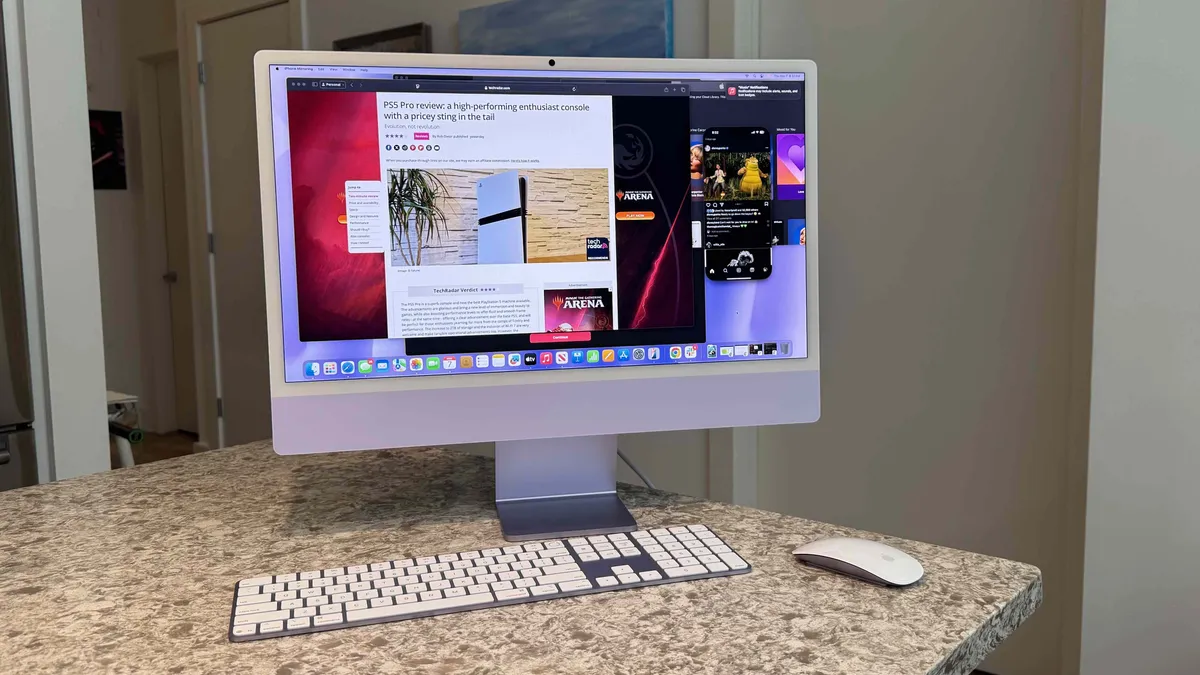


The Apple iMac with the powerful M4 chip is such a great machine - an all-in-one that can capably tackle the full range of business tasks. Overall performance is superb, and it's beautifully designed, as you'd expect from Apple.
This model features a stunning 4.5K panel, but the downside is that you can only opt for a 24-inch size (unlike previous models). That said, it's fantastic and razor sharp at a 4,480 x 5,250 resolution (218 pixels per inch). It's great for general day-to-day usage, as well as streaming movies or TV shows, or working with media files. The iMac is also complemented with a crisp built-in webcam that's got a higher megapixel count and Center Stage functionality to keep you in the shot at all times.
Elsewhere, there are a few more quality of life improvements like the Magic Mouse and Magic Keyboard finally getting USB-C (although the port still lives at the bottom of the mouse), while there are also four USB-C ports with Thunderbolt 4 in the higher-end edition. We'd love to have seen a bit more, including HDMI, but you could always buy expansion hardware to accommodate any additional requirements. Overall, it offers a near-perfect blend of performance, aesthetics, and user-friendly design.
Read our full Apple iMac 24-inch (M4) review
Best business computer for creative professionals
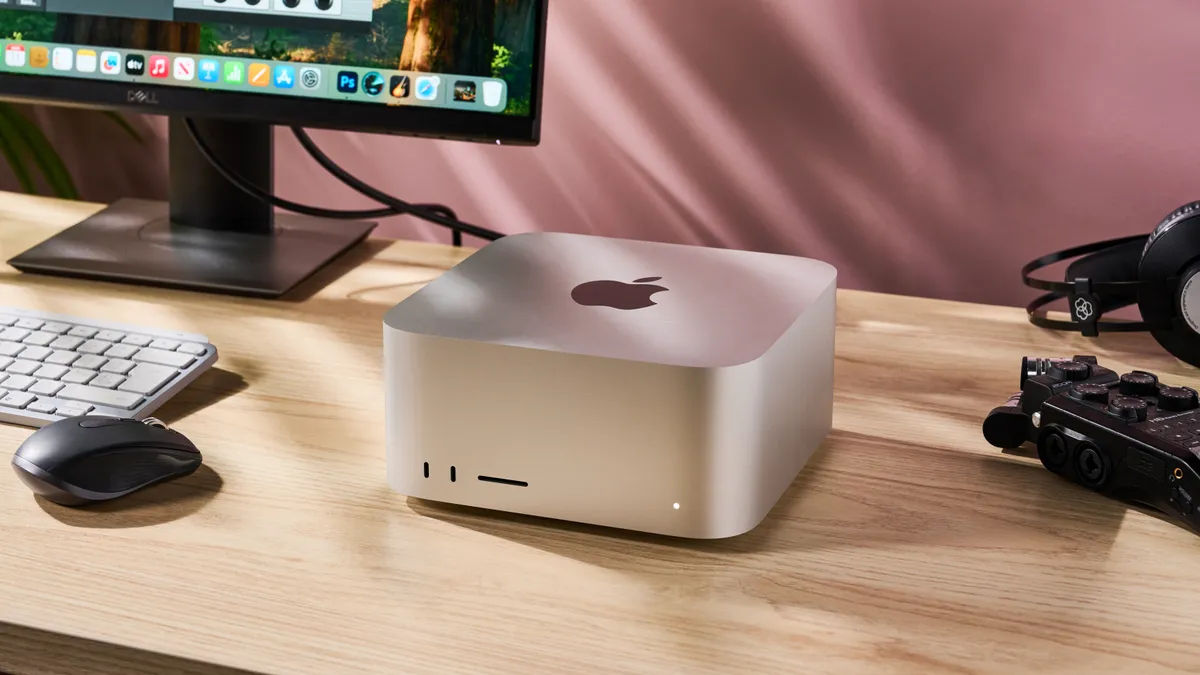


For creative professionals, the Mac Studio has remained a core part of the office set-up. This incredibly powerful desktop is - as we noted in our review - "the ultimate creative workstation."
Packing Apple's most powerful processor, the M3 Ultra, it's a professional-grade computer that delivers a dizzying display of performance. It's probably too powerful for most business tasks, but for those rendering complex 3D models, editing or animating feature-length films, and developing video games, it's the perfect companion.
In our testing, it positively flew through day-to-day office tasks, as we expected. And it was no less snappy when we began editing 4K videos. The super-fast SSD making it a dream importing large, complex files, and even while rendering while multi-tasking, we never experienced slow-down.
And that speed, that power, has clear business benefits. Creating, coding, compiling projects can be complete faster, turnarounds are quicker. This is where we found the Mac Studio really highlighted its value as a business computer. In fact, it never felt we'd even began pushing the Mac Studio to its full potential - which is exactly what we want from a workstation built for creative professionals.
If you prefer a Windows machine for heavy workloads and AI, see our Lenovo ThinkCentre Neo Ultra review. Both the Gen 1 and the high-spec Gen 2 models are effectively Lenovo's alternative to the Mac Studio.
Read our Apple Mac Studio (M3 Ultra) review
Best business computer for work and play


For a machine as adept at business tasks and gaming, the Alienware Aurora (ACT1250) is an excellent choice. Not only does it have that Alienware heritage, but the brand is owned by Dell, so expect the best of both worlds if you're splitting time between work and play.
Configurability is good here - one of the main things we appreciated about this machine. You can choose between a lot of different loadouts, including GeForce RTX 5070, 5070 Ti, and 5080 graphics cards, the option to increase the DDR5 memory, storage, and so on.
All that makes it well-built for a range of tasks. Naturally, it'll fly through day-to-day productivity tasks. But when we turned our attention to testing professional creative workflows, we found these were managed smoothly, too. High-resolution, multi-layered editing in Photoshop occurred with no slowdown. In Premiere Pro, 4K video projects rendered in minutes.
Where it stumbles as a business computer is appearance. Yes, it's gorgeously styled, feeling professional and sleek. But the Aurora desktop still has a decidedly 'gaming' look with LED lighting that, admittedly, feel like a cut above the competitors. So, it's not one for offices. However, small businesses and home office setups won't have any problem, especially once it's tucked under a desk. Good ventilation and plenty of ports round out the overall design.
It's not the most powerful gaming system out there, but in our review, we called it "a sleek, capable desktop that balances style with reliable all-around performance." That feels exactly what most professionals need for a machine capable of tackling work eight hours a day, then switching to games during downtime.
Read our Alienware Aurora (ACT1250) review
Best mini business computer


Before we get started, there are models of the Lenovo ThinkCentre Neo Ultra - the Gen 1 machine, which we reviewed, and the newer Gen 2. Either are perfect for business use, but the specs I've detailed here are for the latest version of this mini PC.
While you'll find several mini computers on this list, the ThinkCentre Neo Ultra is the true business machine for professional use. This is a relatively compact desktop built for high-end office workloads with a definite Mac Studio style. Alongside top-end specs for productivity tasks, it also features enterprise-grade security for those rolling out this machine across large organization.
During our own testing, we used it exactly as intended, running a series of business-style administrative and creative workflows to examine performance. That includes all the standard apps you'll find in the office, including Slack, Asana, Jira, and ZenDesk. We experienced no slowdowns at all.
Where it particularly stood out was the ability to drive several displays - seven in total. This is a real productivity boost for professionals. We hooked up 27-inch and 32-inch business monitors, a 49-inch ultrawide monitor, a portable monitor, and a TV. And the ThinkCentre Neo Ultra easily handled those without issue or graphical lag.
It's not cheap, and it's not the smallest mini desktop out there. However, Lenovo's compact business PC delivers workstation-grade performance across a range of professional tasks.
If you don't need the enterprise-level extras for IT management and so on, my top choice mini PC overall is the Geekom A9 Max 2026 Edition (read our review here). It's a space-saving beast and a genuine desktop replacement for almost all business tasks.
Read our Lenovo ThinkCentre Neo Ultra review
The best business computer: FAQs
What computer is best for business?
A recent development in the desktop PC world has been a modest diversification of the system case. The typical business PC comes in a mini-tower box, probably best suited under or beside your desk.
But a smaller case would be a better choice if space is at a premium. Dell, for example, delivers its Optiplex models in the mini tower, 'thin' desktop, and 'compact' small form factor sizes, each offering the same computing power but in a different case.
Three other formats that have grown in popularity are:
1. All-in-one, or AIO, combines the monitor with the base unit. The move to power-efficient components, the falling price of LCD panels, and the ubiquity of touch functionality make AIO an increasingly popular choice for businesses. The all-in-one PC resembles a slightly larger than normal LCD display containing the processor, hard drive, and memory built into the screen casing. The end result is a very elegant, clutter-free desktop PC.
2. Ultra-small form factors, known as nettops or mini PCs, borrow many of their designs (and components) from laptops. They are laptops without a screen, input peripherals, and battery.
3. HDMI dongles inspired by tablets and smartphones often share parts with the latter. These are usually used for display signage or in niche markets. They are usually not powerful enough for most tasks, but things will likely improve with the expansion of Thunderbolt technology.
What is the difference between workstation vs desktop PC?
• TechRadarPro Q&A with Anu Herranen, Director of New Product Introduction, Advanced Compute and Solutions at HP Inc.
The main thing here is that you must ignore the form factors. In this case, the question would be, what is the difference between a (regular) desktop PC and a desktop workstation? The answer is that the workstation has been developed for a specific professional workflow.
It is not just about the raw performance of a device's processor or other components. It is about how well they perform in specific tasks relevant to the work they are designed to do. Do they make that system easier and faster and remove unnecessary complexity so you can focus on the task and be more productive and creative?
Usually, data scientists will not emphasize the color accuracy of a display. Still, they will care about having a device that can process huge data sets for hours without crashing mid-way. A graphic designer or VR developer, on the other hand, will care about processing jobs quicker by managing how power is split between the CPU and GPU, depending on the task.
You also need to get beyond the box. What software stack or operating system does the workstation need to run? Does the workstation need to run the full Adobe creative suite? Are the keyboard and other input devices optimized for the user's needs? Examples might include a VR headset or a set of separate programmable keys.
Security and manageability in workstations are also designed to work seamlessly across the whole stack and conform to specific requirements defined by role and managed by IT departments. Devices are often configured to get the best out of a given software. They may even carry certifications that guarantee performance for certain software, such as those from Autodesk.
All of this adds up to a curated experience – a device dedicated in every way to a workflow and ready to go out of the box, saving days of configuration time.
The final key difference is that workstations are very expandable – designed with upgrading in mind. Whilst that is true of many PCs, workstations are engineered with this capability in mind. A workstation is designed to be a device that can expand with your needs over a long period of time.
How much RAM do I need for a business computer?
You can pick up plenty of desktop PCs and business computers with 8GB RAM – this will have once been enough, but you really need a minimum of 16GB RAM to work efficiently and effectively without any delays and bottlenecks.
Applications are more demanding now than they've ever been, and even web browsing with multiple tabs consumes a significant amount of RAM, meaning if you're running with only 8GB, you might not be able to do much else without some major lag or hitting a performance wall. Ultimately, 16GB is enough for most day-to-day uses and, in Apple's case, its 16GB unified memory is plenty to even handle moderately intense tasks.
In Windows PCs, you ideally want 32GB if you're using intensive applications like Adobe software (Photoshop, InDesign, Premiere Pro) or plan on doing multiple high-intensity tasks at once. Obviously, 32GB might set you back more in terms of cost, depending on the model and configuration, but you should target no less if you have more intensive needs.
How to choose the best business computer for you
When choosing the best business computers for yourself, start by assessing the nature of your business, the number of computers you need, and the operating system.
If your work primarily involves using office apps, emails, web browsing, or data entry, an entry-level business PC should work perfectly well. If you're in architecture, graphic design, or any other field that demands the use of resource-intensive apps, then you'll want to opt for powerful computers with impressive graphic capabilities. We've reviewed the best photo editing PCs and best video editing PCs for professional content creation.
How much RAM you need will depend on how resource-heavy the apps you use are and whether you do a lot of multitasking. The more apps you run simultaneously, the more RAM you'll want for a smoother experience.
You'll want to evaluate what operating system works best for you. If your employees are used to working on Windows, sticking to that is more efficient than switching to a new system.
Consider the size of the machines if you don't have a lot of desk space or want a neat workplace setup. You'll also want to consider the pricing of the computers and whether the seller offers discounts on bulk purchases.
How we test the best business computers
Our team has gone hands-on with everything from the best business tablets and best business monitors to the best mini PCs to find out which business devices offer a genuine productivity boost. To test the best business computers, we first looked at their specifications, like the CPU, graphics, RAM, storage, connectivity, and dimensions. We considered the types and sizes of businesses they'd be suitable for and whether the tech configurations were expendable.
We assessed how well they handled multiple apps simultaneously, how smoothly they ran resource-heavy apps, and how easy the setup process was.
We evaluated the dimensions and weight of the computers to check whether they take up a lot of desk space and are light enough to be moved around easily. We also considered whether the computers had dual monitor capabilities, ports for external displays and swift wireless connectivity.
For more pro-grade devices, we tested out the best business laptops and the best business monitors.
