
 Become a TechRadar Insider





I tested and reviewed the best free video editing software for anyone who wants professionally polished videos completely for free.
• Not what you need? See my guides to the best video editing software, best video editing software for beginners, and best video editing apps
Whether you're a creative professional, filmmaker, or content creator, DaVinci Resolve stands out as the best free download you can possibly get. This PC software, which is also available on iPad, is a fully featured video editor that's capable of delivering everything from social media clips to feature-length films. We recently reviewed the new version 20, and Resolve just keeps getting better.
Alternatives worth checking out include ACDSee Luxea Free Video Editor, which proved to be very beginner-friendly in my testing, and the ever-excellent Lightworks.
Each app in this round-up has been extensively reviewed, and my team and I have assessed interface and editing flow, features, tools, and effects. I've also checked to see which software has no watermarks and limitations for free plans. Most importantly, I've made sure each option here is completely free with no hidden subscriptions of license fees.
Best free video editing software overall


When it comes to the best free video editing software, the answer has been the same for a long time: DaVinci Resolve. This superb app from Blackmagic Design offers professional-grade editing tools ideal for creating everything from feature-length films to clips for social media. In our experience, it matches and in some areas even exceeds the capabilities of industry-standard Premiere Pro and Apple's Final Cut Pro.
Alright, so what do we like about it, besides the price? Well, for one thing, it works across Windows 11, macOS, and Linux. For a free video editor, it’s absolutely amazing. It has powerful editing tools (with quick and easy, and advanced modes), excellent compositing features and color correction tools.
We found the latest edition, Version 20, effectively turbo-charges everything we love about this software, improving in several key areas and adding in a new keyframe editor, placing PSD files on to the timeline, better text tools, and tons more.
There's also Resolve Studio for those who need even more features and extra AI tools. It's designed for creative professionals and costs $300 (it's a one-off cost). However, for most people, the free version offers more than enough.
Read our full DaVinci Resolve review
Best free video editing software for beginners


While ACDSee has a long and storied history with a host of creative apps, its free video editing software for Windows 11 and Windows 10 might not be on your radar. But it should be.
In my experience, Luxea Video Editor is one of the most accessible video editing software tools on the market. It likely won’t suffice for professional videographers and editors, who may swiftly outgrow the software. But it’s perfect for beginners and intermediates who need to create great-looking, professional videos and social media content fast.
However, that low barrier to entry is deceptive. Under the hood, Luxea is absolutely packed with advanced features, from stock design assets to VFX tools and color grading. And, like the main tool, these are incredibly simple to apply to your footage, even if you’ve never tried it before. Luxea might not deliver Hollywood-grade tools - no Best Picture winner is likely to be created here - but their inclusion and operation is very impressive for a free video editor.
We also found ACDSee’s offering excelled at video editing on low-end PCs and laptops. System requirements are fairly low, and we had no trouble with the tool when we tested it on a basic home laptop.
The free version retains all the features of the premium, paid-for upgrades (available on a monthly/annual subscription, or a lifetime license). The biggest downside is that Luxea adds an intro and outro to all exported videos unless you buy it, limiting its use for commercial (or shareable) purposes.
Read our full ACDSee Free Luxea Video Editor review
Best free video editing software for going pro

While you'll find many video editors suitable for beginners, such as Premiere Elements and PowerDirector, not all of them are free. But then there's Lightworks. This software has been used to cut a whole host of feature-length films, and while the free version is slightly limited compared to the Pro edition, it's still a great place if you're beginning your editing journey and plan to learn how to use professional-grade tools at your own pace.
Yes, some of the best tools are locked behind a paywall, but you'll get a good taste of the possibilities from Lightworks' free app. It's pretty simple to use, and we had no issues editing all types of content using the layer-based timeline.
Our biggest gripe with the software is that you can only export at 720p for free, while 1080p exports require a subscription. To my mind, that's simply not on for a modern app. But if you're basically using it as a training ground, that shouldn't really be an issue long-term.
As an alternative, I really like ACDSee Luxea - the free version has no watermarks or resolution caps, but it will add a short intro and outro. Pick your poison on this one. If you find even the likes of Lightworks somewhat daunting, I'd recommend checking out Clipchamp (see our review here). It's a delightfully simple free online video editing app suitable for shorter content.
Read our full Lightworks review
Best free open-source video editing software
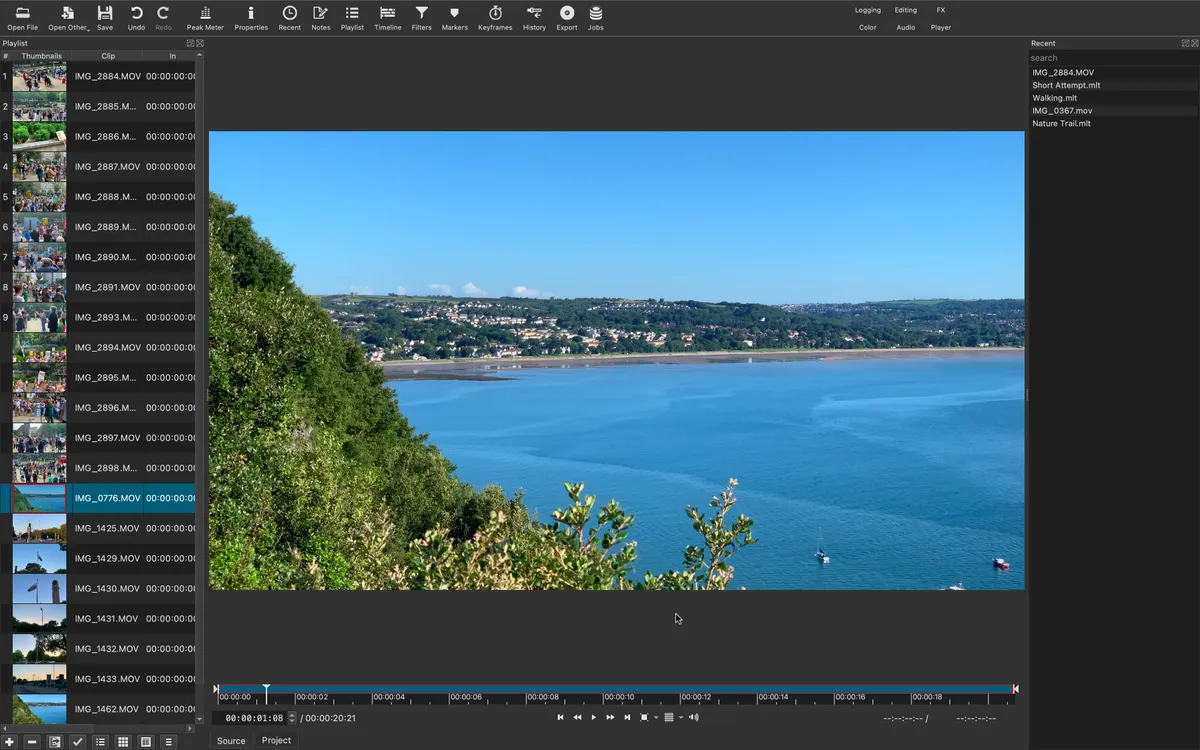
Shotcut has been around for ages, and when it comes to the best free video editing software we've tried, it's still an impressive app - especially considering it's open-source.
In our experience, it serves up all the core features most users will need from an editing app, and even manages to add in tools you may not even realize you need, like markers, time remapping, and keyframing. We also found the interface, while sparse, to be very accommodating, letting you move around sections (or pop them out into floating windows) to help you create a space that matches your workflow.
During our review, we admittedly ran into an issue with the voiceover tool on Mac, which constantly crashed - but we'd expect this to be fixed now. Beyond that single problem, and the general low-key interface, Shotcut remains an excellent free video editor for all kinds of projects.
Read our full Shotcut review
Best free video editing software online

Clipchamp is a free online tool that runs in your browser without needing some heavy duty video editing computer. However, a Windows desktop app is also available, and it's easily one of the best free video editing software for lightweight projects.
When we reviewed this tool, we discovered an incredibly simple free video editor that's especially suitable for creating social media clips and shorter content. It takes more than a few UI design cues from Canva, which that’s no bad thing, and it's largely built for beginners and anyone who needs to crank out a lot of fresh video content fast. We found editing was simple - if you’ve never tried video editing before, it’s a strong place to start. But there’s multi-track support for your more complex projects.
Clipchamp’s real magic is in its templates. This makes it really simple to cook up videos for just about every social media platform - worth a look if you’re in marketing, or a content creator. Especially since videos aren’t watermarked and support full HD exports. You can even create GIFs with videos less than 15 seconds.
The stock libraries are full of image, video, and music assets, but to get the gold, you’ll need a monthly or annual subscription. The software lacks the power to take on full-fat video editors. And it can be difficult gaining granular control over projects. But for anyone boosting their video output quickly and efficiently, Clipchamp has a lot going for it.
Read our full Clipchamp review
Best free video editing software for mobile devices

If you're looking for a free app with plenty of juice under the hood, I recommend both DaVinci Resolve for iPad and the cross-platform CyberLink PowerDirector Mobile, which is free if you don't mind ads.
But if you want a really simple and effective tool for cutting clips, then CapCut is a great app for this. Particularly useful for anyone producing social media content, thanks to seamless integration with TikTok, we found CapCut offered a very clean interface that takes the pain out of content creation. We were also impressed by the sheer number of tools available even without subscribing to the Pro version, including background removal, speed controls, and audio tools.
One of the big highlights for us, and useful for anyone creating content for global audiences, is the speech-to-text auto caption feature. There's even color correction tools for making sure the on-screen images are just right. It's not all perfect - but then again, what is? For example, it only works in portrait (or vertical) mode, rendering it virtually useless for content not designed for phone and tablet screens. And we did find the some of the icons too small, while its demand to access our phone's entire photo library seemed unnecessary. All in all, though, for quick and free video editing, it ticks all the boxes.
Read our full CapCut review
Best free video editing software: Also tested
Not every free video editing software can make the list, either because they're similar to what's on offer elsewhere or they're not quite as powerful as others in this round-up.
Still, these are some of the other options we've also tested that may suit your preferred editing style and deserve an honorable mention at least.

The open-source OpenShot is capable of working on Windows, Linux, and (via the Daily Build workaround) Macs.
The interface is quite original, and is extremely flexible and customisable, to boot. You’ll have an increasing number of effects, many of which are useful in any workflow. Animation is extremely flexible and many parameters are keyframable. The latest version also lets you drop emojis over your videos, making it one of the best free video editor apps for Instagram and other strongly visual social media platforms - it adds a bit of character to videos, at least.
It’s not all smiley faces, though. One of the biggest problems is with the transitions, which still don’t work right. We found them to be pretty complex, too. Elsewhere, Openshot seems to have trouble letting Mac users actually edit those videos. At present, the official build has issues, requiring Apple users to use the latest Daily Build. However, the software is capable of handling most video formats, and the new improvements to the timeline make editing quicker and more enjoyable than before.
Read our full OpenShot review

Canva Video is ideal for marketing teams, small businesses, and online influencers looking to cut clips in seconds. It’s not a fully fledged editor like DaVinci Resolve or Lightworks - don’t expect Hollywood-level editing tools, features, and effects here. You can only export movies to MP4 and GIF for a start. It's more similar to Clipchamp, really - a basic online tool that's free to use.
What Canva Video excels at is helping beginners (or those in a serious rush) create professional-looking short videos and social media assets that can be shared with ease. The interface is near-identical to the company’s popular online graphic design tool, which relies on dragging, dropping, and resizing pre-built, customizable elements onto the canvas. If you’ve so much as glanced at editing software in the last twenty years, you’ll be fairly familiar with the layout and operation (in some ways, it reminded us of a modern take on Windows Movie Maker).
The online tool won’t satisfy experienced editors or those in need of the industry-standard powers of Premiere Pro or Final Cut. It’s far too basic to deliver those results, even with a Pro or Enterprise subscription. But for creating visual media and animations for your social networks, it’s one of the best.
Read our full Canva Video review.

The Adobe Express video editor is cut from the same (or, at least, near-identical) cloth as Canva Video. And while close enough in operation, it’s not quite as fluid as its rival, although like its rival, it’s best used for cutting together short, simple clips for social media or for creating slideshow presentations.
During our time with the online-only video app, we found it offered an incredibly simple interface, and thanks to Adobe’s refined user experience, the cloud-based program makes it supremely easy to edit your footage, add titles, music, and even voiceover narration.
However, in a bid to streamline and simplify, the process can be clunky - and actually uploading and processing videos makes a mockery of the word ‘express’. Still, the free version houses a nice selection of stock images, music samples, and graphics to help your movies pop off the screen. If you choose to take out an Adobe Creative Cloud Express subscription (and power-users may find that essential after a time), you’ll also unlock a wider library of Adobe Stock assets.
Read our full Adobe Express Video Editor review.

Many of the apps here are available for Mac, but if you're looking for one made by Apple, iMovie is still a strong contender. It's a simple tool that comes pre-loaded on Mac, perfect for casual use or new starters who will one day graduate to Apple's superior Final Cut Pro.
It might not have received much love and attention from Apple lately, but there's still a lot to like here. Despite a dearth of updates, you can still edit your videos with it, using its sleek and simple interface, and its compatibility with iMovie for iOS and even Final Cut Pro makes it possible to start editing on your phone, and seamlessly continue to your Mac. That’s a big selling point, but is it enough?
The video editing software is free for all Mac users, and if you’re curious about the art, you can do so much worse. But you can also do better. See how the program compares to Apple's pro tool in our guide Apple iMovie vs Apple Final Cut Pro.
Read our full Apple iMovie review.
Best free video editing software: Frequently asked questions
How to choose the best free video editing software for you
Why you can trust TechRadar We spend hours testing every product or service we review, so you can be sure you're buying the best. Find out more about how we test.
When choosing which free video editing software is best for you, there are several key factors to consider.
Use
What kind of video do you intend to make, and where is it for? There’s a world of difference between quick editing of home videos you’ll watch on TV and editing something for Netflix or cinema distribution.
If you plan to use the software for commercial use, watch out for licensing rights (for stock assets, for example) and ideally opt for free video editing software without watermarks.
Formats
You’ll need to consider what formats the software needs to export in, what level of quality it needs to output, such as HD, 4K, or 8K, and whether it can deliver the kind of VFX software you want to use, if required. If you’ll be collaborating, your app will need to be compatible with the other people’s apps too.
Hardware
What kind of computer are you running your software?
Video editing is pretty resource-intensive. You can get free video editors for low-end PCs. But for flawless performance from editing to rendering, you'll want a powerful rig to run the software. While a good graphics card and plenty of RAM is important, when it comes to GPU vs CPU for video editing software, CPU is the more important of the two.
if your PC specs are low, take a look at the best video editing computers, best video editing Mac and MacBook laptops, and best laptops for video editing.
Experience
Are you an experienced video editor, or would a simpler app that takes you step by step through the whole process be more helpful? Do you want to have complete control over every pixel, or would you rather let the computer do most of the work? How future-proof do you need your app to be?
Upgrades
Remember that most, if not all, free video editing apps are limited while not all high-end editors are unaffordable. Think about whether a free-to-use option is best for you or if it's worth paying a little more for a bit more functionality. Can your chosen app grow with your imagination?
If you don't need a fully featured video editor, then it's worth looking at EZGif. When you need to crop a video to a specific aspect ratio, this simple online tool could be just what you need. It's not suitable for very large files, but you can set the dimensions, select from a list of presets, and position the crop area yourself.
Which free video editing software do YouTubers use?
Generally speaking YouTubers tend to go for simple, effective and affordable apps. One of the best free apps is Lightworks, which you can get for Windows, Mac and Linux devices. It has integrated YouTube exporting and a bunch of really impressive real-time effects. It looks absolutely terrifying compared to something like Microsoft Photos but it doesn’t take long to learn and it’s a really good editing app.
There are lots of other good options too. The free app DaVinci Resolve is very good, especially on colour correction, while HitFilm is especially powerful and good for both beginners and experienced editors once you get past the learning curve.
See our guide What do YouTubers use to edit videos? for more advice and software recommendations.
Is free video editing software good enough?
It can be. Movies made in Apple’s iMovie have wowed crowds at film festivals over the years, and some people have made perfectly good movies using just it and an iPhone.
There are many decent free video apps out there, but there are a few things to consider. Performance, especially encoding and exporting, isn’t always up there with the big hitters, and you’ll often find that features are only available if you buy in-app purchases or just aren’t there at all. Some stick an enormous watermark over everything you output; few offer any kind of technical support. Pro-level features are rarely offered because these apps aren’t designed for video pros.
It’s worth being a bit pedantic here and differentiating between free commercial software and free open-source software. The former is often a cut-down version of a full product offered for free in the hope you’ll buy its big brother. The latter is usually a full product made available by individuals or teams of volunteers with no expectation of any financial reward. While open source acts can sometimes lack the polish and/or user-friendliness of commercial software they may well deliver all the features you need without requiring you to spend any money.
Why should I care about free software for editing video?
Video consumption is growing - recently, it was revealed that YouTube captures more viewers than Netflix in the US. Add in social media platforms like TikTok and Instagram, and the trajectory is clear. Whether it's growing a YouTube channel or building brand awareness around your business, video is essential. And the best way to get started is with free video editing software, to understand how to add professional polish to your content.
Should I pay for a premium video editor?
To state the blindingly obvious, premium video editors tend to have advantages that free ones don’t. Those advantages tend to come in the form of resources: resources to develop apps that squeeze the most performance out of high-end hardware, resources to develop better effects, resources to fix show-stopping bugs, resources to make sure the app works on the latest hardware, resources to polish the interface and create help files and how-tos and all the other things you’d expect from professional software. But of course, that comes at a price.
If you’re a pro, time is money so you spend money to save time, whether that’s the time it takes to render your footage or the time you can’t afford to spend shouting when the app doesn’t do exactly what you want or crashes mid-edit.
Free apps are aimed at a more forgiving and less demanding kind of user. That’s not to say they can’t do great things. They can. But they often take a hand-holding approach that focuses on the basics and doesn’t give you access to the fine detail. They might take a good-enough approach to performance rather than a “Steven Spielberg needs this NOW!” no-compromise approach, and their effects may be simpler than the pro ones.
What video editing software features should I look out for?
That depends on the kind of editing you’d like to do. For example, you might not need much in the way of visual effects if you’re just splicing together home movies. But there are some key things to consider.
First up, what formats and resolutions does the app support? Can it use the footage from your camera without converting? Can it export to the places you want to share your finished footage?
Do you need features such as green screen or picture in picture (if you’re a YouTuber, the answers to those to are probably yes)? Can you share directly with social media, if that’s your thing?
How many tracks can you use? Can you pull in footage and audio from multiple files, swapping between them as needed, or will you need to do some pre-production first because the app can only handle a couple of tracks at once?
Does the app have any smart features to make everyday editing easier, such as smart trimming of clips or simple editing modes? Is it easy to add titles, transitions between scenes or to adjust the colours?
If it’s a mobile app, can you transfer your project to continue editing in a desktop equivalent of the app?
Which video editors do professionals use?
That depends on your definition of 'professionals' and the industry or sector you’re thinking of. Go to Hollywood or a major TV studio and the editing’s almost certainly being done in Avid Media Composer Ultimate.
In ad agencies, indie film studios and businesses making YouTube films you’re more likely to see Adobe Premiere Pro or Apple Final Cut Pro and associated apps such as Adobe’s After Effects, a motion graphics and visual effects app - see above for how well we rate those. These are very, very good tools designed to run on very, very good computers.
How we test the best free video editing software
We've tested, reviewed, and rated hundreds of paid-for and free video editors and production tools, so readers can make an informed choice. That includes trying out the best Adobe Premiere Pro alternatives, the best video makers, and the best VFX software. We've also compared popular software like Adobe Premiere Pro vs Apple Final Cut Pro.
The best free video editing software may not be as involved as paid ones, but many of the best ones are still full of features that are worth taking a deep dive. So, when testing free video editing software, we go beyond its most basic and most used features.
Naturally, we still start with its user interface, checking to see just how easy (or how difficult) it is to use and navigate for beginners as well as expert users. After all, even pros need a seamless, unencumbered workflow so they can focus more on the creative process.
We take stock of its available tools, testing the important ones to see how they fare against those on paid-for video editors like Premiere Pro, as well as check out the filters and effects on hand. We also make a note of just how many of them are free and how many are stuck behind a paywall. A number of free apps typically come bundled with bloatware, so we make sure to mention in our review if that specific app comes with it.
Finally, we test its exporting prowess, from how efficient it exports a video to how many video formats it has available.
Get in touch
- Want to find out about commercial or marketing opportunities? Click here
- Out of date info, errors, complaints or broken links? Give us a nudge
- Got a suggestion for a product or service provider? Message us directly
