





I've tested over 200 units, and these models are the best printers for Mac. All of them delivered quality print-outs during my tests, and they're all Apple AirPrint compatible for quickly printing from your Mac, MacBook, and iPhone.
For most people, the Epson EcoTank ET-4950 series of printers is my top choice. This ink tank model prints quickly, reliably, and accurately across text and color documents, as well as photos. For the price, I haven't tested a more feature-rich printer with such a generous helping of ink bundled in the box.
Printing from my MacBook is one of the key tests I perform during every printer review I conduct. So, I have first-hand experience in this area. Check out the full line-up of the best Mac printers I've used below, and for more general Apple-friendly machines, see my guide to the best home printers.
Best printer for Mac overall


The Epson EcoTank ET-4950 series of printers is one of those printers I find myself consistently recommending to those looking for a reliable ink tank printer that's quick, accurate, with quality print-outs for most people.
During my testing, the EcoTank put in a strong performance all-round, throughout my standardized tests. Print speed is great - it's rated for 35 pages per minute, with a 8.5-second First Page Out Time.
Plain text documents are precisely detailed, although not ultra-dark. However, color printing is the star. I found prints here to be bright and vivid across color documents and photographs. And there's a generous amount of bottled ink in the box to get you started.
The only hiccup I had was when I tried copying a single photo via the ADF, leading to a paper jam. I put that down to the 200g/m² thickness of the photo paper, but the main printer paper tray handles card stock up to 300g/m².
It is compatible with Apple AirPrint, but for initial set-up, I recommend getting Epson Smart Panel on your iPhone (or Android phone). I found this app makes it a breeze to connect the ET-4950 to your Wi-Fi network for wireless printing.
Overall, in my experience nothing comes close to the ET-4950 printers on features and ink at this price.
Read our full Epson EcoTank ET-4950 series review
Best budget printer for Mac


The HP Envy 6555e (6530e outside the US) is a surprisingly feature-rich three-in-one considering the price. Better suited for home and student printing than for offices, it nevertheless several pro-grade tools a small business user may need, too.
Let's start with the good. The 6500 series printer can print, copy, and scan - and did so well during all my tests. It connected to my phone and laptop instantly, and setup was eased further thanks to a helpful touchscreen.
Alongside the core capabilities, there's a mobile fax option (it's not a real fax machine though), automatic document feeder, self-healing Wi-Fi, two-sided printing, and of course Apple AirPrint connectivity.
Print-outs. Mono text documents were bold and sharp, while my test photos really popped when using glossy photographic paper. It's not as finely detailed as a true photo printer, but I can't imagine most people taking issue with the results.
The bad? Speed. This printer took its time printing even simple black-and-white documents - it took even longer for color documents and scanning.
Saying that, though, I felt the results were worth it, with vivid color printing and accurate scans. I also found that, like most inkjet printers, this one guzzles ink. Even before my tests had finished, I needed to plug in a new one. .
Still, if you don't mind buying new cartridges, it's cheap enough and good enough for everyday casual use.
Read our full HP Envy 6555e (6530e) review
Best Mac printer for home offices & small businesses


The Canon Maxify GX4020 (GX4050 and GX4060 outside the US) is a reliable 4-in-1 ink tank printer that has all the features I expect to see for businesses, including fax machine, 350-sheet paper capacity, and automatic document feeder.
This MegaTank printed very well throughout my testing. Plain black text on white paper looked sharp and appropriately dark for those running off business documents. While it can't match the precision and print speed of a home office laser printer like the print-only HP Color LaserJet Pro 3201dw, it more than makes up for it in features.
I especially like the Draft Mode here, which delivers good enough prints for quickly assessing a document on page before committing to a full print-run.
Color documents also looked striking during my review. They're bright, crisp, and well-detailed. However, photos on glossy paper while impressive, aren't at the level of other ink tank printers. That's not something that will affect most professional users, but it's worth noting.
Where the Maxify GX4020 really shone was its compatibility with paper types. This printer easily printed on everything from envelopes and stickers to heavy paper and paperboard.
As I noted in my review, it has "all the right features for the SMB or home office. It’s not especially fast, but it has enough paper and ink capacity to minimize printer down time." For me, that's essential for any home office or small business user.
Read our full Canon Maxify GX4020 review
Best Mac printer for photos
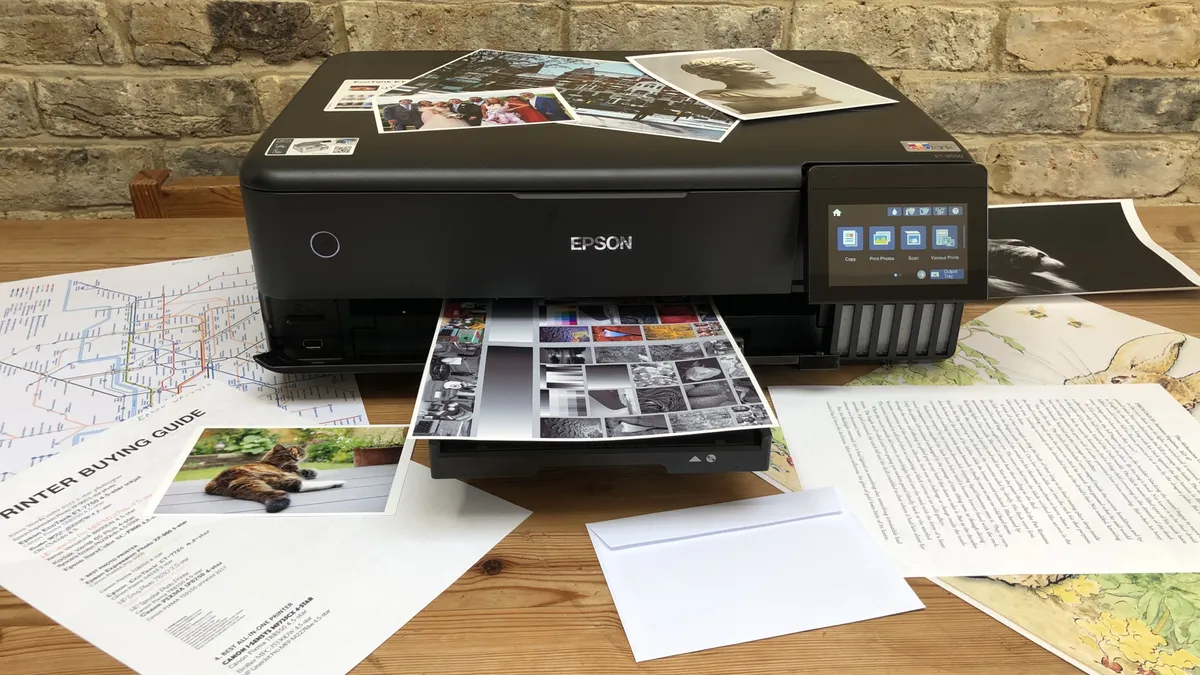


The Epson EcoTank ET-8550 is a Mac printer that excels at printing photographs and it can do so on A3+ and tabloid-size paper. But that’s not all. That ‘EcoTank’ in the name means this printer has refillable ink tanks, so it’s also cheap to run. Epson’s bottled ink costs around 90% less than cartridges and the tanks are large enough to yield thousands of photos. There’s less waste with bottled ink too.
Chiefly aimed at home users, the 3-in-1 ET-8550 has an appealing user-friendly design. That includes a 10.9cm touchscreen interface that I found very intuitive. There’s no ADF (automatic document feed) and no fax facility, but it does have a tabloid-sized scanner bed with the ability to enlarge or reduce copies. It can print on any kind of paper, including heavy card, of all sizes. I even printed a 2m banner successfully via the rear tray.
Connectivity is well-serviced, with options for Ethernet and Wi-Fi, including Wi-Fi Direct and Apple AirPrint. There's also a MicroSD card reader - useful for photographers. I connected my MacBook, iPhone and memory cards without any issues. The only other features I could have asked for would be Bluetooth and NFC.
Print speeds are great for standard A4 documents. But it slows down in auto-duplex mode, and it's worse when printing in color. But the wait is worth it. With the printer prioritizing quality over speed, the optimised print resolution of 5760 x 1400 dpi really shows - and it's very impressive. In all of our tests, the Epson EcoTank ET-8550 performed well, but its real strength is in printing finely detailed photos on glossy photo paper
Read our full Epson EcoTank ET-8550 review
Best laser printer for Mac


The HP Color LaserJet Pro 4201dw (4202dw in the UK) delivered the sort of crisp, fine-detailed document printing that many businesses require. I found it fast, accurate, and I loved the high paper-tray capacity with a modular design that can be expanded when growing your business.
This is a compact, sleek unit ideal for shared workspaces and users of around ten people - for a home office laser printer, the entry-level HP Color LaserJet Pro 3201dw will be a better choice here.
The printer achieved strong print quality in all my tests, including mixed color documents. But the star attraction for me is the superior black print quality. Text is so rich and sharply defined here. It's hard to fault, especially when combined with that 33 pages-per-minute output.
Photos aren't so good, but that's expected from a laser printer, but it's more than good enough for printing material like brochures and flyers. My only real issue with the printer is the dial. There's no touchscreen, so navigating the menu means turning and pressing this dial. It's fine, and I appreciate some will like it, but it's not as intuitive as I'd like.
Overall, I found the HP Color LaserJet Pro 4201dw delivered excellent results, particularly for document-printing, with fast single and double-sided print speeds, and two main paper trays for higher-volume runs.
Read our full HP Color LaserJet Pro 4201dw review
More essential tech for Apple devices
It's not just Mac-compatible printers that we've tested - we've also reviewed and rated a broad range of hardware and peripherals that work with Apple devices.
For all your storage needs, we've lined up all the best external hard drives for Mac.
If you need a new display, we've gone hands-on with the best monitors for MacBook Pro, the best monitors for the Mac mini, and the best monitors for the Mac Studio.
Need a new device? Our team has revealed the best MacBook Pro laptops, the best business Mac and MacBooks, and the best video editing Mac and MacBook based on extensive testing.
And for more essentials for your Apple device, we've rounded up the best MacBook Pro accessories and the
Best printers for Mac: FAQs
Can you use a regular printer with a MacBook?
It depends. Most of the top printers have no issue connecting to a MacBook, or Mac. However, Apple devices are often low on port selection. So, wireless printing facilities remain the easiest way to print from a regular printer to a MacBook or MacBook Pro. If in doubt, look for a printer that clearly states support for AirPrint,
Will any wireless printer work with MacBook?
Yes, all the best wireless printers will work with MacBook and MacBook Pro devices. These printers allow Wi-Fi- and Bluetooth printing - but most importantly, they support Apple AirPrint. This Apple tech lets you easily print without the need for drivers to Mac, MacBook, iPad, and iPhones. Check the specs to see if it's enabled on your printer.
Why is there no Apple printer?
With Apple's track record, we've no doubt the company could design and build a beautiful, fast, accurate printer for Macs and MacBooks. But it's unlikely to happen any time soon.
Printer manufacturers don't make much money selling printers. The real income is through the continuous supply of ink cartridges, toners, and bottles. It's a lot like video game consoles, which don't make much if any profit. The profit is made from the games and licenses.
So, while Apple may want to enter the printer market, it has no desire to enter the ink market - and that's likely why there is no Apple printer. For now, at least.
How do I know if my printer is AirPrint-compatible?
Most modern wireless printers support Apple AirPrint, which lets you quickly connect and print from desktop and mobile Apple devices.
But to be sure, you can see the full list of AirPrint-enabled devices on Apple's support page by clicking here.
How to choose the best printer for Mac for you
When it comes to choosing the Mac printer that's best for you, there are few key features to look out for and, like any tech, some considerations to make.
Category
You generally have two choices here, between the best inkjet printers and the best laser printers. Inkjet models are good all-rounders and favored for photo printing, while laser models tend to excel at crisp text reproduction for high-volume document printing.
Print needs
Certain businesses may have more unique needs - for example, a requirement for the best printers for T-shirts, or the best large format printers for creating eye-catching posters. The best photo printers aren't always the ideal choice for printing a lot of text documents. So identifying the use is essential.
Size and design
Consider the space you have available to house your new printer, and what other functionality you'll be expecting from it. You can find AIO printing units easily capable of handling scan, copy, and even fax capabilities. Decide which of these - if any - you intend to make use of. Finally, consider additional touches like look and feel, which may be particularly important for those keen to ensure their printer doesn't stick out like a sore thumb in an otherwise smart home office.
Apple devices
It's worth considering which Apple devices you intend to use. While wired printers will be fine some certain Mac and MacBook computers, you may need a wireless printer for some models for best results.
Have a preferred brand? We’ve tested, reviewed, and rated the best HP printers, the best Epson printers, the best Canon printers, and the best Brother printers.
How we test the best printers for Mac
Having been the printer specialist at TechRadar Pro for some years, I’ve tested hundreds of products, from the best all-in-one printers and the best ink tank printers, to the best sublimation printers, and I’m always improving my methodology.
The process starts right from the unboxing and initial set-up, which is timed. If there’s a problem with unsustainable packaging, or a baffling user manual, I’ll call it. If it’s a pleasure to use, that’ll be reflected in the final score too. I always test both wired and wireless connections to a range of devices. Specifically, I want to know how well it works with macOS.
For the performance tests, I have a folder of test cards, photos and text documents designed to assess detail resolution, contrast, color accuracy and gamut. Some are good for spotting feathering in inkjets, while others highlight banding in lasers. A ten-page text document is useful for measuring print rates because I never take manufacturer's claims at face value. Having said that, the quoted print and scan speeds are usually accurate enough that I rarely contradict them.
I print each test page on a range of standard paper stock from cheap 75gsm sheets to 600gsm card, as every printer has its limits and preferences when it comes to paper quality. And if the manual claims you can print on envelopes, labels or t-shirts, I test that too.
Features such as auto-duplex scanning or copying multi-page documents via an ADF (automatic document feed) are evaluated, and an assessment of build quality and design contributes to the overall rating. I pay particular attention to the COO (cost of ownership) because cheap printers can often give lower value for money when you calculate the ongoing consumables cost.
You can find out more in guide How we test printers at TechRadar Pro
