


Thanks to the launch of the iPhone 18 Pro and iPhone 18 Pro Max, this list has received an update with the phones now taking the top spto for the best iPhone overall.
However, Apple won't be releasing a new standard iPhone this year, which mans the iPhone 17 remains our expert recommendation for the best iPhone for most people. And we're still testing the iPhone Duo, Apple's first foldable phone, so expect that to make an appearance here once we've fully tested it.
Speaking of that, we've tested all the phones on this list extensively and regularly use iPhones as our main devices or keep hold of for on going testing.
So read on for our picks of the best iPhones you can buy today.
The best iPhone overall


Just as night follows day, Apple’s latest flagships step up to claim the top spot on this list. The iPhone 18 Pro and iPhone 18 Pro Max represent the very best iPhones you can buy today. While both models see a slight price increase and stick close to last year’s design, a series of thoughtful refinements help them stand out from the crowd.
Under the hood, the new A20 Pro chip effortlessly powers through demanding tasks, backed by a new vapor chamber that keeps thermals under control during heavy performance spikes. While casual users may not notice a dramatic leap over the iPhone 17 Pro, reviewer Jacob Krol notes that creators frequently offloading large 4K video files will likely feel the extra speed.
On the display front, screen visibility gets a boost thanks to a new anti-reflective coating that tames glare in bright sunlight, complemented by a slightly smaller Dynamic Island.
Battery performance remains a strong suit, delivering around 30 hours of real-world use according to Krol. In Future Labs' standardized testing, the iPhone 18 Pro lasted 16 hours and 17 minutes, while the Pro Max reached 18 hours and 27 minutes. Wired charging also receives an upgrade, capable of bringing a drained battery to 50% in just 15 minutes.
The most substantial upgrade arrives on the back of the device. The main 48-megapixel camera now features a mechanically variable aperture ranging from f/1.48 to f/4.0, giving mobile photographers far greater control over depth of field and low-light exposure. Built-in manual controls let users fine-tune shutter speed, white balance, and ISO directly within the app. Even for everyday point-and-shoot users, Krol highlights that the new cameras outperform their predecessors with sharper detail, smoother background blur, and excellent highlight management.
Rounding out the package is the arrival of iOS 27 and Siri AI. While iOS 27 functions largely as an iterative refinement, the upgraded Siri AI introduces deeper cross-app integration and context-aware assistance. Though it remains a work in progress and is restricted to the US at launch, it signals a promising push forward for Apple's AI platform.
Ultimately, the iPhone 18 Pro and 18 Pro Max are class-leading flagships that belong at the top of any buyer’s shortlist, provided you have the budget and aren't already holding an iPhone 17 Pro.
Read our full iPhone 18 Pro and iPhone 18 Pro Max review
The best iPhone for most people
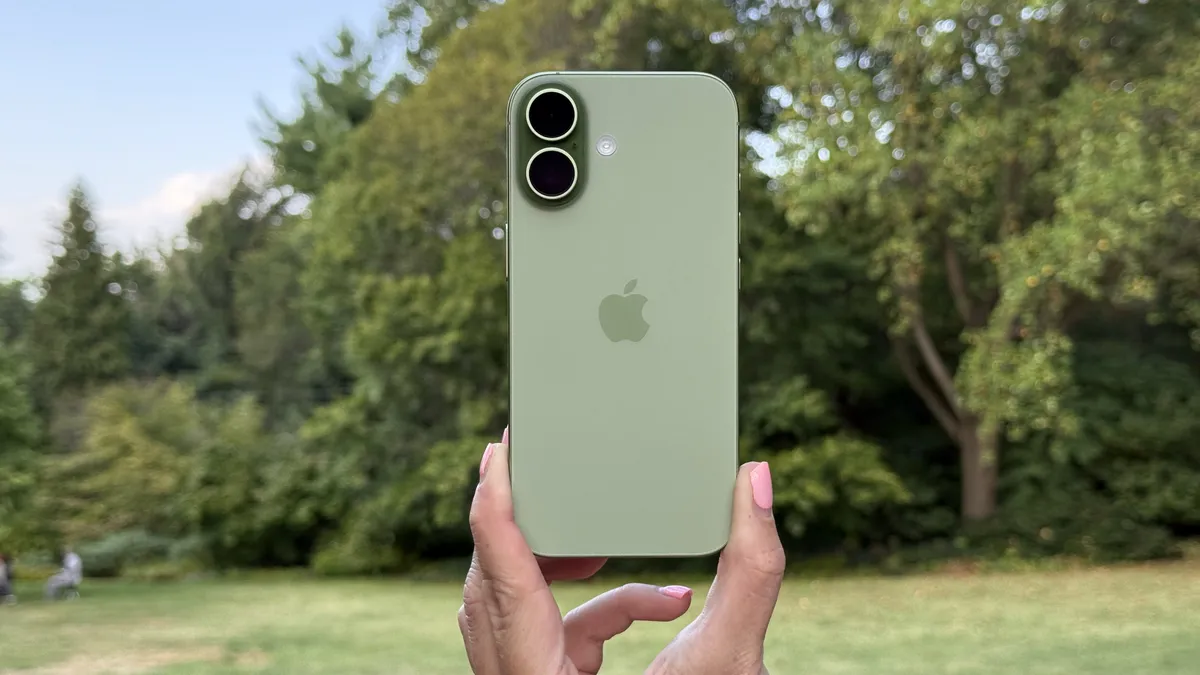


The best iPhone for most people is, without question, the standard iPhone 17, which might just be the best-value iPhone ever released.
This unassuming handset might look like the boring choice next to the flashy iPhone 17 Pro (indeed, it looks identical to the iPhone 16), but the iPhone 17 brings so many meaningful upgrades to the table that it's become hard to recommend Apple's top-end handset to anyone except power users.
For starters, the iPhone 17 boasts a bright and crisp 6.3-inch display with Apple's ProMotion technology. That means it can dynamically scale between 1Hz and 120Hz depending on the type of content on-screen, and ProMotion also gives you the option of an Always-On display, so you can view the time, date, notifications, and widgets without fully waking your phone.
In addition to that Pro-rivaling screen, the iPhone 17 also gets the same 256GB starting storage capacity, the same 18MP selfie camera, the same customizable Action button, the same Camera Control button, the same scratch-resistant Ceramic Shield 2 display cover, and all of the same iOS 26 software features (including the new Liquid Glass interface).
So, what do you miss out on versus the iPhone 17 Pro? Well, Apple's 48MP 'Fusion' camera is plenty capable on the iPhone 17, but it's no substitute for a 48MP zoom lens, which you'll find on its most expensive models. The iPhone 17 Pro also offers marginally longer battery life and faster charging, while its A19 Pro chipset is, on paper, more powerful than the iPhone 17's non-Pro variant.
Are those upgrades worth a $299 / £299 / AU$600 premium to you? If so, you're better off choosing Apple's top-of-the-line iPhone (which you'll find below). But if you're not a keen zoom photographer and aren't intending to record and edit lengthy 4K videos, I’d urge you to sit down and consider whether the cheaper iPhone 17 might actually be a better fit for your needs (take it from me: I spent a month with the iPhone 17 Pro, and then switched to the regular iPhone 17).
Read our full iPhone 17 review
The best budget iPhone


Beyond getting an older or pre-owned iPhone, the iPhone 17e is basically the only viable budget iPhone around. Building upon its predecessor, the iPhone 16e, Apple has taken the basic formula that uses a modern iPhone design and with a few tweaks to make it more affordable, and built upon it.
So the iPhone 17e comes still comes with a single 48-megapixel main camera, which is perfectly good at getting most of the photos one might need from a smartphone and doing away with the extra lenses the standard and Pro iPhones pack. But the latest budget Apple smartphone now has the A19 chipset, which offers plenty of power for all manner of smartphone tasks, and also gets MagSafe for wireless charging and a suite of compatible accessories, such as magnetic card holders.
Unless Android models on out best cheap phones list, the iPhone 17e doesn't come with a high-speed refresh rate, as the display has a 60Hz panel. That's not ideal in our opinion, but it's far from a deal-breaker as Apple's iOS 26 software is still so slick and smooth, in most cases, that it provides a smooth experience all the same.
Adding back some appeal is the iPhone 17e now starts at a base storage of 256GB rather than 128GB but doesn't command a higher price. So if you can do without all the bells and whistles of the other iPhones on this list, the iPhone 17e is well worth your consideration.
Read our full iPhone 17e review
FAQs
What is the best iPhone?
The best iPhone is usually one of the latest numbered models, but the value of each will depend on your specific needs. If you want the very best specs, go for the iPhone 18 Pro Max, while the regular iPhone 17 is a better-value choice for the majority of users. If you're not fussed about fancy cameras and extra hardware features, consider the iPhone 16e or one of Apple's last-generation models.
Which iPhone is the best value for money?
Right now, the iPhone that offers the best value for money is the regular iPhone 17. It's got a Pro-rivaling screen, as well as the same main, ultra-wide, and selfie cameras, the same buttons, and the same starting storage capacity as Apple's top-end models. The base iPhone 16 is also a great-value pick.
How to choose the best iPhone?
A lot of iPhones are quite similar to one another, so choosing which model to buy mostly just means seeing what's different between them and finding the right fit for you.
All iPhones are powerful, and Apple supports them for a long time, so age and chipset needn't be a big deal, but if you don't plan on upgrading for a long time, then a newer model with a faster chipset is ideal.
Bigger factors, though, include the screen size – and bigger isn't always better. If you want something compact that you can easily slip into a small pocket, then consider Apple's 6.3-inch models. But if you plan on doing a lot of gaming or video-watching, something larger would be better.
Resolution and refresh rate are also worth paying attention to for the optimal visual experience – the higher the better in both cases, so ideal options will have things like a 120Hz refresh rate and a resolution above 1080p.
Camera quality and battery life are important considerations, too, and you can't get a full picture of these just from a specs list, so read our full entries above (or click through to our detailed reviews) for insights into how each iPhone fares in those departments.
How we test
We've reviewed every iPhone on this list, meaning for each, we've passed our expert judgment on them after extensive testing. These reviews saw us use each phone as our main handset for at least a week, and often longer.
In the process, we would explore various use cases, including calls, texts, social media, video streaming, gaming, taking photos, and more, with some heavy use days and other lighter ones.
In short, we use our iPhones just like you would – but we make sure to test every key feature, as well as run benchmark tests, checking how long they take to charge, and more.
Using that data, we've then ranked each handset, factoring in price, value, and how they compare to one another, with a particular focus on their screens, designs, battery life, performance, and cameras.
It is worth noting that a lot of the TechRadar team use iPhones as their main phones and we're always checking out new features and updates, so we keep that in mind when assessing the phones as they mature.
- You've reached the end of the page. Jump back up to the top ^